
1. Киришүү
This manual provides detailed instructions for the safe and efficient operation, setup, and maintenance of the Huanyu AEL-1000N Electric Single Column Test Stand. The AEL-1000N is designed as a force load test platform, specifically compatible with HF and NK series force measurement gauges. It features a double vertical rod structure, ensuring stability and a wide range of applications.
2. Коопсуздук маалыматы
Жарааттарды жана жабдууларды бузууну болтурбоо үчүн ар дайым төмөнкү коопсуздук эрежелерин сактаңыз:
- Ensure the test stand is placed on a stable, level surface.
- Кубат менен камсыздоону текшериңизtage (220V/110V) matches the equipment requirements before connecting.
- Do not exceed the maximum load capacity of 1000N.
- Иштөө учурунда колдоруңузду жана кенен кийимдериңизди кыймылдуу бөлүктөрдөн алыс кармаңыз.
- Regularly inspect the equipment for any signs of wear or damage. Do not operate if damaged.
- Техникалык тейлөөнү же оңдоону квалификациялуу адистер гана жүргүзүшү керек.
- Disconnect power before performing any adjustments or maintenance.
3. Продукт бүтүп калдыview
3.1. Өзгөчөлүктөрү
- Electric Load: Provides precise and controlled force application.
- Кадамсыз ылдамдыкты жөнгө салуу: Allows for fine adjustment of test speed.
- Gear Drive: Ensures compact structure and stable, reliable drive.
- Башкаруу режимдери: Supports both manual (point) and automatic control switching functions.
- Шайкештик: Designed to be used with HF and NK series force measurement gauges.
- Ар тараптуу колдонмо: Suitable for force load, insertion and withdrawal, and destruction tests across various industries.
3.2. Компоненттер
The AEL-1000N test stand consists of the main electric single column unit, a test platform, and controls for speed and operation mode. Specific force gauges (HF/NK series) are sold separately and integrate with this stand.
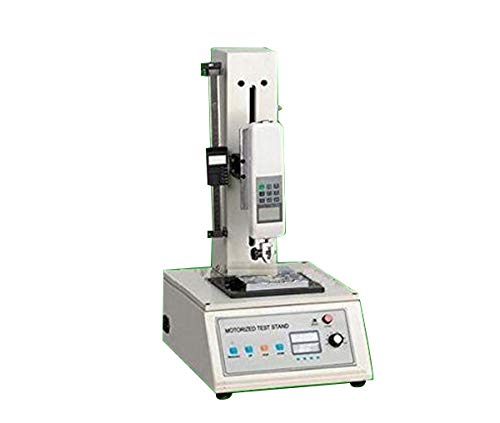
1-сүрөт: Huanyu AEL-1000N Electric Single Column Test Stand. This image shows the main unit of the test stand, highlighting its robust single-column design and base.
4. Техникалык шарттар
| Параметр | Нарк |
|---|---|
| Модель номери | AEL-1000N |
| Максималдуу жүк | 1000N |
| Effective Travel | 200мм |
| Test Speed Range | 15~240 mm/min or 60-500 mm/min (customer selectable) |
| Working Voltage | 220V/110V (тандалышы мүмкүн) |
| Power Source | Электрондук |
5. Орнотуу
- Пакеттен чыгаруу: Бардык компоненттерди таңгактан кылдаттык менен алып салыңыз. Келечектеги ташуу же сактоо үчүн таңгактарды сактаңыз.
- Жайгашкан жери: Position the test stand on a sturdy, level workbench or floor capable of supporting its weight and the maximum test load. Ensure adequate clearance around the unit for safe operation and access.
- Кубат туташуу: Томду ырастаңызtage selector (if present) is set to your local power supply (220V or 110V). Connect the power cord to the test stand and then to a grounded electrical outlet.
- Mounting Force Gauge: Securely attach your compatible HF or NK series force measurement gauge to the designated mounting points on the test stand. Refer to the force gauge's manual for specific mounting instructions.
- Аксессуарларды орнотуу: Install any necessary test fixtures or grips according to your specific testing requirements. Ensure they are firmly attached.
6. Иштөө нускамалары
- Күйгүзүү: Turn on the main power switch of the test stand.
- Force Gauge Preparation: Power on your force measurement gauge and perform any necessary calibration or zeroing procedures as per its manual.
- Режимди тандоо: Choose between manual (point) or automatic control mode using the selector switch.
- Manual (Point) Mode: Allows for precise, incremental movement of the test head.
- Автоматтык режим: Enables continuous movement at a set speed.
- Set Test Speed: Adjust the stepless speed regulation knob to achieve the desired test speed within the range of 15-240 mm/min or 60-500 mm/min.
- Mount Specimen: Carefully mount the test specimen into the installed fixtures. Ensure it is securely held and aligned correctly.
- Сыноо жүргүзүү:
- In manual mode, use the directional controls to apply force gradually.
- In automatic mode, initiate the test, and the stand will move at the set speed.
- Сыноону токтотуу: Once the test is complete or the desired force/displacement is reached, stop the movement using the controls.
- Remove Specimen: Carefully remove the tested specimen from the fixtures.
- Өчүрүү: Turn off the force gauge, then the main power switch of the test stand.
7. Техникалык тейлөө
Regular maintenance ensures the longevity and accuracy of your AEL-1000N test stand.
- Тазалоо: Keep the test stand clean and free from dust, debris, and corrosive substances. Use a soft, dry cloth for cleaning. Do not use harsh chemicals or abrasive materials.
- Майлоо: Periodically inspect the vertical rods and moving parts for smooth operation. Apply a light, appropriate lubricant if necessary, following manufacturer recommendations for industrial equipment.
- Текшерүү: Regularly check all cables, connections, and mounting hardware for tightness and signs of wear or damage. Replace any worn or damaged parts immediately.
- Сактагыч: When not in use for extended periods, store the test stand in a clean, dry environment, protected from extreme temperatures and humidity.
8. Кыйынчылыктарды
| Көйгөй | Мүмкүн себеп | Чечим |
|---|---|---|
| Test stand does not power on. | No power supply; loose power cord; faulty power switch. | Check power outlet and cord connection. Ensure power switch is ON. Verify correct voltage. |
| Test head does not move. | Motor issue; control mode not selected; speed set to zero. | Ensure a control mode (manual/auto) is selected. Check speed setting. If problem persists, contact support. |
| Inconsistent movement or speed. | Load exceeds capacity; mechanical obstruction; motor/gear issue. | Reduce load if exceeding 1000N. Inspect for obstructions. Contact support if mechanical issue is suspected. |
| Иш учурунда адаттан тыш ызы-чуу. | Lack of lubrication; loose components; internal mechanical issue. | Check for loose parts and tighten. Apply lubricant to moving parts. If noise persists, discontinue use and contact support. |
For issues not listed above or if solutions do not resolve the problem, please contact Huanyu customer support.
9. Кепилдик жана колдоо
Huanyu products are manufactured to high-quality standards. For warranty information, please refer to the warranty card included with your purchase or visit the official Huanyu website. For technical support, spare parts, or service inquiries, please contact Huanyu customer service through the details provided on our webсайт же сатып алуу документтери.
Байланыш маалыматы: Please refer to your product packaging or the official Huanyu webакыркы байланыш маалыматы үчүн сайт.