
1. Киришүү
This manual provides comprehensive instructions for the installation, operation, and maintenance of your K-Rain 2514 Single Station Controller 110V. This controller is designed for automatic irrigation systems, offering reliable and efficient water management for a single zone.
Түзмөктү туура колдонуу жана ага зыян келтирбөө же жаракат алуудан сактоо үчүн орнотуудан жана иштетүүдөн мурун ушул колдонмону кылдат окуп чыгыңыз.
2. Коопсуздук боюнча маанилүү маалымат
- Электр коопсуздугу: This unit operates on 110V AC. Installation should be performed by a qualified individual or in accordance with local electrical codes. Disconnect power before servicing.
- Сыртта колдонуу: The controller features a rain-tight enclosure suitable for outdoor installation. Ensure the enclosure is properly sealed after wiring.
- Балдар: Контроллерди балдар жетпеген жерде сактаңыз.
- Суу таасири: While rain-tight, avoid submerging the unit in water or directing high-pressure water jets directly at it.
3. Пакеттин мазмуну
Орнотууну баштоодон мурун бардык компоненттер бар экендигин текшериңиз:
- K-Rain 2514 Single Station Controller 110V
- Көрсөтмө (бул документ)
- Монтаждоочу жабдыктар (буроолор, анкерлер)
4. Орнотуу жана орнотуу
4.1 Контроллерди орнотуу
Choose a suitable location for mounting the controller. It should be easily accessible, protected from direct sunlight if possible, and near a 110V power outlet. Use the provided mounting hardware to securely attach the controller to a wall or sturdy surface.
4.2 Зымдарды туташтыруу
Before making any electrical connections, ensure the power supply is disconnected.
The K-Rain 2514 controller is pre-wired for 110V input and includes connections for a single irrigation valve and a rain sensor.
- Кубат туташуу: Connect the 110V power supply wires to the designated terminals inside the controller. Ensure proper polarity (Line, Neutral, Ground) as indicated.
- Клапан туташтыруу: Connect the wires from your 24V AC irrigation solenoid valve to the "VALVE" and "COMMON" terminals. The controller supports one valve.
- Rain Sensor Connection: The controller is pre-wired for easy connection of a rain sensor. Connect the rain sensor wires to the designated "RAIN SENSOR" terminals. Refer to your rain sensor's manual for specific wiring instructions.
After all connections are made, ensure the wiring compartment is securely closed to maintain the rain-tight integrity of the enclosure.
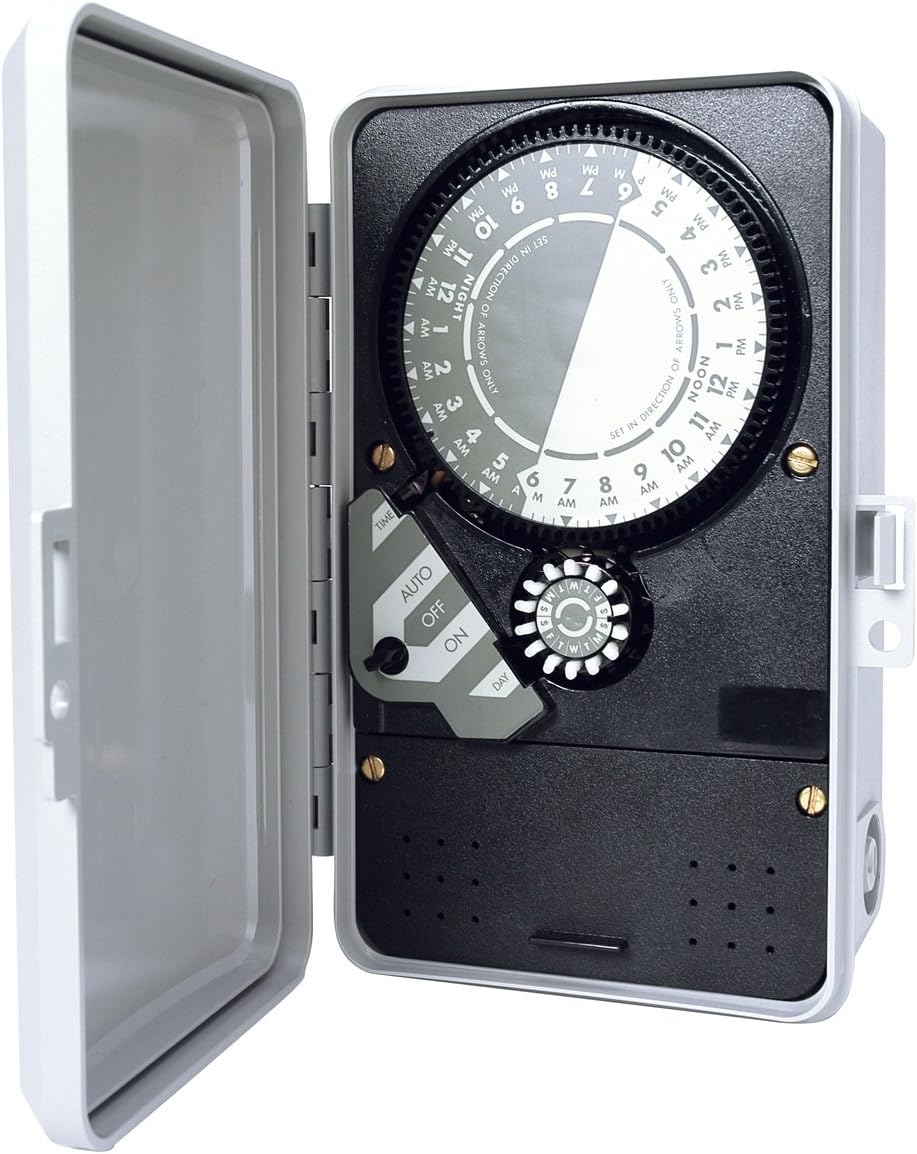
1-сүрөт: K-Rain 2514 Controller with cover open, showing the internal dial timer, AUTO/OFF/ON switch, and day selector. The wiring terminals are located in the lower section, covered by a panel.
5. Иштөө нускамалары
The K-Rain 2514 uses a mechanical dial timer for programming.
5.1 Учурдагы убакытты орнотуу
Rotate the large central dial clockwise until the current time aligns with the "TIME" indicator arrow. The dial is marked with AM/PM hours. Ensure the correct AM/PM is set (e.g., 3 PM is different from 3 AM).
5.2 Programming Watering Cycles
The dial has small pins around its circumference. Each pin represents a time interval. To set a watering start time, push the pins outwards for the desired duration. For example, if you want watering to start at 6 AM and last for 30 minutes, push out the pins corresponding to 6:00 AM to 6:30 AM.
- Бир нече баштоо убакыттары: You can set multiple watering cycles throughout the day by pushing out pins at different times.
- Minimum Watering Duration: The smallest increment for watering is typically 15 minutes, corresponding to one pin.
5.3 Setting Watering Days ("Skip-A-Day" 14 Day Program)
The controller features a "Skip-A-Day" 14-day program. This is typically controlled by a separate dial or switch (often labeled "DAY" or with day indicators) that allows you to select specific days or intervals for watering. Consult the specific markings on your controller's day selector for detailed configuration. For example, you might select to water every other day, or on specific days of the week within a 14-day cycle.
5.4 AUTO/OFF/ON Switch
The controller features a three-position switch:
- АВТО: The controller operates according to the programmed schedule. This is the standard operating mode.
- ӨЧҮК: All automatic watering is suspended. The valve will remain closed.
- КҮЙҮК: The valve will open immediately and remain open until the switch is moved to AUTO or OFF. This is for manual testing or immediate watering.
5.5 Rain Sensor Functionality
When a compatible rain sensor is connected and detects sufficient rainfall, it will override the programmed schedule and prevent watering. This conserves water. The controller allows for manual override of the rain sensor from the controller face, typically via a dedicated switch or setting.
6. Техникалык тейлөө
- Тазалоо: Periodically wipe the exterior of the controller with a damp кездеме. Абразивдүү тазалагычтарды же эриткичтерди колдонбоңуз.
- Текшерүү: Annually inspect wiring connections for corrosion or damage. Ensure the enclosure remains sealed.
- Rain Sensor Check: Regularly check your rain sensor for debris accumulation that might impede its function.
7. Кыйынчылыктарды
| Көйгөй | Мүмкүн себеп | Чечим |
|---|---|---|
| Controller not powering on. | No power supply; faulty wiring; tripped breaker. | Check 110V power source. Verify wiring connections. Reset circuit breaker. |
| Valve not watering. | Controller in OFF mode; incorrect programming; faulty valve; rain sensor active. | Set switch to AUTO. Verify program settings. Test valve manually. Check rain sensor status. |
| Valve continuously watering. | Controller in ON mode; faulty valve; stuck program pin. | Set switch to AUTO or OFF. Inspect valve. Check program pins on dial. |
| Watering at wrong times. | Incorrect current time setting; incorrect program pin placement. | Reset current time. Re-verify program pin settings. |
If troubleshooting steps do not resolve the issue, contact K-Rain customer support.
8. Техникалык шарттар
- Модел: 2514
- Киргизүү күчү: 110V AC
- Чыгуу күчү: 24V AC (for solenoid valve)
- Станциялардын саны: 1
- Программалоо: Mechanical dial timer with push pins
- Сугаруу узактыгы: Adjustable via pins (typically 15-minute increments)
- Сугаруу циклдери: Multiple start times per day
- Day Selection: "Skip-A-Day" 14-day program
- Жамгыр сенсору: Pre-wired for rain sensor connection
- Корпусу: Rain-tight
- Өлчөмдөрү: Болжол менен 7.9 x 2.9 x 8.8 дюйм (20.1 x 7.4 x 22.4 см)
- Салмагы: Болжол менен 2.5 фунт (1.13 кг)
- Сертификаттар: ул бекитилген
9. Кепилдик жана колдоо
For warranty information, technical support, or service inquiries, please contact K-Rain customer service directly. Details can typically be found on the K-Rain official webсайт же продукт таңгак.
K-Rain Contact Information: кайрылыңыз www.krain.com for the most current support details.