
1. Киришүү
The Innovo Medical FR201 is a non-contact infrared thermometer designed for accurate and reliable temperature measurement of the human body. It offers a safe and hygienic method for temperature screening, suitable for infants, children, adults, and the elderly. This device is CE and FDA cleared, ensuring its quality and safety standards.
Негизги өзгөчөлүктөр төмөнкүлөрдү камтыйт:
- Non-contact measurement for hygiene.
- One-second reading for quick results.
- Switchable between Fahrenheit (°F) and Celsius (°C).
- Silent and audible mode options.
- Memory recall for up to 20 previous readings.
2. Коопсуздук маалыматы жана сактык чаралары
Please read this manual thoroughly before using the thermometer. Improper use may lead to inaccurate readings or device damage.
- Термометрди сууга же башка суюктуктарга салбаңыз.
- Аппаратты түз күндүн нурунан, чаңдан жана экстремалдык температурадан алыс кармаңыз.
- Термометрди түшүрүүдөн же катуу соккулардан сактаныңыз.
- Аппаратты өз алдынча бөлүүгө же оңдоого аракет кылбаңыз.
- Көрсөтүлгөн батареянын түрүн гана колдонуңуз (2 AAA батарейка).
- Батареяларды балдар жетпеген жерде сактаңыз.
- Consult a medical professional if you have concerns about temperature readings.
- This thermometer is intended for household use and should not replace professional medical advice.
3. Продукт бүтүп калдыview
Familiarize yourself with the components of your Innovo FR201 thermometer.
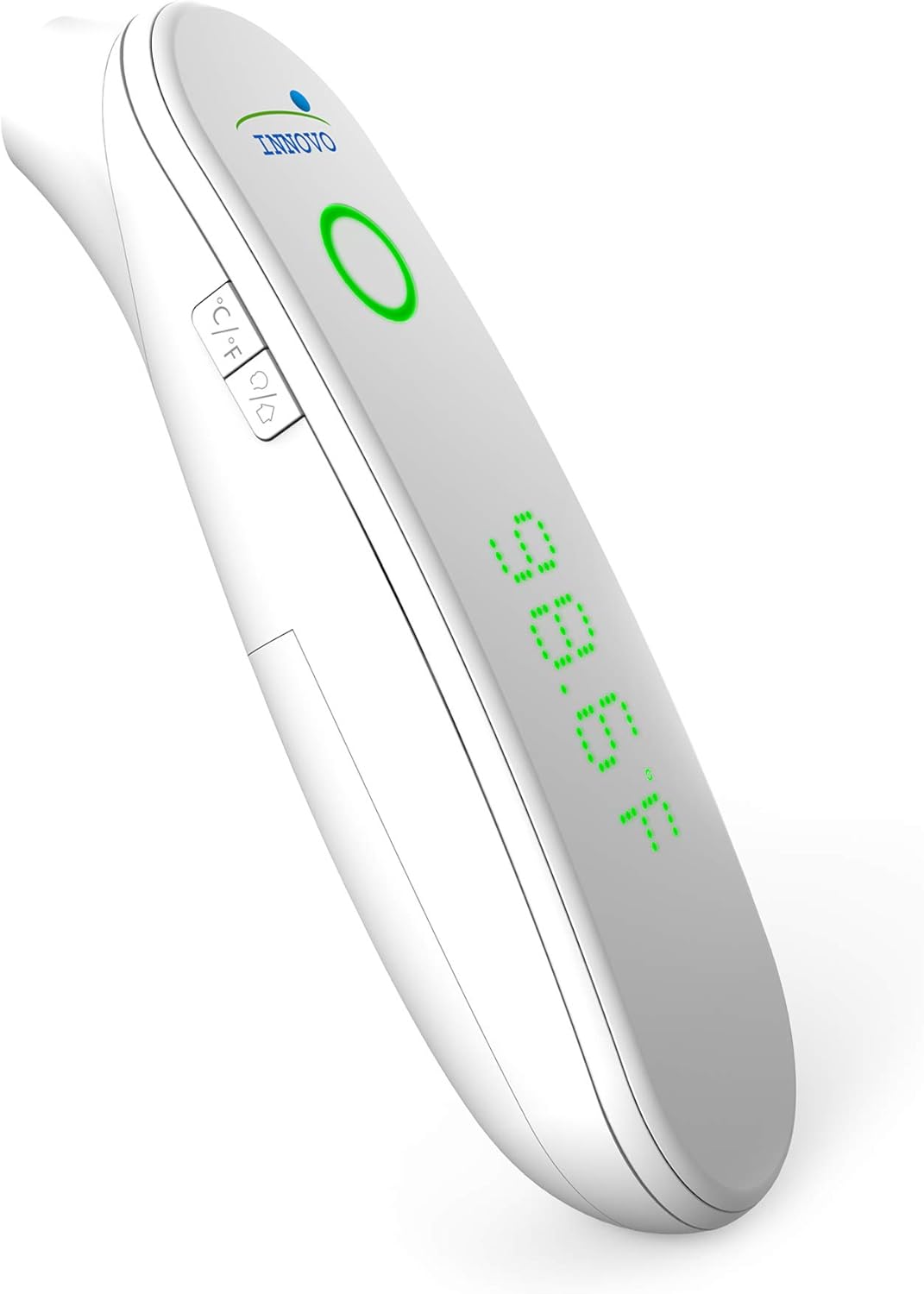
Сүрөт 1: Алдыңкы view of the Innovo FR201 thermometer, highlighting the display, measurement button, and mode selection buttons.
The thermometer features a clear LCD display, a measurement button, and buttons for switching between Fahrenheit/Celsius and silent/audible modes. The infrared sensor is located at the front of the device.
4. Орнотуу
4.1 Батареяны орнотуу
The Innovo FR201 thermometer requires 2 AAA batteries (included).
- Термометрдин артындагы батарея бөлүкчөсүнүн капкагын табыңыз.
- Капкакты жылдырыңыз.
- Бөлүмдүн ичинде көрсөтүлгөндөй туура полярдуулукту (+ жана -) камсыз кылып, эки AAA батарейкасын салыңыз.
- Батарея бөлүмүнүн капкагын ордуна чыкылдаган үн чыкканча жабыңыз.
Термометр азыр колдонууга даяр.
5. Иштөө нускамалары
5.1 Taking a Forehead Temperature Measurement
- Ensure the thermometer is in forehead measurement mode. If not, press the mode button to switch.
- Термометрди чекенин ортосунан болжол менен 1-2 дюйм (2-5 см) алыстыкта кармаңыз.
- Өлчөө баскычын басып, коё бериңиз.
- The temperature reading will be displayed on the LCD screen within one second.
- A beep will sound (if not in silent mode) to indicate the measurement is complete.
Эскертүү: For best accuracy, ensure the forehead is clean and dry, free from hair or sweat. Wait at least 30 seconds between measurements if taking multiple readings on the same person.
5.2 Фаренгейт жана Цельсийдин ортосунда которулуу
With the thermometer turned on, press the °C/°F button to toggle between Fahrenheit and Celsius display modes.
5.3 Silent and Audible Mode
To switch between silent and audible modes, press the speaker icon button. The display will indicate if silent mode is active.
5.4 Эстутумду кайра чакыруу
The thermometer can store up to 20 previous temperature readings.
- With the thermometer turned on, press the "MEM" button (or similar memory icon, refer to device for exact icon).
- "MEM" баскычын ар бир басканда сакталган көрсөткүчтөр эң жаңысынан эң эскисине чейин айланып өтөт.
6. Техникалык тейлөө
6.1 Термометрди тазалоо
Regular cleaning ensures accurate readings and extends the life of your device.
- Термометрдин корпусун жумшак, кургак чүпүрөк менен сүртүңүз.
- Инфракызыл сенсор үчүн спирт менен бир аз нымдалган кебез менен акырын сүртүңүз. Колдонуудан мурун толугу менен кургатуу керек.
- Абразивдүү тазалагычтарды колдонбоңуз же аппаратты сууга салбаңыз.
6.2 Сактоо
When not in use, store the thermometer in its protective carrying case in a cool, dry place, away from direct sunlight and extreme temperatures.

Image 2: Innovo FR201 thermometer with its user manual and protective carrying case, illustrating proper storage.
Эгерде термометр көпкө чейин колдонулбаса, агып кетпеши үчүн батарейкаларды алып салыңыз.
7. Кыйынчылыктарды
| Көйгөй | Мүмкүн себеп | Чечим |
|---|---|---|
| "Ло" же "Салам" көрсөтүлөт | Temperature is outside the measurement range (e.g., below 89.6°F / 32°C or above 109.2°F / 42.9°C). | Ensure the thermometer is used within the specified ambient temperature range. Re-measure correctly. |
| Так эмес окуулар | Dirty sensor, incorrect measurement distance, environmental factors (drafts, direct sunlight), recent activity (eating, exercising). | Clean the sensor. Ensure correct distance and stable environment. Wait 15-30 minutes after activity before measuring. |
| No display / Device won't turn on | Өлүк же туура эмес салынган батарейкалар. | Туура полярдуулукту камсыз кылуу менен батарейкаларды жаңы AAA батарейкалары менен алмаштырыңыз. |
| "Err" message | Системанын катасы же иштебей калышы. | Remove batteries, wait 1 minute, then reinsert. If error persists, contact customer support. |
8. Техникалык шарттар
| Модел: | FR201 (10499DC2-O) |
| Өлчөө диапазону: | Body: 89.6°F - 109.2°F (32.0°C - 42.9°C) |
| Өлчөөнүн тактыгы: | ± 0.4 ° F (± 0.2 ° C) |
| Дисплейдин чечилиши: | 0.1°F / 0.1°C |
| Өлчөө аралык: | 1-2 дюйм (2-5 см) |
| Эстутум: | 20 окуу |
| Кубат булагы: | 2 x AAA батарейкалар (киргизилген) |
| Автоматтык түрдө өчүрүү: | Акыркы өлчөөдөн болжол менен 30 секунд өткөндөн кийин |
| Продукциянын өлчөмдөрү: | 6.8 x 5 x 2.6 дюйм |
| Элемент Салмагы: | 0.5 фунт (8 унция) |
| Техникалык мүнөздөмөлөрү: | CE, FDA |
9. Кепилдик жана колдоо
Innovo Medical products are designed for reliability and durability. For specific warranty details, please refer to the warranty card included with your product or visit the official Innovo Medical webсайт.
If you encounter any issues or have questions regarding your Innovo FR201 thermometer, please contact Innovo Medical customer support. Contact information can typically be found on the product packaging or the official Innovo Medical webсайт.
Эскертүү: The provided product data does not contain explicit warranty duration or direct support contact details. Please refer to the manufacturer's official resources for the most current information.