
Introduction
The Olympus Infinity SuperZoom 3500 is a sophisticated 35mm point and shoot film camera designed for ease of use and high-quality photography. Featuring a versatile 35-120mm Olympus Zoom Lens, this camera allows for a wide range of photographic expressions, from wide-angle landscapes to telephoto portraits. This manual provides essential information for setting up, operating, maintaining, and troubleshooting your camera to ensure optimal performance and longevity.
Жайгашуу
1. Батареяны орнотуу
The camera requires batteries for operation. Ensure you use fresh batteries of the correct type (refer to the battery compartment for specifications, typically CR123A or similar). Incorrect battery insertion can prevent the camera from functioning.
- Камеранын ылдый жагындагы батарея уясынын капкагын табыңыз.
- Капкакты жебе менен көрсөтүлгөндөй жылдырып же айландыруу менен ачыңыз.
- Insert the batteries according to the polarity indicators (+/-) inside the compartment.
- Батарея бөлүкчөсүнүн капкагын чыкылдагыча бекем жабыңыз.

1-сүрөт: Төмөнкү view of the camera, illustrating the battery compartment and tripod mount.
2. Фильмди жүктөө
Бул камера стандарттуу 35 мм пленканы колдонот. Кокусунан жарыкка тийип калбашы үчүн, пленканы ар дайым күңүрт жарыкта жүктөңүз.
- Open the camera back cover by sliding the latch on the side of the camera.
- Пленка картриджин пленка камерасына салыңыз.
- Pull the film leader across to the film take-up spool, ensuring it aligns with the red mark or engages with the sprocket teeth.
- Close the camera back cover firmly until it latches. The camera will automatically advance the film to the first frame. The frame counter on the top display will show '1'.

2-сүрөт: Арткы view of the camera, showing the film door and viewтапкыч.
Камераны иштетүү
1. Күйгүзүү/өчүрүү
To power on the camera, slide the power switch, usually located near the shutter button. The lens will extend, and the display will activate. To power off, slide the switch back; the lens will retract.
2. Негизги атуу
Point and shoot operation is straightforward:
- Максаты: Frame your subject through the viewтапкыч.
- Фокус: Lightly press the shutter button halfway down. The camera will automatically focus, and a focus indicator (e.g., a green light) will illuminate in the viewтапкыч.
- Атуу: Press the shutter button fully to take the picture. The camera will automatically advance the film to the next frame.
3. Чоңойтуу функциясы
The Infinity SuperZoom 3500 features a 35-120mm zoom lens. Use the 'W' (Wide) and 'T' (Telephoto) buttons to adjust the focal length.
- Press 'W' to zoom out (wider angle).
- Press 'T' to zoom in (telephoto).

3-сүрөт: Алдыңкы үстүнкү бөлүгү view of the camera with the zoom lens extended.
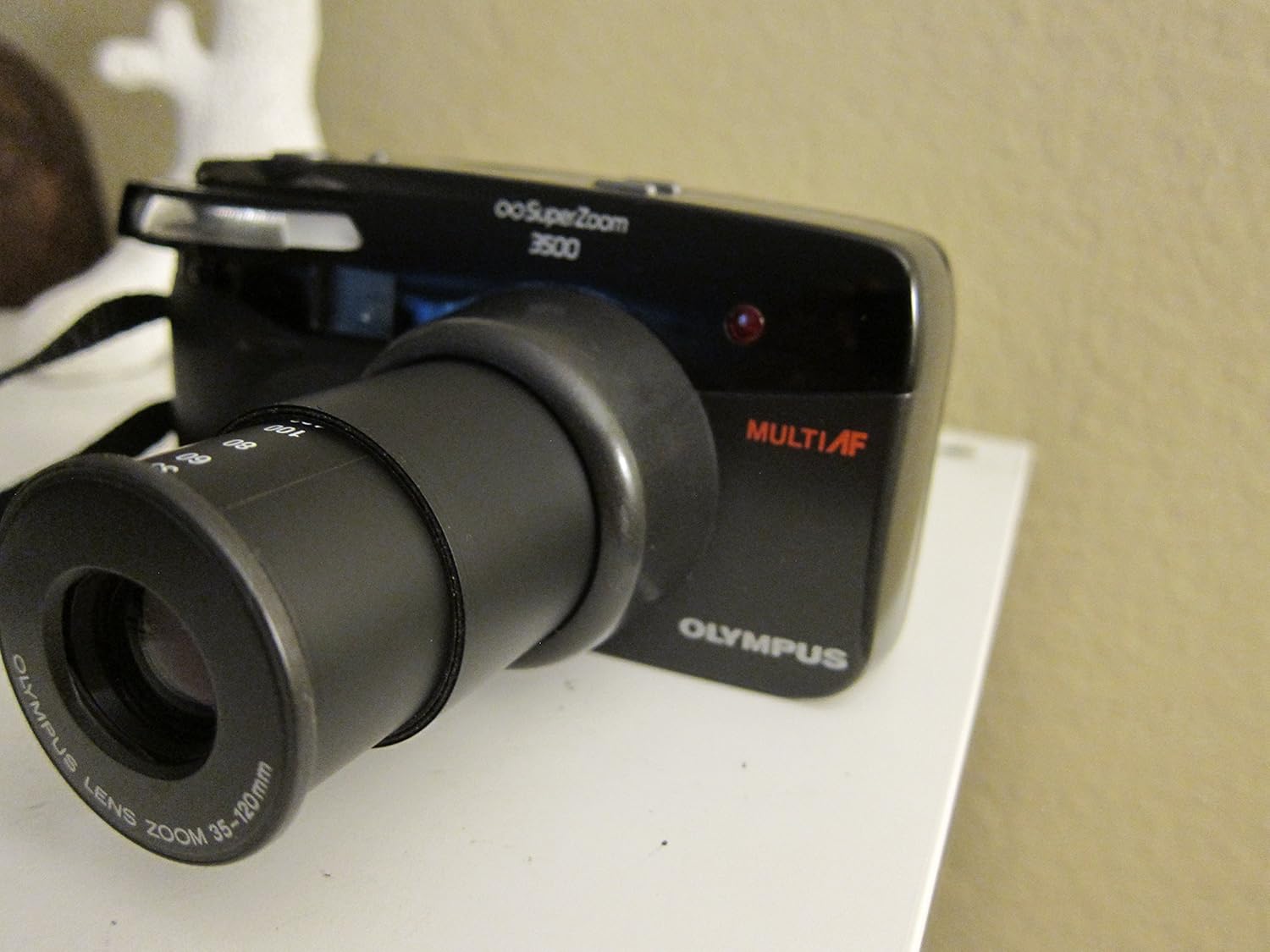
4-сүрөт: Алдыңкы үстүнкү бөлүгү view of the camera with the zoom lens retracted.
4. Flash режимдери
The camera offers various flash modes to suit different lighting conditions. Press the FLASH button to cycle through available modes, which may include:
- Авто жарк: Камера керек болгондо автоматтык түрдө жаркылдатууну күйгүзөт.
- Кызыл көздү азайтуу: Fires a pre-flash to reduce red-eye effect.
- Fill-in Flash: Жаркылдактын күйүшүнө мажбурлайт, бул жарык шарттарда көлөкөлөрдү жарыктандыруу үчүн пайдалуу.
- Жаркырап өчүк: Жарыкты өчүрөт.

5-сүрөт: Жогорку view of the camera, highlighting the display and control buttons.

Figure 6: Close-up of the LCD display, showing the 'FILL-IN' flash mode indicator.
5. Режимди тандоо
басыңыз РЕЖИМ button to select different shooting modes, if available. Common modes might include:
- Program Auto: Standard automatic shooting.
- Авто таймер: Delays the shutter release for a few seconds.
- Алыстан башкаруу: For use with an optional remote control.
6. Film Rewinding and Unloading
Once all frames on the film roll have been exposed, the camera will typically rewind the film automatically. Listen for the rewinding sound. Once rewinding is complete, the frame counter will reset or show 'E' (Empty).
- Wait for the camera to complete automatic film rewinding.
- Камеранын арткы капкагын ачыңыз.
- Remove the rewound film cartridge.
- Close the camera back cover.
Техникалык тейлөө
1. Тазалоо
- Объектив: Use a soft, lint-free cloth or a lens brush to gently remove dust. For smudges, use a specialized lens cleaning solution and cloth. Avoid touching the lens surface with your fingers.
- Камеранын корпусу: Камеранын корпусун жумшак, кургак чүпүрөк менен сүртүңүз. өжөр кир үчүн, бир аз гampen the cloth with water. Do not use solvents or abrasive cleaners.
- Viewтапкыч: Use a soft brush or air blower to remove dust.
2. Сактоо
- Камераны салкын, кургак жерде күндүн тике тийген нурунан жана экстремалдык температурадан алыс сактаңыз.
- Узак мөөнөткө сактасаңыз, акып кетпеш үчүн батарейкаларды алып салыңыз.
- Keep the camera in a protective case to prevent dust and scratches.
3. Батареяга кам көрүү
- Батарея аз индикатор пайда болгондо батарейкаларды дароо алмаштырыңыз.
- Эски жана жаңы батарейкаларды же ар кандай типтеги батареяларды аралаштырбаңыз.
- Колдонулган батарейкаларды жергиликтүү эрежелерге ылайык таштаңыз.
Проблемаларды чечүү
| Көйгөй | Мүмкүн себеп | Чечим |
|---|---|---|
| Камера күйбөйт. | Өлүк же туура эмес салынган батарейкалар. | Батареянын полярдуулугун текшериңиз; жаңысына алмаштырыңыз. |
| Кино өнүкпөйт. | Плёнка туура эмес жүктөлгөн; плёнканын жетекчиси тартылган эмес. | Re-open camera back and re-load film, ensuring leader is properly engaged. |
| Flash күйбөйт. | Flash mode set to 'Off'; insufficient charge; too much ambient light. | Check flash mode setting; wait for flash to charge; use 'Fill-in' mode if desired. |
| Сүрөттөр бүдөмүк. | Camera shake; subject too close/far for focus; dirty lens. | Hold camera steady; ensure subject is within focusing range; clean lens. |
| Lens does not extend/retract. | Obstruction; low battery. | Check for obstructions; replace batteries. |
Техникалык шарттар
| Өзгөчөлүк | Деталь |
|---|---|
| Модель аты | Infinity Superzoom 3500 |
| Элемент моделинин номери | 102-960 |
| Бренд | Олимп |
| Фильм форматынын түрү | 35мм |
| Объектив | 35-120mm Olympus Zoom Lens |
| Өзгөчө өзгөчөлүк | Auto Exposure |
| Элемент Салмагы | 12.8 унция |
| Пакеттин өлчөмдөрү | 6.4 x 4.6 x 2.8 дюйм |
| Камтылган компоненттер | Камеранын корпусу гана |
| UPC | 050332104723 |
Кепилдик жана колдоо
For specific warranty information, please refer to the documentation provided at the time of purchase or contact your retailer. Olympus provides customer support for its products. For technical assistance, service, or further inquiries, please visit the official Olympus webсайтка же кардарларды тейлөө бөлүмүнө кайрылыңыз.
You can visit the Olympus Store on Amazon for more information: Olympus Store