
1. Киришүү
This manual provides comprehensive instructions for the installation, operation, and maintenance of your Speco Technologies HT5941T Intense IR HD TVI Dome Camera. This camera is designed to deliver high-definition surveillance with advanced features such as True WDR, Intense IR, and day/night operation. Please read this manual thoroughly before installation and use to ensure proper functionality and safety.
2. Коопсуздук маалыматы
- Электр камсыздоо: Use only the specified 12VDC or 24VAC power supply. Incorrect voltagал камерага зыян келтириши мүмкүн.
- Орнотуу: Ensure the camera is securely mounted to prevent accidental falls. Professional installation is recommended.
- Курчап турган чөйрө: Камераны көрсөтүлгөн иштөө шарттарынан тышкары өтө жогорку температурага, нымдуулукка же коррозиялуу чөйрөлөргө дуушар кылбаңыз.
- Тазалоо: Тазалоодон мурун электр энергиясын өчүрүңүз. Жумшак, кургак чүпүрөктү колдонуңуз. Катуу химиялык заттардан алыс болуңуз.
- Тейлөө: Do not attempt to disassemble or service the camera yourself. Refer all servicing to qualified personnel.
3. Пакеттин мазмуну
Пакетиңизде бардык буюмдар бар экенин текшериңиз:
- HT5941T Dome Camera
- Chameleon Cover
- Монтаждоочу жабдуулар (буроолор, анкерлер)
- Ыкчам баштоо колдонмосу (эгер бар болсо)
4. Орнотуу жана орнотуу
4.1 Камераны орнотуу
The HT5941T camera supports 3-axis adjustment for both wall and ceiling mounting. Ensure the mounting surface is strong enough to support the camera's weight.
- Ылайыктуу монтаждоо жерин тандаңыз.
- Use the provided mounting template (if included) or the camera base to mark drilling points.
- Зарыл болсо, багыттоочу тешиктерди бургулап, дубалга бекиткичтерди орнотуңуз.
- Камеранын негизин монтаждоо бетине берилген бурамалар менен бекитиңиз.
- Adjust the camera's angle for optimal viewing.
4.2 Зымдар жана электр туташтыруу
The HT5941T is an HD-TVI output only camera, providing full HD resolution over coaxial cable.
- Connect a coaxial cable (RG59 or similar) from the camera's BNC output to your HD-TVI DVR or monitor.
- Connect the power cable to the camera's power input. The camera supports dual voltage operation (12VDC or 24VAC). Ensure the power supply matches the camera's requirements.
- Кубатты колдонуудан мурун бардык туташуулар коопсуз экенин текшериңиз.
4.3 Chameleon Cover Installation
The included Chameleon Cover can be painted to match your décor.
- If desired, paint the Chameleon Cover before installation. Allow it to dry completely.
- Align the cover with the camera body and snap it into place.
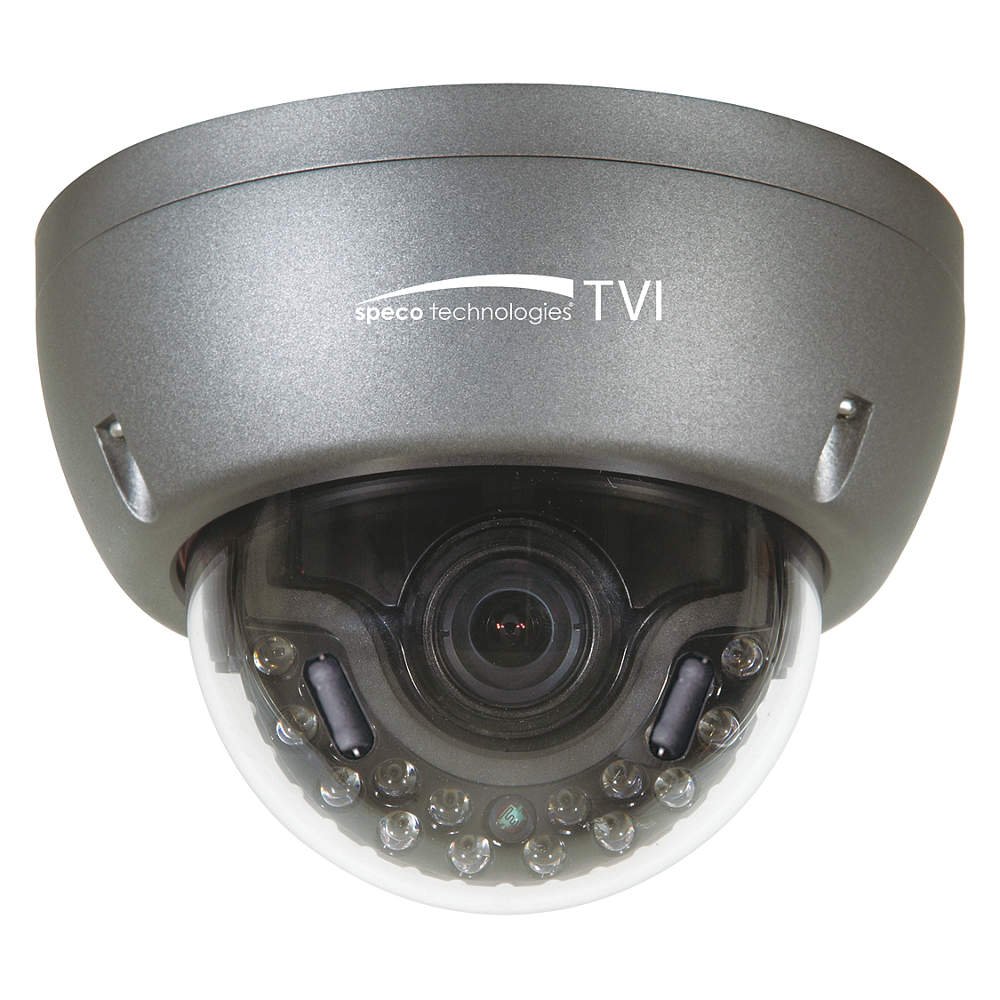
Figure 1: Speco Technologies HT5941T Dome Camera with its dark gray housing and dome design.
5. Иштөө нускамалары
5.1 Powering On and Initial View
Once the camera is properly wired and powered, it will automatically begin transmitting video. Connect your HD-TVI DVR or monitor to view жандуу тоют.
5.2 Экрандагы дисплей (OSD) менюсу
The camera features a full OSD menu for configuration, accessible via on-board controls or UTC (Up The Coax) control from a compatible DVR.
- OSDге кирүү: Use the joystick or buttons on the camera (if present) or the UTC control function on your DVR to bring up the OSD menu.
- Навигация: Use the directional controls to navigate through menu options. Select options to adjust settings such as exposure, white balance, and image enhancements.
- Негизги өзгөчөлүктөрү:
- Чыныгы WDR: Wide Dynamic Range for clear images in high-contrast lighting.
- Intense IR: Adapts IR intensity to the subject, preventing saturation and providing vivid night vision.
- Күндүз/Түнкү операция: Mechanical IR cut filter automatically switches between color (day) and monochrome (night) modes for optimal image quality.
6. Техникалык тейлөө
6.1 Тазалоо
Үзгүлтүксүз тазалоо сүрөттүн сапатын оптималдуу сактоого жардам берет.
- Gently wipe the camera lens and housing with a soft, lint-free cloth.
- өжөр кир үчүн, бир аз гampen the cloth with water or a mild lens cleaning solution. Avoid abrasive cleaners.
- Тазалоодон мурун камеранын өчүк экенин текшериңиз.
6.2 Айлана-чөйрөнү коргоо
The HT5941T features heater circuitry and anti-moisture glass to reduce fog or condensation in various weather conditions. No specific user maintenance is required for these features, but ensure the camera's power supply is stable to allow these functions to operate effectively.
7. Кыйынчылыктарды
| Көйгөй | Мүмкүн себеп | Чечим |
|---|---|---|
| Видео чыгаруу жок | No power; Loose cable connection; Incorrect video format (not HD-TVI compatible DVR) | Check power supply and connections; Ensure DVR supports HD-TVI input. |
| Сүрөттүн сапаты начар (бүдөмүк, бурмаланган) | Dirty lens; Improper focus; Cable interference; Insufficient lighting | Clean the lens; Adjust focus via OSD; Use shielded coaxial cable; Verify adequate lighting or IR function. |
| IR not working at night | Insufficient power; Day/Night setting incorrect; IR sensor blocked | Check power supply; Verify Day/Night mode in OSD; Ensure nothing obstructs the IR LEDs or sensor. |
| OSD менюсу көрүнбөй жатат | Incorrect control method; DVR not compatible with UTC | Try on-board controls if available; Consult DVR manual for UTC compatibility and operation. |
8. Техникалык шарттар
| Өзгөчөлүк | Спецификация |
|---|---|
| Модель номери | HT5941T |
| Бренд | Speco Technologies |
| Видео тартуунун резолюциясы | 1080p (Full HD) |
| Frame Rate | 30 кадр/сек |
| Байланыш технологиясы | HD-TVI (Coaxial) |
| Power Source | 12VDC & 24VAC Dual Voltage |
| Монтаж түрү | Wall Mount (3-axis adjustment) |
| Форма фактору | Купол |
| Төмөн жарык технологиясы | Day/Night, Intense IR |
| Өзгөчөлүктөр | True WDR, Heater circuitry, Anti-moisture glass, Chameleon Cover |
| Эл аралык коргоо рейтинги | IP67 |
| Өлчөмдөрү (L x W x Y) | 5.12 x 4.84 x 3.66 дюйм |
| Элемент Салмагы | 1.5 фунт |
| Материал | Glass (lens) |
9. Кепилдик жана колдоо
For warranty information and technical support, please refer to the official Speco Technologies webсайтка же кардарларды тейлөө бөлүмүнө кайрылыңыз. Сатып алуу квитанциясын кепилдик дооматтары үчүн сатып алуунун далили катары сактаңыз.
Speco Technologies Official Webсайт: www.specotech.com