
uxcell a13050800ux0558
Uxcell PT100 Type 400°C Thermocouple Sensor: Instruction Manual
Model: a13050800ux0558
1. Киришүү
This manual provides essential information for the safe and effective use of your Uxcell PT100 Type 400°C Thermocouple Sensor. Please read these instructions carefully before installation and operation. This sensor is designed for accurate temperature measurement in industrial and scientific applications, working effectively with compatible temperature controllers.
2. Коопсуздук маалыматы
Жарааттарды же аппаратты бузууну болтурбоо үчүн ар дайым төмөнкү коопсуздук чараларын сактаңыз:
- Электр коопсуздугу: Ensure all power is disconnected from the temperature controller and associated equipment before making any electrical connections. Improper wiring can lead to electrical shock or damage to the sensor and controller.
- Температуранын чектери: Do not expose the sensor to temperatures exceeding its specified maximum of 400°C. Exceeding this limit can cause permanent damage to the sensor and lead to inaccurate readings.
- Физикалык иштетүү: Handle the probe and cable with care. Avoid sharp bends or excessive force on the cable, especially near the probe and terminal connections, to prevent internal wire damage.
- Туура орнотуу: Ensure the probe is securely installed in the measurement environment to prevent accidental dislodgement during operation.
- Квалификациялуу кадрларды: Installation and maintenance should be performed by qualified personnel familiar with electrical systems and temperature measurement devices.
3. Продукт бүтүп калдыview
The Uxcell PT100 Thermocouple Sensor is a resistance temperature detector (RTD) designed for precise temperature monitoring. It features a robust probe, a flexible spring section, and fork terminals for easy connection.

1-сүрөт: Негизги view of the Uxcell PT100 Thermocouple Sensor, showing the metal probe, braided cable, and three color-coded fork terminals (red, blue, blue).
Негизги компоненттер:
- Текшерүү: The metallic tip containing the PT100 sensing element, designed for immersion into the medium being measured.
- Flexible Spring Section: Allows for bending and positioning of the probe, enhancing adaptability in various installations.
- Кабель: Connects the probe to the terminals, featuring internal fiberglass insulation and external metal shielding for durability and signal integrity.
- Айры терминалдары: Provide a secure and convenient connection point to a temperature controller or data acquisition system.
4. Техникалык шарттар
Refer to the following technical specifications for your PT100 sensor:
| Өзгөчөлүк | Спецификация |
|---|---|
| Продукт аты | Thermocouple (PT100 Type) |
| Температура диапазону | 400°Сге чейин |
| Зонддун диаметри | 5 мм / 0.2 дюйм |
| Probe Length (excluding flexible section) | 20 см / 7.9 дюйм |
| Жип диаметри | 7.6 мм / 0.3 дюйм |
| Ички изоляция | Fiberglass |
| External Shielding | Металл калкан |
| Жалпы кабелдин узундугу | 9.8 фут (болжол менен 3 метр) |
| Fork Terminal Spacing | 4.3 мм / 0.17 дюйм |
| Салмагы | 62 грамм |
| Модель номери | a13050800ux0558 |
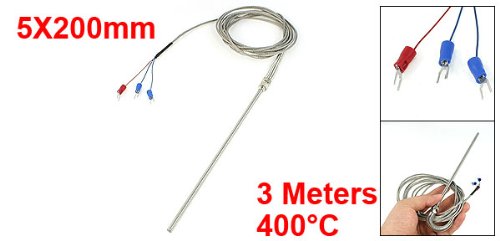
Figure 2: Uxcell PT100 Thermocouple Sensor illustrating key dimensions and temperature rating.
5. Орнотуу жана орнотуу
Follow these steps for proper installation of your PT100 sensor:
- Prepare the Environment: Ensure the area where the sensor will be installed is clean and free from obstructions. Verify that the temperature range of the environment is within the sensor's operating limits.
- Зондду орнотуу: Insert the probe into the desired measurement point. The flexible spring section allows for some adjustment in positioning. Ensure the probe is securely fixed to prevent movement during operation.
- Контроллерге туташуу:
- Өчүрүү: Before making any connections, ensure your temperature controller or data acquisition system is powered off and disconnected from its power source.
- Терминалдарды аныктоо: The PT100 sensor typically uses three wires for connection (two for the resistance element, one for compensation). Refer to your temperature controller's manual for specific wiring diagrams for a 3-wire PT100 input.
- Коопсуз байланыштар: Connect the fork terminals of the sensor to the corresponding input terminals on your temperature controller. Ensure connections are tight and secure to prevent signal loss or intermittent readings.
- Орнотууну текшерүү: Double-check all physical and electrical connections before proceeding.
6. Иштөө нускамалары
Once the PT100 sensor is correctly installed and connected to a compatible temperature controller, follow these general operating guidelines:
- Күйгүзүү: Restore power to your temperature controller.
- Контроллердин конфигурациясы: Configure your temperature controller to recognize a PT100 (RTD) input type. Set any necessary parameters such as measurement range, alarm points, or control logic according to your application's requirements.
- Мониторлордун окуулары: Observe the temperature readings displayed on your controller. Allow sufficient time for the sensor to stabilize and provide accurate measurements, especially after initial power-up or changes in the measured environment.
- Калибрлөө (зарыл болсо): If precise accuracy is critical, periodic calibration of the entire measurement system (sensor + controller) may be required. Refer to your controller's manual for calibration procedures.
7. Техникалык тейлөө
The Uxcell PT100 sensor is designed for durability and requires minimal maintenance. However, adhering to these practices can prolong its lifespan and ensure continued accuracy:
- Үзгүлтүксүз текшерүү: Periodically inspect the sensor probe, cable, and connections for any signs of physical damage, corrosion, or wear.
- Тазалоо: If the probe becomes contaminated with debris or residue from the measured medium, gently clean it using appropriate methods that will not damage the probe material. Ensure the probe is dry before re-immersion.
- Туташуу бүтүндүгү: Ensure all electrical connections remain tight and free from oxidation. Loose connections can lead to inaccurate readings or intermittent operation.
- Сактагыч: When not in use, store the sensor in a clean, dry environment, protected from extreme temperatures and physical stress.
8. Кыйынчылыктарды
If you encounter issues with your PT100 sensor, consider the following common troubleshooting steps:
- Окууга же туура эмес окууга болбойт:
- Check all electrical connections for tightness and correct wiring according to your controller's manual.
- Verify that the temperature controller is correctly configured for a PT100 (RTD) input.
- Кабелди кандайдыр бир көрүнгөн бузулуулар же сыныктар үчүн текшериңиз.
- Ensure the probe is properly immersed in the medium being measured.
- Туура эмес окуулар:
- Confirm the sensor is operating within its specified temperature range.
- Check for any buildup or contamination on the probe tip that might affect heat transfer.
- Consider if the sensor or controller requires calibration.
- Ensure there are no strong electromagnetic interference sources near the sensor cable.
- Сенсор жооп бербей жатат:
- Power cycle the temperature controller.
- Disconnect and reconnect the sensor to ensure a proper connection.
- If possible, test the sensor with a known good controller or test the controller with a known good sensor to isolate the fault.
9. Кепилдик жана колдоо
For information regarding warranty coverage, technical support, or replacement parts for your Uxcell PT100 Thermocouple Sensor, please refer to the purchase documentation or contact Uxcell customer service directly. Keep your purchase receipt as proof of purchase.
Кошумча жардам алуу үчүн, баш багыңыз Uxcell Store on Amazon.
Ask a question about this manual
Ask about setup, troubleshooting, compatibility, parts, safety, or missing instructions. Manuals+ will review the question and use this page’s manual context to help answer it.