
MICTUNING LS083501JL
MICTUNING Blue ROCK LIGHTS Rocker Switch Kit
Модел: LS083501JL
Introduction
This user manual provides detailed instructions for the MICTUNING Blue ROCK LIGHTS Rocker Switch Kit, model LS083501JL. This 5-pin ON/OFF rocker switch is designed for automotive applications, featuring a blue LED light for clear visibility and a durable construction.
The switch is a Single Pole Single Throw (SPST) design, making it straightforward to integrate into various wiring harnesses. It includes pre-attached jumper wires for simplified installation.
Equipped with two premium LEDs, the switch emits a cozy blue beam that illuminates the etched patterns, ensuring easy identification and operation even in low-light conditions. Its robust construction, made from strengthened plastic and well-conductive pins, guarantees long-lasting durability. The patterns are laser-etched directly onto the switch surface to prevent fading.
This versatile switch is rated for 20A at 12V and 10A at 24V, making it suitable for controlling a wide range of automotive lighting, including LED light bars, work lights, fog lamps, headlights, taillights, and auxiliary lamps.

Figure 1: MICTUNING Blue ROCK LIGHTS Rocker Switch Kit with included jumper wires.
Продукт спецификациялары
| Өзгөчөлүк | Деталь |
|---|---|
| Иштөө режими | КҮЙГҮЗҮҮ ӨЧҮРҮҮ |
| Учурдагы рейтинг | 20 Ampс (12V), 10 Ampс (24V) |
| Operating Voltage | 12 Вольт (ТК), 24 Вольт (ТК) |
| Байланыш түрү | Адатта ачык |
| Туташтыргыч түрү | Плагин |
| Бренд | MICTUNING |
| Терминал | Pin |
| Элементтин өлчөмдөрү (L x W x Y) | 168 x 24 x 24 дюйм (Note: This dimension appears to be for packaging or a different product aspect. Refer to Figure 2 for actual switch dimensions.) |
| Circuit Type | 1-жол |
| Актуатор түрү | Рокер |
| Байланыш материалы | Пластик |
| Эл аралык коргоо рейтинги | IP66 |
| Позициялардын саны | 2 |
| Жогорку температура рейтинги | 80 градус |
| Башкаруу ыкмасы | тийүү |
| Түс | Көк |
| Элемент Салмагы | 1 унция |
| Модель номери | LS083501JL |
| Коопсуздук рейтинги | DOT Certified, 3C, ROHS, CE |
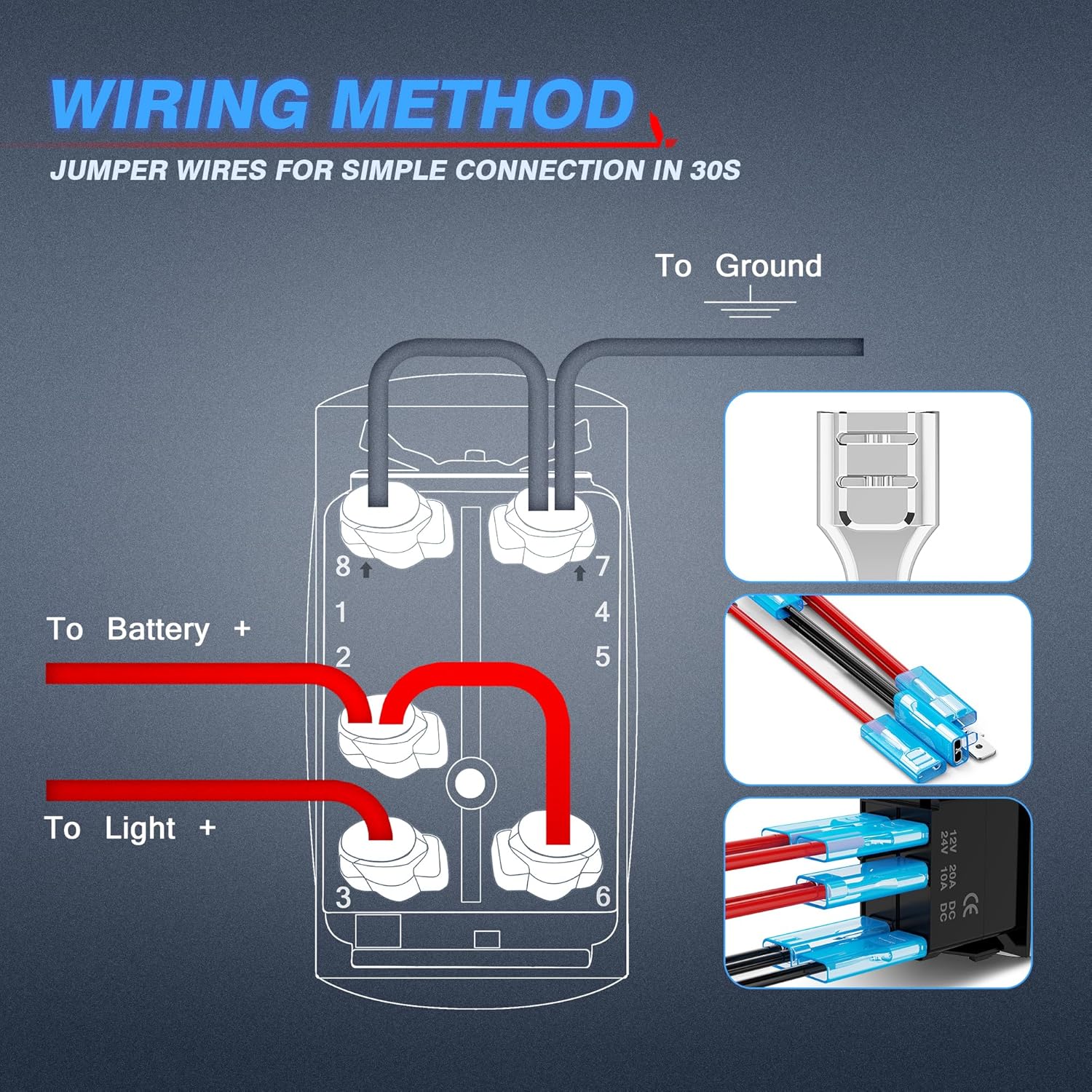
Figure 2: Detailed product dimensions for installation planning (approx. 0.83in width, 1.7in height, 1.5in depth).
Кутуда эмне бар
The MICTUNING Blue ROCK LIGHTS Rocker Switch Kit includes the following components:
- 1x 5 Pin Rocker Switch
- 1x Jumper wire set
Орнотуу жана орнотуу
Before beginning installation, ensure the vehicle's power is disconnected to prevent electrical hazards. This switch is designed for easy installation with the included jumper wires.
Зымдар диаграммасы
The switch features a standard 5-pin configuration. Refer to the diagram below for proper wiring connections. The included jumper wires simplify the connection process, typically completed within 30 seconds per connection.

Figure 3: Detailed wiring diagram showing connections for battery, light, and ground. The jumper wires are designed for quick and secure connections.
- Pin 2 (or 1): Connect to Battery Positive (+)
- 3 -пин: Connect to Light Positive (+)
- Pin 8 (or 7): Connect to Ground (-)
- The remaining pins are for internal switch illumination and can be connected as per the diagram for full functionality.
For applications with significant current draw, it is highly recommended to use a relay in conjunction with this switch to protect your vehicle's electrical system and ensure optimal performance.
Которгучту орнотуу
The rocker switch is designed for flush mounting into a compatible panel opening. Ensure the opening dimensions match the switch's specifications (approximately 0.83in x 1.5in) for a secure fit. The tin-plated copper terminals provide superior wear and corrosion resistance.

Figure 4: The switch features both pattern and words that illuminate when activated, and the words light up continuously for easy location in the dark.

Figure 5: Two premium LEDs provide bright, clear illumination for the laser-etched pattern, which resists fading.

Figure 6: Comparison highlighting the superior features of the MICTUNING switch, including laser-etched patterns, well-conductive pins, and rubber protectors.
Иштөө нускамалары
The MICTUNING Rocker Switch operates as a simple ON/OFF control for your connected accessories.
- Күйгүзүү: Press the upper part of the rocker switch. The blue LED pattern and words will illuminate, indicating that the connected device (e.g., rock lights) is active.
- Өчүрүү: Press the lower part of the rocker switch. The LED pattern will turn off, indicating the connected device is no longer active. The "ROCK LIGHTS" text may remain dimly lit for easy location in the dark, depending on wiring configuration.
The switch is designed for wide application across various vehicles and marine vessels, including RVs, SUVs, ATVs, motorcycles, yachts, marine boats, trailers, buses, and trucks.

7-сүрөт: Мисamples of vehicles and applications where the MICTUNING Rocker Switch can be used.
Техникалык тейлөө
The MICTUNING Rocker Switch is designed for durability and requires minimal maintenance. Follow these guidelines to ensure its longevity:
- Тазалоо: Use a soft, dry cloth to wipe the surface of the switch. Avoid using abrasive cleaners or solvents, as they may damage the plastic or etched patterns.
- Текшерүү: Periodically check the wiring connections to ensure they are secure and free from corrosion. If any wires appear loose or damaged, disconnect power and re-secure or replace them as necessary.
- Курчап турган чөйрөнү коргоо: While the switch has an IP66 rating for protection against dust and strong jets of water, avoid prolonged submersion or exposure to extreme conditions beyond its specified operating temperature range (up to 80°C).
Проблемаларды чечүү
If you encounter issues with your MICTUNING Rocker Switch, refer to the following common problems and solutions:
- Problem: The switch does not turn on the connected device.
- Күчтү текшерүү: Ensure there is power supplied to the switch's battery input pin (Pin 2 or 1). Use a multimeter to verify voltage.
- Check Ground: Confirm that the ground connection (Pin 8 or 7) is secure and properly grounded to the vehicle chassis.
- Check Load Connection: Verify that the wire to the connected device (Pin 3) is properly attached and that the device itself is functioning.
- Зымдарды текшерүү: Double-check all wiring against the provided diagram (Figure 3) for correct connections. Loose or incorrect wiring is a common cause of non-functionality.
- Fuse/Circuit Breaker: Ensure any inline fuses or circuit breakers in the power line are intact and not tripped.
- Problem: The LED light on the switch does not illuminate, or illuminates incorrectly.
- Wiring for Illumination: Ensure all 5 pins are correctly wired according to the diagram. The illumination functionality relies on specific pin connections.
- Continuous Illumination: If the "ROCK LIGHTS" text remains lit even when the switch is off, this is often by design for easy location. If you prefer it to turn off completely, review your wiring to ensure it's not directly connected to a constant power source without a trigger from the ignition or another switched source.
- Жарык жок: If no LEDs light up at all, re-check all power and ground connections to the switch. A faulty switch is rare but possible; if all wiring is confirmed correct, consider replacing the switch.
- Problem: Switch feels loose or pops out of the panel.
- Panel Opening Size: Ensure the panel cutout dimensions precisely match the switch's dimensions (approx. 0.83in x 1.5in). An oversized opening will prevent a secure fit.
- Орнотуу: Ensure the switch is fully pushed into the panel until it clicks securely into place.
Кепилдик жана колдоо
MICTUNING products are designed for quality and reliability. For specific warranty details regarding your MICTUNING Blue ROCK LIGHTS Rocker Switch Kit, please refer to the product packaging or the official MICTUNING webсайт.
For technical support, troubleshooting assistance, or to inquire about replacement parts, please contact MICTUNING customer service through their official channels. You can also visit the official MICTUNING Brand Store on Amazon for more information and product offerings:
Visit the MICTUNING Brand Store
Additionally, a user manual in PDF format may be available for download:
Ask a question about this manual
Ask about setup, troubleshooting, compatibility, parts, safety, or missing instructions. Manuals+ will review the question and use this page’s manual context to help answer it.