
1. Киришүү
This manual provides instructions for the LaView LV-PB932F4 IP Bullet Camera. This camera is designed for surveillance applications, offering 1080P HD resolution for both indoor and outdoor use. It features day and night vision capabilities, with infrared (IR) night vision up to 100 feet. The camera is weatherproof with an IP66 rating and operates in temperatures from -13°F to 140°F (-25°C to 60°C).

Image 1.1: LaView LV-PB932F4 IP Bullet Camera features.
2. Пакеттин мазмуну
Пакетиңизде бардык буюмдар бар экенин текшериңиз:
- 1 x LaView LV-PB932F4 2MP 1080P IP Bullet Camera
- (Additional accessories such as mounting screws, anchors, and Ethernet cable may vary by package and are often sold separately.)
3. Орнотуу жана орнотуу
3.1 Орнотуудан мурун
Ensure your Network Video Recorder (NVR) system is compatible with IP 2MP cameras. Plan the camera's placement to maximize coverage and minimize obstructions.
3.2 Физикалык орнотуу
The camera is designed for wall mounting. Select a suitable location that provides the desired field of view and protection from direct impact.
Монтаждоо кадамдары:
- Mark drilling points using the camera's base as a template.
- Drill pilot holes appropriate for your mounting surface.
- Secure the camera to the mounting surface using appropriate screws and anchors (not included).
- Оптималдуу чагылдыруу үчүн камеранын бурчун тууралаңыз.
3.3 Connection
This camera utilizes Power over Ethernet (PoE) for simplified installation. A single network cable provides both power and data connection.
- Connect one end of an Ethernet cable (Cat 5e or Cat 6 recommended) to the camera's Ethernet port.
- Connect the other end of the Ethernet cable to a PoE-enabled port on your NVR or a PoE switch.
- The camera should automatically power on and attempt to connect to your NVR system.
Эскертүү: For systems that do not automatically configure, refer to your NVR's manual for adding IP cameras and network configuration.
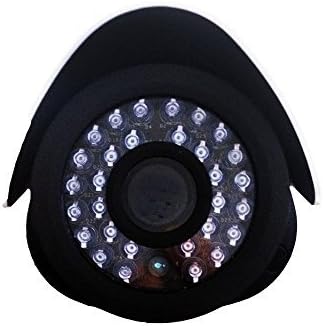
Сүрөт 3.1: Алдыңкы view of the camera lens and IR LEDs.
4. Операция
4.1 Күндүзгү/түнкү көрүү
The camera automatically switches between day (color) and night (black and white, infrared) modes based on ambient light conditions. In night mode, the camera's infrared LEDs activate to provide visibility up to 100 feet in darkness.
4.2 Кыймылды аныктоо
The camera supports motion detection. Configuration of motion detection zones and sensitivity settings is typically done through your connected NVR system's interface. Refer to your NVR's manual for detailed instructions on setting up motion alerts and recording triggers.
4.3 Видеону жазуу жана ойнотуу
Video recording and playback functions are managed by your NVR system. Consult your NVR's user manual for instructions on accessing live view, configuring recording schedules, and reviewжазылган footage.
5. Техникалык тейлөө
Камеранын оптималдуу иштешин жана узак убакытка чейин кызмат кылышын камсыз кылуу үчүн, төмөнкү техникалык тейлөө көрсөтмөлөрүн аткарыңыз:
- Тазалоо: Мезгил-мезгили менен камеранын линзасын жумшак, гamp cloth. Avoid abrasive cleaners or solvents that could damage the lens coating.
- Кабелдик текшерүү: Regularly inspect all cables for damage, wear, or loose connections.
- Программалык камсыздоонун жаңыртуулары: Check the official LaView website for any available firmware updates for your camera model. Firmware updates can improve performance, enhance security, and add new features.
- Курчап турган чөйрөнү коргоо: While the camera is IP66 weatherproof, extreme environmental conditions (e.g., direct lightning strikes, prolonged submersion, or corrosive environments) should be avoided.
6. Кыйынчылыктарды
6.1 No Image/Video Signal
- Күчтү текшерүү: Ensure the camera is receiving power via the PoE connection. Verify the Ethernet cable is securely connected to both the camera and the PoE source (NVR/switch).
- Тармак туташуусун текшерүү: Confirm the Ethernet cable is not damaged. Try a different port on your NVR/switch.
- NVR шайкештиги: Ensure your NVR system is compatible with 2MP IP cameras.
- IP дареги чатак: If manually configuring, check for IP address conflicts on your network.
6.2 Сүрөттүн сапаты начар
- Таза линза: Clean the camera lens for any dirt, dust, or smudges.
- Жарыктандыруу шарттары: Ensure adequate lighting for optimal image quality. In low light, the camera will automatically switch to IR night vision.
- Резолюция орнотуулары: Verify the video resolution settings on your NVR are set to 1080P or higher, if supported by your NVR.
6.3 Night Vision Not Working
- IR Диоддордон: In dark conditions, check if the infrared LEDs are illuminating. They may emit a faint red glow.
- Тоскоолдуктар: Ensure there are no obstructions directly in front of the camera that could block the IR light.
6.4 Кыймылды аныктоо көйгөйлөрү
- Сезимталдуулук жөндөөлөрү: Adjust the motion detection sensitivity on your NVR. High sensitivity can lead to false alarms (e.g., from insects, moving branches).
- аныктоо зоналары: Verify that the motion detection zones are correctly configured to cover the desired areas.
7. Техникалык шарттар
| Өзгөчөлүк | Спецификация |
|---|---|
| Модель номери | LV-PB932F4 |
| Видео тартуунун резолюциясы | 1080p |
| Сүрөт сенсорунун чечилиши | 2 депутат |
| Натыйжалуу дагы эле чечим | 4 депутат |
| Байланыш технологиясы | Зымдуу (PoE) |
| Ички/тышкы колдонуу | Ички, сырткы |
| Суу өткөрбөйт рейтинги | IP66 |
| Түнкү көрүү диапазону | 100 Фут |
| Өзгөчөлүктөр | Кыймыл сенсору, Түнкү көрүү |
| Иштөө температурасы | -13°F – 140°F (-25°C – 60°C) |
| Power Source | Зымдуу электр (PoE) |
| Элементтин өлчөмдөрү | 8.5 x 5 x 5 дюйм |
| Элемент Салмагы | 1.35 фунт |
| Форма фактору | Ок |
| Тоо түрү | Дубалга орнотуу |
8. Кепилдик жана колдоо
8.1 Кепилдик маалыматы
This LaView product is covered by a 2-year manufacturer's warranty. Please retain your proof of purchase for warranty claims. The warranty covers defects in materials and workmanship under normal use.
8.2 Техникалык колдоо
For technical assistance or support, please visit the official LaView website or contact their customer service. Lifetime technical support is provided to assist with setup, operation, and troubleshooting.
LaView Официалдуу Webсайт: www.laviewsecurity.com