
Introduction
The ASTRO Gaming A40 TR Headset and MixAmp Pro TR are designed to provide a high-fidelity audio experience for gaming on PlayStation 4 and PC. The A40 TR headset offers user customization, allowing transformation from an open-back to a closed-back noise-canceling headset with optional Mod Kits. The MixAmp Pro TR features all-digital components for clear, interference-free audio and voice communication, with customizable settings via the ASTRO Command Center software.

Image: The ASTRO Gaming A40 TR Headset and MixAmp Pro TR, showcasing both components together. The headset is black with gold accents, and the MixAmp is a compact black unit with control dials.
Пакеттин мазмуну
Төмөндө саналган нерселердин баары сиздин продуктунун таңгагында камтылганын текшериңиз:
- ASTRO A40 TR Headset
- ASTRO MixAmp Pro TR
- A40 TR Inline Mute Cable (2.0m)
- TOSlink Optical Cable (3.0m)
- Micro-USB Cable (3.0m)
- Digital Daisy Chain Cable (0.5m)
- Swappable Microphone
Жайгашуу
PlayStation 4 (PS4) менен туташууда
- туташтыруу TOSlink Optical Cable from the MixAmp Pro TR's OPTICAL port to the PS4's Optical Out port.
- туташтыруу Микро-USB Cable from the MixAmp Pro TR's USB port to an available USB port on the PS4.
- туташтыруу A40 TR Inline Mute Cable from your A40 TR Headset to the headset port on the front of the MixAmp Pro TR.
- PS4 түзмөгүңүздө, төмөнкүгө өтүңүз: Settings > Sound and Screen > Audio Output Settings.
- коюу Негизги чыгаруу порту чейин Санарип чыгуу (оптикалык).
- Тандоо Dolby Digital (Bitstream) for the audio format.
- барыңыз Орнотуулар> Түзмөктөр> Аудио шаймандар.
- коюу Киргизүү түзмөк чейин USB Headset (ASTRO MixAmp Pro TR).
- коюу Output Device чейин USB Headset (ASTRO MixAmp Pro TR).
- Тууралоо Үндү көзөмөлдөө (наушник) максималдуу.
- коюу Наушниктерге чыгаруу чейин Аудио чат or Бардык аудио as preferred.
Компьютерге туташуу
- туташтыруу Микро-USB Cable from the MixAmp Pro TR's USB port to an available USB port on your PC.
- туташтыруу A40 TR Inline Mute Cable from your A40 TR Headset to the headset port on the front of the MixAmp Pro TR.
- On your PC, ensure the MixAmp Pro TR is selected as the default playback and recording device in your sound settings.
- жүктөп алып, орнотуңуз ASTRO Command Center software from the official ASTRO Gaming website to customize settings, update firmware, and manage EQ presets.
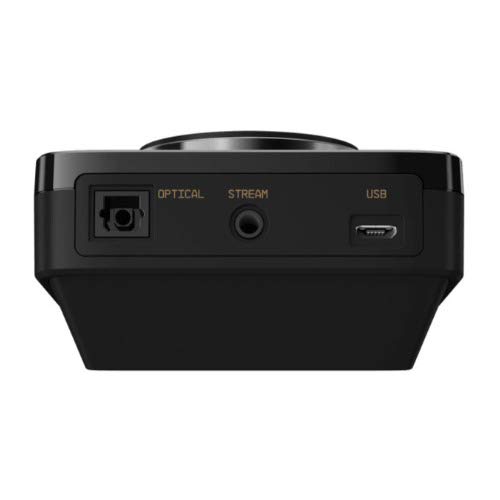
Сүрөт: Арткы view of the ASTRO MixAmp Pro TR, highlighting the Optical, USB, AUX, and Stream ports for various connections.
Operating the MixAmp Pro TR
The MixAmp Pro TR provides intuitive controls for managing your audio experience:
- Master Volume Dial: The large dial on the left controls the overall volume of your headset. Rotate clockwise to increase volume, counter-clockwise to decrease.
- Game/Voice Balance Dial: The smaller dial on the right allows you to adjust the balance between game audio and voice chat.
- Rotate towards "GAME" to prioritize game audio.
- Rotate towards "VOICE" to prioritize voice chat.
- EQ Presets Button: Located in the center, this button cycles through four customizable equalizer presets. The active preset is indicated by the illuminated icon (star, headphone, etc.). These presets can be configured using the ASTRO Command Center software.
- Dolby Button: Activates or deactivates Dolby Surround Sound. When active, the Dolby logo will illuminate.
- Микрофондун үнүн басуу баскычы: Located on the A40 TR Inline Mute Cable, this switch mutes or unmutes your microphone. When muted, the MixAmp's volume dials will typically glow red.
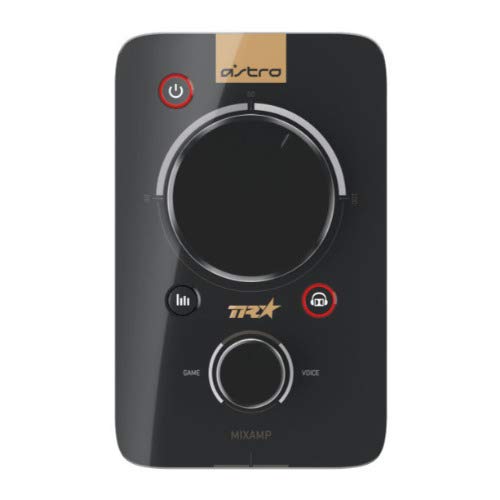
Сүрөт: Жогорку view of the ASTRO MixAmp Pro TR, showing the large master volume dial, the smaller game/voice balance dial, and the EQ preset buttons.
Техникалык тейлөө
- Тазалоо: Use a soft, dry cloth to clean the headset and MixAmp. Абразивдүү тазалагычтардан же эриткичтерден качыңыз.
- Сактагыч: Store the headset and MixAmp күн нурунан жана экстремалдык температурадан алыс салкын, кургак жерде.
- Кабельге кам көрүү: Зымдарды бузубаш үчүн этият кармаңыз. Курч ийилүүлөрдү же ашыкча тартууларды болтурбоо керек.
- Кулак жаздыктары: Periodically check ear cushions for wear and tear. Replacement cushions are available from ASTRO Gaming.
Проблемаларды чечүү
If you encounter issues with your ASTRO Gaming A40 TR Headset or MixAmp Pro TR, try the following solutions:
| Көйгөй | Чечим |
|---|---|
| Гарнитурадан аудио жок. |
|
| Микрофон иштебей жатат. |
|
| Бурмаланган же начар үн сапаты. |
|
For more detailed troubleshooting, please refer to the official ASTRO Gaming support resources.
Техникалык шарттар
- Модель номери: 939-001511
- Жыштык жообу: 20 - 20,000 Гц
- Номиналдуу импеданс: 48 Ом
- Баштын басымы: 2.6N
- Продукциянын өлчөмдөрү: 9.06 x 13.87 x 4.33 дюйм
- Элемент Салмагы: 1.06 фунт
- Байланыш: Оптикалык, USB
- Шайкештик: PlayStation 4, PC
Кепилдик жана колдоо
For detailed warranty information and product support, please visit the official ASTRO Gaming webсайтка же берилген документтерге кайрылыңыз:
Ensure you register your product on the ASTRO Gaming website for the latest updates and support.