
Introduction
This manual provides essential information for the safe and efficient operation, installation, and maintenance of your HP 5065-5262 DYNAMITE Power Supply. This 340-watt power supply is designed with integrated cooling fans for reliable performance in disk systems. Please read this manual thoroughly before installation and use.
Коопсуздук маалыматы
Жарааттарды же жабдууларды бузууну болтурбоо үчүн ар дайым төмөнкү коопсуздук чараларын сактаңыз:
- Ensure the power supply is disconnected from the main power source before installation, removal, or servicing.
- Монтаждоо жана тейлөөнү квалификациялуу кызматкерлер гана аткарышы керек.
- Электр жабдыгын ачпаңыз casing. There are no user-serviceable parts inside, and dangerous voltages бар.
- Электр шоктун алдын алуу үчүн туура жерге туташтырууну камсыз кылыңыз.
- Электр менен камсыздоону көрсөтүлгөн кубаттуулук чегинде иштетиңизtage жана учурдагы рейтингдер.
- Maintain adequate ventilation around the power supply to prevent overheating.
Орнотуу жана орнотуу
Follow these steps for proper installation of the HP 5065-5262 DYNAMITE Power Supply:
- Даярдоо: Before beginning, ensure your system is powered off and unplugged from the wall outlet. Discharge any static electricity by touching a grounded metal object.
- Эски кубат менен жабдууну алып салуу (эгер бар болсо): Disconnect all cables from the existing power supply. Unscrew and carefully remove the old unit from the chassis.
- Insert New Power Supply: Gently slide the HP 5065-5262 DYNAMITE Power Supply into the designated bay in your disk system chassis. Ensure it aligns correctly with the mounting holes.
- Secure the Power Supply: Use the appropriate screws to firmly secure the power supply to the chassis. Do not overtighten.
- Кабелдерди туташтыруу: Connect all necessary power cables from the power supply to the motherboard, disk drives, and any other components requiring power. Refer to your system's motherboard manual for specific power connector locations.
- Акыркы текшерүү: Double-check all connections to ensure they are secure and correctly seated. Ensure no loose cables are obstructing airflow.
- Күйгүзүү: Close the system chassis, plug the system back into a grounded power outlet, and power on the system.
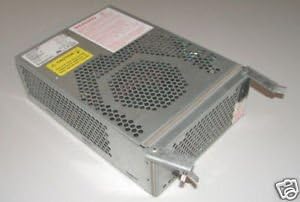
1-сүрөт: Бурчтуу view of the HP 5065-5262 DYNAMITE Power Supply, illustrating its size and design for integration into a disk system.
Иштөө нускамалары
The HP 5065-5262 DYNAMITE Power Supply operates automatically once installed and connected. It provides stable power to your disk system components.
- Күйгүзүү/өчүрүү: The power supply is controlled by the system's main power switch. When the system is powered on, the power supply will activate and deliver power.
- Муздатуу желдеткичтери: The integrated cooling fans will operate automatically to maintain optimal internal temperatures. Ensure fan vents are not obstructed.
- Статус көрсөткүчтөрү: Some systems may have diagnostic LEDs on the motherboard or chassis that indicate power supply status. Refer to your system's manual for details.
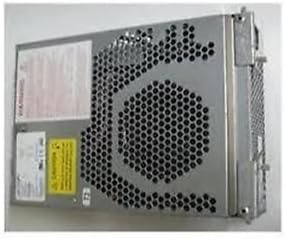
2-сүрөт: Каптал view of the HP 5065-5262 DYNAMITE Power Supply, highlighting the ventilation design crucial for its cooling system.
Техникалык тейлөө
Regular maintenance helps ensure the longevity and stable operation of your power supply:
- Чаңды тазалоо: Periodically (e.g., every 6-12 months), power off and unplug your system. Use compressed air to gently clear dust from the power supply's fan vents and internal components. Hold the fan blades to prevent them from spinning too fast during cleaning.
- Кабелдик текшерүү: Check all power cables connected to the power supply for any signs of wear, fraying, or loose connections. Replace damaged cables immediately.
- Экологиялык шарттар: Ensure the operating environment is clean, dry, and within the recommended temperature range to prevent dust buildup and moisture damage.
Проблемаларды чечүү
Эгерде сиз электр менен камсыздоодо көйгөйлөргө туш болсоңуз, төмөнкү кеңири таралган көйгөйлөрдү жана чечимдерди караңыз:
| Көйгөй | Мүмкүн себеп | Чечим |
|---|---|---|
| Система күйбөйт. | Бош электр кабелинин туташуусу. Туура эмес дубал розетка. Электр энергиясы менен камсыздоо бузулуу. | Check all power connections (wall, power supply, motherboard). Розетканы башка аспап менен текшериңиз. If possible, test with a known good power supply. |
| Система күйүп жатат, бирок күтүүсүздөн өчүп калат. | Overheating (poor ventilation). Overload (too many components). Электр менен камсыздоонун туруксуздугу. | Ensure proper airflow; clean dust from vents. Disconnect non-essential components to check for overload. Consider professional diagnosis or replacement. |
| Loud fan noise from power supply. | Dust buildup in fan. Worn fan bearing. | Clean fan with compressed air. If noise persists, the fan may be failing; consider professional service or replacement of the power supply. |
If these steps do not resolve the issue, contact HP support or a qualified technician.
Техникалык шарттар
| Өзгөчөлүк | Деталь |
|---|---|
| Бренд | HEWLETT PACKARD |
| Модель номери | 5065-5262 |
| Ватtage | 340 ватт |
| Муздатуу ыкмасы | Air (with integrated fans) |
| ASIN | B014S277MO |
| UPC | 787322237757 |
| Биринчи жеткиликтүү | 9-июль, 2013-жыл |
Кепилдик жана колдоо
This HP 5065-5262 DYNAMITE Power Supply is typically covered by Hewlett Packard's standard manufacturer warranty. For specific warranty terms and conditions, please refer to the documentation provided with your original system or contact HP customer support directly.
For technical support, service, or to inquire about replacement parts, please visit the official Hewlett Packard support website or contact their customer service line. Have your product model number (5065-5262) and serial number (if applicable) ready when contacting support.
HP колдоо Webсайт: https://www.hp.com/support