
Introduction
This manual provides essential information for the safe and efficient installation, operation, and maintenance of your APC Smart-UPS SRT 8kVA Rack Mount Uninterruptible Power Supply (UPS) with a 208V to 120V Step-Down Transformer. Please read this manual thoroughly before installing or operating the equipment.
The APC Smart-UPS SRT 8kVA is designed to provide protected power to electronic equipment from utility power outages, sags, surges, and small utility fluctuations. The integrated step-down transformer converts 208V input to 120V output for compatible equipment.
Маанилүү коопсуздук нускамалары
БУЛ КӨРСӨТМӨЛӨРДҮ САКТАҢЫЗ - This manual contains important instructions that should be followed during installation and maintenance of the UPS and batteries.
- Бул UPS имараттын ичинде гана колдонууга арналган.
- Бул UPSти күндүн түз нурунда, суюктуктар менен байланышта же ашыкча чаң же нымдуулук бар жерде иштетпеңиз.
- UPSтин электр кабелин түз розеткага туташтырыңыз. Чыңалуудан коргоочу же узартуучу зымдарды колдонбоңуз.
- Батареяларды тейлөө аккумуляторлорду жана керектүү чараларды билген персонал тарабынан аткарылышы же көзөмөлдөөсү керек. Уруксаты жок адамдарды батареядан алыс кармаңыз.
- Батареяларды алмаштырууда, ошол эле типтеги жана сандагы батарейкаларды же батарея топтомдорун алмаштырыңыз.
- Батареяларды отко таштабаңыз. Батареялар жарылып кетиши мүмкүн.
- Батареяларды ачпаңыз же кыйратпаңыз. Чыгарылган электролит териге жана көзгө зыяндуу. Бул уулуу болушу мүмкүн.
- Батарея электр шок жана жогорку кыска туташуу ток коркунучун алып келиши мүмкүн. Батареялар менен иштөөдө төмөнкү сактык чараларын сактоо керек:
- Сааттарды, шакектерди же башка металл буюмдарды алып салыңыз.
- Изоляцияланган туткалары бар шаймандарды колдонуңуз.
- Резина кол кап жана өтүк кийиңиз.
- Батареялардын үстүнө аспаптарды же металл тетиктерди койбоңуз.
- Батарея терминалдарын туташтыруудан же ажыратуудан мурун заряддоо булагын ажыратыңыз.
Пакеттин мазмуну
Inspect the package upon receipt. Notify the carrier and dealer if there is any damage. The package contains:
- APC Smart-UPS SRT 8kVA UPS Unit
- 208V to 120V Step-Down Transformer
- Стойкага орнотуучу аппаратура
- Сериялык байланыш кабели
- USB байланыш кабели
- Документтик CD
- Коопсуздук көрсөтмөлөрү
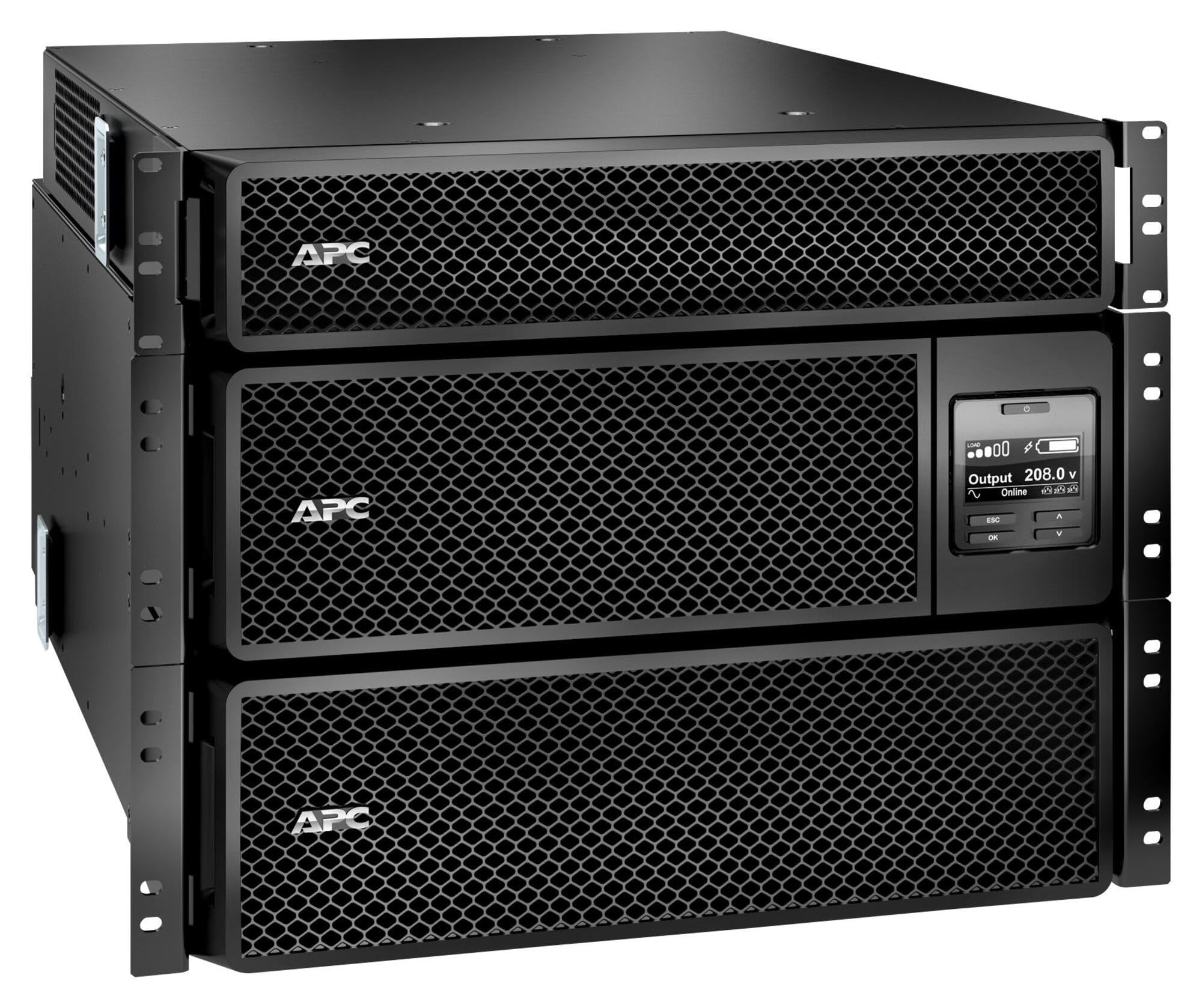
Image: APC Smart-UPS SRT 8kVA Rack Mount UPS with 208V to 120V Step-Down Transformer. This image shows the main UPS unit and the accompanying step-down transformer, typically in a rack-mountable configuration.
Жайгашуу
1. Жайгаштыруу
The UPS and transformer are heavy. For rack-mount installations, ensure the rack is stable and capable of supporting the combined weight of the UPS, transformer, and any other equipment. For tower installations, place the unit on a flat, stable surface.
- Maintain at least 20 cm (8 inches) of clearance from the front and rear panels for proper ventilation.
- Аппаратты жылуулук булактарынын жанына же тике күн нуруна коюудан алыс болуңуз.
2. Батареяны туташтыруу
The UPS is shipped with the internal batteries disconnected for safety. Follow these steps to connect the batteries:
- Remove the front bezel or access panel to expose the battery compartment.
- Connect the internal battery cables as indicated by the labels or instructions inside the compartment. Ensure a secure connection.
- Replace the front bezel or access panel.
3. Power Connection
Connect the UPS to utility power and your equipment.
- Киргизүү күчү: Connect the UPS input power cord (NEMA L6-30P) to a dedicated 208V AC outlet. Ensure the outlet is properly grounded and rated for the UPS capacity.
- Трансформатор байланышы: Connect the output of the UPS to the input of the 208V to 120V Step-Down Transformer.
- Чыгуу күчү: Connect your 120V equipment to the 120V output receptacles on the step-down transformer. Do not overload the transformer or the UPS.
- Байланыш кабелдери: Connect the serial or USB communication cable from the UPS to your computer or server for monitoring and management.
4. Баштапкы ишке киргизүү
After all connections are made:
- Press the power ON button on the UPS front panel. The UPS will perform a self-test.
- Allow the UPS to charge its batteries for at least 24 hours before connecting critical loads to ensure full runtime capacity.
- Verify the UPS display shows normal operation status.
UPSти иштетүү
Алдыңкы панелдин дисплейи жана башкаруу элементтери
The front panel features an LCD display and control buttons for monitoring and configuring the UPS. Refer to the detailed user manual on the documentation CD for specific menu navigation.
- ON/OFF баскычы: Powers the UPS on or off.
- Escape/Menu Button: Navigates back or enters the main menu.
- Өйдө/төмөн жебелер: Меню параметрлерин карап чыгат же жөндөөлөрдү тууралайт.
- Кирүү баскычы: Selects an option or confirms a setting.
- LED көрсөткүчтөрү: Provide quick status updates (e.g., On Line, On Battery, Fault).
Кадимки операция
During normal operation, the UPS will be in "On Line" mode, providing conditioned power to connected equipment and charging its batteries. The LCD display will show input/output voltagд, жүк пайызыtage, жана батареянын заряд деңгээли.
Батарея режими
If utility power fails or fluctuates outside acceptable limits, the UPS will automatically switch to battery power. An audible alarm may sound, and the display will indicate "On Battery" mode. The runtime available depends on the load and battery charge level.
Өчүрүү процедуралары
- Ырааттуу өчүрүү: Use the PowerChute software (if installed) to gracefully shut down connected equipment before the UPS runs out of battery power.
- Кол менен өчүрүү: Press and hold the OFF button on the front panel until the UPS powers down. Ensure all connected equipment is safely shut down first.
Техникалык тейлөө
Батареяны алмаштыруу
The batteries in the UPS are user-replaceable hot-swappable battery modules. Refer to the specific battery replacement instructions provided with your replacement battery kit or on the APC website. Always use genuine APC replacement battery cartridges (RBCs).
- Battery life is typically 3-5 years, but can vary based on temperature and discharge cycles.
- Replace batteries when the UPS indicates a "Replace Battery" warning or when runtime significantly decreases.
Тазалоо
Keep the UPS and transformer free of dust and debris. Use a dry cloth to clean the exterior. Do not use liquid cleaners or solvents.
Орнотулган программаны жаңыртуу
APCди мезгил-мезгили менен текшерип туруңуз website for available firmware updates for your UPS model. Firmware updates can provide enhanced features, improved performance, or bug fixes. Follow the instructions provided with the firmware update package carefully.
Проблемаларды чечүү
This section provides solutions to common issues. For more complex problems, contact APC Technical Support.
| Көйгөй | Мүмкүн себеп | Чечим |
|---|---|---|
| UPS күйбөйт. | Battery not connected; No input power; UPS fault. | Ensure battery cables are securely connected. Verify input power cable is plugged into a live outlet. If fault persists, contact support. |
| UPS үзгүлтүксүз же тез-тез сигнал берет. | On battery mode; Overload; Low battery. | Check utility power. Reduce connected load. Allow batteries to charge. |
| "Батареяны алмаштыруу" индикатору күйүп турат. | Batteries are at end of life or faulty. | Order and install new APC replacement battery cartridges. |
| Connected equipment not receiving 120V. | Transformer not connected or faulty; UPS output issue. | Verify transformer connections. Check UPS output voltage on display. Ensure equipment is plugged into the 120V outlets of the transformer. |
Техникалык шарттар
The following table outlines the key specifications for the APC Smart-UPS SRT 8kVA Rack Mount with 208V to 120V Step-Down Transformer (SRT8KRMXLT-5KTF).
| Өзгөчөлүк | Деталь |
|---|---|
| Бренд | APC |
| Модель номери | SRT8KRMXLT-5KTF |
| Кубаттуулугу (VA/Watts) | 8000 VA / 8000 Вт |
| Киргизүү көлөмүtage | 208 В AC |
| Output Voltage | 120 V AC (via Step-Down Transformer) |
| Output Current | 66.67 Amps |
| Жыштык диапазону | 50/60 Гц |
| Батарея түрү | Коргошун кислотасы |
| Батареяны заряддоо убактысы | 1.5 саат |
| Typical Runtime (Full Load) | 5 мүнөт |
| Форма фактору | Rack / Tower Mountable (8U) |
| Продукциянын өлчөмдөрү (D x W x Y) | 28.2" x 17" x 13.9" (71.6см x 43.2см x 35.3см) |
| Элемент Салмагы | 341 фунт (154.7 кг) |
| Output Connections | 1 x NEMA L6-30R, 4 x NEMA 5-20R (via transformer) |
| Коргоочу материал | Металл |
| Түс | Кара |
| Коопсуздук стандарты | UL 1778 |
Кепилдик жана колдоо
Кепилдик жөнүндө толук маалымат алуу үчүн, өнүмүңүз менен кошо берилген кепилдик картасын караңыз же расмий APC дүкөнүнө баш багыңыз website. APC offers technical support to assist with installation, troubleshooting, and product inquiries.
- Онлайн колдоо: АТКга барыңыз webКөп берилүүчү суроолор, документтер жана программалык камсыздоону жүктөп алуу үчүн сайт.
- Телефондук колдоо: Contact APC Technical Support using the numbers provided on the APC webсиздин аймак үчүн сайт.
- Продукцияны каттоо: Register your product online to receive notifications about firmware updates and product information.