
1. Киришүү
The Sony SBH54 is a versatile Stereo Bluetooth Headset designed for wireless communication and audio playback. It offers both handset and headset functionalities, allowing you to take and make calls, view messages, listen to music, and tune into FM radio directly from its display. Crafted from premium metal with a splash-proof design, it combines elegance with durability.
Key features include Bluetooth Wireless 3.0, NFC technology for easy pairing, an OLED display, and built-in noise cancellation for clear audio during calls. The headset supports A2DP profile and can connect to two devices simultaneously.
2. Продукт бүтүп калдыview
The SBH54 features a compact design that fits comfortably in your hand. It includes an OLED display for information at a glance and physical controls for media and call management.
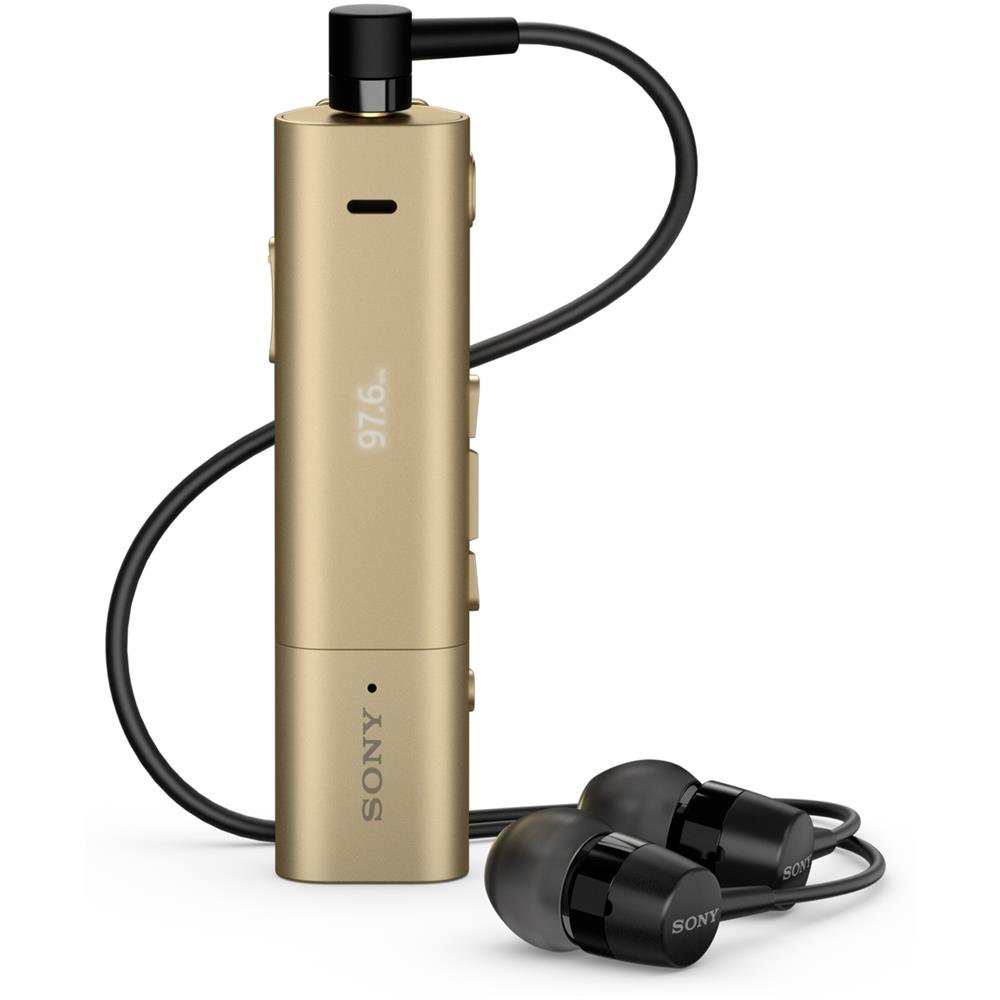
Image: Sony SBH54 Gold Stereo Bluetooth Headset. This image displays the compact, gold-colored headset with its integrated clip and display screen.
Башкаруу каражаттары жана көрсөткүчтөр:
- OLED дисплей: Shows caller ID, messages, music track information, and FM radio frequency.
- Көп функциялуу баскыч: For call answering/ending, play/pause music.
- Үн баскычтары: Аудионун үнүн тууралоо.
- Чабыттоо баскычтары: For menu navigation and track skipping.
- Микрофон: Integrated for voice calls.
- Гарнитура уячасы: 3.5mm port for connecting the included premium headphones.
- Заряддоо порту: Аппаратты кубаттоо үчүн микро USB порту.
3. Орнотуу
3.1 Гарнитураны заряддоо
- Connect the supplied USB cable to the headset's charging port and to a USB power adapter or a computer's USB port.
- Дисплейдеги батареянын индикатору заряддоо абалын көрсөтөт.
- Биринчи колдонуудан мурун гарнитураны толук заряддаңыз.
3.2 Pairing with a Device (Bluetooth)
- Гарнитура заряддалганын жана өчүрүлгөнүн текшериңиз.
- Press and hold the power button until the headset enters pairing mode (indicated by a specific light pattern or message on the display).
- Смартфонуңузда же башка Bluetooth иштетилген түзмөгүңүздө Bluetooth'ду иштетиңиз жана жеткиликтүү түзмөктөрдү издеңиз.
- Select "SBH54" from the list of found devices.
- If prompted, enter the passcode "0000" (four zeros).
- Жупташтырылгандан кийин, гарнитура ийгиликтүү туташууну көрсөтөт.
3.3 Pairing with a Device (NFC)
For devices with NFC (Near Field Communication):
- Ensure NFC is enabled on your smartphone and the screen is unlocked.
- Touch the NFC detection area of your smartphone to the NFC detection area on the SBH54 headset.
- Жупташтыруу процессин аяктоо үчүн экрандагы көрсөтмөлөрдү аткарыңыз.
4. Гарнитураны иштетүү
4.1 Күйгүзүү/өчүрүү
- Күйгүзүү үчүн: Дисплей күйгүчө кубат баскычын басып, кармап туруңуз.
- Өчүрүү үчүн: Дисплей өчкөнчө кубат баскычын басып, кармап туруңуз.
4.2 Чалууларды кабыл алуу жана кабыл алуу
- Чалууга жооп берүү: When a call comes in, press the multi-function button.
- Чалууну аяктоо: During a call, press the multi-function button.
- Чалуудан баш тартуу: Press and hold the multi-function button when a call comes in.
- Чакыруу: Dial the number on your phone. The call will automatically route to the headset. You can also use voice commands if supported by your phone.
- Handset Function: The compact SBH54 can be used as an unobtrusive handset for calls.
- Ызы -чууну жокко чыгаруу: The headset features echo, wind, and noise cancellation for clear voice transmission.
- HD үн: Enhances voice clarity for both parties during a call.
4.3 Музыканы ойнотуу
- Ойнотуу/тындыруу: Көп функциялуу баскычты басыңыз.
- Кийинки трек: Press the forward navigation button.
- Мурунку трек: Press the backward navigation button.
- Үндү көзөмөлдөө: Үндү катуулатуу/акырындатуу баскычтарын колдонуңуз.
4.4 FM радиосу
- FM радиосун иштетүү: Navigate through the headset menu to select the FM Radio function.
- Түнкү станциялар: Use the navigation buttons to scan or manually tune to FM frequencies.
- Алдын ала орнотууларды сактоо: The headset may allow saving favorite stations (refer to on-screen prompts).
5. Техникалык тейлөө
- Тазалоо: Гарнитураны жумшак, кургак чүпүрөк менен сүртүңүз. Катуу химиялык заттарды же абразивдүү материалдарды колдонуудан алыс болуңуз.
- Суу каршылык: The SBH54 has a splash-proof design. This means it can withstand light splashes of water but should not be submerged or exposed to heavy rain. Ensure the charging port cover is securely closed.
- Сактагыч: Гарнитураны күн нурунан жана экстремалдык температурадан алыс салкын, кургак жерде сактаңыз.
- Батареяга кам көрүү: Батареянын иштөө мөөнөтүн узартуу үчүн, аны тез-тез толук зарядсыздандырбаңыз. Аны үзгүлтүксүз кубаттап туруңуз.
6. Кыйынчылыктарды
Жалпы маселелер жана чечимдер:
- Гарнитура күйбөй жатат: Батарея заряддалганын текшериңиз. Кубат булагына туташып, кайра аракет кылыңыз.
- Түзмөк менен жупташтыруу мүмкүн эмес:
- Гарнитура жупташтыруу режиминде экенин текшериңиз.
- Түзмөгүңүздө Bluetooth иштетилгенин текшериңиз.
- Гарнитураны түзмөгүңүзгө жакыныраак жылдырыңыз.
- Гарнитураны да, түзмөгүңүздү да өчүрүп күйгүзүңүз.
- Түзмөгүңүздөгү мурунку Bluetooth байланыштарын тазалап, кайра жупташтырып көрүңүз.
- Аудио жок же сапаты начар:
- Гарнитурадагы жана туташкан түзмөгүңүздүн үнүнүн деңгээлин текшериңиз.
- Ensure the headset is within range of your device.
- Bluetooth байланышын ажыратып, кайра туташтырыңыз.
- Ensure the headphones are properly plugged into the 3.5mm jack.
- FM радиосу иштебейт: FM сигналы жакшы кабыл алынган аймакта экениңизди текшериңиз.
7. Техникалык шарттар
| Өзгөчөлүк | Деталь |
|---|---|
| Бренд | Sony |
| Модель номери | SBH54GD |
| Түс | Алтын |
| Кулак жайгаштыруу | Кулакта |
| Форма фактору | Кулакта |
| Noise Control | Активдүү ызы-чууну жокко чыгаруу |
| Элемент Салмагы | 0.1 килограмм |
| Аудио драйвер түрү | Динамикалык драйвер |
| Жыштык диапазону | 20 Гц - 20 000 Гц |
| Коргоочу материал | Металл |
| Шайкеш түзмөктөр | Smartphones, Laptops, Tablets, Bluetooth-enabled Devices |
| Сууга туруктуулук деңгээли | Water Resistant (Splash-proof) |
| Байланыш технологиясы | Bluetooth, NFC |
| Зымсыз технология | Bluetooth, NFC |
| Bluetooth версиясы | 3.0 |
| Башкаруу түрү | Медиа көзөмөл |
| Башкаруу ыкмасы | Алыстан |
8. Кепилдик жана колдоо
For warranty information and customer support, please refer to the documentation included with your purchase or visit the official Sony support webсайт. Кепилдиктин конкреттүү шарттары аймакка жана сатуучуга жараша өзгөрүшү мүмкүн.
Онлайн колдоо: www.sony.com/electronics/support