
Introduction
This manual provides essential instructions for the safe and effective use of your Axus Digital AXP25 Portable Keyboard. Please read this manual thoroughly before operating the instrument and retain it for future reference. The AXP25 is a 61-key touch-sensitive portable keyboard designed for beginners and enthusiasts, featuring a variety of voices, styles, and a built-in learning system.

Figure 1: Axus Digital AXP25 Portable Keyboard.
Маанилүү коопсуздук маалыматы
- Электр камсыздоо: Белгиленген AC адаптерин гана колдонуңуз. Voltage matches the requirements of your region. Disconnect the power cord during lightning storms or when not in use for extended periods.
- Жайгашкан жери: Do not expose the instrument to direct sunlight, high temperatures, excessive humidity, dust, or strong vibrations. Place it on a stable, flat surface.
- Суу жана ным: Do not use the instrument near water or expose it to rain or moisture. Do not place objects containing liquids on the instrument.
- Чет өлкөлүк объекттер: Аспаптын тешиктерине бөтөн нерселерди киргизбеңиз.
- Тазалоо: Clean the instrument with a soft, dry cloth. Do not use abrasive cleaners, waxes, or solvents.
- Тейлөө: Аспапты өз алдынча тейлөөгө аракет кылбаңыз. Бардык тейлөө иштерин квалификациялуу адистерге тапшырыңыз.
Пакеттин мазмуну
Төмөнкү нерселердин баары пакетиңизге камтылганын текшериңиз:
- Axus Digital AXP25 Portable Keyboard
- AC кубат адаптери
- Музыкалык эс алуу
- Колдонуучунун Колдонмосу (бул документ)

Figure 2: The power adapter is typically located within the polystyrene packaging that supports the keyboard.

Figure 3: The included AC power adapter.
Жайгашуу
1. Кубат адаптерин туташтыруу
- Locate the DC IN jack on the rear panel of the keyboard.
- Connect the included AC power adapter to the DC IN jack.
- Plug the other end of the adapter into a standard electrical outlet.
2. Attaching the Music Rest
Insert the tabs of the music rest into the slots provided on the top panel of the keyboard, behind the control panel.
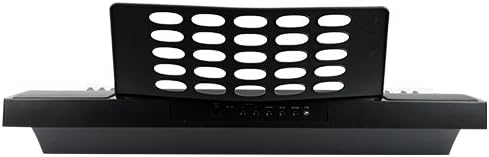
Figure 4: Rear panel connections and music rest slots.
3. Күйгүзүү / Өчүрүү
басыңыз КҮЧ баскычтопту иштетүү же өчүрүү үчүн башкаруу панелинде жайгашкан.
Баскычтопту иштетүү
Башкаруу панелиview

5-сүрөт: Детальдуу view of the control panel and LCD display.
The control panel features an LCD display, various buttons for selecting voices, styles, and functions, and a master volume knob.
1. Башкы том
колдонуу VOLUME knob to adjust the overall output level of the keyboard.
2. Үндөрдү (үндөрдү) тандоо
The AXP25 includes 300 high-quality voices. To select a voice:
- басыңыз VOICE баскычы.
- Сандык тактаны же колдонуңуз +/- buttons to enter the desired voice number. The selected voice will be displayed on the LCD screen.
Example voices include: Grand Piano, Electric Piano, Organ, Strings, Guitar, Bass, Synth, Drum Kits.
3. Selecting Styles (Accompaniment)
The keyboard offers 200 backing styles. To select a style:
- басыңыз СТИЛЬ баскычы.
- Сандык тактаны же колдонуңуз +/- buttons to enter the desired style number.
- Басыңыз START/STOP коштоону баштоо.
- Колдонуу INTRO/аягы for an introduction or ending phrase.
- Басыңыз ТОЛТУРУУ А or ТОЛТУРУУ Б for a short rhythmic variation during playback.
4. Темпти жөндөө
колдонуу ТЕМПО +/- buttons to increase or decrease the speed of the selected style or lesson song.
5. Сенсордук сезгичтик
The AXP25 features touch-sensitive keys, meaning the volume and tone of a note change based on how hard you press the key. This allows for expressive playing dynamics.
6. Lesson System
The built-in interactive 'learn to play' teaching system includes 100 songs. To use the lesson function:
- басыңыз САБАК баскычы.
- Select a lesson song using the number pad or +/- баскычтар.
- Follow the instructions on the LCD display and play along. The system provides feedback on your performance.
7. Song Record Function
The keyboard allows you to record your performances.
- басыңыз ЖАЗУУ button to enter record standby mode.
- Ойнотууну баштаңыз. Жаздыруу автоматтык түрдө башталат.
- Басыңыз ЖАЗУУ кайра же START/STOP жазууну токтотуу.
- басыңыз ОЙНОО Жазылган аткарууңузду угуу үчүн баскычты басыңыз.
8. USB B MIDI Connection
The USB B port on the rear panel allows you to connect the keyboard to a computer for MIDI communication. This enables the keyboard to function as a MIDI controller for software instruments or to receive MIDI data from a computer.
- Connect a USB B cable (not included) from the keyboard's USB B port to a USB port on your computer.
- No special drivers are typically required for basic MIDI functionality on most modern operating systems.
Техникалык тейлөө
Тазалоо
- Клавиатуранын бетин жумшак, кургак чүпүрөк менен сүртүңүз.
- өжөр кир үчүн, бир аз гampчүпүрөктү суу жана жумшак жуугуч менен жууп, анан дароо кургатып сүртүңүз.
- Avoid using abrasive cleaners, solvents, or alcohol, as these can damage the finish.
Сактагыч
- Узак убакыт бою колдонулбай турганда, кубат адаптерин сууруп коюңуз.
- Клавиатураны салкын, кургак жерде, күн нуру түз тийген жана өтө жогорку температурадан алыс сактаңыз.
- Чаңдын топтолушун алдын алуу үчүн клавиатураны чаң капкак менен жаап коюңуз (кошулмада жок).
Проблемаларды чечүү
| Көйгөй | Мүмкүн себеп | Чечим |
|---|---|---|
| Үн жок |
|
|
| Keys not responding or inconsistent volume |
|
|
| Accompaniment not starting |
|
|
| MIDI туташуу көйгөйлөрү |
|
|
Техникалык шарттар
| Модел | AXP25 |
| Ачкычтар | 61 Full Size, Touch Sensitive |
| Үндөр | 300 High Quality Voices |
| Стилдер | 200 Backing Styles |
| Lesson System | Built-in interactive 'learn to play' with 100 songs |
| Жазуу функциясы | Ооба |
| Байланыш | USB B MIDI, Sustain Connection (port only, pedal not included) |
| Power Source | AC кубат адаптери (кошулган) |
| Баяндамачылар | 2 Speakers, 5 Watts Output |
| Өлчөмдөрү (болжол менен) | 99.6 x 42.6 x 17.4 см |
| Салмагы (болжол менен) | 0.02 килограмм (20 г) (Note: This weight appears to be for a component or packaging, not the full keyboard.) |
| UPC | 700153953283 |
Кепилдик жана колдоо
For information regarding warranty coverage, technical support, or service inquiries, please refer to the warranty card included with your product or contact your retailer or the manufacturer directly. Keep your proof of purchase for warranty claims.