
LyxPro SPA10
LyxPro SPA-10 Portable PA Speaker System User Manual
Бренд: LyxPro | Модель: SPA10
1. Киришүү
LyxPro SPA-10 көчмө PA динамик системасын тандаганыңыз үчүн рахмат. Бул активдүү 10 дюймдук динамик таза үн жана иштөө үчүн иштелип чыккан, жеке колдонуудан баштап чакан чогулуштарга чейин ар кандай учурлар үчүн ылайыктуу. Анын компакттуу жана жеңил дизайны оңой көчүрүүнү камсыз кылат, ал эми бир нече киргизүү опциялары ар тараптуу туташууну камсыз кылат. Бул колдонмо түзмөгүңүздү туура орнотуу, иштетүү жана тейлөө боюнча маанилүү маалыматтарды берет.
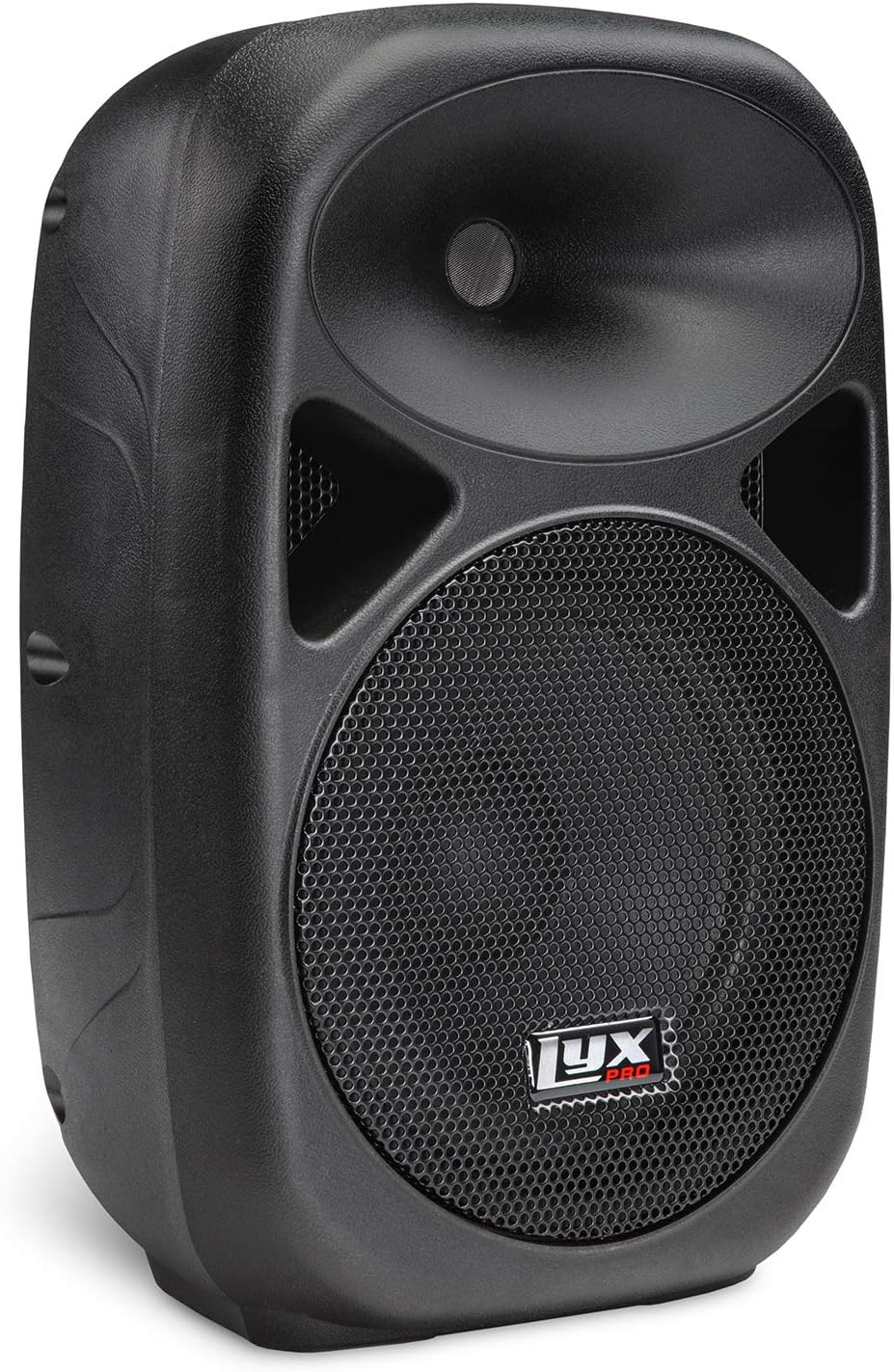
Сүрөт 1: Алдыңкы view LyxPro SPA-10 көчмө PA динамигинин.
2. Пакеттин мазмуну
Төмөндө тизмеленген нерселердин баары пакетиңизге камтылганын текшериңиз:
- LyxPro SPA-10 10 дюймдук портативдик PA спикери
- Электр зымы
- Алыстан башкаруу (эгер бар болсо)
- Киргизүү туташуулары үчүн ар кандай кабелдер (эгер бар болсо)

2-сүрөт: Кошумча аксессуарлар: электр шнуру жана пульт.
3. Продукциянын өзгөчөлүктөрү
- Кемчиликсиз тунук үн жана аткаруу: Кесипкөй 10 дюймдук активдүү PA системасы, оңой ташуу үчүн компакттуу жана жеңил (болжол менен 21 фунт).
- Ар кандай учур жана жайгашкан жер үчүн эң сонун: Музыкалык аткаруулар (гитара, пианино, барабандар), имараттын ичинде/сыртында кечелер же эл алдында сүйлөө үчүн идеалдуу.
- Бир нече жеңил байланыштар: Зымсыз агым үчүн орнотулган Bluetooth, MP3 эквалайзерин башкаруу бөлүмү, SD карта уячасы жана USB киргизүү, ар бир киргизүү деңгээлинин баскычтары бар R/L RCA киргизүүлөрү, микрофон/линия которгучу бар XLR 1/4" киргизүүлөрү.
- Бир эле учурда бир нече динамикти туташтыруу: Кеңейтилген үн камтуусу үчүн жөнөкөй XLR кабелин колдонуп, Daisy чынжырлуу бир нече активдүү динамиктерди туташтырат.

3-сүрөт: Оңой көчүрүү үчүн интеграцияланган көтөрүү туткасы.

4-сүрөт: SD карта, USB жана Bluetooth сыяктуу универсалдуу туташуу параметрлери.
4. Орнотуу
LyxPro SPA-10 динамигиңизди орнотуу үчүн төмөнкү кадамдарды аткарыңыз:
- Жайгашкан жери: Динамикти туруктуу, тегиз бетке коюңуз же аны шайкеш келген динамик стендине орнотуңуз. Динамиктин түбүндө бекем орнотуу үчүн бекемдөөчү бурамасы бар стандарттуу 35 мм устун бекиткичи бар.
- Кубат туташуу: Динамиктин кубат которгучу ӨЧҮК абалында экенин текшериңиз. Берилген кубат шнурун динамиктин кубат киргизүү булагына, андан кийин тиешелүү электр розеткасына туташтырыңыз.
- Баштапкы күйгүзүү: Кубат которгучун ON абалына буруңуз. 'Кубат' индикатору күйүшү керек.
- Аудио булагы туташуу: Арткы панелдеги жеткиликтүү киргизүүлөрдүн бирин колдонуп, каалаган аудио булагын туташтырыңыз:
- Микрофон/Сызык киргизүү (XLR же 1/4"): Микрофондор же сызык деңгээлиндеги аспаптар үчүн. 'Үн 1' баскычын тууралаңыз.
- Линия киргизүү (RCA же 3.5 мм AUX): MP3 ойноткучтар, телефондор же микшерлер сыяктуу түзмөктөрдү туташтыруу үчүн. 'Үн 2' баскычын тууралаңыз.
- Bluetooth: Түзмөгүңүздөгү Bluetooth'ту иштетип, 'LyxPro SPA-10' менен жупташтырыңыз.
- USB/SD карта: MP3/WMA ойнотуу үчүн USB дискти же SD картаны тиешелүү уячага салыңыз.
- Daisy чынжырлоо (милдеттүү эмес): Бир нече активдүү динамиктерди туташтыруу үчүн, биринчи динамиктин "Mix Out" портунан кийинки активдүү динамиктин киргизүүсүнө XLR кабелин колдонуңуз.

5-сүрөт: Ар кандай киргизүүлөр, чыгаруулар жана башкаруу элементтери көрсөтүлгөн арткы панель.

6-сүрөт: Тирөөчкө орнотулган динамик, ал мамыга орнотуу функциясын көрсөтөт.
5. Иштөө нускамалары
Орнотулгандан кийин, LyxPro SPA-10 түзмөгүңүздү төмөнкү көрсөтмөлөрдү колдонуп иштетиңиз:
- Үндү көзөмөлдөө: Микрофон/Сызык киргизүү үчүн "1-үн" жана линия киргизүү үчүн "2-үн" колдонуңуз (RCA/AUX). "MP3 үнүн катуулатуу" баскычы Bluetooth, USB жана SD карта аркылуу ойнотуунун үн катуулугун башкарат.
- Мадам: Үндү өзүңүз каалагандай кылдаттык менен жөндөө үчүн "Эквалайзер" бөлүмүндөгү "Жогорку жыштыктар" жана "Басс" баскычтарын тууралаңыз.
- Bluetooth операциясы:
- Динамик күйгүзүлгөнүн текшериңиз.
- MP3 ойноткуч бөлүмүндөгү "MODE" баскычын колдонуп, "Bluetooth" режимин тандаңыз. Дисплейде "BT" көрсөтүлөт.
- Түзмөгүңүздө (смартфон, планшет ж.б.) Bluetooth түзмөктөрүн издеп, жупташтыруу үчүн "LyxPro SPA-10" тандаңыз.
- Жупташтырылгандан кийин, сиз аудиону зымсыз агылта аласыз.
- USB/SD карта ойнотуу:
- MP3/WMA файлдары камтылган USB флеш-дискти же SD картаны салыңыз files тиешелүү уячага.
- Динамик автоматтык түрдө USB же SD режимине которулушу керек. Эгер андай болбосо, "MODE" баскычын басыңыз.
- Музыкаңызды башкаруу үчүн MP3 ойноткуч бөлүмүндөгү ойнотуу башкаруу элементтерин (Ойнотуу/Тынытуу, Кийинки/Мурунку трек) колдонуңуз.
- Клип көрсөткүчү: Киргизүү сигналы өтө жогору болгондо, 'Clip' LED индикатору күйөт, бул мүмкүн болгон бурмалоону көрсөтөт. Кысылып калбашы үчүн киргизүү үнүн азайтыңыз.

7-сүрөт: Эквалайзердин жана үндү башкаруу элементтеринин чоо-жайы.
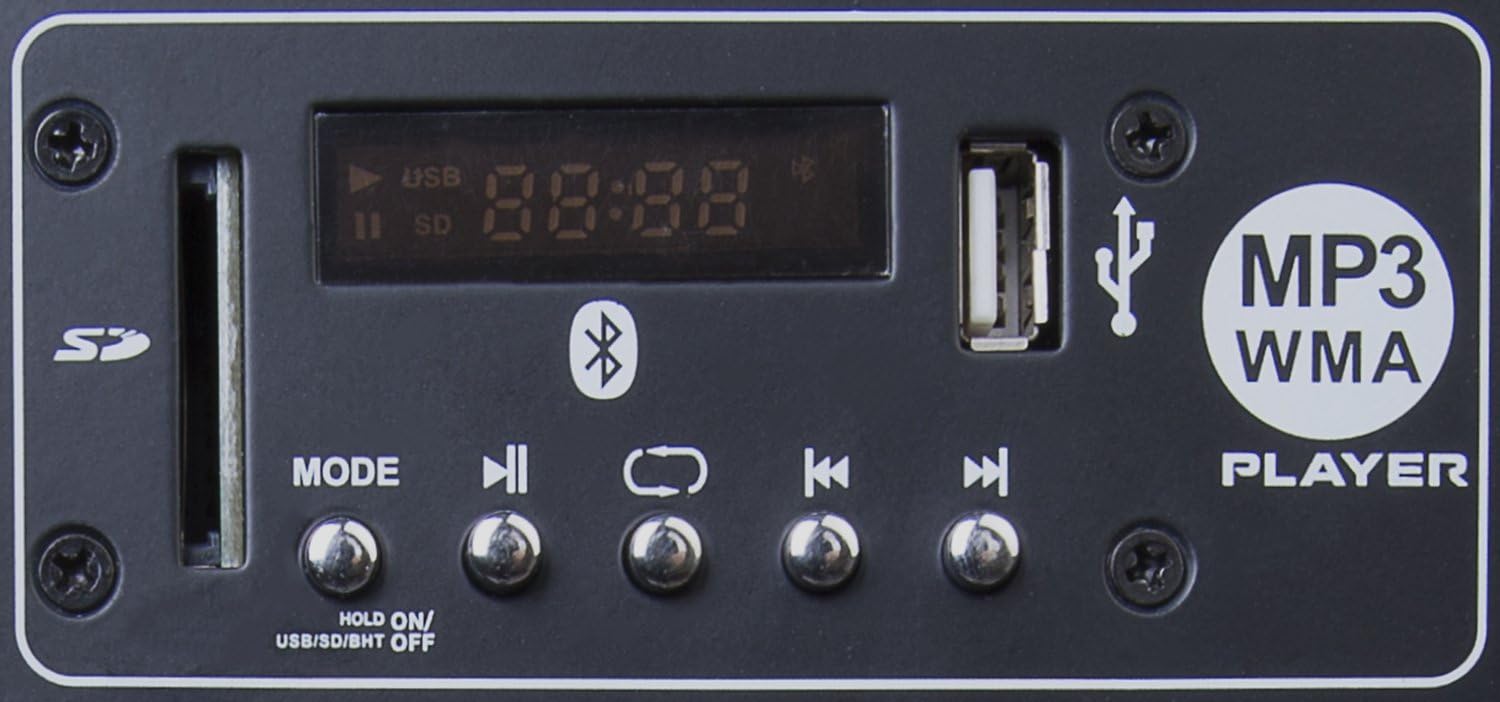
8-сүрөт: SD карта уячасы, USB порту жана ойнотууну башкаруу элементтери бар MP3 ойноткуч бөлүмү.
6. Техникалык тейлөө
LyxPro SPA-10 колонкаңыздын узак мөөнөттүү иштешин жана оптималдуу иштешин камсыз кылуу үчүн, төмөнкү тейлөө кеңештерин аткарыңыз:
- Тазалоо: Динамиктин сыртын тазалоо үчүн жумшак, кургак чүпүрөктү колдонуңуз. Абразивдүү тазалоочу каражаттарды, эриткичтерди же күчтүү химиялык заттарды колдонуудан алыс болуңуз, анткени алар сырткы көрүнүшүнө зыян келтириши мүмкүн.
- Сактагыч: Колдонулбай турган учурда, динамикти салкын, кургак жерде, күндүн түз нурунан, өтө жогорку температурадан жана чаңдан алыс сактаңыз.
- Колдонуу: Динамикти жылдырганда ар дайым орнотулган тутканы колдонуңуз. Динамикти түшүрүп албоодон же катуу соккуга кабылтпоодон алыс болуңуз.
- Вентиляция: Ашыкча ысып кетпеши үчүн динамиктин айланасында жакшы желдетүүнү камсыз кылыңыз. Желдетүүчү тешиктерди жаппаңыз.
7. Кыйынчылыктарды
Эгерде сиз LyxPro SPA-10 динамигиңиз менен көйгөйлөргө туш болсоңуз, төмөнкү кеңири таралган көйгөйлөрдү жана чечимдерди караңыз:
| Көйгөй | Мүмкүн себеп | Чечим |
|---|---|---|
| Күч жок | Электр шнуру туташтырылган эмес; Кубат өчүргүч өчүрүлгөн; Розетканын иштебей калышы | Кубат шнурунун бекем сайылганын текшериңиз; Кубат которгучун күйгүзүңүз; Башка розетканы колдонуп көрүңүз. |
| Үн чыгышы жок | Үн өтө төмөн; Туура эмес киргизүү тандалган; Аудио булагында көйгөй бар; Кабелдер туура туташтырылган эмес | Негизги жана жеке киргизүү үндөрүн көбөйтүңүз; Туура киргизүү режимин текшериңиз; Аудио булагын текшериңиз (мисалы, телефондун үнү); Бардык аудио кабелдерди кайра бекем туташтырыңыз. |
| Бурмаланган үн | Киргизүү сигналы өтө жогору (кесилип жатат); Эквалайзердин жөндөөлөрү туура эмес; Динамик ашыкча жүктөлдү | 'Clip' LED өчкөнгө чейин киргизүү үнүн азайтыңыз; Эквалайзердин жөндөөлөрүн тууралаңыз; Динамиктин кубаттуулугунан ашып кетпегенин текшериңиз. |
| Bluetooth байланышы көйгөйлөрү | Динамик Bluetooth режиминде эмес; Түзмөк жупташтырылган эмес; Тоскоолдук | Динамиктен Bluetooth режимин тандаңыз; Түзмөктүн табылаарын текшерип, кайра жупташтырыңыз; Динамикке жакындаңыз; Башка Bluetooth түзмөктөрүн ажыратыңыз. Эскертүү: Айрым колдонуучулар көйгөйлөр чечилбесе, кайра жупташтыруудан мурун телефонундагы түзмөктү "унутуп коюу" керек экенин билдиришет. |
| USB/SD карта ойнотулбай жатат | Туура эмес file форматтоо; Карта/диск бузулган; Туура эмес режимде | камсыз кылуу fileMP3/WMA форматында; Башка USB/SD картасын колдонуп көрүңүз; 'MODE' баскычын колдонуп, USB/SD режимин тандаңыз. |
8. Техникалык шарттар
| Өзгөчөлүк | Деталь |
|---|---|
| Бренд | LyxPro |
| Модель аты | 10 дюймдук (SPA10) |
| Динамик түрү | Сыртта, Вуфер |
| Өзгөчө өзгөчөлүк | Mp3 бөлүмү, Bluetooth, SD карта уячасы, стерео жупташтыруу |
| Продукт үчүн сунушталган колдонуу | Музыкалык оюнчулар үчүн |
| Шайкеш түзмөктөр | Фортепиано, MP3 ойноткуч, гитара, клавиатура, электрондук барабан |
| Сабвуфердин диаметри | 10 дюйм |
| Бирдик саны | 1 Сан |
| Controller Type | баскыч |
| Түс | Кара |
| Продукциянын өлчөмдөрү | 10"D x 12.5"W x 19.5"H |
| Импеданс | 4 Ом |
| Суу өткөрбөйт | ЖАЛГАН |
| Заряддоо убактысы | 10 саат |
| Зымсыз байланыш технологиясы | Bluetooth |
| Динамик өлчөмү | 10 дюйм |
| Power Source | Электр зымдары |
| Аудио драйвер түрү | Динамикалык драйвер |
| Микрофондордун саны | 1 |
| Сабвуфердин туташуу технологиясы | Зымдуу |
| Connectivity Protocol | Bluetooth, USB |
| MP3 ойноткучту камтыйт? | Ооба |
| Circuits саны | 1 |
| Кубат деңгээли саны | 1 |
| USB 2 порттордун саны | 1 |
| Продукт үчүн атайын колдонуу | Түз эфирдеги концерттер, презентациялар, билим берүү жайлары |
| Өндүрүүчү | LyxPro |
| Элемент Салмагы | 17.36 фунт |
| Динамиктин максималдуу чыгаруу күчү | 110 Ватт |
| Байланыш технологиясы | XLR, 1/4 |
| Аудио чыгаруу режими | Стерео, балким, башкалар |
| Монтаж түрү | Өзүнчө турган, ички орнотуу, сырткы орнотуу, сайгыч орнотуу |
9. Кепилдик жана колдоо
LyxPro SPA-10 төмөнкүлөр менен келет: Чектелген КепилдикКепилдиктин камтылышы, мөөнөтү жана шарттары боюнча толук маалымат алуу үчүн, өнүмүңүз менен кошо берилген кепилдик картасын караңыз же LyxPro кардарларды колдоо кызматына түз кайрылыңыз.
Техникалык жардам алуу, ушул колдонмодон тышкары мүчүлүштүктөрдү оңдоо же тейлөө боюнча суроолор үчүн, расмий LyxPro сайтына кириңиз. webсайтына кириңиз же алардын кардарларды колдоо кызматына кайрылыңыз. Кепилдик боюнча дооматтар үчүн сатып алуунун далили катары сатып алуу дүмүрчөгүңүздү сактап коюңуз.
Ask a question about this manual
Ask about setup, troubleshooting, compatibility, parts, safety, or missing instructions. Manuals+ will review the question and use this page’s manual context to help answer it.