
Introduction
The Vonyx STM2270 is a versatile 2-channel DJ mixer designed for both aspiring and experienced DJs. It integrates modern features such as Bluetooth connectivity and a USB/SD card MP3 player, alongside essential DJ tools like a crossfader and microphone input. This manual provides detailed instructions for the safe and efficient setup, operation, and maintenance of your Vonyx STM2270 mixer.
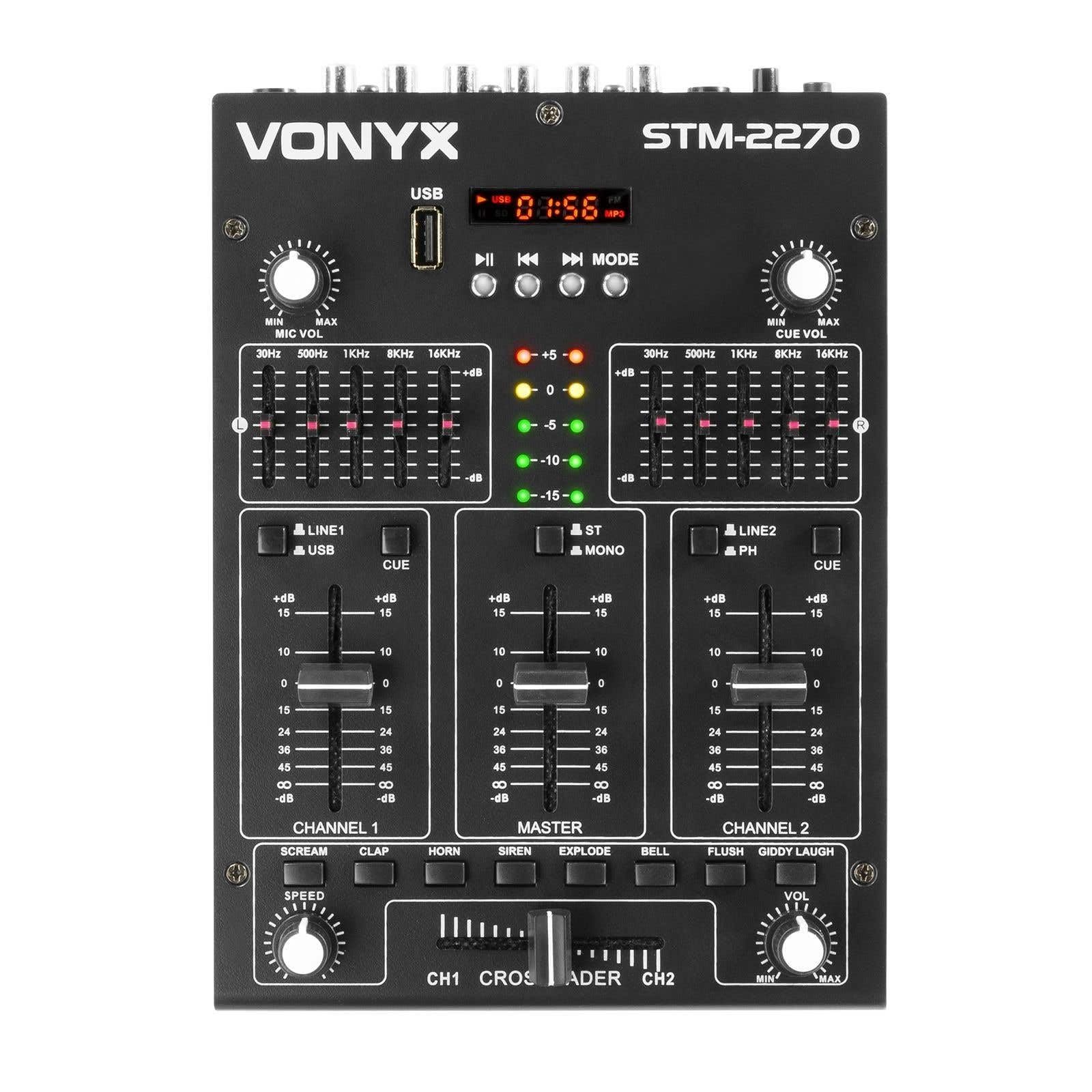
Фронт view of the Vonyx STM2270 DJ Mixer, showing all controls and inputs.
Жайгашуу
Пакеттен чыгаруу
- Бардык компоненттерди таңгактан кылдаттык менен алып салыңыз.
- Verify that all parts are present and undamaged.
- Түпнуска таңгагын келечекте ташуу же сактоо үчүн сактаңыз.
Power Connection
- Ensure the mixer is switched off before connecting the power supply.
- Connect the provided 14V/600mA power adapter to the DC input on the rear panel of the mixer.
- Plug the power adapter into a standard 220V AC electrical outlet.
Аудио байланыштар
The STM2270 offers various input and output options for connecting your audio sources and sound system.
Rear panel of the Vonyx STM2270 DJ Mixer, showing power input, master output, line/phono inputs, and microphone input.
- Башкы жыйынтык: Connect your main sound system (amplifiers, powered speakers) to the MASTER OUTPUT RCA jacks.
- Line/Phono Inputs: Connect CD players, media players, or other line-level devices to the LINE inputs. For turntables, use the PHONO inputs. Ensure the correct input type is selected on the mixer.
- Микрофон киргизүү: Connect a microphone to the 6.3mm jack input on the rear panel.
- Гарнитуранын чыгышы: Connect your headphones to the 6.3mm jack on the front panel for monitoring.
Иштеп жатат
Күйгүзүү/өчүрүү
- To power on, ensure all volume controls are at their minimum setting, then press the POWER button.
- To power off, lower all volume controls, then press the POWER button.
Каналды башкаруу
The mixer features two main channels, each with dedicated controls:
- Киргизүү тандагыч: Switch between LINE/USB (for Channel 1) or LINE/PHONO (for Channel 2) inputs.
- Көзөмөлдү алуу: Adjust the input level for each channel to prevent clipping.
- Эквалайзер (EQ): Each channel has 2-band EQ controls (High and Low) to adjust the tone of the audio. (Highs: ±10dB, Lows: ±10dB).
- Channel Fader: Controls the volume of the respective channel.
- CUE Button: Activates pre-fader listening (PFL) for the channel through headphones.

Close-up of the EQ section and LED level meters.
Master and Crossfader
- Master Fader: Миксердин жалпы чыгаруу көлөмүн көзөмөлдөйт.
- Кроссфейдер: Allows for smooth transitions between Channel 1 and Channel 2. Slide the crossfader to the left for Channel 1, to the right for Channel 2, and to the center for a blend of both.

Close-up of the crossfader and integrated sound effects buttons.
Bluetooth байланышы
- Activate the Bluetooth function on the mixer (usually via the MP3 player section).
- Тышкы түзмөгүңүздө (смартфон, планшет ж.б.) Bluetooth функциясын иштетиңиз.
- Издөө and select "Vonyx STM2270" (or similar) in your device's Bluetooth settings to pair.
- Once paired, audio from your device will be routed through the mixer.
USB/SD MP3 Player
- MP3 аудио камтылган USB флеш-дискти же SD картаны салыңыз files белгиленген уячага салыңыз.
- Use the player controls (Play/Pause, Next, Previous, Mode) to navigate and play tracks.
- The display will show track information and playback time.

Close-up of the USB port and SD card slot for the integrated MP3 player.
Микрофонду колдонуу
- Connect your microphone to the MIC input.
- Микрофондун үнүн башкаруу үчүн MIC VOL баскычын тууралаңыз.
- The mixer may include a 'talkover' function, which automatically lowers the music volume when the microphone is in use, allowing vocals to be heard clearly.
Үн эффекттери
The mixer includes integrated sound effects. Use the dedicated buttons to trigger effects and the SPEED knob to adjust their characteristics.
Техникалык тейлөө
Тазалоо
- Disconnect the mixer from power before cleaning.
- Сыртын сүртүү үчүн жумшак, кургак чүпүрөктү колдонуңуз.
- өжөр кир үчүн, бир аз гamp жумшак самын менен кездеме, андан кийин кургак чүпүрөк колдонсо болот.
- Avoid using abrasive cleaners, solvents, or excessive moisture, as these can damage the unit.
Сактагыч
- Миксерди күн нурунан жана экстремалдык температурадан алыс салкын, кургак жерде сактаңыз.
- If storing for an extended period, use the original packaging to protect against dust and physical damage.
Проблемаларды чечүү
If you encounter issues with your Vonyx STM2270 mixer, refer to the following common problems and solutions:
- Кубат жок:
- Check if the power adapter is securely connected to both the mixer and the electrical outlet.
- Электр розеткасынын иштешин текшериңиз.
- Үн чыгышы жок:
- Ensure the Master Fader is raised.
- Check that individual Channel Faders are raised and not muted.
- Verify all audio cables are correctly connected to the mixer's inputs and outputs, and to your sound system.
- Confirm the correct input source is selected for each channel.
- Бурмаланган аудио:
- Reduce the Gain control for the input channel to prevent clipping (indicated by red LEDs on the level meter).
- Check the volume levels on your connected audio sources.
- Аудио кабелдеринде бузулуу же бош байланыш бар-жоктугун текшериңиз.
- Bluetooth туташуу маселелери:
- Миксердин Bluetooth функциясы активдүү жана жупташтыруу режиминде экенин текшериңиз.
- Make sure your external device's Bluetooth is enabled and searching for devices.
- Move your device closer to the mixer to ensure it's within range.
- Түзмөктү жупташып, кайра жупташып көрүңүз.
- Humming/Noise in Headphones:
- Бардык байланыштар коопсуз экенин текшериңиз.
- Кулакчындардын көйгөйлөрүн жокко чыгаруу үчүн ар кандай кулакчындар менен сынап көрүңүз.
- Check for potential ground loops or interference from other electronic devices nearby.
Техникалык шарттар
| Өзгөчөлүк | Спецификация |
|---|---|
| Бренд | Vonyx |
| Модел | STM2270 |
| Каналдардын саны | 2 (with multiple inputs per channel) |
| Frequency Response | 20 Гц - 20 КГц |
| THD (Толук гармоникалык бурмалоо) | < 0.05% |
| Эквалайзер (EQ) | Highs: ±10dB, Lows: ±10dB |
| Микрофон киргизүү | 10 mV / 10 K Ohm (6.3mm Jack) |
| Line Input | 300 mV / 30 K Ohm |
| Phono киргизүү | 15 mV / 22 K Ohm |
| Master Output | 2 V / 400 Ohm (RCA) |
| Наушник импедансы | 16 - 32 Ом |
| Ызы-чуунун катышы | > 70 дБ |
| Электр камсыздоо | 14 V / 600 mA (AC Adapter) |
| Operating Voltage | 220 вольт |
| Байланыш технологиясы | Bluetooth, USB |
| Өлчөмдөр (D x W x H) | 24 см х 20 см х 6 см |
Кепилдик жана колдоо
This Vonyx STM2270 DJ Mixer is covered by a manufacturer's warranty, subject to the terms and conditions provided at the time of purchase. Please retain your proof of purchase for warranty claims.
For technical support, service, or warranty inquiries, please contact your retailer or the official Vonyx support channels. Refer to the product packaging or the Vonyx webбайланыш маалыматы үчүн сайт.
Do not attempt to repair the unit yourself, as this may void your warranty and could result in electrical shock or damage to the device.