
HUMAX FVP-4000T 1TB Cappuccino
Humax FVP-4000T Freeview Play HD TV Recorder User Manual
Model: FVP-4000T 1TB Cappuccino
1. Киришүү
This manual provides comprehensive instructions for the setup, operation, and maintenance of your Humax FVP-4000T Freeview Play HD TV Recorder. Please read this manual carefully before using the product to ensure proper functionality and to avoid damage.
The Humax FVP-4000T is a Freeview Play HD TV Recorder designed to enhance your television viewing experience. It features multiple HD tuners, allowing you to record several programmes simultaneously while watching another. With its integrated hard drive, you can store a significant amount of recorded content. The device also offers Wi-Fi connectivity for access to catch-up services and other online features.
2. Кутунун Мазмуну
Таңгакты ачканда, төмөнкү нерселердин бардыгы камтылганын текшериңиз:
- Humax FVP-4000T/1TB Set-top Box
- Алыстан башкаруу
- HDMI кабели
- Power adapter (not explicitly listed but implied for operation)
- Колдонуучунун Колдонмосу (бул документ)

2.1-сүрөт: Фронт view of the Humax FVP-4000T recorder. This image shows the main unit in a cappuccino colour with a textured top surface and the Humax logo on the front left. A small red light is visible on the front right, indicating power status.
3. Орнотуу колдонмосу
3.1. Connecting Your FVP-4000T
Follow these steps to connect your Humax FVP-4000T to your television and antenna.
- Антеннаны туташтыруу: Connect your TV aerial cable to the "RF IN" port on the back of the FVP-4000T. If you wish to loop the signal through to your TV's internal tuner, connect a second aerial cable from the "RF OUT" port on the FVP-4000T to the aerial input on your TV.
- Телевизорго (HDMI) туташуу: Use the supplied HDMI cable to connect the "HDMI" port on the FVP-4000T to an available HDMI input on your television. Note the HDMI input number (e.g., HDMI 1, HDMI 2) for later selection on your TV.
- Connect to Network (Optional - Ethernet): For wired internet access, connect an Ethernet cable from the "ETHERNET" port on the FVP-4000T to your home router. The device also supports Wi-Fi for wireless connectivity.
- Туташуу кубаты: Connect the power adapter to the "POWER" input on the FVP-4000T, then plug the adapter into a wall socket.

3.1-сүрөт: Rear panel connections of the Humax FVP-4000T. This image displays the various input and output ports including RF IN/OUT, Audio/Video (RCA), SPDIF (optical), HDMI, Ethernet, USB, and Power input.
3.2-сүрөт: Illustration indicating the requirement for a TV antenna. The image shows an antenna icon with an arrow pointing down to the Humax FVP-4000T unit, emphasizing that an external antenna is needed for Freeview кабыл алуу.
3.2. Баштапкы орнотуу устасы
Upon first power-on, the FVP-4000T will guide you through an initial setup wizard. This process includes:
- Тил тандоо: Өзүңүзгө жаккан тилди тандаңыз.
- Аймакты тандоо: Өлкөңүздү/регионуңузду тандаңыз.
- Каналды сканерлөө: The device will automatically scan for available Freeview channels. This may take several minutes.
- Тармакты орнотуу: Configure your internet connection. If using Wi-Fi, you will be prompted to select your network and enter the password.
- Time Zone and Parental Control: Set your local time zone and configure any desired parental control settings.
Ensure your TV is set to the correct HDMI input to view орнотуу устасы.
4. Иштөө нускамалары
4.1. Remote Control Overview
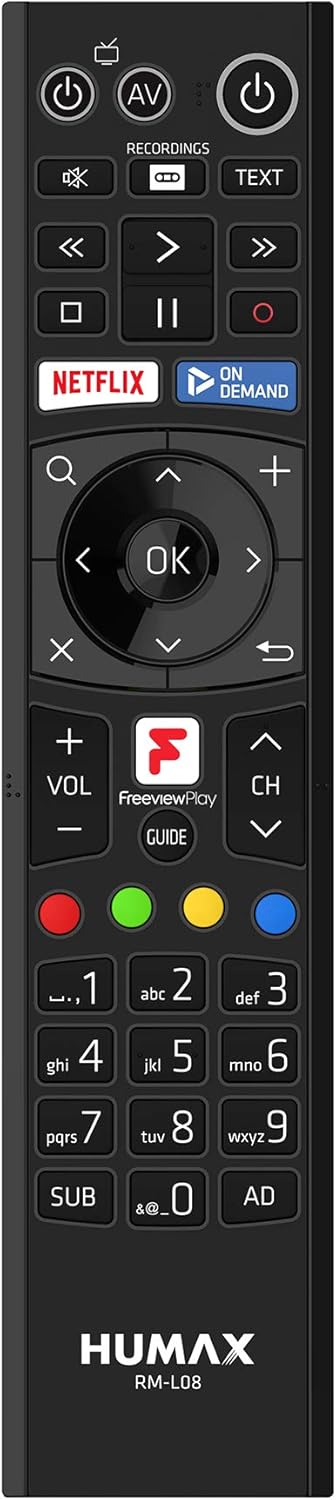
The supplied remote control provides full functionality for navigating the FVP-4000T. Familiarize yourself with its layout:

4.1-сүрөт: Humax RM-L08 Remote Control. This image displays the full layout of the remote control, including power buttons, navigation keys, playback controls, numerical keypad, and dedicated buttons for Netflix, On Demand, and Freeview Play Guide.
- Кубат баскычы: Агрегатты күйгүзөт же өчүрөт.
- Чабыттоо тактасы (ОК, Өйдө, Төмөн, Сол, Оң): Менюларда багыттоо жана параметрлерди тандоо үчүн колдонулат.
- Канал өйдө/төмөн: Телеканалды өзгөртөт.
- Үнүн жогорулатуу/төмөндөтүү: Үнүн тууралайт.
- Record (Red Circle): Initiates recording of the current programme.
- Ойнотуу башкаруулары (ойнотуу, тындыруу, токтотуу, алдыга жылдыруу, артка түрүү): Медианы ойнотууну көзөмөлдөйт.
- Гид: Opens the Electronic Programme Guide (EPG).
- Netflix / On Demand: Dedicated buttons for quick access to these services.
4.2. Watching Live TV
After setup, you can start watching live Freeview каналдар:
- Ensure the FVP-4000T is powered on.
- Сыналгыдан туура HDMI киргизүүсүн тандаңыз.
- колдонуу Канал өйдө/төмөн buttons or the numerical keypad on the remote to change channels.
4.3. Recording Programmes
The FVP-4000T allows you to record up to three programmes simultaneously while watching a fourth live, thanks to its triple tuners.
- Instant Record: While watching a programme, press the Жаздыруу button (red circle) on the remote control. The programme will begin recording immediately.
- Scheduled Record (EPG): басыңыз Гид button to open the Electronic Programme Guide. Navigate to the desired programme and press the Жаздыруу button. You can set single recordings or series recordings.
- Managing Recordings: Access your recorded programmes by pressing the Жазуулар button on the remote. From here, you can play, delete, or manage your stored content.
4.4. Акысызview Play and Catch-up Services
бекерview Play integrates live TV with catch-up and on-demand services from BBC iPlayer, ITV Hub, All 4, My5, and UKTV Play.
- ТВнын уландысы: Scroll back through the EPG (Electronic Programme Guide) to find programmes you've missed from the last seven days. Select a programme and press OK to launch the relevant catch-up app.
- On-Demand Apps: Access dedicated apps like Netflix, BBC iPlayer, ITV Hub, All 4, and My5 directly from the main menu or via dedicated remote buttons.

4.2-сүрөт: Humax FVP-4000T showcasing integrated Freeview Play and streaming services. This image features the Humax unit in the foreground with a collage of logos for various streaming and catch-up services such as BBC One, BBC iPlayer, ITV, All 4, Netflix, and YouTube, illustrating the device's capabilities.
4.5. Wi-Fi байланышы
The FVP-4000T features built-in Wi-Fi for convenient wireless connection to your home network. This enables access to Freeview Play services, software updates, and media sharing.
- багыттоо Settings > Network > Wi-Fi Setup.
- Тизмеден үйүңүздүн Wi-Fi тармагын тандаңыз.
- Экрандагы клавиатураны колдонуп, Wi-Fi сырсөзүңүздү киргизиңиз.
- Байланышты ырастаңыз.
5. Техникалык тейлөө
5.1. Тазалоо
To maintain the appearance and functionality of your FVP-4000T:
- Тазалоодон мурун ар дайым электр кабелин сууруп алыңыз.
- Аппараттын сыртын сүртүү үчүн жумшак, кургак чүпүрөктү колдонуңуз.
- өжөр белгилери үчүн, бир аз гampкездемени суу менен эритиңиз. Абразивдүү тазалоочу каражаттарды, эриткичтерди же химиялык чачыраткычтарды колдонбоңуз.
- Желдетүүчү тешиктерди чаңдан жана таштандылардан тазалаңыз.
5.2. Программалык камсыздоону жаңыртуу
Humax periodically releases software updates to improve performance, add features, or fix bugs. Ensure your FVP-4000T is connected to the internet to receive these updates.
- Updates are typically downloaded and installed automatically in standby mode.
- You can manually check for updates via Орнотуулар > Система > Программаны жаңыртуу.
6. Кыйынчылыктарды
This section addresses common issues you might encounter with your Humax FVP-4000T.
| Көйгөй | Мүмкүн себеп | Чечим |
|---|---|---|
| Сүрөт же үн жок | Incorrect HDMI input selected on TV; Loose cable connections; Unit not powered on. | Ensure TV is on the correct HDMI input. Check all cable connections (HDMI, power, antenna). Press the power button on the remote or unit. |
| Скандоо учурунда эч кандай канал табылган жок | Antenna not connected or faulty; Weak signal. | Check antenna connection to "RF IN". Ensure your antenna is properly aligned and functioning. Try a manual scan in settings. |
| Алыстан башкаруу жооп бербей жатат | Batteries are flat or inserted incorrectly; Obstruction between remote and unit. | Replace batteries. Ensure line of sight to the FVP-4000T. |
| Wi-Fi'га туташпай жатат | Туура эмес сырсөз; Маршрутизатор көйгөйлөр; Сигналдын кийлигишүүсү. | Double-check Wi-Fi password. Restart your router. Ensure the unit is within range of your Wi-Fi router. |
| Recordings failing or poor quality | Insufficient hard drive space; Signal issues; Recording conflicts. | Delete old recordings to free up space. Check signal strength. Adjust recording padding in settings to avoid conflicts. |
If the problem persists after trying these solutions, please contact Humax customer support.
7. Техникалык шарттар
| Өзгөчөлүк | Деталь |
|---|---|
| Модель номери | FVP-4000T 1TB Cappuccino |
| Сактоо сыйымдуулугу | 1 ТБ (Терабайт) |
| Түнерлер | 3 x Freeview HD Tuners |
| Жаздыруу мүмкүнчүлүгү | Up to 600 hours (SD) |
| Байланыш | HDMI, Ethernet, USB, Wi-Fi (Built-in) |
| Өлчөмдөрү (болжол менен) | 2 x 2 x 2 см (Өнүмдүн өлчөмдөрү) |
| Салмагы (болжол менен) | 360 г |
| Түс | Капучино |
| Камтылган компоненттер | Receiver box, Remote control, HDMI cable |
| Шайкеш түзмөктөр | Телевидение |
8. Кепилдик жана колдоо
8.1. Кепилдик маалыматы
Your Humax FVP-4000T comes with a standard manufacturer's warranty. Please refer to the warranty card included in your product packaging for specific terms and conditions, including the warranty period and coverage details. Keep your proof of purchase for warranty claims.
8.2. Кардарларды колдоо кызматы
For technical assistance, troubleshooting beyond this manual, or warranty inquiries, please contact Humax customer support:
- Webсайт: Visit the official Humax UK webКөп берилүүчү суроолор, программалык камсыздоону жүктөп алуу жана колдоо кызматынын байланыш маалыматы үчүн сайт.
- Телефон: Refer to the contact details provided in your product documentation or on the Humax UK webсайт.
When contacting support, please have your product model number (FVP-4000T) and serial number ready.
Ask a question about this manual
Ask about setup, troubleshooting, compatibility, parts, safety, or missing instructions. Manuals+ will review the question and use this page’s manual context to help answer it.