
Introduction
This manual provides detailed instructions for the Somic G932 Virtual 7.1 Surround Sound Gaming Headset. Please read this manual thoroughly before using the product to ensure proper operation and to maximize your gaming experience.

Сүрөт: алдыңкы view of the Somic G932 Gaming Headset, showcasing its design and orange LED lighting on the earcups.
Пакеттин мазмуну
Пакетте бардык буюмдар бар экенин текшериңиз:
- Somic G932 Virtual 7.1 Surround Sound Gaming Headset
- Продукциянын нускамасы (бул документ)
- Кепилдик картасы
Орнотуу нускамалары
Гарнитураны туташтыруу
The Somic G932 headset connects via a USB plug. It is compatible with PCs, PS4, and laptops.
- Компьютерге/ноутбукка туташуу: Insert the USB plug of the headset into an available USB port on your computer. The operating system should automatically detect and install the necessary drivers.
- PS4'ке туташуу: Insert the USB plug into an available USB port on your PlayStation 4 console. Navigate to the PS4 settings to configure audio output if necessary.
Virtual 7.1 Surround Sound Setup
For optimal Virtual 7.1 Surround Sound experience, ensure the headset's dedicated software (if available from Somic's official website) is installed on your PC. This software allows for customization of audio profiles and surround sound settings.
Гарнитураны иштетүү
Микрофонду колдонуу
The headset features an adjustable, omnidirectional microphone. It can be positioned for optimal voice capture.

Image: Somic G932 headset showing the adjustable and retractable omnidirectional microphone in an extended position.
- Микрофонду тууралоо: Gently bend the microphone arm to position it closer to your mouth for clear communication.
- Retracting the Microphone: When not in use, the microphone can be retracted for convenience.
In-line Control Functions
The headset features an in-line control unit for easy access to audio adjustments.

Сүрөт: деталдуу view of the in-line control unit, highlighting buttons for volume adjustment, microphone control, and LED light control.
- Volume + (1): Press to increase the headset volume.
- Volume - (2): Press to decrease the headset volume.
- Mic Control (3): Toggle this switch to mute or unmute the microphone. A light indicator on the microphone tip will show its status (e.g., lit when active, off when muted).
- Light Control (4): Toggle this switch to turn the LED lights on the earcups on or off.
Гарнитураны тагынуу
The headset features a lightweight and self-adjusting headband design for comfort during extended use. The large-sized earmuffs are designed for passive noise reduction and comfort.
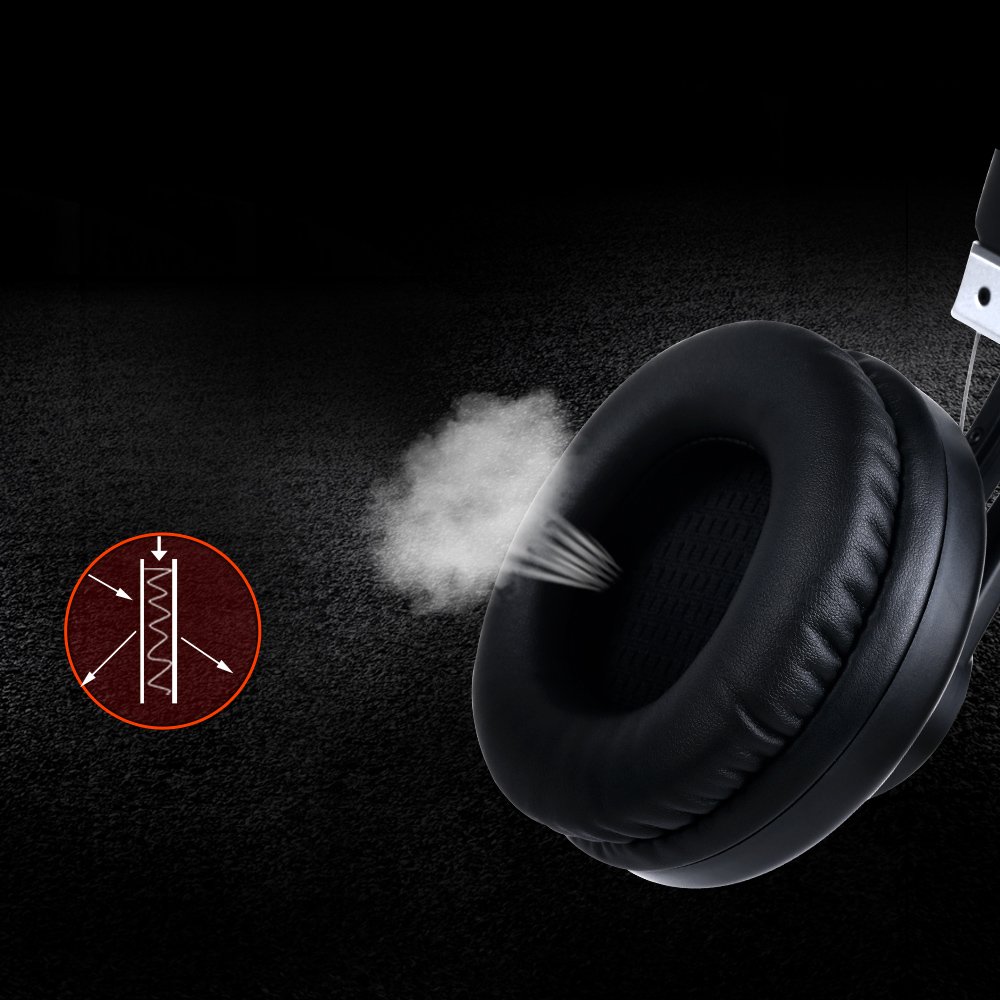
Image: Close-up of an earcup, illustrating the breathable material and design for comfort and passive noise reduction.
Техникалык тейлөө жана кам көрүү
Proper maintenance ensures the longevity and performance of your Somic G932 headset.
- Тазалоо: Гарнитураны тазалоо үчүн жумшак, кургак чүпүрөктү колдонуңуз. Абразивдүү тазалагычтарды же эриткичтерди колдонбоңуз.
- Сактагыч: Гарнитураны күн нурунан жана экстремалдык температурадан алыс салкын, кургак жерде сактаңыз.
- Кабельге кам көрүү: Зыяндын алдын алуу үчүн кабелди курч ийилүүдөн же ашыкча тартуудан качыңыз.
- Кулакчындар: Periodically check earmuffs for wear and tear.
Проблемаларды чечүү
If you encounter issues with your Somic G932 headset, refer to the following common solutions:
- Үн жок:
- Ensure the USB plug is fully inserted into the port.
- Check the in-line volume control to ensure it is not set to minimum.
- Verify audio settings on your computer or console (e.g., default playback device).
- Түзмөккө тиешелүү маселени болтурбоо үчүн гарнитураны башка түзмөктө сынап көрүңүз.
- Микрофон иштебейт:
- Ensure the microphone mute switch on the in-line control is in the "unmuted" position.
- Check microphone settings in your computer's or console's sound control panel.
- Confirm the microphone is positioned correctly and not obstructed.
- Virtual 7.1 Surround Sound Not Functioning:
- Ensure the dedicated Somic audio software is installed and configured correctly on your PC.
- Verify that the 7.1 surround sound option is enabled within the software or your system's audio settings.
Техникалык мүнөздөмөлөр
Below are the technical specifications for the Somic G932 Gaming Headset.

Image: Chart displaying key technical specifications for the Somic G932 headset, including microphone dimensions, impedance, and driver diameter.
| Өзгөчөлүк | Спецификация |
|---|---|
| Модель номери | G932 |
| Байланыш технологиясы | Зымдуу (USB) |
| Микрофондун өлчөмдөрү | Ø4.0 X 1.5мм |
| Микрофондун багыты | Көп багыттуу |
| Микрофон импедансы | <=2.2kΩ |
| Микрофондун сезгичтиги | -47±3dB (at 1KHz) |
| Айдоочунун диаметри | Ø50мм |
| Сезимталдуулук (SPL) | 105±3dB (at 1KHz) |
| Импеданс | 32Ω |
| Frequency Response | 20Гц-20кГц |
| Кордун узундугу | >=2.2м |
| Таза Салмак | 378г |
| Продукциянын өлчөмдөрү (LxWxH) | 20.32 x 17.78 x 8.89 см |
| Материал | Пластик |
| Түс | Кара |
| Noise Control | Пассивдүү ызы-чууну азайтуу |
Кепилдик маалымат
The Somic G932 Gaming Headset comes with a 1 жылдык кепилдик from the date of purchase. Please retain your purchase receipt and the included Warranty Card for any warranty claims. The warranty covers manufacturing defects and malfunctions under normal use conditions.
For detailed terms and conditions, refer to the Warranty Card provided in your package.
Кардарларды колдоо
If you require further assistance or have questions not covered in this manual, please contact Somic customer support. Refer to the contact information provided on the Warranty Card or visit the official Somic webколдоо булактары үчүн сайт.