
1. Бүттүview
The HDWR HD-PS6C is a versatile 2-in-1 device that combines the functionality of a wireless barcode reader and a data collector. This integrated solution significantly enhances daily work comfort and convenience, making tasks easier and more efficient. It is designed for various applications requiring efficient 1D barcode scanning and data storage, such as inventory management, retail, and logistics.
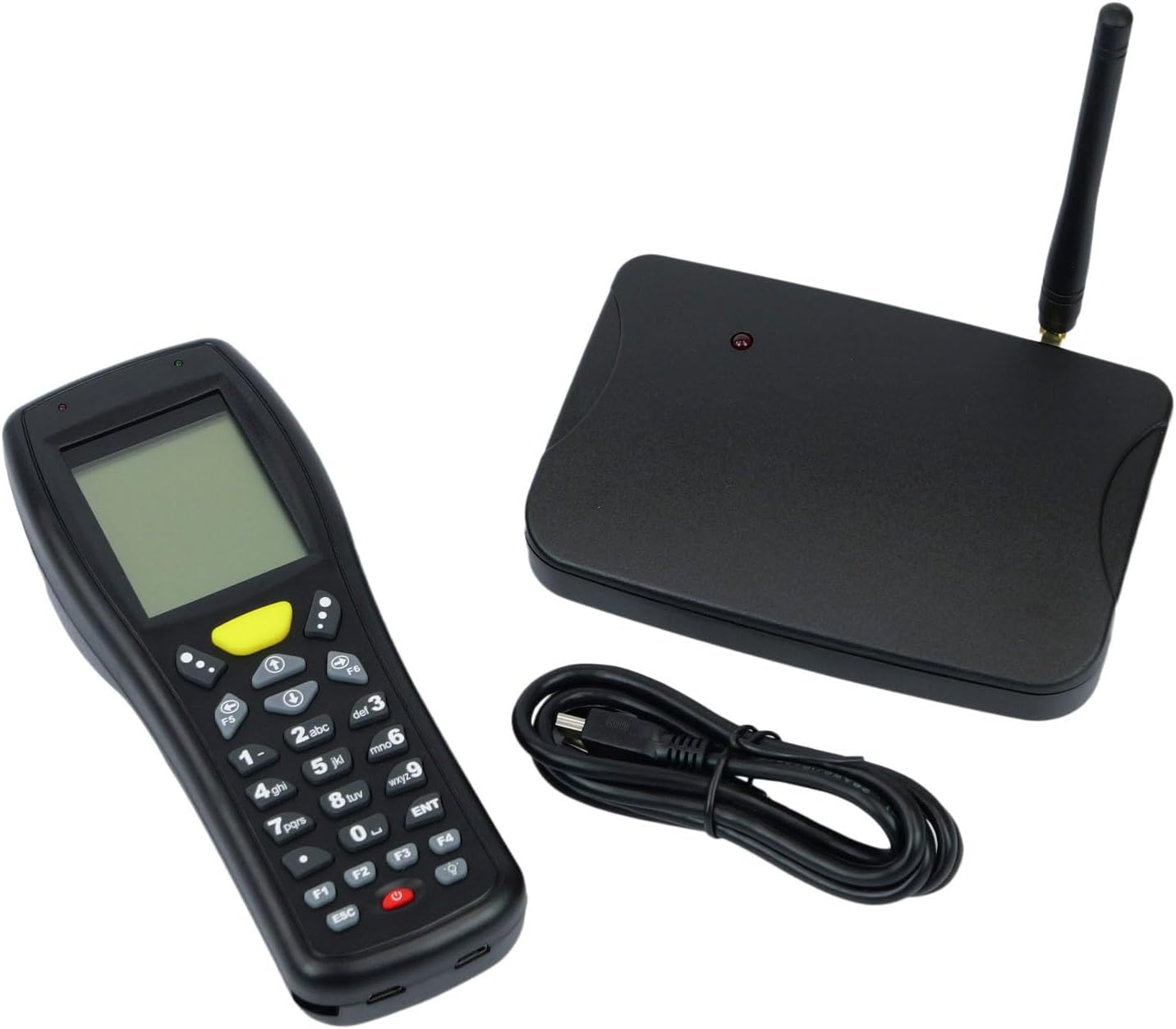
Image: The HDWR HD-PS6C wireless data collector shown with its wireless receiver and USB cable, illustrating the complete package.
2. Негизги өзгөчөлүктөрү
- Two-in-One Functionality: Combines a wireless barcode reader and a data collector in a single device.
- Колдонуучуга ыңгайлуу интерфейс: Equipped with a clear screen and a practical keyboard for easy navigation and manual data entry, especially for damaged or unclear codes.
- Инвентаризация режими: Allows storage of up to 50,000 scanned codes in its integrated memory, ideal for extensive inventory tasks.
- 1D штрих-коддун шайкештиги: Supports a wide range of 1D barcode types including EAN13, EAN8, Code 39, Code 93, Code 128, Interleaved 2 of 5 (IT25), Codabar, UPCA, UPCE, and more.
- Broad OS Support: Compatible with Windows XP/7/8/8.1/10, Android, and iOS operating systems.

Image: The HD-PS6C highlighting its dual functionality as a data collector and barcode scanner.

Сүрөт: жакын план view of the integrated laser barcode scanner, capable of reading 1D codes.

Image: Visual representation of the wireless USB receiver, 50,000 code internal memory, and the clear screen with keyboard for easy navigation.
3. Орнотуу колдонмосу
3.1. Пакеттин мазмуну
Баштоодон мурун, пакетте бардык буюмдар бар экенине ынаныңыз:
- HDWR HD-PS6C Wireless Data Collector
- Зымсыз USB кабыл алгыч
- USB кабели
- 2 АА батарейкалар (кошулган)
3.2. Батареяны орнотуу
- Locate the battery compartment on the back of the HD-PS6C device.
- Батарея уясынын капкагын ачыңыз.
- Туура полярдуулукту (+/-) камсыз кылуу менен 2 AA батарейкасын салыңыз.
- Батарея уясынын капкагын бекем жабыңыз.
3.3. Зымсыз кабылдагычты туташтыруу
- Plug the wireless USB receiver into an available USB port on your computer or host device.
- The system should automatically detect and install the necessary drivers. If not, refer to the Troubleshooting section.
3.4. Баштапкы күйгүзүү
- Press and hold the power button (usually red) on the HD-PS6C until the screen illuminates.
- The device will boot up and display the main menu or a default mode.
Видео: Бүттүview of the HDWR HD-PS6C, showcasing its design, features, and how it sits on its charging/communication base. This video provides a visual introduction to the product.
4. Иштөө нускамалары
4.1. Негизги навигация
- Use the arrow keys (up, down, left, right) to navigate through menu options on the screen.
- Press the 'ENT' (Enter) key to select an option or confirm an action.
- Press the 'ESC' key to go back to the previous menu or cancel an operation.
- The numeric keypad can be used for manual data input.

Сүрөт: алдыңкы view of the HDWR HD-PS6C, clearly showing the screen and the full alphanumeric keypad for navigation and data entry.
4.2. Инвентаризация режими
In Inventory Mode, the device stores scanned barcodes in its internal memory for later transfer.
- From the main menu, select 'Inventory Mode' (or similar option).
- Point the scanner window at a 1D barcode and press the scan button (often a large yellow button or a trigger).
- The scanned code will appear on the screen and be stored in memory.
- Repeat for all items. The device can store up to 50,000 codes.
4.3. Штрихкод сканерлөө
The HD-PS6C is designed to read various 1D barcodes:
- EAN13, EAN8
- 39-код, 93-код, 128-код
- Interleaved 2 of 5 (IT25)
- Codabar
- UPCA, UPCE
- And other standard 1D codes.
Ensure the barcode is clean and well-lit for optimal scanning performance.
4.4. Manual Data Entry
If a barcode is damaged or unreadable, you can manually enter the code:
- Navigate to the manual entry option within the device's menu.
- Use the numeric and alphanumeric keys on the keypad to type the barcode.
- Press 'ENT' to confirm and save the entry.
4.5. Маалыматтарды өткөрүү
To transfer collected data to your computer:
- Connect the HD-PS6C to your computer using the provided USB cable.
- On the device, select the 'Data Transfer' or 'Upload' option.
- Follow the on-screen prompts or software instructions on your computer to complete the transfer. Data is typically transferred as a text file.
5. Техникалык тейлөө
5.1. Тазалоо
- Аппаратты жумшак, кургак чүпүрөк менен аарчыңыз.
- өжөр кир үчүн, бир аз d колдонууamp жумшак самын менен чүпүрөк, андан кийин дароо кургатуу.
- Катуу химиялык заттарды, эриткичтерди же абразивдүү тазалагычтарды колдонбоңуз.
- Keep the scanner window clean and free of dust or smudges for accurate scanning.
5.2. Батареяга кам көрүү
- Экранда батареянын заряды аз калганын көрсөткөн индикатор пайда болгондо, батареяларды алмаштырыңыз.
- Аппарат узак убакыт бою колдонулбаса, агып кетпеш үчүн батарейкаларды алып салыңыз.
- Колдонулган батарейкаларды жергиликтүү эрежелерге ылайык жок кылыңыз.
6. Кыйынчылыктарды
| Көйгөй | Мүмкүн себеп | Чечим |
|---|---|---|
| Түзмөк күйбөйт. | Төмөн же өлүп калган батарейкалар; туура эмес орнотулган батареялар. | Replace batteries with new ones; ensure batteries are installed with correct polarity. |
| Штрихкоддорду сканерлөө мүмкүн эмес. | Barcode is damaged or unclear; scanner window is dirty; incorrect scanning mode. | Try scanning a different barcode; clean the scanner window; ensure the device is in the correct scanning mode. Use manual entry if necessary. |
| Data transfer fails or device not recognized by PC. | Missing or incorrect drivers; loose USB connection; incompatible OS. | Ensure the wireless receiver is properly connected; try a different USB port or cable. For Windows, check Device Manager for driver issues. If drivers are missing, search for 'HDWR HD-PS6C drivers' online. Verify your OS is supported (Windows XP/7/8/8.1/10, Android, iOS). |
| Экран бош же жооп бербей жатат. | Түзмөк токтоп калды; батареясы аз. | Try restarting the device by holding the power button. If unresponsive, remove and reinsert batteries. Check battery level. |
7. Техникалык шарттар
| Өзгөчөлүк | Деталь |
|---|---|
| Модель номери | HDPS6C |
| Бренд | HDWR |
| Байланыш технологиясы | USB (Wireless 2.4G via receiver) |
| Power Source | Батарея менен иштейт (2 AA батарейкасы камтылган) |
| Шайкеш түзмөктөр | Иш столунун компьютери |
| Operating Voltage | 5 вольт |
| Максималдуу сактоо температурасы | 50 градус |
| Элемент Салмагы | 349 грамм |
| Келип чыккан өлкө | Кытай |
8. Кепилдик жана колдоо
The HDWR HD-PS6C comes with a 2 жылдык кепилдик сатып алынган күндөн тартып. Бул кепилдик өндүрүштүн кемчиликтерин жана нормалдуу колдонуу шарттарындагы бузулууларды камтыйт.
For technical support, warranty claims, or further assistance, please contact HDWR customer service through your retailer or the official HDWR website. Please have your purchase receipt and product model number (HDPS6C) ready when contacting support.