
Infinix X180
Infinix X180 уюлдук телефонунун колдонуучу колдонмосу
Модели: X180
1. Продукт бүтүп калдыview
The Infinix X180 is a compact and reliable feature phone designed for essential communication. It supports dual SIM functionality, allowing you to manage two phone numbers simultaneously. This manual provides detailed instructions to help you get the most out of your device.

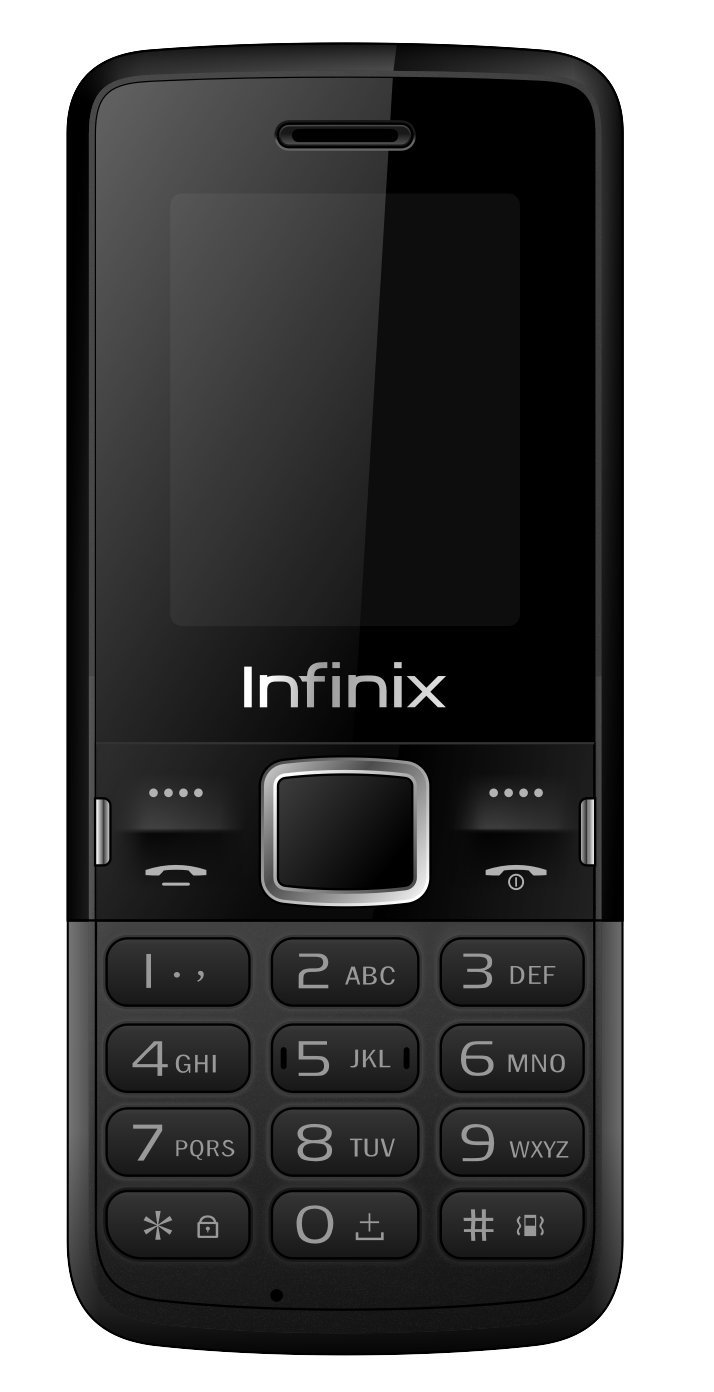
1-сүрөт: Infinix X180 Mobile Phone - Front, Back, and Side Views. This image displays the phone from various angles, highlighting its compact design, physical keypad, and rear camera.
Негизги өзгөчөлүктөрү:
- Кош SIM колдоо: Use two SIM cards simultaneously.
- Компакт дизайн: Жеңил жана башкарууга оңой.
- 1.77 дюймдук дисплей: Clear screen for basic navigation.
- 2 MP Rear Camera: For capturing basic photos.
- 1000 мАч Батарея: Provides extended talk time.
- Кеңейтүүчү сактагыч: Supports MicroSD (TransFlash) cards.
- Bluetooth 4.0: Зымсыз байланыш үчүн.
2. Орнотуу
2.1 Пакеттин мазмуну
Баштоодон мурун, таңгагыңызда төмөнкү нерселер камтылганын текшериңиз:
- Infinix X180 Mobile Phone
- Battery (1 Lithium ion battery)
- Заряддагыч
- Наушник
- User Manual
2.2 Installing SIM Cards and MicroSD Card
- Арткы капкакты алып салуу: Телефондун арткы капкагын, адатта, астыңкы же каптал жагында жайгашкан оюктан акырын ачыңыз.
- Батарея салыңыз: Place the battery into its compartment, ensuring the gold contacts align with the phone's terminals.
- SIM карталарды салыңыз: Locate the SIM card slots. The Infinix X180 supports two standard SIM cards. Insert your SIM cards into the designated slots with the gold contacts facing down.
- MicroSD картасын салыңыз (милдеттүү эмес): If you wish to expand storage, insert a MicroSD (TransFlash) card into the dedicated slot.
- Арткы капкакты алмаштыруу: Carefully align and press the back cover until it clicks into place.
2-сүрөт: Артка View of Infinix X180 Mobile Phone. This image shows the rear of the phone, indicating the location of the camera, speaker, and the Infinix branding, where the back cover can be removed to access SIM and battery compartments.
2.3 Батареяны заряддоо
Биринчи жолу колдонуудан мурун, телефондун батарейкасын толугу менен заряддаңыз.
- Connect the charger to the phone's Micro USB port.
- Заряддоо түзүлүштү розеткага сайыңыз.
- The charging indicator on the phone will show the charging status. Disconnect the charger once the battery is full.
2.4 Күйгүзүү/өчүрүү
- Күйгүзүү үчүн: Экран күйгөнгө чейин Күйгүзүү/Чалууну бүтүрүү баскычын басып, кармап туруңуз.
- Өчүрүү үчүн: Өчүрүү параметрлери пайда болгонго чейин Күйгүзүү/Чалууну аяктоо баскычын басып туруңуз, андан кийин "Өчүрүү" дегенди тандаңыз.
3. Иштөө нускамалары
3.1 Негизги навигация
Use the physical keypad and navigation buttons to interact with the phone.
- Чабыттоо баскычтары: Use the directional keys (Up, Down, Left, Right) to scroll through menus.
- Борбордук ачкыч: Press the center key to select an option.
- Left/Right Soft Keys: Functions vary depending on the screen, indicated by text above the keys.
- Чалуу ачкычы: Чакыруу же кирүүчү чалууга жооп берүү үчүн басыңыз.
- Чакырууну аяктоо/кубат ачкычы: Press to end a call or return to the home screen. Long press to power on/off.
3.2 Чалууларды кабыл алуу жана кабыл алуу
- Чалуу үчүн: Enter the phone number using the keypad and press the Call key. If using Dual SIM, you may be prompted to select which SIM to use.
- Чалууга жооп берүү үчүн: Чалуу келгенде Чакыруу баскычын басыңыз.
- Чалууну аяктоо үчүн: Чалууну аяктоо баскычын басыңыз.
3.3 Кабарлашуу (SMS)
The phone supports sending and receiving SMS messages. Note that SMS storage is limited to 50 messages on the phone and 50 per SIM card.
- "Билдирүүлөр" менюсуна өтүңүз.
- Select "Write Message" to compose a new SMS.
- Алуучунун номерин жана билдирүүңүздү киргизиңиз.
- "Жөнөтүү" тандаңыз.
3.4 Байланыштар
Store frequently used numbers in your phone's contacts. The phone can store up to 200 contacts, and each SIM card can store up to 250 contacts.
- Go to the "Contacts" menu.
- Select "Add New Contact" to save a number.
- You can choose to save contacts to the phone memory or a specific SIM card.
3.5 камеранын иштеши
The Infinix X180 features a 2 MP rear camera for basic photography and video recording.
- Негизги менюдан камерага кириңиз.
- Use the center key to take a photo.
- Video recording resolution is 128 x 160 pixels.
Эскертүү: The actual photo resolution may be limited to 128x160 pixels, despite the 2MP sensor specification. This is typical for entry-level feature phones.
3.6 Bluetooth байланышы
The phone supports Bluetooth 4.0 for connecting to compatible devices like headsets or for file өткөрүп берүү.
- Go to "Settings" and then "Bluetooth".
- Bluetooth күйгүзүп, жеткиликтүү түзмөктөрдү издеңиз.
- Select the device you wish to pair with and follow the on-screen prompts.
4. Техникалык тейлөө
4.1 Батареяга кам көрүү
- Батареяны экстремалдуу температурага тийгизүүдөн сактаңыз.
- Батареяны тешип же зыян келтирбеңиз.
- Түпнуска же бекитилген кубаттагычты гана колдонуңуз.
- If the phone will not be used for an extended period, charge it partially before storing.
4.2 Телефонуңузду тазалоо
- Телефондун экранын жана корпусун тазалоо үчүн жумшак, кургак чүпүрөктү колдонуңуз.
- Суюк тазалагычтарды же абразивдүү материалдарды колдонуудан алыс болуңуз.
- Ensure no moisture enters the charging port or headphone jack.
4.3 Сактоо
Телефонду түз күн нурунан жана экстремалдык температурадан алыс салкын, кургак жерде сактаңыз.
5. Кыйынчылыктарды
If you encounter issues with your Infinix X180, refer to the following common solutions:
5.1 Phone Does Not Power On
- Батарея туура орнотулганын жана заряддалганын текшериңиз.
- Кубаттагычты туташтырып, кайра күйгүзүп көрүңүз.
- Батарея контакттары таза экенин текшериңиз.
5.2 No Network Signal
- Check if the SIM card(s) are correctly inserted.
- Тармактын камтуусу бар аймакта экениңизди текшериңиз.
- Телефонду кайра күйгүзүңүз.
- Verify with your mobile provider if there are any network issues in your area.
5.3 Cannot Make or Receive Calls/SMS
- Check your SIM card balance or subscription status.
- Ensure the phone is not in airplane mode (if applicable).
- Verify that the recipient's number is correct.
- Check if any call barring or message blocking features are enabled.
5.4 Limited Storage Capacity
- The phone has 32 MB internal memory. Consider installing a MicroSD card to expand storage for photos and other media.
- Regularly delete old messages, photos, or files you no longer need.
6. Техникалык шарттар
| Өзгөчөлүк | Деталь |
|---|---|
| Модель аты | X180 |
| Бренд | Infinix |
| Дисплей өлчөмү | 1.77 дюйм |
| Display Resolution | 128 x 160 пиксел |
| RAM эс тутуму | 32 MB |
| Сактоо сыйымдуулугу | 32 MB |
| Rear Camera Sensor Resolution | 2 депутат |
| Видео жаздыруу чечими | 128 x 160 пиксел |
| Батарея | 1 Литий-ион (кошулган) |
| Talk Time | 3 саат |
| Байланыш | Bluetooth 4.0, USB (Micro USB Type B) |
| Уюлдук технология | 2G (GSM 900/DCS 1800 MHz) |
| SIM карта уячалары | Кош SIM |
| Шайкеш түзмөктөр | MicroSD (TransFlash) |
| Продукциянын өлчөмдөрү | 7.3 x 1 x 14.5 см; 75 г |
| Операция системасы | Proprietary (Note: Not Android 9.0 as sometimes listed, which is likely an error for this feature phone.) |
| Сууга туруктуулук деңгээли | Сууга чыдамдуу эмес |
| Наушник уясы | 1 |
Эскертүү: Техникалык мүнөздөмөлөр алдын ала эскертүүсүз өзгөртүлүшү мүмкүн.
7. Кепилдик жана колдоо
7.1 Кепилдик маалыматы
Your Infinix X180 mobile phone is covered by a limited manufacturer's warranty. Please refer to the warranty card included in your product packaging for specific terms and conditions, including warranty period and coverage details. Keep your purchase receipt as proof of purchase.
7.2 Кардарларды колдоо
For technical assistance, troubleshooting beyond this manual, or warranty claims, please contact Infinix customer support. Contact details can typically be found on the manufacturer's official webсайтында же кепилдик картасында.
Өндүрүүчү: Infinix
Webсайт: www.infinixmobility.com (Note: This is a general link and may not be specific to your region.)
Тектеш документтер - X180
 |
Infinix X669C User Manual Comprehensive user manual for the Infinix X669C smartphone, including component identification, SIM/SD card installation, charging instructions, and regulatory compliance details. |
 |
Infinix X678B колдонуучусунун колдонмосу Official user manual for the Infinix X678B smartphone, including device layout, SIM/SD card installation, charging instructions, and regulatory compliance information. |
 |
Infinix XPAD 30E (X1102B) User Manual Official user manual for the Infinix XPAD 30E (Model X1102B). Includes exploded diagram, hardware layout, SIM/SD card installation, charging instructions, and regulatory compliance information. |
 |
Infinix HOT 40i колдонуучусунун колдонмосу Infinix HOT 40i уюлдук телефонунун колдонуучу колдонмосу, анда иштетүү, коопсуздук, SIM/SD картаны орнотуу жана жок кылуу боюнча көрсөтмөлөр камтылган. |
 |
Infinix NOTE 40 Pro Колдонуучунун колдонмосу User manual for the Infinix NOTE 40 Pro smartphone, model X6850. This guide provides essential information on operation, safety, and maintenance. |
 |
Infinix XPAD 20 Edge (X1302) User Manual User manual for the Infinix XPAD 20 Edge (X1302) tablet, including exploded diagram specifications, SIM/SD card installation, charging instructions, and regulatory compliance information. |
Ask a question about this manual
Ask about setup, troubleshooting, compatibility, parts, safety, or missing instructions. Manuals+ will review the question and use this page’s manual context to help answer it.