
Mars XBox Original Replacement Controller

Instruction Manual: Replacement Controller for Original Xbox
Model: XBox Original Replacement Controller
Brand: Mars
Продукт бүттүview
This manual provides essential information for the proper use and maintenance of your Mars Replacement Controller for the Original Xbox system. This controller is designed to offer a familiar gaming experience, serving as a direct replacement for your existing or worn Original Xbox controllers. It features a classic layout with ten buttons, a D-pad, and two joysticks, built for durability and extended gameplay sessions.
Орнотуу нускамалары
Follow these steps to connect your new controller to your Original Xbox console:
- Locate Controller Port: Identify an available controller port on the front of your Original Xbox console. The Original Xbox typically has four controller ports.
- Контроллерди туташтыруу: Align the proprietary connector of the Mars Replacement Controller with the chosen port on the console. Gently push the connector firmly into the port until it clicks into place.
- Күйгүзүү консолу: Turn on your Original Xbox console. The controller should be automatically recognized by the system.
- Сыноо функциясы: Once the console is on, test all buttons, joysticks, and the D-pad to ensure proper functionality before starting a game.
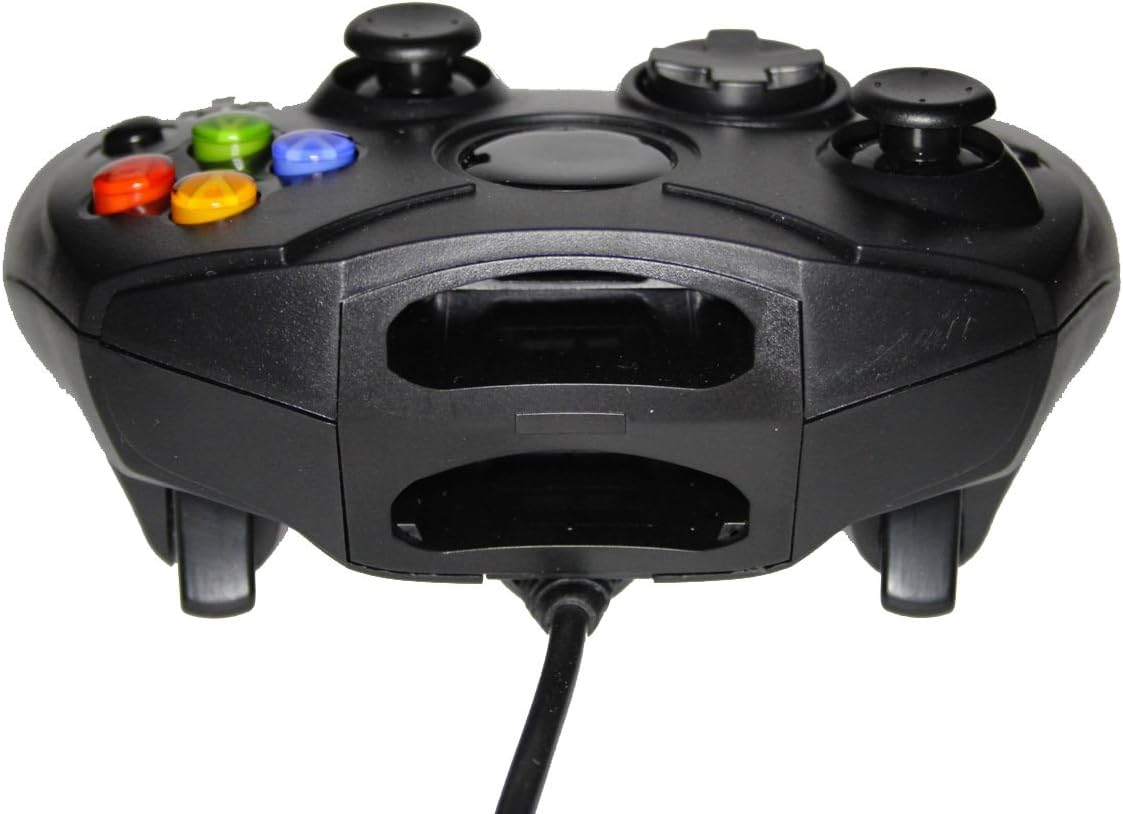
Сүрөт 1: Алдыңкы view of the controller, highlighting the proprietary Xbox connector and memory card slots.
Контроллериңизди иштетүү
The Mars Replacement Controller features the standard button layout for the Original Xbox, providing intuitive control for your games.

2-сүрөт: Жогорку view of the controller, displaying the button layout.
Баскыч функциялары:
- A, B, X, Y баскычтары: Primary action buttons, typically used for jumping, attacking, interacting, or confirming selections.
- D-Pad (багыттоочу такта): Used for precise directional input, menu navigation, or specific in-game actions.
- Сол жана оң аналогдук таякчалар: Provide 360-degree movement and camera control. Pressing them down often activates additional functions (L3/R3).
- Black and White Buttons: Auxiliary action buttons, often used for secondary actions or specific game mechanics.
- Баштоо баскычы: Typically used to pause games, access in-game menus, or confirm selections.
- Артка баскычы: Often used to access maps, inventories, or return to previous menus.
- Left and Right Triggers: Analog triggers on the underside of the controller, commonly used for acceleration, braking, or firing weapons.
Specific button assignments may vary depending on the game. Refer to your game's instruction manual for detailed control schemes.
Кароо жана тейлөө
To ensure the longevity and optimal performance of your Mars Replacement Controller, follow these care guidelines:
- Тазалоо: Башкаргычты үзгүлтүксүз сүртүү үчүн жумшак, кургак чүпүрөктү колдонуңуз. Өтө кир болсо, бир азampen the cloth with water or a mild, non-abrasive cleaner. Avoid excessive moisture, especially near buttons and ports.
- Сактагыч: Store the controller in a clean, dry place away from direct sunlight, extreme temperatures, and excessive dust. Avoid wrapping the cable too tightly around the controller to prevent damage.
- Колдонуу: Башкаргычты түшүрүп албаңыз же катуу соккуга дуушар кылбаңыз. Кабелди пульттан ажыратканда күч менен тартпаңыз; ар дайым туташтыргычтын өзүн кармаңыз.
- Суюктук таасири: Keep the controller away from liquids. Spills can cause internal damage and void any potential warranty.
Проблемаларды чечүү
Контроллериңизде көйгөйлөргө туш болсоңуз, төмөнкү жалпы көйгөйлөрдү жана чечимдерди караңыз:
| Көйгөй | Мүмкүн чечим |
|---|---|
| Контроллер жооп бербей жатат. |
|
| Buttons or joysticks are unresponsive or sticky. |
|
| Контроллер мезгил-мезгили менен өчүрүлөт. |
|
Бул чечимдерди колдонуп көргөндөн кийин көйгөй чечилбесе, кардарларды колдоо менен байланышыңыз.
Техникалык мүнөздөмөлөр
| Өзгөчөлүк | Деталь |
|---|---|
| Продукциянын өлчөмдөрү | 7 x 5.6 x 2.4 дюйм |
| Элемент Салмагы | 3.99 унция |
| Шайкеш түзмөктөр | Original Xbox Console |
| Controller Type | Gamepad |
| Байланыш | Wired (Proprietary Xbox Connector) |
| Түс | Кара |
| Өндүрүүчү | Mars Devices |
Кепилдик маалымат
This Mars Replacement Controller is covered by a manufacturer's warranty. For specific details regarding warranty duration, coverage, and claims procedures, please refer to the official Mars Devices webсайтка же түздөн-түз кардарларды колдоо менен байланышыңыз. Кепилдикти текшерүү үчүн сатып алганыңыздын далилин сактаңыз.
Кардарларды колдоо
For further assistance, technical support, or inquiries regarding your Mars Replacement Controller, please contact Mars Devices customer support. Contact information can typically be found on the product packaging or the official Mars Devices webсайт.
Онлайн ресурстар: Mars Devices Store on Amazon