
Introduction
The Minelab GPX 4500 is a high-performance metal detector designed for relic and gold prospecting. Utilizing advanced MPS, DVT, and SETA technologies, it offers superior sensitivity and depth for detecting various targets in diverse ground conditions. This manual provides essential information for the proper setup, operation, and maintenance of your GPX 4500 detector.

Figure 1: The Minelab GPX 4500 Metal Detector, fully assembled.
Коопсуздук маалыматы
- Кичинекей балдардан алыс болуңуз: Ensure the device and its components are stored out of reach of children to prevent accidents.
- Avoid using near sensitive electrical equipment: Operating the detector close to sensitive electronics may cause interference.
- Do not immerse in water: The GPX 4500 is not waterproof. Avoid submerging any part of the detector in water to prevent damage.
- Use protective eyewear to prevent eye injury from flying debris: When digging or operating in certain environments, wear appropriate eye protection.
Пакеттин мазмуну
Your Minelab GPX 4500 package typically includes the following components:
- Minelab GPX 4500 Control Box and Shaft Assembly
- 11-inch Double-D Search Coil (for general use)
- 11-inch Monoloop Search Coil (for deeper detecting)
- Li-Ion Battery Pack with built-in audio ampөмүрлүү
- Наушник
- Ат жабдыктары Ассамблеясы
- Coil mounting hardware
- Rubbish & Finds Bag
- Charger (not explicitly listed but implied for Li-Ion battery)
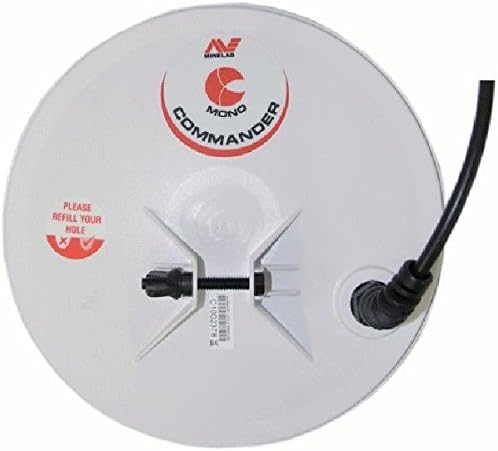
Figure 2: An 11-inch Monoloop Commander Search Coil, included for deeper detection.
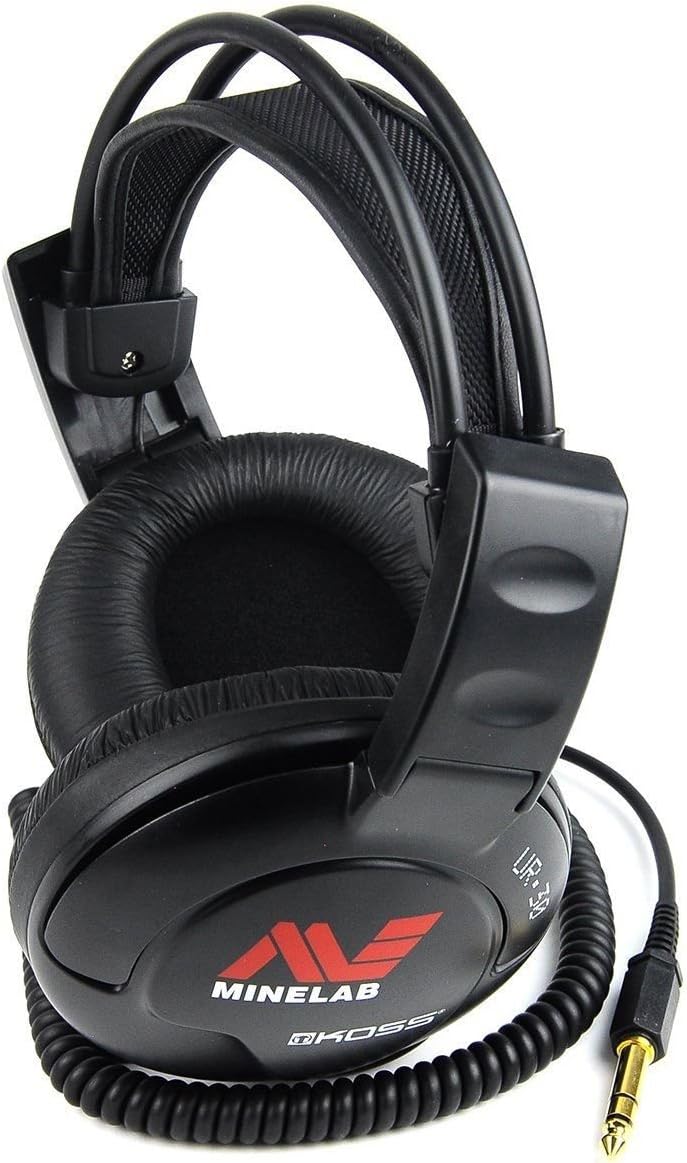
Figure 3: Included headphones for clear audio target signals.
Жайгашуу
1. Assembling the Detector
- Attach the lower shaft to the middle shaft, and then connect the middle shaft to the upper shaft/control box assembly. Ensure all locking collars are tightened securely.
- Select your desired search coil (11-inch Double-D for general use or 11-inch Monoloop for deeper targets). Attach the coil to the lower shaft using the provided coil mounting hardware.
- Wrap the coil cable snugly around the shaft, securing it with the integrated clips or Velcro straps to prevent tangling and false signals. Plug the coil connector into the control box.

Figure 4: Coil mounting hardware for securing the search coil to the shaft.
2. Батареяны орнотуу жана заряддоо
The GPX 4500 uses a Li-Ion battery pack. Ensure the battery is fully charged before use. Connect the battery pack to the control box. Refer to the separate charger instructions for proper charging procedures.
3. Adjusting the Harness
For comfortable operation, especially during long detecting sessions, adjust the included harness. Distribute the weight of the detector evenly across your shoulders and hips. Adjust straps until the detector feels balanced and comfortable.

Figure 5: Adjustable harness for ergonomic weight distribution during use.
Иштөө нускамалары
The GPX 4500 offers a range of settings to optimize performance in various conditions. Familiarize yourself with these controls for effective gold and relic prospecting.
1. Күйгүзүү/өчүрүү
Locate the power button on the control box. Press and hold to power on the detector. Repeat to power off.
2. Издөө режимдери
The GPX 4500 features six pre-programmed search modes for easy switch-on-and-go detecting. These modes are designed for different ground conditions and target types. All six search modes can be modified with your preferred settings and renamed for quick access.
3. Timing Settings
Versatile Timing settings allow adaptation to various ground conditions:
- Enhance Timing: Similar to Sensitive Smooth timing, this feature improves depth and signal response on both small and large targets.
- Sharp Timing: Best suited for quieter soils, this setting can help pinpoint faint targets more effectively.
4. Stabilizer Control
The Stabilizer control provides the smoothest threshold. In noisy conditions, increasing this setting will result in a smoother threshold. In quiet conditions, decreasing the stabilizer will make faint target signals more obvious.
5. Ground Balance OFF
This feature is useful for very benign, low mineralized, or salt-saturated soils. It also works well for treasure or relic hunters operating in loam or sandy soils.
6. Арткы жарык
The adjustable backlight includes a time-out function to preserve battery life. Adjust the duration to suit your detecting environment.
7. Target Volume
Target Volume allows you to increase the strength of softer target signals. This is beneficial in windy conditions, for users with hearing loss, and for adjusting audio volume with external speakers. It can also provide an audio boost in mild soils and help smooth out ground noise signals in highly mineralized soils.
8. Iron Reject Function
The Iron Reject function enables you to set the desired level of discrimination, from cautious to aggressive. This is particularly useful for detecting in areas with high levels of ferrous junk, allowing you to filter out unwanted iron targets.
Техникалык тейлөө
- Тазалоо: Ар бир колдонуудан кийин детекторду жарнама менен сүртүңүзamp кирди жана чаңды кетирүү үчүн кездеме колдонуңуз. Катуу химиялык заттарды же абразивдүү тазалоочу каражаттарды колдонуудан алыс болуңуз.
- Катушкага кам көрүү: Inspect search coils for damage. Keep the coil clean, especially the underside, to maintain optimal performance.
- Батареяга кам көрүү: Store the Li-Ion battery in a cool, dry place. Do not allow the battery to fully discharge for extended periods. Recharge as needed.
- Сактагыч: When not in use, store the detector in a dry, secure location, preferably disassembled or in a protective case, away from extreme temperatures.

Figure 6: Utilize the provided Rubbish & Finds Bag to maintain clean detecting sites.
Проблемаларды чечүү
If you encounter issues with your GPX 4500, consider the following common troubleshooting steps:
- Кубат жок: Ensure the battery is fully charged and correctly connected. Check all cable connections.
- Erratic Signals/Noise:
- Check that the coil cable is tightly wrapped around the shaft and secured.
- Perform a Ground Balance procedure for the current soil conditions.
- Adjust the Stabilizer control to a higher setting in noisy environments.
- Ensure you are not operating near strong electromagnetic interference sources (power lines, other detectors).
- Poor Depth:
- Verify the correct search coil is being used for the target type and ground conditions (Monoloop for deeper targets).
- Check Ground Balance.
- Ensure the coil is parallel to the ground during sweeps.
- Аудио жок: Check headphone connection and ensure Target Volume is not set to minimum.
For persistent issues, refer to the comprehensive user manual provided with your detector or contact Minelab customer support.
Техникалык шарттар
| Бренд | MINELAB |
| Модель номери | GPX 4500 |
| Түс | Кара |
| Power Source | Батарея менен иштейт (Li-Ion) |
| Батареялар талап кылынат | Ооба |
| Материал | Seta (Material Type) |
| Узундук | 60 дюйм |
| Жөнгө салынуучу узундук | Ооба |
| Катушканын өлчөмүн издөө | 11 Inches (Double-D and Monoloop included) |
| Программалардын саны | 6 (Pre-programmed search modes) |
| Дисплей түрү | LCD |
| Элемент Салмагы | 0.01 унция (Note: This value may represent a component weight; the full detector's weight will be higher.) |
| Сунушталган Колдонуулар | Metal Detection, Gold Prospecting, Relic Hunting |
| Эл аралык коргоо рейтинги | IP54 |
| UPC | 811493014395 |
Кепилдик жана колдоо
For warranty information, please refer to the documentation included with your Minelab GPX 4500 at the time of purchase. Minelab products typically come with a manufacturer's warranty covering defects in materials and workmanship.
For technical support, service, or additional product information, please visit the official Minelab webсайтка же кардарларды тейлөө бөлүмүнө кайрылыңыз. Кененирээк маалыматты даректен таба аласыз Minelab Store on Amazon же алардын расмий корпорациясы webсайт.

Figure 7: The official Minelab logo.