
Introduction
This manual provides essential instructions for the setup, operation, maintenance, and troubleshooting of your HP Flexible Thin Client T520. Please read this document thoroughly before using the device to ensure proper functionality and longevity.
1. Орнотуу
1.1 Пакеттен чыгаруу жана мазмунун текшерүү
Бардык компоненттерди таңгактан кылдаттык менен алып салыңыз. Төмөнкү заттар бар экенин текшериңиз:
- HP Flexible Thin Client T520 unit
- Кубат адаптери жана кабели
- Баскычтоп
- Чычкан
- Vertical stand (if included)
- Документтер (бул колдонмо)
1.2 Перифериялык түзүлүштөрдү туташтыруу
Before powering on the thin client, connect all necessary peripherals.
- Дисплейди туташтыруу: Use a DisplayPort or VGA cable to connect your monitor to the corresponding port on the rear of the thin client. The T520 supports up to 3840x2160 resolution via DisplayPort.
- USB түзмөктөрүн туташтыруу: Plug the keyboard and mouse into any available USB ports. The thin client features USB 3.0 (SuperSpeed) ports on the front and USB 2.0 ports on the rear.
- Тармакка туташуу: For a wired connection, insert an Ethernet cable into the RJ-45 network port on the rear.
- Аудио туташтыруу: If using external speakers or a headset, connect them to the audio output jack. A microphone can be connected to the microphone input jack.
- Туташуу кубаты: Insert the power adapter cable into the DC-in port on the rear of the thin client, then plug the power cord into an electrical outlet.
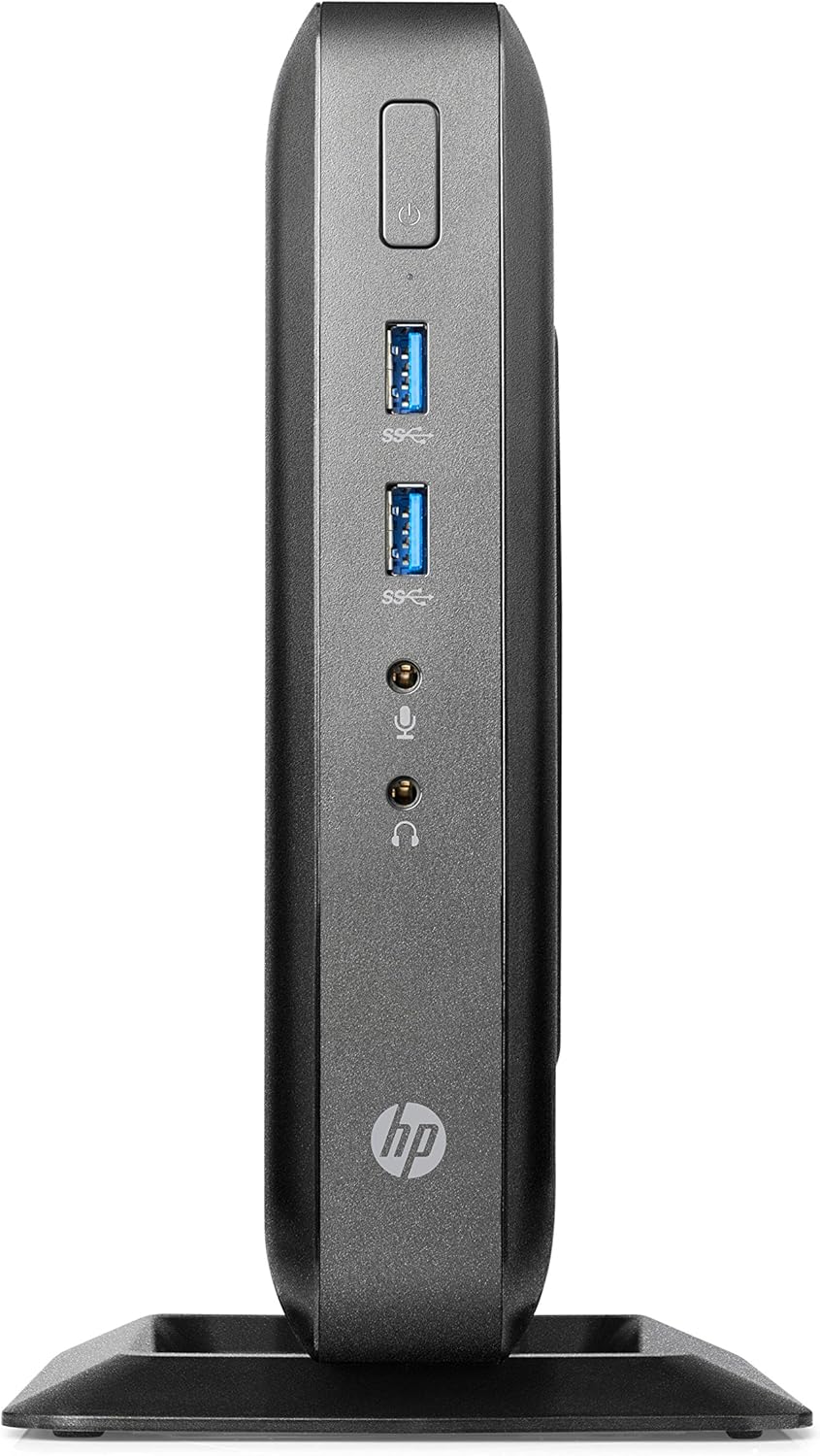
Figure 1: Front panel connections of the HP Flexible Thin Client T520. This view shows the power button, two SuperSpeed USB (USB 3.0) ports, a headphone jack, and a microphone jack.

Figure 2: Rear panel connections of the HP Flexible Thin Client T520. This view includes the Ethernet port, DisplayPort, HDMI port, VGA port, multiple USB 2.0 ports, and the DC power input.
1.3 Баштапкы күйгүзүү
After connecting all peripherals and power, press the power button located on the front of the thin client. The device will boot into the Windows Embedded Standard 7E operating system.
2. Иштөө нускамалары
2.1 Күйгүзүү жана өчүрүү
- Күйгүзүү үчүн: Алдыңкы панелдеги кубат баскычын басыңыз.
- Жабуу: From the Windows Embedded Standard 7E desktop, click the Баштоо баскычын басып, анан тандаңыз Өчүрүү. Allow the system to power off completely before disconnecting power.
- Кайра баштоо үчүн: From the Windows Embedded Standard 7E desktop, click the Баштоо баскычын басып, анан тандаңыз Кайра баштоо.
2.2 Operating System Overview
The HP Flexible Thin Client T520 runs on Windows Embedded Standard 7E, a specialized operating system designed for thin client environments. It provides a familiar Windows interface for accessing remote desktops, virtual applications, and web-based services.
2.3 Тармакка туташуу
The thin client is designed for network-centric operations. Ensure a stable wired Ethernet connection for optimal performance. Network settings can be configured through the Windows Control Panel, typically managed by your IT administrator in a corporate environment.
3. Техникалык тейлөө
3.1 Аппаратты тазалоо
Оптималдуу аткарууну жана көрүнүштү сактоо үчүн:
- Ensure the thin client is powered off and disconnected from the power source before cleaning.
- Жумшак, түксүз кездемени жеңил колдонуңуз dampсуу же жумшак, абразивдүү эмес тазалоо эритмеси менен.
- Суюктуктарды түз эле аппаратка чачпаңыз.
- Катуу химиялык заттарды, эриткичтерди же абразивдүү материалдарды колдонуудан алыс болуңуз.
3.2 Программалык камсыздоо жаңыртуулары
Regularly check for and apply any available operating system or firmware updates as recommended by HP or your IT department. This ensures security and performance enhancements.
3.3 Сактагычты башкаруу
The T520 features a 16 GB SSD. While primarily used for the operating system and client software, it is advisable to monitor available storage space. Avoid storing large, unnecessary files directly on the thin client's local drive.
4. Кыйынчылыктарды
This section addresses common issues you might encounter with your HP Flexible Thin Client T520.
4.1 Күч жок
- Verify the power cable is securely connected to both the thin client and the electrical outlet.
- Электр розеткасынын иштешин башка аспап менен текшерип текшериңиз.
- Электр адаптеринде көрүнгөн зыяндын бар-жоктугун текшериңиз.
4.2 Display Output жок
- Confirm the monitor is powered on and connected correctly to the thin client's DisplayPort or VGA port.
- Мониторуңузда туура киргизүү булагы тандалганын текшериңиз.
- Test with a different monitor or display cable if available.
4.3 Тармакка туташуу маселелери
- Check that the Ethernet cable is securely plugged into both the thin client and the network router/switch.
- Verify network status lights on the Ethernet port are active.
- Consult your network administrator for network configuration assistance.
4.4 Peripheral Devices Not Responding
- Ensure USB devices (keyboard, mouse) are properly connected to the USB ports.
- Түзмөктөрдү ар кандай USB портторуна туташтырып көрүңүз.
- Test the peripherals on another computer to confirm they are functional.
5. Техникалык шарттар
The following table outlines the key technical specifications for the HP Flexible Thin Client T520 (G9F08AA#ABA):
| Өзгөчөлүк | Спецификация |
|---|---|
| Процессор | AMD G-Series GX-212JC 1.2 GHz |
| RAM | 4 ГБ DDR3 SDRAM |
| Сактагыч | 16 ГБ SSD |
| Операция системасы | Windows Embedded Standard 7E |
| Графикалык сопроцессор | AMD Embedded G-Series (Integrated) |
| Max Screen Resolution | 3840x2160 (via DisplayPort) |
| Порттор (Алдыңкы) | 2x USB 3.0, Headphone, Microphone |
| Порттар (арткы) | Ethernet (RJ-45), DisplayPort, HDMI, VGA, Multiple USB 2.0, DC-in |
| Элемент Салмагы | 7.73 фунт |
| Өлчөмдөрү (пакет) | 20 x 12 x 6.9 дюйм |
6. Кепилдик жана колдоо
6.1 Өндүрүүчүнүн Кепилдиги
The HP Flexible Thin Client T520 typically comes with a 3-year manufacturer warranty. Please refer to the warranty documentation included with your product or visit the official HP support webбелгилүү бир шарттар жана шарттар үчүн сайт.
6.2 Техникалык колдоо
Техникалык жардам, драйверди жүктөө же андан аркы көйгөйлөрдү чечүү үчүн, расмий HP колдоо бөлүмүнө баш багыңыз website or contact HP customer service. Have your product model (T520) and serial number ready when seeking support.