
Introduction
This manual provides instructions for setting up, operating, and maintaining your HP Business T6L04UT Slim Wireless Keyboard and Mouse. Please read this manual thoroughly before using the product to ensure proper functionality and longevity.
Пакеттин мазмуну
- HP Slim Wireless Keyboard
- HP Wireless Mouse
- USB зымсыз кабыл алгыч
- Батареялар (алдын ала орнотулган же өзүнчө камтылган)
Жайгашуу
- Батареяларды салыңыз: Open the battery compartments on both the keyboard and the mouse. Insert the included batteries, ensuring correct polarity (+/-). Close the compartments securely.
- USB зымсыз кабыл алгычын туташтырыңыз: Locate an available USB port on your computer (laptop or desktop). Insert the USB wireless receiver firmly into the USB port. Your computer should automatically detect and install the necessary drivers.
- Күйгүзүү: Ensure the keyboard and mouse are powered on. The mouse typically has an on/off switch on its underside. The keyboard may not have a separate power switch and will activate once batteries are inserted and the receiver is connected.
- Сыноо байланышы: Move the mouse and type on the keyboard to confirm they are working. If they do not respond, ensure the receiver is properly connected and batteries are correctly installed.

Image: The HP Slim Wireless Keyboard, Mouse, and the compact USB receiver. This image shows the complete set ready for connection to a computer.
Баскычтопту иштетүү
The HP Slim Wireless Keyboard features a standard QWERTY layout with 104 keys, including a numeric keypad and function keys. It is designed for comfortable and efficient typing.
- Функция баскычтары: Utilize the F1-F12 keys for various system functions, often in combination with the 'Fn' key, depending on your operating system and computer settings.
- Сандык баскычтоп: The dedicated numeric keypad on the right provides quick data entry.
- Индикатор жарыктары: Please note that this keyboard does not feature dedicated indicator lights for Caps Lock, Num Lock, or Scroll Lock.
Чычканды иштетүү
The HP Wireless Mouse uses optical or laser movement detection for precise tracking. Its ambidextrous design ensures comfortable use for both left and right-handed users.
- Сол жана оң чыкылдатуу: Standard buttons for primary and secondary actions.
- Жылдыруу дөңгөлөгү: Документтердин ичинде вертикалдуу навигация үчүн жылдыруу дөңгөлөгүн колдонуңуз жана web pages. The scroll wheel may also function as a middle-click button.
- Кыймыл: Ensure the mouse is used on a suitable surface for optimal tracking performance.
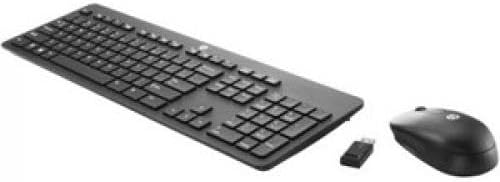
Сүрөт: А view of the HP Slim Wireless Keyboard and Mouse, showcasing their compact and ergonomic design from an elevated perspective.
Техникалык тейлөө
- Тазалоо: Баскычтоптун жана чычкандын беттерин тазалоо үчүн жумшак, кургак чүпүрөктү колдонуңуз. өжөр кир үчүн, бир аз гamp жумшак самын менен кездеме колдонсо болот, бул аппаратка суюктук кирбесин.
- Батареяны алмаштыруу: When performance degrades, replace the batteries in both the keyboard and mouse with new ones of the same type. Dispose of old batteries responsibly.
- Сактагыч: Түзмөктөрдү узак убакыт бою колдонбогон учурда салкын, кургак жерде, күндүн түз тийген нурларынан жана өтө жогорку температурадан алыс сактаңыз.
Проблемаларды чечүү
| Көйгөй | Мүмкүн себеп | Чечим |
|---|---|---|
| Баскычтоп/чычкан жооп бербей жатат | Low or dead batteries; USB receiver disconnected; device not powered on. | Replace batteries; ensure USB receiver is securely plugged into a working USB port; turn on the mouse power switch. |
| үзгүлтүктүү байланыш | Interference from other wireless devices; receiver too far from devices. | Move the receiver closer to the keyboard and mouse; avoid placing other wireless devices or large metal objects between the devices and receiver. |
| Чычкан курсору туура эмес же жылмакай эмес | Dirty optical sensor; unsuitable surface. | Clean the optical sensor on the underside of the mouse; use the mouse on a clean, non-reflective, opaque surface or a mouse pad. |
| No Caps Lock indicator light | This model does not include a physical Caps Lock indicator light. | This is normal operation for this product. Some operating systems may provide an on-screen indicator. |
Техникалык шарттар
- Бренд: HEWLETT PACKARD
- Модел: T6L04UT
- Байланыш технологиясы: Зымсыз (USB кабыл алгыч)
- Баскычтоптун жайгашуусу: QWERTY, 104 Keys
- Mouse Movement Detection: Optical, Laser
- Колдун багыты: Эки тараптуу
- Шайкеш түзмөктөр: Laptop, Netbook (and other devices with USB support)
- Операциялык системанын шайкештиги: Windows Vista (and newer operating systems)
- Кубат булагы: Батарея менен иштейт
- Түсү: Кара
- Элемент Салмагы: Approximately 0.45 Pounds (for the set)
- Өндүрүүчү: Hewlett Packard кеңсеси
- UPC/GTIN: 889894647825
Кепилдик жана колдоо
For warranty information and technical support, please refer to the documentation provided with your purchase or visit the official HP support webсайт. Кепилдик дооматтар үчүн сатып алганыңыздын далилин сактаңыз.