
1. Продукт бүтүп калдыview
The J-Tech Digital ProAV Unlimited HDMI Extender Transmitter (TX) is designed to extend 1080P HDMI signals over a single Cat5e/6 cable up to 400 feet (120 meters). This device facilitates flexible audio-video distribution, supporting various configurations including point-to-point, point-to-many, and many-to-many broadcasting when used with compatible receivers and an Ethernet switch. It converts HDMI signals to standard TCP/IP for transmission over an internet cable or local area network (LAN). The system supports 1080p resolution, 3D content, HDCP, and wideband IR control (38-56 kHz).
2. Пакеттин мазмуну
Пакетте бардык буюмдар бар экенин текшериңиз:
- 1x J-Tech Digital ProAV Unlimited HDMI Extender Transmitter (TX)
- 1x Колдонуучунун колдонмосу
- 1x IR TX кабели
- 1x Power Adapter DC 5V/1A

3. Продукциянын өзгөчөлүктөрү
- Supports Point-to-Point, Point-to-Many, and Many-to-Many Broadcasting configurations.
- Extends 1080P HDMI signals up to 120m (394ft) over a single Cat5e/6 cable.
- Converts HDMI signals to standard TCP/IP for transmission over Ethernet or LAN.
- Compatible with 1080p, 3D, and HDCP content.
- Features wideband IR (38-56 kHz) control for remote device management.
- Can be cascaded for multiple layers by integrating additional Ethernet switches.
- Android application available for matrix switching control (search "J-Tech Digital Matrix" on Google Play).

4. Орнотуу жана орнотуу
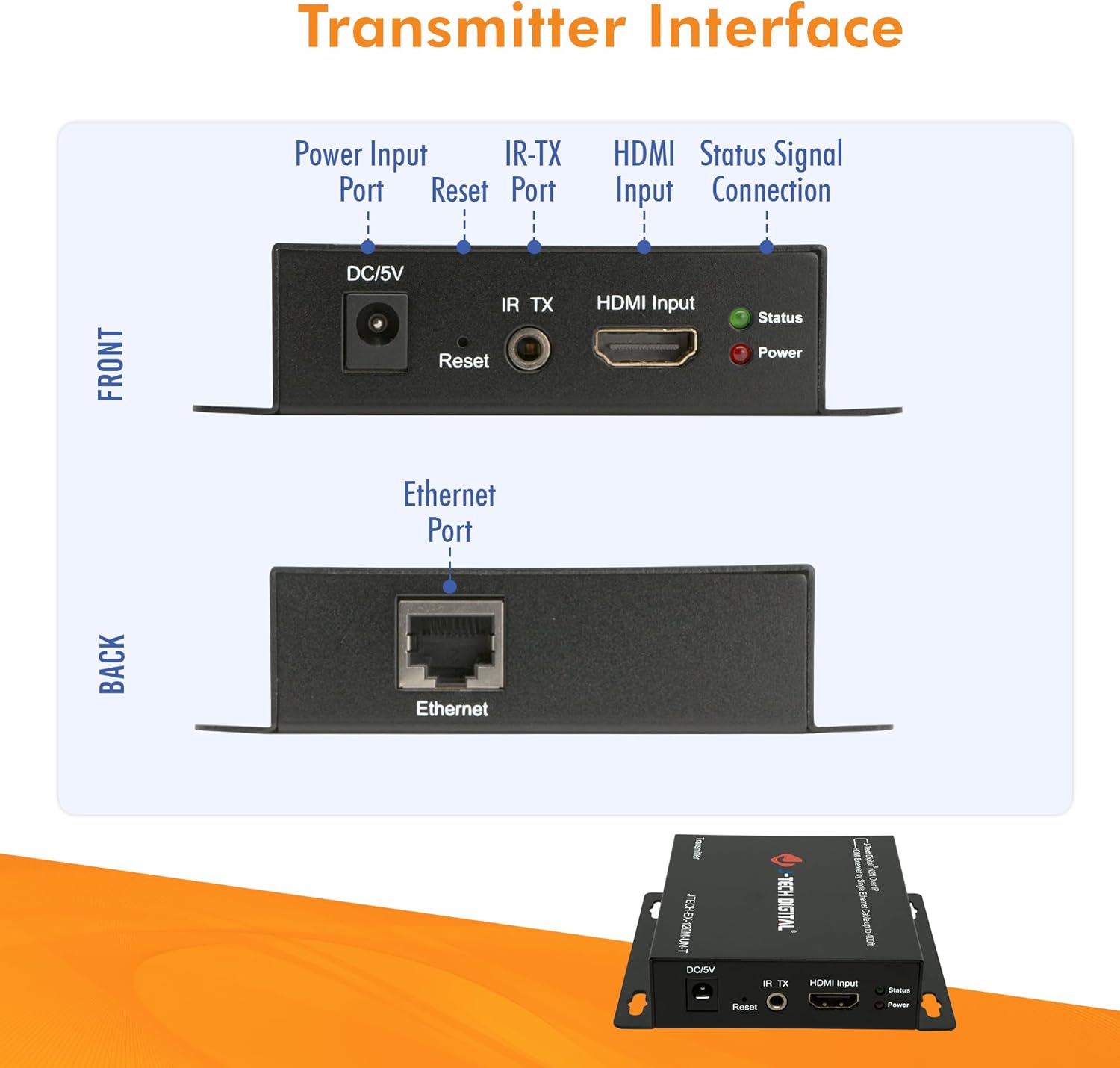
4.1. Transmitter Interface
Familiarize yourself with the ports and indicators on the Transmitter unit:
- DC/5V: Power Input Port.
- Кайтаруу: Түзмөктү баштапкы абалга келтирүү баскычы.
- IR TX: IR Transmitter Port for sending IR signals to the source device.
- HDMI киргизүү: Connect your HDMI source device here.
- Статусу: LED indicator for signal status.
- Күч: LED indicator for power status.
- Ethernet: RJ45 port for Cat5e/6 cable connection to the network switch or receiver.
4.2. Туташуу режимдери
The J-Tech Digital HDMI Extender system supports various connection modes:
4.2.1. One-to-One Connection
In a point-to-point setup, a single Transmitter connects directly to a single Receiver via a Cat5e/6 cable. This extends the HDMI signal from one source to one display.

4.2.2. Many-to-Many Connection (Matrix Setup)
For more complex installations, multiple Transmitters and Receivers can be connected through one or more Gigabit Ethernet switches to create a flexible HDMI matrix. This allows any source to be routed to any display, or multiple displays simultaneously.

4.3. Орнотуунун негизги кадамдары
- Connect your HDMI source (e.g., Blu-Ray Player, Gaming Console) to the HDMI Input port of the Transmitter unit using an HDMI cable.
- Connect a Cat5e/6 Ethernet cable from the Ethernet port of the Transmitter to a Gigabit Ethernet switch (for matrix setup) or directly to a Receiver unit (for point-to-point).
- If using a matrix setup, connect Receiver units to the same or cascaded Gigabit Ethernet switches using Cat5e/6 cables.
- Connect your HDMI display (e.g., Monitor, Projector, Television) to the HDMI Output port of each Receiver unit using an HDMI cable.
- Connect the provided power adapters to all Transmitter and Receiver units, then plug them into a power outlet.
- For IR control, connect the IR TX cable to the Transmitter unit and position the IR emitter near the IR sensor of your source device.
5. Иштөө нускамалары
5.1. Matrix Switching via Web Интерфейс
When using the J-Tech Digital ProAV Unlimited HDMI Extender system with a compatible Gigabit Ethernet switch, you can manage input-to-output routing via a web-based interface. Connect a computer to the same network as the switch to access its configuration menu.
5.2. Android App Control
An Android application is available for convenient control of the matrix switching functionality. Издөө "J-Tech Digital Matrix" on Google Play to download and install the app. This allows for intuitive management of your HDMI sources and displays from a mobile device.
6. Техникалык шарттар
| Өзгөчөлүк | Спецификация |
|---|---|
| Бренд | J-Tech Digital |
| Модел | ProAV Unlimited HDMI Extender Transmitter (TX) |
| Түс | Кара |
| Туташтыргыч түрү | HDMI |
| Шайкеш түзмөктөр | Blu-Ray Player, Gaming Console, Monitor, Projector, Television |
| Кабель түрү | Ethernet, HDMI |
| Узартуу Дистанция | Up to 120m (394ft) over Cat5e/6 cable |
| Резолюцияны колдоо | 1080p, 3D |
| HDCP колдоо | Ооба |
| IR башкаруу | Wideband IR (38-56 kHz) |
| UPC | 766150278057 |
| ASIN | B01C3HCZPK |

7. Кыйынчылыктарды
- Сүрөт жок/сигнал:
- Ensure all HDMI and Ethernet cables are securely connected.
- Verify that both the Transmitter and Receiver units are powered on.
- Check the status LEDs on the units; refer to the manual for their meaning.
- Test with shorter, certified Cat5e/6 cables to rule out cable issues.
- Ensure your display supports the output resolution (e.g., 1080p).
- Picture Flickering/Intermittent Signal:
- Кабелдик туташуулардын боштугун текшериңиз.
- Ensure the Cat5e/6 cable is of good quality and within the specified length limit (up to 400ft).
- Minimize electromagnetic interference by keeping cables away from power lines or other electronic devices.
- Инфракызыл башкаруу иштебей жатат:
- Ensure the IR TX cable is correctly plugged into the Transmitter and the IR emitter is directly facing the IR sensor of the source device.
- Verify that the remote control is functioning correctly.
- Matrix Switching Issues:
- Ensure the Gigabit Ethernet switch is compatible and properly configured.
- Verify network connectivity to the switch and the extender units.
- текшерүү web interface settings to ensure correct input-to-output routing.
8. Техникалык тейлөө
To ensure optimal performance and longevity of your J-Tech Digital HDMI Extender Transmitter, follow these maintenance guidelines:
- Түзмөктү салкын, кургак жана жакшы желдетилген жерде сактаңыз.
- Avoid exposing the unit to excessive heat, moisture, or direct sunlight.
- Түзмөктү жумшак, кургак чүпүрөк менен тазалаңыз. Суюк же аэрозоль тазалагычтарды колдонбоңуз.
- Бардык кабелдик туташуулар коопсуз жана бузулбагандыгын текшериңиз.
- Periodically check for firmware updates from the J-Tech Digital website to ensure compatibility and improved performance.
9. Кепилдик жана колдоо
J-Tech Digital өнүмдөрү ишенимдүүлүк жана иштөө үчүн иштелип чыккан. Кепилдик жөнүндө маалымат жана техникалык колдоо үчүн расмий J-Tech Digital сайтына кайрылыңыз. website or contact their customer service. Their knowledgeable employees are based in Stafford, TX, and are available to assist with product inquiries and troubleshooting.
Кошумча жардам алуу үчүн, баш багыңыз J-Tech санарип дүкөнү.