
1. Киришүү
Сатып алганыңыз үчүн рахматasing the Caliber HPG415BT/B Portable Bluetooth Speaker. This manual provides important information regarding the safe and efficient operation of your device. Please read it thoroughly before use and retain it for future reference.
Пакеттин мазмуну
- Caliber HPG415BT/B Portable Bluetooth Speaker
- USB to Mini USB Charging Cable
- 3.5 мм аудио кабель
- Алыстан башкаруу
- Instruction Manual
2. Коопсуздук маалыматы
Коопсуз эксплуатацияны камсыз кылуу жана зыян келтирбөө үчүн төмөнкү коопсуздук эрежелерин сактаңыз:
- Аппаратты жамгырдын, нымдуулуктун же экстремалдык температуранын таасиринде калтырбаңыз.
- Avoid placing the speaker near heat sources such as radiators, stoves, or other heat-producing appliances.
- Агрегатты өз алдынча ажыратпаңыз, оңдобоңуз же өзгөртпөңүз. Бардык тейлөөлөрдү квалификациялуу кызматкерлерге тапшырыңыз.
- Use only the specified charging cable and power adapter (5V USB) to charge the battery.
- Аппаратты күчтүү магнит талаасынан алыс кармаңыз.
- Аппаратты кургак, жумшак чүпүрөк менен гана тазалаңыз. Суюк тазалоочу каражаттарды колдонбоңуз.
3. Продукциянын өзгөчөлүктөрү
The Caliber HPG415BT/B speaker offers a range of features for versatile audio playback:
- Зымсыз Bluetooth технологиясы: Connect wirelessly to compatible devices within a 10-meter range (Bluetooth version 2.1, supports A2DP and AVRCP profileс).
- Бир нече ойнотуу параметрлери: Play audio from USB drives and SD cards (up to 32GB).
- FM радиосу: Enjoy your favorite radio stations with automatic search and storage functions.
- LED дисплей: Provides clear information on current mode and status.
- High Power Sound: Equipped with 2x 3W speakers for a total of 6W RMS output.
- Интегралдык кайра заряддалуучу батарея: Offers up to 5 hours of continuous playback.
- Интуитивдик башкаруулар: Features buttons for previous/next track, play/pause, mode selection, EQ adjustment, and volume control.
- 3.5 мм аудио киргизүү: Connect external audio devices via the included audio cable.
- Алыстан башкаруу: Conveniently operate the speaker from a distance.
4. Башкаруу элементтери жана байланыштар
Familiarize yourself with the speaker's controls and connection ports:
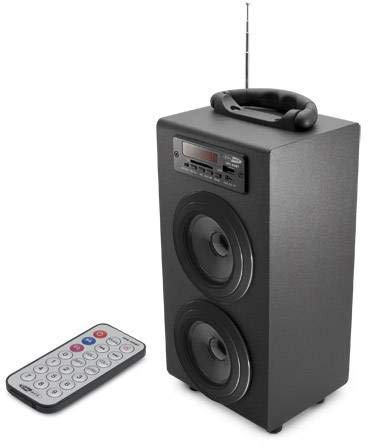
Image 1: Caliber HPG415BT/B Portable Bluetooth Speaker. This image shows the overall design of the speaker, featuring a tubular shape, front-facing speakers, and a control panel on the top or front.
Control Panel (Typical Layout)
- MODE баскычы: Switches between Bluetooth, FM Radio, USB, SD, and AUX modes.
- ОЙНОО/ТЫНДЫРУУ баскычы: Ойнотууну баштайт же тындырат.
- МУРУНКУ/КИЙИНКИ баскычтары: Skips tracks in media modes or changes radio stations in FM mode.
- ҮНҮН КЕҢЕЙТҮҮ +/- баскычтары: Аудио чыгаруу деңгээлин тууралайт.
- EQ баскычы: Эквалайзер алдын ала орнотуулары аркылуу айланышат.
- Кубатты күйгүзүү / өчүрүү Located typically on the rear or side.
Connection Ports (Typical Layout)
- USB порт: USB флэш-дисктерди туташтыруу үчүн.
- SD карта уячасы: SD эстутум карталарын салуу үчүн.
- AUX киргизүү (3.5 мм): Тышкы аудио түзмөктөрдү кабель аркылуу туташтыруу үчүн.
- Mini USB Charging Port: Заряддоо кабелин туташтыруу үчүн.
5. Орнотуу
5.1 Алгачкы заряддоо
- Биринчи жолу колдонуудан мурун, динамиктин ички батареясын толугу менен заряддаңыз.
- Connect the supplied Mini USB cable to the speaker's charging port.
- Connect the other end of the USB cable to a 5V USB power source (e.g., a computer USB port or a USB wall adapter, not included).
- The LED indicator will show charging status. Once fully charged, the indicator may change color or turn off.
5.2 Күйгүзүү/өчүрүү
- To power on, slide the Power ON/OFF switch to the 'ON' position. The LED display will light up.
- To power off, slide the Power ON/OFF switch to the 'OFF' position.
6. Иштөө нускамалары
6.1 Bluetooth режими
- Power on the speaker. It will automatically enter Bluetooth pairing mode, indicated by a flashing Bluetooth icon on the LED display.
- Смартфонуңузда, планшетиңизде же башка Bluetooth иштетилген түзмөгүңүздө Bluetooth'ду иштетиңиз.
- Издөө available Bluetooth devices and select "HPG415BT" from the list.
- Once paired, the speaker will emit a confirmation sound, and the Bluetooth icon on the display will stop flashing.
- You can now play audio from your connected device through the speaker. Use the PLAY/PAUSE and PREVIOUS/NEXT buttons on the speaker or remote to control playback.
6.2 FM радио режими
- басыңыз РЕЖИМ button repeatedly until "FM" appears on the LED display.
- To perform an automatic station scan, press and hold the ОЙНОО/ТЫНЫТТЫРУ баскычы. Динамик жеткиликтүү FM станцияларын сканерлейт жана сактайт.
- колдонуу МУРУНКУ КИЙИНКИ Сакталган станциялар арасында багыт алуу үчүн баскычтарды басыңыз.
6.3 USB/SD картаны ойнотуу
- USB флеш-дискти USB портуна же SD картанын уячасына салыңыз.
- Динамик автоматтык түрдө USB же SD режимине которулуп, аудиону ойнотууну баштайт fileс. Болбосо, басыңыз РЕЖИМ туура булагын тандоо үчүн баскыч.
- колдонуу ОЙНОО/ТЫНЫТТЫРУ жана МУРУНКУ КИЙИНКИ ойнотууну башкаруу үчүн баскычтар.
6.4 AUX киргизүү режими
- Connect one end of the supplied 3.5mm audio cable to the speaker's AUX input port.
- Connect the other end of the cable to the headphone jack or audio output of your external audio device.
- басыңыз РЕЖИМ LED дисплейде "AUX" пайда болгонго чейин баскычын кайра-кайра басыңыз.
- Control playback and volume directly from your external audio device.
7. Батареяны заряддоо
When the battery is low, the speaker may emit an audible warning or the LED indicator will show a low battery status. To charge:
- Connect the Mini USB charging cable to the speaker's charging port.
- Connect the USB end to a 5V USB power source.
- The charging indicator will illuminate. Charging typically takes several hours.
- Once fully charged, the indicator will change or turn off. Disconnect the charging cable.
8. Техникалык тейлөө
- Тазалоо: Динамиктин сыртын сүртүү үчүн жумшак, кургак чүпүрөктү колдонуңуз. Абразивдүү тазалоочу каражаттарды, момдорду же эриткичтерди колдонбоңуз.
- Сактагыч: Узак мөөнөткө колдонулбаганда, динамикти салкын, кургак жерде, тике күн нурунан жана экстремалдык температурадан алыс сактаңыз.
- Батареяга кам көрүү: Батареянын иштөө мөөнөтүн узартуу үчүн, батареяны тез-тез толук зарядсыздандырбаңыз. Колдонулбаса дагы, аны үзгүлтүксүз кубаттап туруңуз.
9. Кыйынчылыктарды
| Көйгөй | Мүмкүн себеп | Чечим |
|---|---|---|
| Күч жок | Батарея зарядсызданды; Кубат өчүргүч ӨЧҮК. | Батареяны заряддаңыз; Кубат которгучун КҮЙГҮЗҮҮ абалына жылдырыңыз. |
| Үн жок | Үн өтө төмөн; Туура эмес режим тандалды; Түзмөк туура эмес туташтырылган. | Increase volume; Press MODE to select correct source; Reconnect device. |
| Bluetooth туташпай жатат | Динамик жупташтыруу режиминде эмес; Түзмөктүн Bluetooth функциясы өчүк; Динамик түзмөктөн өтө алыс. | Ensure speaker is in Bluetooth mode and flashing; Enable Bluetooth on your device; Move devices closer (within 10m). |
| FM радио статикалык | Алсыз сигнал; Интерференция. | Relocate the speaker for better reception; Perform an auto-scan again. |
10. Техникалык шарттар
- Модел: HPG415BT/B
- Чыгуу күчү: 6W RMS (2x 3W)
- Bluetooth версиясы: 2.1
- Bluetooth иштөө диапазону: 10 метрге чейин
- Байланыш: Bluetooth, USB, SD Card, 3.5mm AUX Input
- Колдоого алынган медиа: USB drives, SD cards (up to 32GB)
- FM радиосу: Yes, with auto-scan
- Дисплей: LED
- Батарея түрү: Интеграцияланган кайра заряддалуучу
- Батареянын иштөө мөөнөтү: 5 саатка чейин
- Заряддоо: USB 5V
- Өлчөмдөрү (L x W x Y): 140 x 120 x 280 мм
- Салмагы: Болжол менен 1.04 кг (2.29 фунт)
- Башкаруу түрү: Buttons, Remote Control
11. Кепилдик жана колдоо
Caliber products are designed and manufactured to the highest quality standards. For warranty information or technical support, please refer to the warranty card included with your product or visit the official Caliber webбайланыш маалыматы үчүн сайт.