Introduction
This manual provides comprehensive instructions for the AT&T CL80115 DECT 6.0 Cordless Expansion Handset. This accessory handset is designed to extend the functionality of compatible AT&T cordless phone base systems, offering enhanced audio calls and additional communication features. It is not a standalone device and requires connection to a compatible base unit for operation.
Кутуда эмне бар
- AT&T CL80115 Cordless Handset
- Телефон заряддагыч
- Power Adapter for Charger
- Заряддалуучу Батарея топтому

Image: The AT&T CL80115 Cordless Handset resting in its charging cradle. The handset features a large display, backlit keys, and an AT&T logo.
Шайкештик
The AT&T CL80115 accessory handset requires one of the following AT&T cordless phone base systems to operate:
- CL82115
- CL82215
- CL82315
- CL82415
- CL82465
- CL82515
- CL83215
- CL83315
- CL83365
- CL83415
- CL83465
- CL83565
- CL84115
- CL84215
- CL84265
- CL84365
Жайгашуу
1. Батареяны орнотуу
- Телефондун артындагы батарея отсегин табыңыз.
- Туура полярдуулукту камсыз кылуу менен кайра заряддалуучу батарейканын пакетин салыңыз.
- Батарея уясынын капкагын бекем жабыңыз.
2. Телефонду заряддоо
- Connect the power adapter to the handset charger and plug it into an electrical outlet.
- Place the handset in the charger with the display facing forward.
- Allow the handset to charge for at least 10 hours before initial use to ensure optimal battery performance. The "CHARGE" indicator on the handset will illuminate.

Сүрөт: бурчтуу view of the AT&T CL80115 Cordless Handset in its charging cradle, highlighting the display and keypad.
3. Registering the Handset to a Base Unit
This accessory handset must be registered to a compatible AT&T cordless phone base unit before it can be used.
- Ensure the base unit is powered on and not in use.
- Негизги бирдикте баскычын басып, кармап туруңуз БЕТ button (or equivalent registration button) for approximately 4 seconds until the КОЛДОНУУДА light on the base unit turns on.
- On the CL80115 handset, press the # key. The handset will display "Registering..."
- Once registered, the handset will display "Handset X Registered" (where X is the handset number) and emit a confirmation tone.
- If registration fails, repeat the steps. If it continues to fail, refer to the troubleshooting section or the base unit's manual.
Operating the Handset
Чакыруу жана жооп берүү
- Чалуу үчүн: Басыңыз ТЕЛЕФОН, андан кийин номерди териңиз.
- Чалууга жооп берүү үчүн: Басыңыз ТЕЛЕФОН when the handset rings.
- Чалууну аяктоо үчүн: Басыңыз ӨЧҮРҮҮ же телефонду кайра заряддагычка салыңыз.
Үндү тууралоо
Чалуу учурунда, басыңыз VOLUME up or down buttons on the side of the handset to adjust the earpiece volume.
Үнсүз функция
Чалуу учурунда, басыңыз Үнсүз/ЖОК button to mute the microphone. Press it again to unmute.
Intercom (Walkie-Talkie)
If multiple handsets are registered to the same base, you can use the intercom feature for internal communication. This handset supports communication with up to 4 individuals simultaneously.
- Басыңыз МЕНЮ/ТАНДОО.
- Scroll to "Intercom" and press МЕНЮ/ТАНДОО.
- Select the desired handset to call or choose "Broadcast" to call all other handsets.
Өзгөчөлүктөрү
- Enlarged Font and Backlit Keys: The handset features an extra-large display with enlarged font and backlit keys for improved visibility and ease of use, particularly beneficial for individuals with visual impairments.
- Жөнгө салынуучу эквалайзер: Enhance audio call quality with the adjustable equalizer, allowing customization of sound profiles for clearer conversations.
- ЭКО режими: This mode intelligently manages power consumption, optimizing battery life and reducing energy usage.
- Ringer Silence: Temporarily or permanently silence the ringer on both the handset and the base unit as needed.
- Caller ID Display: The extra-large display clearly shows caller ID information for incoming calls, provided by the compatible base unit.
Техникалык тейлөө
- Тазалоо: Телефонду жана кубаттагычты жумшак, d менен сүртүңүзamp кездеме. Катуу химиялык заттарды же абразивдүү тазалагычтарды колдонуудан алыс болуңуз.
- Батареяга кам көрүү: Ensure the handset is placed in the charger when not in use to maintain battery charge. Replace the battery pack when its performance significantly degrades.
- Сактагыч: If storing the handset for an extended period, remove the battery pack. Store in a cool, dry place.
Проблемаларды чечүү
| Көйгөй | Чечим |
|---|---|
| Телефон күйбөйт же кубат жок. |
|
| Чалууларды кабыл алуу же жасоо мүмкүн эмес. |
|
| Аудио сапаты начар же статикалык. |
|
| Handset displays "Not Registered". |
|
Техникалык шарттар
- Модел: CL80115
- Бренд: AT&T (Manufactured by VTech)
- Телефон түрү: Зымсыз
- Технология: DECT 6.0
- Түсү: Боз
- Материал: Пластик
- Элемент Салмагы: 11.7 унция (болжол менен 331 грамм)
- Продукциянын өлчөмдөрү (L x W x Y): 4.9 x 2 x 7 дюйм (болжол менен 12.4 x 5.1 x 17.8 см)
- Батареялар: 2 AA кайра заряддоого болгон батарейкалар (кошулган)
- Кубат булагы: Электр зымдары (заряддоо үчүн)
- Көп линия операциясы: Ооба
- Caller ID Display: Supported (via compatible base unit)
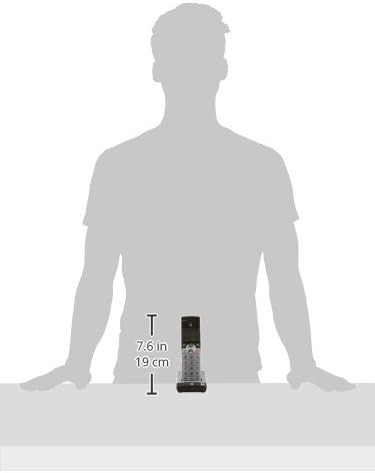
Image: A diagram illustrating the dimensions of the AT&T CL80115 Cordless Handset, showing a height of 7.6 inches (19 cm).
Маанилүү коопсуздук маалыматы
ЭСКЕРТҮҮ:
Бул продукт Калифорния штатында рак жана тубаса кемтик же башка репродуктивдүү зыян алып келген химиялык заттарды камтыйт.
Өрт, электр шок жана адамдардын жаракат алуу коркунучун азайтуу үчүн бул продуктуну колдонууда ар дайым негизги коопсуздук чараларын сактаңыз.
Кепилдик жана колдоо
For warranty information, technical support, or customer service inquiries, please refer to the documentation included with your primary AT&T cordless phone base system or visit the official AT&T/VTech support webсайт. Сатып алганыңыздын далили катары сатып алуу дүмүрчөгүңүздү сактаңыз.