
1. Продукт бүтүп калдыview
The Hikvision DS-7B08HQHI-K1 Turbo HD DVR is a robust digital video recorder designed for advanced surveillance systems. It supports various signal inputs including HDTVI, HDCVI, AHD, and CVBS, and is compatible with H.265+/H.265/H.264+/H.264 IP cameras. This DVR offers high-resolution recording up to 3MP and HDMI output up to 4K resolution, ensuring clear and detailed video monitoring. It is built for long-distance transmission over UTP and coaxial cables and supports up to 6TB HDD storage for extensive recording capabilities.
Негизги өзгөчөлүктөрү:
- H.265+/H.265/H.264+/H.264 encoding for main stream and H.265/H.264 for sub-stream of analog cameras.
- Self-adaptive HDTVI/HDCVI/AHD/CVBS signal input.
- Connectable to H.265+/H.265/H.264+/H.264 IP cameras.
- Supports up to 3MP resolution for recording.
- HDMI output at up to 4K (3840 × 2160) resolution.
- Long distance transmission over UTP and coaxial cable.
- 4/8-channel synchronous playback.
- Playback resolution: 3MP/1080p/720p/VGA/WD1/4CIF/CIF.
- Supports up to 6TB HDD (HDD not included).
- Features RJ45, 2 USB ports, and includes mouse support.
- Free Cloud P2P in-built for mobile viewing (Android and Windows Phone).

Сүрөт 1: Алдыңкы view of the Hikvision DS-7B08HQHI-K1 Turbo HD DVR, showing the sleek design and front panel indicators.
2. Орнотуу колдонмосу
2.1 Кутудан чыгаруу жана алгачкы текшерүү
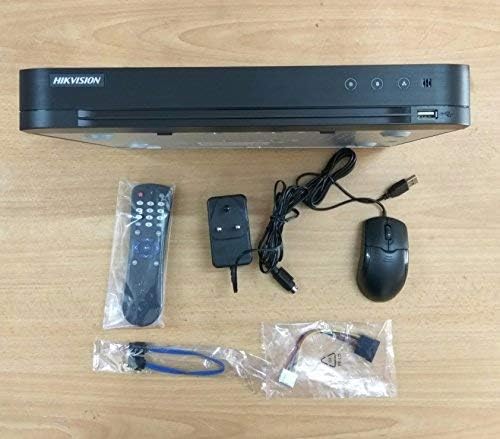
Carefully unpack all components from the box. Verify that all items listed in the packing list are present and undamaged. The package typically includes the DVR unit, power adapter, USB mouse, and a remote control.
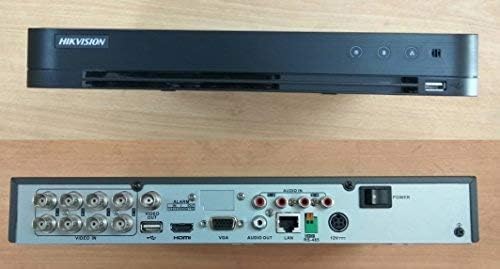
Figure 2: The Hikvision DVR unit displayed with its standard accessories, including the remote control, power adapter, and USB mouse.
2.2 Катуу дискти (HDD) орнотуу
The DVR supports up to a 6TB HDD, which is not included. Follow these steps to install an HDD:
- DVRдин үстүнкү капкагын бурап алып салыңыз.
- Connect the SATA power and data cables from the DVR to the HDD.
- Берилген бурамаларды колдонуп, HDDди DVR корпусуна бекитиңиз.
- Үстүнкү капкакты ордуна коюп, бурама менен бекитиңиз.
2.3 Перифериялык түзүлүштөрдү туташтыруу
Refer to the back panel diagram for port identification:
3-сүрөт: Арткы view of the Hikvision DVR, illustrating the various input/output ports for video, audio, network, and power connections.
- Video Input: Connect your HDTVI/HDCVI/AHD/CVBS cameras to the "VIDEO IN" BNC ports.
- Видео чыгаруу: Connect a monitor to the HDMI or VGA port.
- Аудио киргизүү/чыгыш: Connect audio devices to the "AUDIO IN" and "AUDIO OUT" RCA ports.
- Тармак: Connect an Ethernet cable from the "LAN" port to your router or network switch.
- USB: Connect the USB mouse to one of the USB ports. Additional USB ports can be used for backup devices.
- Күч: Connect the provided power adapter to the "12V" power input.
2.4 Күйгүзүү жана баштапкы конфигурация
After all connections are made, plug the power adapter into an electrical outlet. The DVR will power on automatically. Follow the on-screen prompts to complete the initial setup, including setting up an administrator password, date/time, and network settings. Ensure the HDD is formatted through the DVR's menu for proper recording.
3. Иштөө нускамалары
3.1 Live View
Once powered on, the DVR will display the live view from connected cameras on the connected monitor. You can switch between single-camera view жана көп камералуу тор view башкаруу элементтерин колдонуу.
3.2 Жазуу
The DVR is configured to record continuously by default once an HDD is installed and formatted. You can adjust recording schedules, motion detection settings, and other recording parameters through the DVR's main menu (typically accessible by right-clicking with the mouse).
3.3 Ойнотуу
Кайраview foo жазылганtage:
- Негизги интерфейс аркылуу "Ойнотуу" менюсуна кириңиз.
- Каалаган күн жана убакыт диапазонун тандаңыз.
- Choose the camera(s) you wish to view.
- Foo аркылуу өтүү үчүн ойнотуу башкаруу элементтерин (ойнотуу, тындыруу, алдыга жылдыруу, артка түрүү) колдонуңузtage.
3.4 Remote Access (Cloud P2P / Mobile View)
DVR алыстан башкарууну колдойт viewing via Hik-Connect (or similar P2P service) on Android and Windows Phone devices. To set up remote access:
- Ensure the DVR is connected to the internet via the LAN port.
- Enable the Cloud P2P service in the DVR's network settings.
- Download the Hik-Connect app on your mobile device.
- Register an account and add your DVR by scanning the QR code or entering the serial number.
- Сиз азыр болот view жаша фооtage and playback recordings remotely.
4. Техникалык тейлөө
Regular maintenance ensures the longevity and optimal performance of your DVR system.
- Тазалоо: Periodically clean the exterior of the DVR with a soft, dry cloth. Ensure ventilation openings are free from dust and obstructions. Do not use liquid cleaners directly on the unit.
- Программалык камсыздоонун жаңыртуулары: Hikvision расмий сайтынан текшериңиз website for the latest firmware updates. Keeping your DVR's firmware up-to-date can improve performance, add new features, and enhance security. Follow the provided instructions carefully when performing updates.
- Маалыматтын камдык көчүрмөсү: Маанилүү азык-түлүктөрдүн камдык көчүрмөсүн үзгүлтүксүз сактап туруңузtage to an external USB drive or network storage. This is crucial for preserving critical video evidence.
- HDD ден соолугун текшерүү: Monitor the health of your installed HDD through the DVR's system information menu. Replace the HDD if any errors or warnings are indicated.
5. Кыйынчылыктарды
This section addresses common issues you might encounter with your DVR.
| Көйгөй | Мүмкүн себеп | Чечим |
|---|---|---|
| No power to DVR | Power adapter disconnected; faulty power outlet; DVR power switch off. | Check power adapter connection; try a different outlet; ensure power switch is on. |
| Монитордо видео көрсөтүлбөйт | Monitor cable loose/faulty; incorrect video output setting; camera not connected/powered. | Check HDMI/VGA cable; ensure monitor is on correct input; verify camera connections and power. |
| Жаздыруу жок | HDD not installed/formatted; recording schedule not set; HDD full. | Install and format HDD; check recording schedule; delete old footage or replace HDD. |
| DVRге алыстан кирүү мүмкүн эмес | Network cable disconnected; P2P service disabled; incorrect network settings. | Check LAN cable; enable P2P in DVR settings; verify network configuration (IP address, gateway, DNS). |
If the problem persists after attempting these solutions, please contact Hikvision technical support or refer to the comprehensive user manual available on the Hikvision webсайт.
6. Техникалык шарттар
| Өзгөчөлүк | Деталь |
|---|---|
| Модель номери | DS-7B08HQHI-K1 (Note: Product specifications may also refer to DS-7208HQHI-F1 due to product upgrades and enhancements, but core resolution and functions remain consistent.) |
| Видео киргизүү | Self-adaptive HDTVI/HDCVI/AHD/CVBS signal input |
| IP камера киргизүү | Connectable to H.265+/H.265/H.264+/H.264 IP cameras |
| Resolution Recording | 3 МП чейин |
| HDMI чыгышы | Up to 4K (3840 × 2160) resolution |
| Ойнотуу каналдары | 4/8-channel synchronous playback |
| HDD колдоосу | 6 ТБ чейин (катуу диск кошулган эмес) |
| USB порттору | 2 |
| Тармак интерфейси | RJ45 Ethernet порту |
| Өлчөмдөр | 31.5 x 24.2 x 4.5 см |
| Салмагы | 1.98 кг (1980 грамм) |
| Байланыш технологиясы | HDMI, USB, VGA |
| Шайкеш түзмөктөр | Камера, смартфон |
7. Кепилдик жана колдоо
7.1 Кепилдик маалыматы
The Hikvision DS-7B08HQHI-K1 Turbo HD DVR comes with a 2 жылдык кепилдик. Please note that the warranty does not cover the adapter, mouse, remote, physical damage, or burning. For specific warranty claims, retain your proof of purchase.
7.2 Техникалык колдоо
For technical assistance, troubleshooting beyond this manual, or warranty inquiries, please contact Hikvision customer support. You can find contact information and additional resources, including updated manuals and software, on the official Hikvision webсайт:
When contacting support, please have your product model number (DS-7B08HQHI-K1 or DS-7208HQHI-F1) and serial number ready.