
1. Киришүү
The GAMDIAS Hermes GKB3000 is a mechanical gaming keyboard designed for enhanced durability and performance. It features GAMDIAS Certified Blue Switches with a 50 million actuation lifecycle, a 7-color spectrum backlight with 14 lighting effects, and various functional keys for an optimized gaming and typing experience. This manual provides instructions for setting up, operating, and maintaining your keyboard.
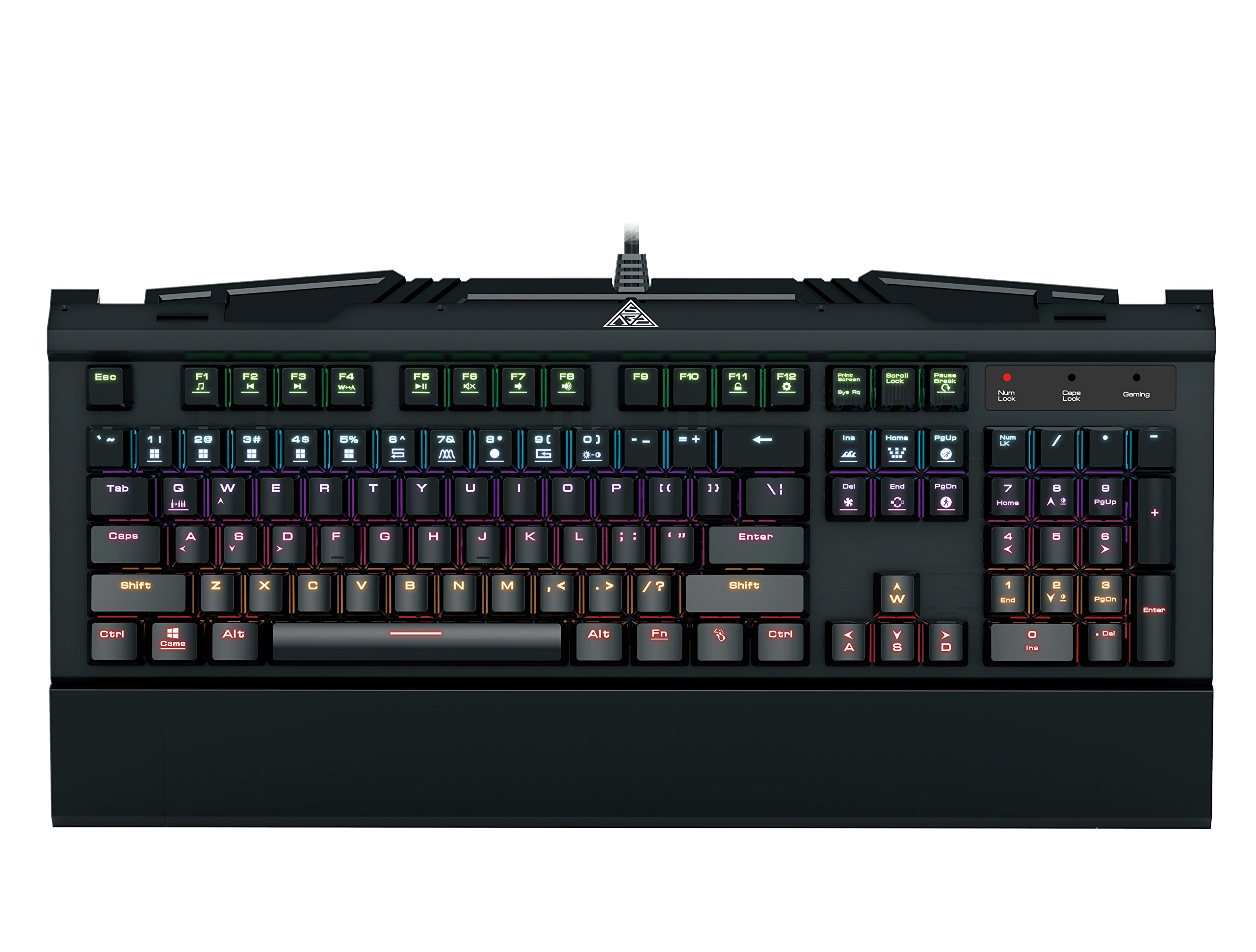
Image 1.1: The GAMDIAS Hermes GKB3000 Mechanical Gaming Keyboard. This image displays the full keyboard with its key layout and design, highlighting its compact yet robust build.
2. Пакеттин мазмуну
Кутучаны ачканда, бардык буюмдардын бар экенин жана бузулбаганын текшерүү үчүн таңгактын ичиндегисин текшериңиз.
- GAMDIAS Hermes GKB3000 Mechanical Gaming Keyboard
- Колдонуучунун Колдонмосу (бул документ)
3. Орнотуу
Follow these steps to set up your GAMDIAS Hermes GKB3000 keyboard:
- Баскычтопту таңгактан чыгаруу: Баскычтопту таңгагынан кылдаттык менен чыгарып алыңыз.
- Компьютерге туташуу: Клавиатура кабелинин USB-A туташтыргычын компьютериңиздеги жеткиликтүү USB портуна сайыңыз.
- Драйверди орнотуу: The keyboard is plug-and-play. Your operating system (e.g., Windows) will automatically detect and install the necessary drivers. No additional software installation is typically required for basic functionality.
- Жайгашкан жери: Place the keyboard on a stable, flat surface for comfortable use.
4. Иштөө нускамалары
4.1. Жарык эффекттери
The Hermes GKB3000 features a 7-color spectrum backlight with 14 sets of lighting effects. These include 9 preset effects and 5 customizable patterns.
- Которуштуруу эффекттери: Use the dedicated function keys (often combined with the Fn key) to cycle through the preset lighting effects. Refer to the keyboard's keycap legends for specific combinations.
- Customizing Effects: The keyboard supports 5 customizable lighting patterns. Instructions for programming these patterns are typically found in the full software suite available for download from the GAMDIAS website, if applicable.
- Жарыктыкты жөндөө: Adjust backlight brightness using designated function key combinations.
4.2. Multimedia Control Keys
Access multimedia functions quickly using the dedicated multimedia control keys, often activated by holding the Fn баскычын F баскычтары (F1-F12) менен айкалыштырып басыңыз.
- Үндү көзөмөлдөө: Increase, decrease, or mute audio.
- Медиа ойнотуу: Ойнотуу/тындыруу, токтотуу, мурунку трек, кийинки трек.
- Башка функциялар: May include opening default browser, email client, or calculator.
4.3. Special Gaming Functions
- WASD-Arrow Key Swap: This feature allows you to swap the functionality of the WASD keys with the arrow keys. This is useful for certain games or user preferences. Activate this function using a specific Fn key combination (e.g., Fn + W).
- Consecutive Attack Mode: This mode enhances rapid key input for gaming. Refer to the keyboard's specific documentation or GAMDIAS software for activation and configuration details.
- Баскычтоп кулпусу: Temporarily disable the keyboard input to prevent accidental presses. Activate using a Fn баскыч айкалышы.
- Windows ачкычын өчүрүү: Prevent accidental presses of the Windows key during gaming, which can minimize your game. Activate using a Fn key combination (e.g., Fn + Win key).
- N-Key Rollover: The GKB3000 supports N-key rollover, meaning multiple keys can be pressed simultaneously without ghosting or missed inputs. This ensures accurate and responsive commands during intense gaming sessions.
5. Техникалык тейлөө
Туура тейлөө клавиатураңыздын узак мөөнөттүү жана оптималдуу иштешин камсыз кылат.
- Тазалоо:
- Тазалоодон мурун клавиатураны компьютерден ажыратыңыз.
- Бир аз жумшак, түксүз кездемени колдонуңуз dampбетти сүртүү үчүн суу же жумшак тазалоо эритмеси менен жабылган.
- Ачкычтардын ортосундагы чаң жана таштанды үчүн кысылган абаны колдонуңуз.
- Катуу химиялык заттарды, абразивдүү тазалагычтарды же эриткичтерди колдонуудан алыс болуңуз.
- Сактагыч: Клавиатураны узак убакыт бою колдонбогондо, күндүн тике тийген нурунан жана экстремалдык температурадан алыс, салкын, кургак жерде сактаңыз.
- Колдонуу: Avoid dropping the keyboard or exposing it to excessive force, as this can damage the mechanical switches or internal components.
6. Кыйынчылыктарды
If you encounter issues with your GAMDIAS Hermes GKB3000 keyboard, refer to the following common solutions:
| Көйгөй | Мүмкүн чечим |
|---|---|
| Клавиатура жооп бербей жатат. |
|
| Арткы жарык иштебейт же күңүрт. |
|
| Айрым баскычтар иштебей жатат. |
|
| WASD keys are acting as arrow keys. |
|
If the problem persists after trying these solutions, please contact GAMDIAS customer support for further assistance.
7. Техникалык шарттар
The following are the technical specifications for the GAMDIAS Hermes GKB3000 Mechanical Gaming Keyboard:
| Өзгөчөлүк | Деталь |
|---|---|
| Бренд | ГАМДИАС |
| Модель номери | GKB3000 |
| Которуу түрү | GAMDIAS Certified Mechanical Blue Switches |
| Actuation Lifecycle | 50 миллион басуу |
| Арткы жарыктандыруу | 7-Color Spectrum, 14 Lighting Effects (9 preset, 5 customizable) |
| Anti-Ghosting | N-Key Rollover |
| Байланыш | USB-A |
| Операция системасы | Windows |
| Элемент Салмагы | 2.42 фунт (болжол менен 1.1 кг) |
| Продукциянын өлчөмдөрү (LxWxH) | 18.8 x 10.5 x 2 дюйм (болжол менен 47.75 x 26.67 x 5.08 см) |
| Материал | Plastic with Elegant Metal Plate Design |
8. Кепилдик жана колдоо
GAMDIAS products are manufactured to the highest quality standards. For information regarding warranty coverage, terms, and conditions, please refer to the warranty card included with your product or visit the official GAMDIAS webсайт.
For technical support, troubleshooting assistance, or any product-related inquiries, please contact GAMDIAS customer support through their official webсайт же продукт таңгагында көрсөтүлгөн байланыш маалыматы.
GAMDIAS расмий Webсайт: www.gamdias.com