
Introduction
This manual provides essential instructions for the safe and efficient operation, maintenance, and troubleshooting of your NuWave 30602 Double Precision Induction Cooktop Burner. Please read this manual thoroughly before first use and retain it for future reference.
Маанилүү коопсуздук маалыматы
Өрт, электр тогуна урунуу жана жаракат алуу коркунучун азайтуу үчүн электр шаймандарын колдонууда ар дайым негизги коопсуздук чараларын сактаңыз. Бул шайман үй тиричилигинде гана колдонулат.
- ысык беттерге тийбеңиз. Туткаларды же туткаларды колдонуңуз.
- Электр шокунан коргоо үчүн шнурду, вилкаларды же шайманды сууга же башка суюктукка салбаңыз.
- Кандайдыр бир шайманды балдар же алардын жанында колдонуп жатканда, катуу көзөмөл керек.
- Колдонбогондо жана тазалоодон мурун розеткадан ажыратыңыз. Бөлүктөрүн кийүүдөн же чечүүдөн мурун муздатыңыз.
- Эч кандай шайманды зымы же сайы бузулган, же шайман иштебей калгандан кийин же кандайдыр бир түрдө бузулгандан кийин иштетпеңиз.
- Шаймандын өндүрүүчүсү сунуш кылбаган кошумча тиркемелерди колдонуу жаракатка алып келиши мүмкүн.
- Сыртта колдонбоңуз.
- Шнур столдун же столдун четине илинип калышына же ысык беттерге тийбеңиз.
- Ыстык газ же электр мешине же ысытылган мештин жанына коюуга болбойт.
- Курамында ысык май же башка ысык суюктуктар бар шайманды жылдырууда өтө этияттык керек.
- Ар дайым алгач сайгычка сайыңыз, андан кийин шнурду розеткага сайыңыз. Өчүрүү үчүн каалаган башкарууну "өчүрүү" абалына буруңуз, андан кийин розеткадан сайгычты чыгарыңыз.
- Шайманды максаттуу колдонуудан башка максатта колдонбоңуз.
- Individuals with pacemakers or similar medical devices should consult their physician before using an induction cooktop.
- Use only induction-compatible cookware (magnetic bottom).
Продукт бүттүview
The NuWave 30602 is a double precision induction cooktop designed for efficient and precise cooking. It features two independent cooking zones, each with its own control panel.
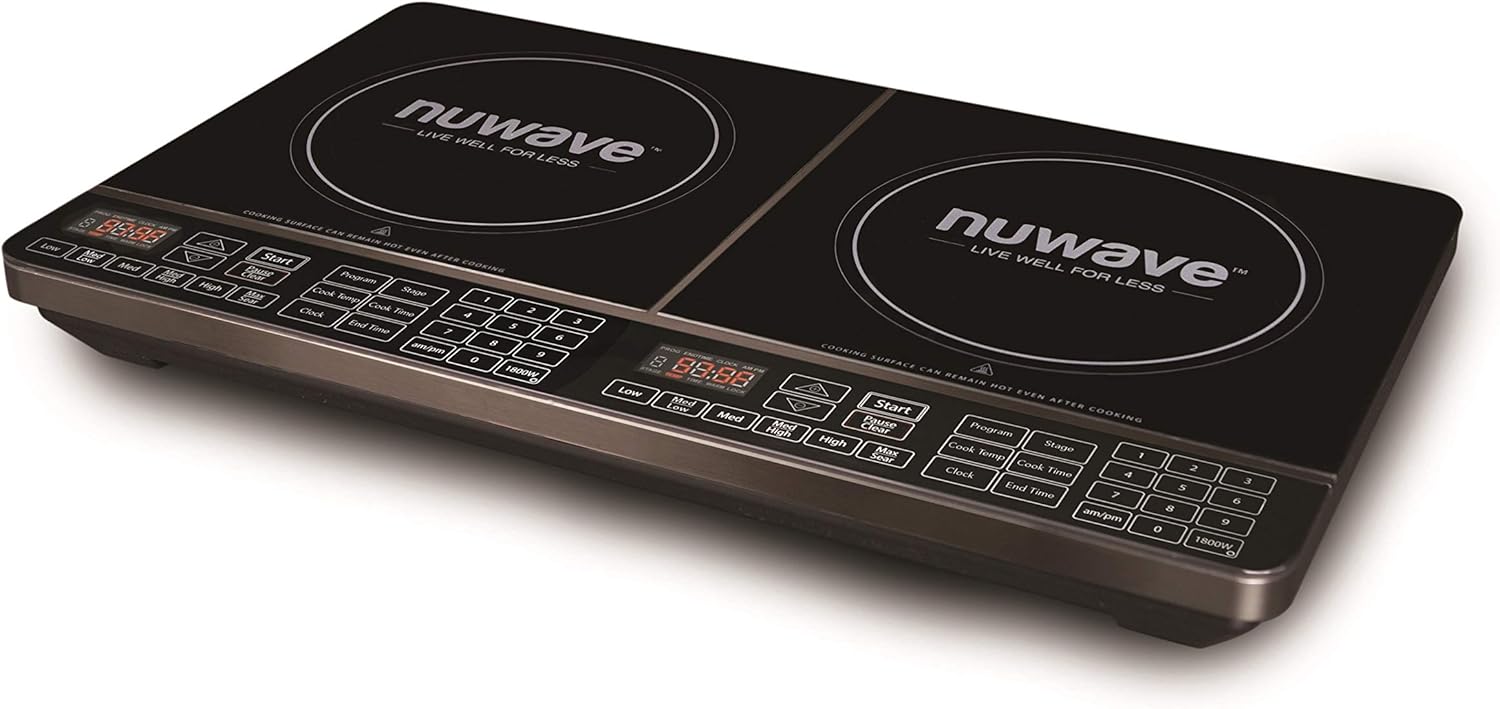
Сүрөт 1: Бурчтуу view of the NuWave 30602 Double Precision Induction Cooktop Burner. This image shows the overall design of the cooktop, including the two cooking zones and the integrated control panels.
Башкаруу панелинин өзгөчөлүктөрү
Each cooking zone has a dedicated control panel with touch-sensitive buttons and a digital display. Key controls include:
- Санариптик дисплей: Shows temperature, time, and error codes.
- Start/Pause/Clear: Initiates, pauses, or clears cooking settings.
- Program/Stage: Көптөр үчүнtagд тамак жасоо.
- Temperature/Wattage Controls: Buttons for adjusting temperature (Low, Med Low, Med, Med High, High, Max Sear) and wattage (am/pm, 1800W).
- Clock/Cook Time/End Time: For setting timers and delayed cooking.
- Сандар тактасы (1-9, 0): For precise temperature and time input.

Сүрөт 2: жогорудан ылдыйга view of the NuWave 30602 Double Precision Induction Cooktop Burner, highlighting the control panels for each burner. This image provides a clear view of all buttons and the digital displays.
Жайгашуу
- Пакеттен чыгаруу: Carefully remove the cooktop from its packaging. Retain packaging for storage or return if necessary.
- Жайгашкан жери: Place the cooktop on a stable, level, heat-resistant surface. Ensure there is adequate ventilation around the unit. Do not block the air vents located on the bottom or sides.
- Кубат туташуу: Кубат шнурун стандарттуу 120 В AC электр розеткасына сайыңыз. Розетканын жерге туура туташтырылганын текшериңиз.
- Rear Power Switch: Locate the main ON/OFF switch at the back of the unit, near where the power cord connects. Flip this switch to the 'ON' position to supply power to the cooktop. The digital displays will illuminate.
- Идиш идиштерин текшерүү: Before cooking, ensure you are using induction-compatible cookware. This typically includes cast iron, enameled iron, and stainless steel with a magnetic bottom. A simple test is to place a magnet on the bottom of your pot or pan; if it sticks, the cookware is compatible.
Иштөө нускамалары
Негизги операция
- Ensure the rear power switch is ON.
- Place induction-compatible cookware containing food or liquid on the desired cooking zone.
- Press the 'Start' button for the chosen cooking zone. The display will show a default temperature or wattage.
- Adjust the temperature or wattage using the dedicated temperature buttons (Low, Med Low, Med, Med High, High, Max Sear) or the number pad for precise settings. The cooktop offers 94 different temperature settings, ranging from 100°F to 575°F, in 5-degree increments.
- To stop cooking, press the 'Clear' button for the active zone, or remove the cookware. The unit will automatically shut off if no cookware is detected for a period.
Алдын-ала программаланган орнотуулар
The cooktop includes 6 different pre-programmed temperature settings for common cooking tasks. Refer to your quick-start guide for specific details on activating these programs.
Жылуу сактоо функциясы
Activate the 2-hour 'Keep Warm' feature to maintain food at approximately 155°F (68°C). This is ideal for keeping dishes warm after cooking.
Мульти-Сtage Тамак жасоо
The 'Program' and 'Stage' buttons allow you to set up to three different cooking stages with varying temperatures and times. This is useful for recipes that require different heat levels during the cooking process.
Ватtage Management
The cooktop allows for wattage adjustment between the two heating elements. This feature helps manage power consumption, especially when using both burners simultaneously. Consult the display for current wattage distribution and adjust as needed.
Кулпу өзгөчөлүгү
To prevent accidental changes to settings during cooking, use the lock feature. This typically involves a long-press or simultaneous press of specific buttons. Refer to the on-screen prompts or quick-start guide for exact activation and deactivation steps. Note that activating the lock feature may require precise button presses.
Күйөрмандар операциясы
It is normal for the internal cooling fan(s) to operate continuously while the cooktop is heating and for a period after cooking has finished. This ensures proper cooling of internal components.
Тейлөө жана тазалоо
Regular cleaning ensures optimal performance and extends the life of your cooktop.
- Тазалоодон мурун: Always unplug the cooktop from the power outlet and ensure it has completely cooled down.
- Мештин үстү: Жарнама менен айнек бетин сүртүңүзamp cloth and mild detergent. For stubborn stains or spills, use a non-abrasive cooktop cleaner specifically designed for glass or ceramic surfaces. Avoid abrasive pads, scouring powders, or harsh chemicals that can scratch or damage the surface.
- Башкаруу панели: Башкаруу панелин жумшак менен сүртүңүз, гamp cloth. Do not use excessive water or allow liquids to seep into the controls.
- Сырткы: Тышкы корпусту жумшак менен тазалаңыз, гamp кездеме.
- Тешиктер: Ensure the air intake and exhaust vents are clear of dust and debris. Use a soft brush or vacuum cleaner to gently clean them.
- Төгүлүүлөр: Clean up spills immediately, especially sugary liquids, to prevent them from hardening and potentially damaging the glass surface.
Проблемаларды чечүү
Эгерде сиз плитаңызда көйгөйлөргө туш болсоңуз, төмөнкү кеңири таралган көйгөйлөрдү жана чечимдерди караңыз:
| Көйгөй | Мүмкүн себеп | Чечим |
|---|---|---|
| Ашкана күйбөйт. | Rear power switch is OFF. Unit not plugged in. Power outage. | Ensure the rear power switch is ON. Check if the power cord is securely plugged into a working outlet. Check your household circuit breaker. |
| Дисплейде ката коду көрсөтүлөт (мисалы, E0, E1). | No cookware or incompatible cookware detected. Overheating. Internal malfunction. | Ensure induction-compatible cookware is centered on the cooking zone. Allow the unit to cool if it overheated. If the error persists, contact customer support. |
| Temperature setting (e.g., 'Sear') does not activate. | Убактылуу программалык ката. | Turn the unit off using the rear power switch, wait a few seconds, then turn it back on. This often resets the controls. |
| Cooktop makes a humming or buzzing noise. | Индукциялык технологиянын же муздатуу желдеткичинин нормалдуу иштеши. | This is typically normal. Induction cooktops use electromagnetic fields which can cause a slight hum in some cookware. The cooling fan also produces noise. |
| Temperature control seems inaccurate or too high/low. | Induction heats very rapidly. Cookware type and food volume affect heat transfer. | Adjust temperature in smaller increments. Familiarize yourself with how your specific cookware reacts to induction heat. Start with lower settings and increase as needed. |
Эгерде бул чечимдерди колдонуп көргөндөн кийин көйгөй чечилбесе, Nuwave кардарларды колдоо кызматына кайрылыңыз.
Техникалык шарттар
- Модель номери: 30602
- Бренд: Nuwave
- Күч: 900/1800 Watts (shared between two burners)
- Температура диапазону: 100°F - 575°F
- Температура Орнотуулары: 94 precise temperature settings, 5-degree increments
- Алдын ала программаланган жөндөөлөр: 6
- Жылуу сактоо өзгөчөлүгү: 2 саат 155°F
- Жылытуу элементтери: 2 (Sealed Burner type)
- Башкаруу түрлөрү: Сенсордук баскычтар
- Өзгөчөлүктөр: Temperature Control, Induction Compatible
- Элемент Салмагы: Болжол менен 17.4 фунт
- UPC: 735343078521, 793842115260, 652185306028
Кепилдик маалымат
For detailed warranty information, please refer to the warranty card included with your product packaging. You may also visit the official Nuwave webэң акыркы кепилдик шарттары жана эрежелери үчүн сайтты караңыз.
Кардарларды колдоо
If you require further assistance, have questions about your NuWave 30602 Double Precision Induction Cooktop Burner, or need to report a service issue, please contact Nuwave customer support through their official webсайт же продукт документациясында көрсөтүлгөн байланыш маалыматы.