
1. Киришүү
This manual provides detailed instructions for the operation and maintenance of your Supersonic SC-1495BT Bluetooth AM/FM Boombox. Please read this manual thoroughly before using the device to ensure proper function and to maximize your listening experience.
2. Коопсуздук маалыматы
- Өрт же электр тогуна урунуп калбаш үчүн аппаратты жамгырга же нымга тийгизбеңиз.
- Вентиляция тешиктерин жаап албаңыз. Аба агымы туура болушу үчүн аппараттын айланасында жетиштүү мейкиндикти камсыз кылыңыз.
- Аппаратты радиаторлор, жылуулук регистрлери, мештер же башка аппараттар (анын ичинде) сыяктуу жылуулук булактарынын жанына коюудан алыс болуңуз. ampкөтөргүчтөр) жылуулукту пайда кылуучу.
- Өндүрүүчү белгилеген тиркемелерди/аксессуарларды гана колдонуңуз.
- Чагылган бороондо же көпкө колдонулбаганда бул аппаратты электр розеткасынан ажыратыңыз.
- Бардык тейлөөнү квалификациялуу тейлөө кызматкерлерине тапшырыңыз. Аппарат кандайдыр бир жол менен бузулганда тейлөө талап кылынат.
3. Пакеттин мазмуну
Таңгактан чыгарганда, төмөндө көрсөтүлгөн бардык буюмдардын бар экенине ынаныңыз:
- Supersonic SC-1495BT Bluetooth AM/FM Boombox
- AC Power Cord
4. Продукциянын өзгөчөлүктөрү
The Supersonic SC-1495BT Boombox offers a variety of features for versatile audio playback:
- Bluetooth Version 3.0 for wireless music streaming
- Built-in USB input for media playback
- Built-in SD card and Micro SD card slot for media playback
- 3.5 mm Line-in (AUX) jack for external audio devices
- Four-band radio: AM, FM, SW1, SW2
- Integrated rechargeable battery for portable use
- Таза LCD дисплей
- Fast forward and rewind functions for media playback
- 360-degree rod antenna for enhanced radio reception
- Ротари көлөмүн башкаруу
- Жеке угуу үчүн кулакчын уячасы
- AC/DC operation for flexible power options
5. Башкаруу элементтери жана байланыштар
Familiarize yourself with the various controls and connection ports on your boombox.
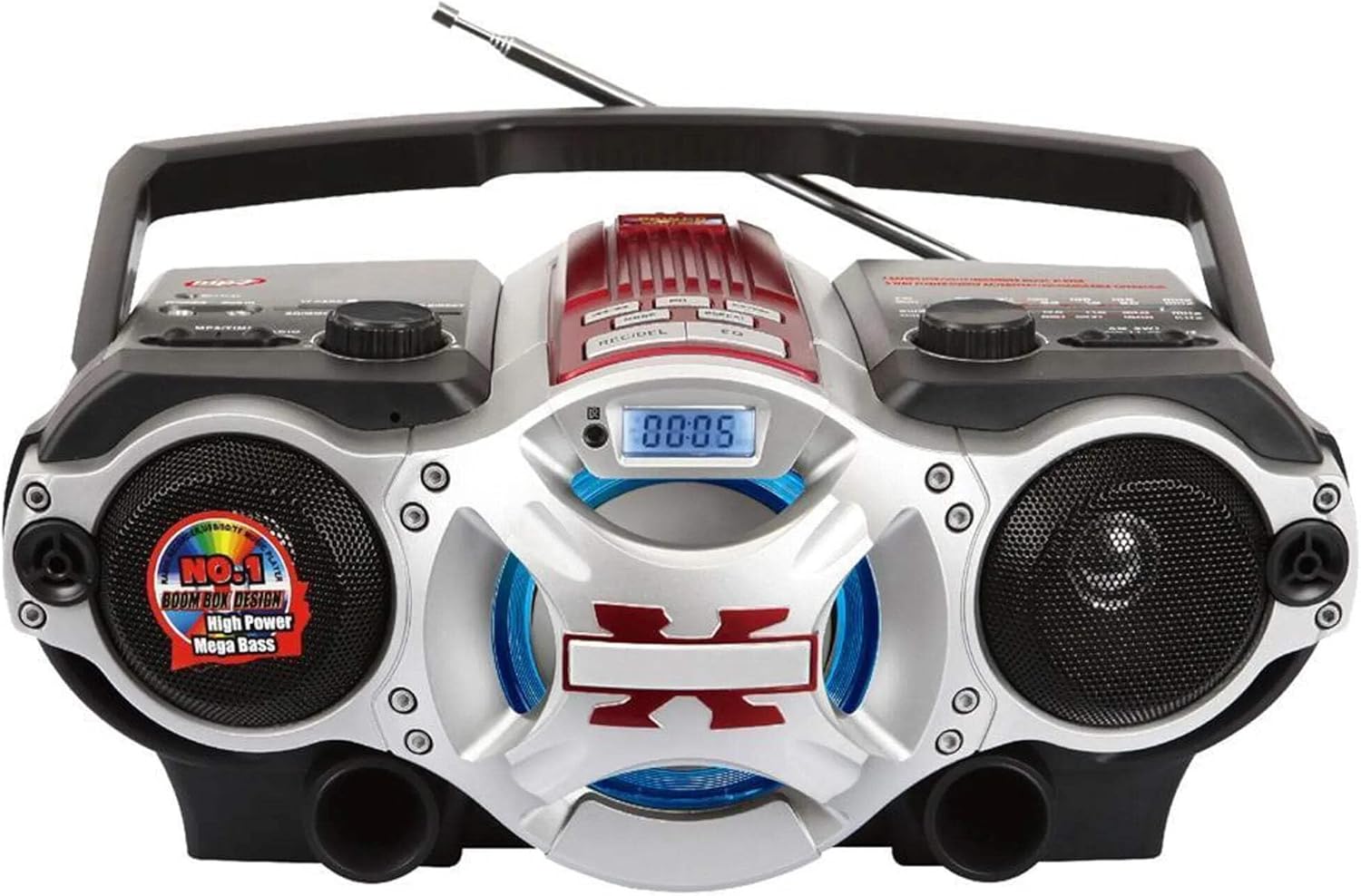
1-сүрөт: Фронт view of the Supersonic SC-1495BT Boombox, showing the speakers, central display, and main control area.

2-сүрөт: Left side controls, including USB input, SD/Micro SD card slot, AUX IN, PHONES jack, BT/MP3/RADIO mode switch, and Rotary Volume control.

3-сүрөт: Right side controls, featuring the AM/FM/SW1/SW2 band selector, TUNING knob, and playback control buttons (Play/Pause, Skip, Mode, Clock, EQ).
6. Орнотуу
6.1 Кубат туташтыруу
- AC кубаттуулугу: Connect the included AC power cord to the AC input on the back of the boombox and then plug it into a standard wall outlet. The internal rechargeable battery will begin charging.
- Туруктуу ток (батарея): The boombox has a built-in rechargeable battery. Ensure it is charged before portable use. The unit can also operate on DC power from the internal battery when not connected to AC.
6.2 Антеннаны тууралоо
Extend the 360-degree rod antenna for optimal radio reception, especially for FM and SW bands. Adjust its position for the clearest signal.
7. Иштөө нускамалары
7.1 Күйгүзүү/өчүрүү жана режимди тандоо
- To power on the unit, slide the BT/MP3/RADIO switch to the desired mode (BT, MP3, or RADIO).
- Өчүрүү үчүн, которгучту ӨЧҮРҮҮ абалына жылдырыңыз.
7.2 Bluetooth операциясы
- Режим которуштурууну төмөнкүгө жылдырыңыз BT (Bluetooth). The LCD display will indicate Bluetooth mode, and the unit will enter pairing mode.
- Bluetooth иштетилген түзмөгүңүздө (смартфон, планшет ж.б.) Bluetooth'ду иштетиңиз жана жеткиликтүү түзмөктөрдү издеңиз.
- Select "SC-1495BT" from the list of devices. Once paired, the unit will emit a confirmation sound.
- You can now play audio from your device through the boombox. Use your device or the boombox's playback controls (Play/Pause, Skip) to manage music.
7.3 Radio Operation (AM/FM/SW1/SW2)
- Режим которуштурууну төмөнкүгө жылдырыңыз РАДИО.
- Select the desired band (AM, FM, SW1, or SW2) using the band selector switch.
- Extend and adjust the rod antenna for optimal reception.
- айлантыңыз TUNING knob to scan for radio stations. The frequency will be displayed on the LCD.
7.4 USB/SD картаны ойнотуу
- Режим которуштурууну төмөнкүгө жылдырыңыз MP3.
- Insert a USB flash drive into the USB input or an SD/Micro SD card into the corresponding slot. Ensure the card is inserted correctly.
- The unit will automatically detect and begin playing MP3 audio fileс киргизилген медиадан.
- Use the playback control buttons (Play/Pause, Skip, Fast Forward, Rewind) to navigate tracks.
7.5 Көмөкчү (AUX) киргизүү
- Режим которуштурууну төмөнкүгө жылдырыңыз MP3.
- Тышкы аудио аспапты (мисалы, MP3 ойноткуч, смартфон) туташтырыңыз AUX IN 3.5 мм аудио кабелин колдонуп уячага салыңыз (кошулмага кирбейт).
- Play audio from your external device. The sound will be routed through the boombox speakers. Control playback from your external device.
7.6 Үндү башкаруу
айлантыңыз VOLUME үнүн жогорулатуу үчүн саат жебеси боюнча баскычты, аны азайтуу үчүн саат жебесине каршы.
7.7 Наушник уячасы
For private listening, plug standard 3.5mm earphones (not included) into the ТЕЛЕФОНДОР jack. The main speakers will be muted.
8. Техникалык тейлөө
- Тазалоо: Түзмөктүн сыртын тазалоо үчүн жумшак, кургак чүпүрөктү колдонуңуз. Абразивдүү тазалоочу каражаттарды же эриткичтерди колдонбоңуз.
- Сактагыч: Узак мөөнөткө колдонулбаганда, бумбоксту күн тийбеген жана экстремалдык температурадан алыс, салкын, кургак жерде сактаңыз.
- Батареяга кам көрүү: To prolong the life of the built-in rechargeable battery, avoid fully discharging it frequently. Charge the unit regularly, even if not in use.
9. Кыйынчылыктарды
If you encounter issues with your boombox, refer to the following common problems and solutions:
| Көйгөй | Мүмкүн себеп | Чечим |
|---|---|---|
| Күч жок | AC cord not connected; Battery discharged; Power switch off | Ensure AC cord is securely plugged in; Charge the battery; Slide power switch to ON/BT/MP3/RADIO. |
| Үн жок | Volume too low; Mute activated (if applicable); Incorrect mode selected; Earphones connected | Increase volume; Ensure correct mode (BT, MP3, RADIO) is selected; Disconnect earphones. |
| Bluetooth жупташкан жок | Boombox not in pairing mode; Device Bluetooth off; Too far from boombox | Ensure boombox is in BT mode; Enable Bluetooth on your device; Move device closer (within 30 feet/10 meters); Try re-pairing. |
| Радио кабыл алуу начар | Antenna not extended/adjusted; Weak signal area | Fully extend and adjust the rod antenna; Try moving the unit to a different location. |
| USB/SD карта ойнотулбай жатат | Туура эмес file формат; Карта/диск туура салынган эмес; Бузулган files | камсыз кылуу files are MP3 format; Re-insert card/drive; Try a different USB drive or SD card. |
10. Техникалык шарттар
- Модел: SC-1495BT
- Бренд: Supersonic
- Байланыш: Bluetooth (Ver. 3.0), USB, SD/Micro SD, 3.5mm AUX
- Радио топтору: AM, FM, SW1, SW2
- Колдоого алынган аудио форматтары: MP3
- Кубат булагы: AC 110-220V, Built-in Rechargeable Battery
- Баяндамачылар: 2 (Стерео)
- Өлчөмдөрү (L x W x Y): 15 x 10 x 12 дюйм
- Салмагы: 4.3 фунт
- Өндүрүүчү: Capitol Sales Company
- UPC: 639131814950
11. Кепилдик
This product comes with a 1-year limited warranty. Please retain your proof of purchase for warranty claims. For specific warranty terms and conditions, refer to the documentation included with your purchase or contact Supersonic customer support.
12. Колдоо
For further assistance, technical support, or inquiries regarding your Supersonic SC-1495BT Boombox, please visit the official Supersonic webсайтка же кардарларды тейлөө бөлүмүнө кайрылыңыз. Байланыш маалыматы, адатта, өндүрүүчүнүн сайтынан тапса болот webсайт же продукт таңгак.