
1. Киришүү
The Tone City Comp Engine is a compact compressor pedal designed for electric guitar. It provides dynamic control over your signal, enhancing sustain and evening out volume peaks for a more consistent sound. Featuring a mini housing, rugged construction, and true bypass circuitry, this pedal is built for reliable performance.
2. Коопсуздук маалыматы
- Use only a regulated 9V DC power supply with a center-negative plug. Using an incorrect power supply may damage the unit and void the warranty.
- Do not expose the pedal to water, moisture, or extreme temperatures.
- Педалды түшүрүп алуудан же катуу соккуга кабылтуудан алыс болуңуз.
- Түзмөктү өз алдынча ачууга же тейлөөгө аракет кылбаңыз. Бардык тейлөө иштерин квалификациялуу адистерге тапшырыңыз.
3. Пакеттин мазмуну
Пакетиңизде төмөнкү заттар камтылганын текшериңиз:
- Tone City Comp Engine Compressor Pedal
- User Manual
Note: A 9V DC power adapter is not included and must be purchased separately.
4. Башкаруу элементтери жана өзгөчөлүктөрү

Сүрөт 1: үстү жана каптал view of the Tone City Comp Engine pedal, illustrating the control knobs, input/output jacks, and power input.
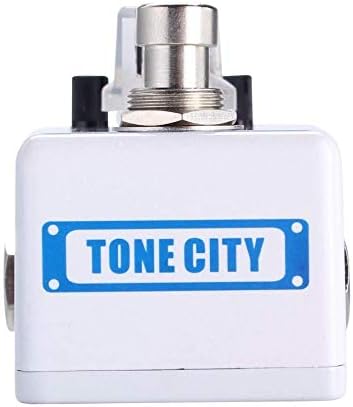
Сүрөт 2: Алдыңкы view of the Tone City Comp Engine pedal, highlighting the footswitch and compact design.
- ҮН (Үн) баскычы: Controls the overall output level of the pedal. Adjust this to match the bypassed signal level or to boost your signal.
- COMP (Compression) Knob: Сигналдын кысуу көлөмүн тууралайт. Жогорку жөндөөлөр көбүрөөк туруктуулукту жана кысылган үндү камсыз кылат.
- ЧАБУУ ТҮЙМӨГҮ: Controls how quickly the compressor reacts to the initial transient of your guitar signal. A faster attack (lower setting) will compress the initial pick attack more, while a slower attack (higher setting) allows more of the initial attack to pass through before compression engages.
- IN Jack: 1/4-inch mono input jack for connecting your guitar or other instrument.
- OUT Jack: 1/4-inch mono output jack for connecting to your ampкөтөргүч же башка эффект педалдар.
- 9V DC киргизүү: Power input for a standard 9V DC, center-negative power adapter (8mA current draw).
- Бут өчүргүч: Engages or bypasses the effect. The pedal features true bypass, ensuring your signal remains unaffected when the pedal is off.
5. Орнотуу
- Кубат туташуу: Connect a 9V DC, center-negative power adapter to the 9V DC input jack on the pedal. Ensure the power supply meets the specified requirements (8mA minimum current).
- Аспап туташуу: Гитараңызды же башка аспапты туташтырыңыз IN jack of the Comp Engine pedal using a standard 1/4-inch instrument cable.
- Ampкөтөргүч туташуу: туташтыруу OUT jack of the Comp Engine pedal to your ampстандарттуу 1/4 дюймдук аспап кабелин колдонуп, көтөргүчтүн киргизүүсүнө же сигнал чынжырыңыздагы кийинки педалдын киришине.
- Күйгүзүү: Бардык байланыштар коопсуз болгондон кийин, өзүңүздү күйгүзүңүз amplifier and then apply power to the pedal.
6. Иштөө нускамалары
To operate the Tone City Comp Engine pedal:
- Engage/Bypass: Press the footswitch to toggle the effect on or off. When the effect is engaged, the LED indicator will illuminate. When bypassed, the LED will be off.
- Adjusting Volume (VOL): Start with the VOL knob at the 12 o'clock position. Adjust it to achieve the desired output level, ensuring it matches or slightly boosts your bypassed signal.
- Setting Compression (COMP): Begin with the COMP knob at a lower setting (e.g., 9 o'clock). Increase the COMP knob gradually to add more sustain and dynamic control. Higher settings will result in a more noticeable compression effect.
- Controlling Attack (ATTACK): Experiment with the ATTACK knob to fine-tune the compressor's response. A lower ATTACK setting will compress the initial pick attack more, resulting in a smoother, more rounded tone. A higher ATTACK setting will allow more of the initial pick attack to pass through, preserving some of the natural dynamics before the compression kicks in.
Experiment with different knob settings to find the compression characteristics that best suit your playing style and musical context.
7. Техникалык тейлөө
- Тазалоо: Use a soft, dry cloth to clean the pedal's exterior. Do not use abrasive cleaners or solvents.
- Сактагыч: Store the pedal in a dry, cool environment away from direct sunlight and extreme temperatures when not in use.
- Байланыштары: Periodically check all cable connections for wear and tear. Replace damaged cables to ensure optimal performance.
8. Кыйынчылыктарды
- Үн жок:
- Ensure all cables are securely connected to the correct input/output jacks.
- Verify the power supply is correctly connected and providing the specified 9V DC.
- Check if the footswitch LED is illuminated when the effect is intended to be on.
- Test with different cables and a different power supply if available.
- Алсыз же бурмаланган үн:
- Check the VOL knob setting; it may be too low.
- Ensure the power supply is providing stable power.
- Reduce the COMP knob setting if the sound is overly squashed or distorted.
- Керексиз ызы-чуу:
- Жөнгө салынуучу электр менен жабдууну колдонуп жатканыңызды текшериңиз. Жөнгө салынбаган электр булактары ызы-чуу келтириши мүмкүн.
- Сигнал чынжырыңыздагы жерге туташтыруу циклдерин текшериңиз.
- Педалды күчтүү электромагниттик интерференция булактарынан (мисалы, күч трансформаторлору, флуоресценттик жарыктар) алыс кармаңыз.
9. Техникалык шарттар
| Өзгөчөлүк | Спецификация |
|---|---|
| Тtage | 9 Volts DC (Center-Negative) |
| Ampөчүрүү | 8 миллионamps |
| Controls Type | баскыч |
| Аппараттык интерфейс | 1/4 дюймдук аудио киргизүү/чыгаруу |
| Сигнал форматы | Аналог |
| Айланып өтүү түрү | Чыныгы айланып өтүү |
10. Кепилдик жана колдоо
For warranty information or technical support, please refer to the documentation provided at the point of purchase or contact your authorized Tone City dealer. Keep your proof of purchase for any warranty claims.