
1. Киришүү
This manual provides detailed instructions for the safe and effective operation of your SNDWAY SW-T80 Digital Laser Distance Meter. This device is designed for precise measurement of distances, areas, and volumes, and includes advanced functions such as Pythagorean calculations and continuous measurement. Please read this manual thoroughly before using the device.

Сүрөт 1: Алдыңкы view of the SNDWAY SW-T80 Digital Laser Distance Meter, showing the display, control buttons, and laser aperture.
2. Коопсуздук нускамалары
Коопсуз иштешин камсыз кылуу жана аппараттын бузулушуна же жаракатка жол бербөө үчүн төмөнкү коопсуздук чараларын сактаңыз:
- Лазердик нурлануу: This device emits Class II laser radiation. Do not stare directly into the laser beam or direct it at other people or reflective surfaces.
- Көздү коргоо: Лазердик нурга түздөн-түз көз тийбеңиз.
- Балдар: Аппаратты балдар жетпеген жерде сактаңыз.
- Иштөө чөйрөсү: Do not operate the device in explosive environments or near flammable materials.
- Өзгөртүүлөр: Аппаратты өзгөртүүгө же ажыратууга аракет кылбаңыз. Оңдоону ыйгарым укуктуу тейлөө кызматкерлери гана жүргүзүшү керек.
- Суу жана чаң: The device has an IP54 rating for dust and splash protection. However, avoid submerging it in water or exposing it to heavy rain.
- Батареялар: Use only specified battery types (2 x 1.5V AAA). Ensure correct polarity when installing. Remove batteries if the device will not be used for an extended period.
3. Пакеттин мазмуну
Пакетте бардык буюмдар бар экенин текшериңиз:
- 1 x SNDWAY SW-T80 Digital Laser Distance Meter (80m range)
- 1 х көтөрүп баштык
- 1 x Hanging Rope (Wrist Strap)
- 1 x User Manual
- Note: 2 x 1.5V AAA batteries are not included due to shipping regulations.
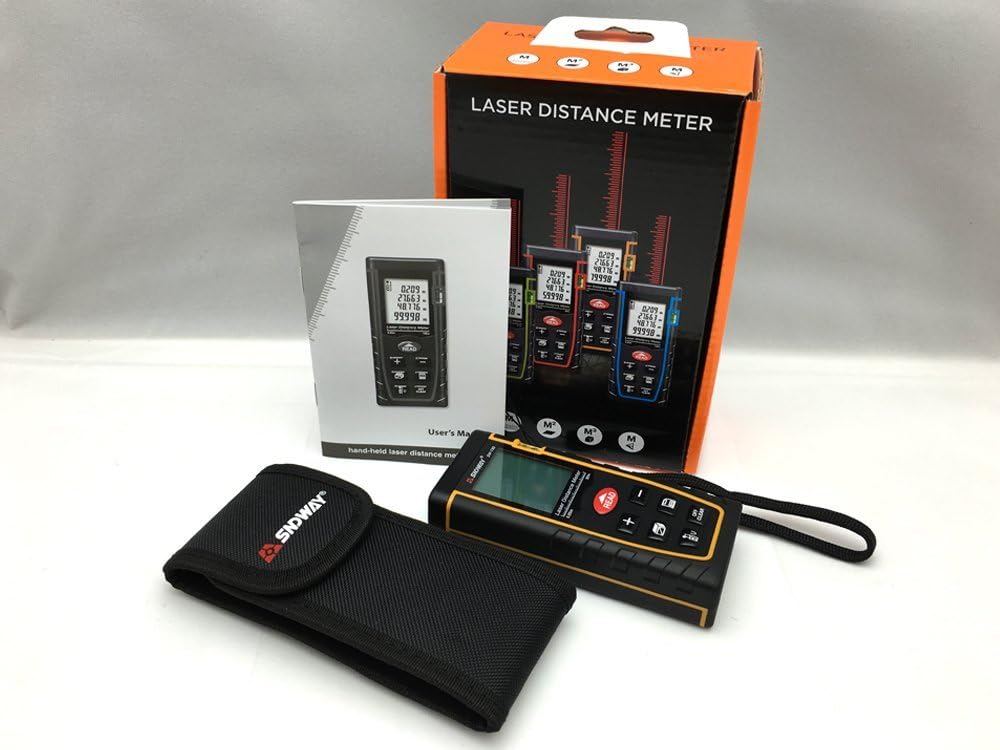
Figure 2: Contents of the SNDWAY SW-T80 package, including the device, carrying pouch, wrist strap, and user manual.
4. Түзмөк бүттүview
4.1. Физикалык компоненттер

3-сүрөт: Бурчтуу view of the SNDWAY SW-T80, highlighting its compact design and button layout.
- Лазердик диафрагма: Located at the top of the device, emits the laser beam.
- Алуучу линзасы: Located near the laser aperture, receives the reflected laser beam.
- LCD дисплей: Large, backlit screen showing measurement data, units, battery status, and function indicators.
- Башкаруу баскычтары: Various buttons for power, measurement, function selection, and data management.
- көбүк деңгээли: Integrated bubble level for horizontal alignment.
- Батарея бөлүмү: Түзмөктүн арткы бетинде жайгашкан.
4.2. Индикаторлорду көрсөтүү
The LCD display provides various indicators:
- Measurement Value: Displays the current measurement.
- Бирдик көрсөткүчү: Shows selected unit (m, in, ft).
- Батареянын абалы: Калган батареянын иштөө мөөнөтүн көрсөтөт.
- Laser On/Off: Icon indicating laser status.
- Маалымдама пункту: Indicates whether measurements are taken from the front or rear of the device.
- Функция режими: Icons for single measurement, continuous measurement, area, volume, and Pythagorean modes.
- Маалыматтарды сактоо: Indicates when data is stored or recalled.

Figure 4: Close-up of the SW-T80 display, illustrating the bubble level, and icons for area, volume, and Pythagorean measurement modes.
5. Орнотуу
5.1. Батареяны орнотуу
- Аппараттын артындагы батарея бөлүкчөсүнүн капкагын табыңыз.
- Бөлүмдү ачуу үчүн капкакты ылдый карай жылдырыңыз.
- Insert two (2) 1.5V AAA batteries, ensuring correct polarity (+/-) as indicated inside the compartment.
- Батарея бөлүкчөсүнүн капкагын жабыңыз, аны ордунан чыккыча өйдө жылдырыңыз.
Маанилүү: Агып кетүүнү жана бузулууну алдын алуу үчүн аппарат узак убакыт бою колдонулбай турган болсо, батареяларды алып салыңыз.

5-сүрөт: Арткы view of the SNDWAY SW-T80 with the battery compartment open, showing where to insert two AAA batteries.
6. Негизги операция
6.1. Күйгүзүү/өчүрүү
- Күйгүзүү: басыңыз ОКУ button once to turn on the device. The laser will activate.
- Өчүрүү: басып, кармап туруңуз ӨЧҮРҮҮ/ТААЗ button for approximately 2 seconds to turn off the device. The device will automatically power off after 150 seconds of inactivity, and the laser will turn off after 20 seconds of inactivity.
6.2. Бирдиктүү аралыкты өлчөө
- Аппаратты күйгүзүңүз.
- Aim the laser pointer at the target point.
- басыңыз ОКУ button once. The measurement will be displayed on the screen.
6.3. Continuous Measurement (Tracking)
- Аппаратты күйгүзүңүз.
- басып, кармап туруңуз ОКУ button for approximately 2 seconds. The device will enter continuous measurement mode, displaying real-time distance updates.
- The display will show the maximum and minimum measured distances during the continuous measurement.
- басыңыз ОКУ Үзгүлтүксүз өлчөөнү токтотуу үчүн баскычты кайра басыңыз.
6.4. Өлчөө бирдиктерин өзгөртүү
To cycle through measurement units (meters, inches, feet), press the UNIT button (often labeled with 'U' or 'UNIT' icon).
6.5. Changing Measurement Reference Point
The device can measure from its front or rear edge. Press the МААЛЫМАТ button (often labeled with an icon showing a measurement line from front/rear) to switch between these reference points. An icon on the display will indicate the current reference point.
7. Өркүндөтүлгөн функциялар
7.1. Аймакты өлчөө
- басыңыз ФУНКЦИЯ button (often labeled with a square icon) until the area measurement icon appears on the display.
- Measure the first side (length) by pressing ОКУ.
- Measure the second side (width) by pressing ОКУ кайра.
- Түзмөк автоматтык түрдө аянтты эсептеп, көрсөтөт.
7.2. Volume Measurement
- басыңыз ФУНКЦИЯ button until the volume measurement icon (cube) appears.
- Басуу менен узундугун өлчөө ОКУ.
- Басуу менен туурасын өлчөө ОКУ.
- Баскычты басып, бийиктикти өлчөңүз ОКУ.
- Түзмөк автоматтык түрдө көлөмдү эсептеп, көрсөтөт.
7.3. Пифагордук өлчөө (кыйыр өлчөө)
This mode allows indirect measurement of heights or distances using the Pythagorean theorem.
- басыңыз ФУНКЦИЯ button until the Pythagorean measurement icon (triangle) appears. There might be different Pythagorean modes (e.g., two-point or three-point). Select the appropriate mode.
- Follow the on-screen prompts or diagram to measure the required sides (hypotenuse, base). Ensure the device remains stationary for each measurement.
- Түзмөк белгисиз тарапты эсептеп, көрсөтөт.
7.4. Addition and Subtraction of Measurements
After a measurement is taken, you can add or subtract subsequent measurements:
- Perform a measurement.
- басыңыз + button to add the next measurement, or the - button to subtract it.
- Perform the next measurement by pressing ОКУ. The result will be added or subtracted from the previous total.
- Керектүү түрдө кайталаңыз.
8. Маалыматтарды башкаруу
8.1. Storing Data
After a measurement is displayed, press the САКТОО button (often labeled with a memory icon) to store the value. The device typically has a limited memory capacity for storing multiple measurements.
8.2. Маалыматтарды кайра чакырып алуу
басыңыз ЧАКЫРУУ button (often labeled with a memory icon or arrow) to view previously stored measurements. Repeated presses will cycle through the stored values.
8.3. Маалыматтарды тазалоо
To clear the current measurement from the display, press the ӨЧҮРҮҮ/ТААЗ button once. To clear all stored data, refer to the device's specific instructions, as this may involve holding a button or a menu option.
9. Техникалык тейлөө
- Тазалоо: жумшак колдонуу, damp cloth to clean the device. Do not use abrasive cleaners or solvents. Clean the laser aperture and receiver lens with a soft, lint-free cloth.
- Сактагыч: Store the device in its carrying pouch in a cool, dry place when not in use. Avoid extreme temperatures and direct sunlight.
- Батареялар: Remove batteries if the device is not used for extended periods to prevent corrosion.
- Калибрлөө: The device is factory calibrated. If you suspect accuracy issues, contact customer support.
10. Кыйынчылыктарды
| Көйгөй | Мүмкүн себеп | Чечим |
|---|---|---|
| Түзмөк күйбөйт. | Төмөн же өлүп калган батарейкалар; туура эмес батарея орнотуу. | Батареяларды алмаштыруу; туура полярдуулугун камсыз кылуу. |
| Туура эмес өлчөө. | Unstable surface; laser beam obstructed; target surface too reflective/absorbent; incorrect reference point. | Ensure stable measurement; clear obstructions; use a reflective target plate if needed; check reference point setting. |
| Дисплейде "Ката" билдирүүсү. | Measurement out of range; strong light interference; internal error. | Ensure target is within range (0.05-80m); avoid strong light; restart device. If persistent, contact support. |
| Лазер көрүнбөйт. | Bright ambient light; laser off. | Use in lower light conditions; ensure device is powered on and laser is active. |
11. Техникалык шарттар
| Өлчөө диапазону | 0.05дөн 80 метрге чейин |
| Өлчөө тактыгы | ±2 мм |
| Лазердик класс | II класс |
| Maximum Laser Output | <1 MW |
| Чаңдан жана чачыратмадан коргоо | IP54 |
| Автоматтык лазердик өчүрүү | 20 секунд |
| Түзмөктү автоматтык түрдө өчүрүү | 150 секунд |
| Иштөө температурасы | 0 °C менен 40 °C (32 °F - 104 °F) |
| Сактоо температурасы | -20 °C менен 60 °C (-4 °F менен 140 °F) |
| Электр камсыздоо | 2 x 1.5V AAA батарейкалар (киргизилген эмес) |
| Өлчөмдөр | 112 x 50 x 25 мм |
| Салмагы | Болжол менен 250 г |
| Материал | Пластик |
| Түс | Кара |
| UPC | 714532989770 |
12. Кепилдик жана колдоо
Warranty information for the SNDWAY SW-T80 Digital Laser Distance Meter is typically provided at the point of purchase or included with the product packaging. Please retain your proof of purchase for warranty claims.
For technical support, troubleshooting assistance beyond this manual, or warranty inquiries, please contact SNDWAY customer service through their official webсайтка же продуктуну сатып алган сатуучуга.