
1. Киришүү
Сатып алганыңыз үчүн рахматasing the Forever BS600 Bluetooth Speaker. This portable wireless speaker combines powerful audio with versatile playback options, including Bluetooth, FM radio, USB, and SD card support. It also features a built-in microphone for hands-free calling. Please read this manual carefully to ensure proper use and maintenance of your device.
Камтылган компоненттер:
- Forever BS600 Bluetooth Speaker
- 3.5 мм Jack кабели
- USB заряддоо кабели
- Литий батареясы (алдын ала орнотулган)

Image 1.1: Forever BS600 speaker with its accompanying 3.5mm audio cable and USB charging cable.
2. Коопсуздук маалыматы
To ensure safe and optimal operation, please observe the following precautions:
- Аппаратты экстремалдык температурага, түз күндүн нуруна же жогорку нымдуулукка дуушар кылбаңыз.
- Спикерди түшүрүүдөн же катуу таасирлерге дуушар кылуудан качыңыз.
- Аппаратты өзүңүз ажыратпаңыз, оңдобоңуз же өзгөртпөңүз. Бардык тейлөөлөрдү квалификациялуу кызматкерлерге тапшырыңыз.
- Динамикти суудан жана башка суюктуктардан алыс кармаңыз. Бул суу өткөрбөйт.
- Use only the provided or approved charging cables.
- Dispose of batteries according to local regulations. Do not expose batteries to excessive heat.
3. Продукт бүтүп калдыview
Familiarize yourself with the speaker's controls and ports:
Башкаруу баскычтары:
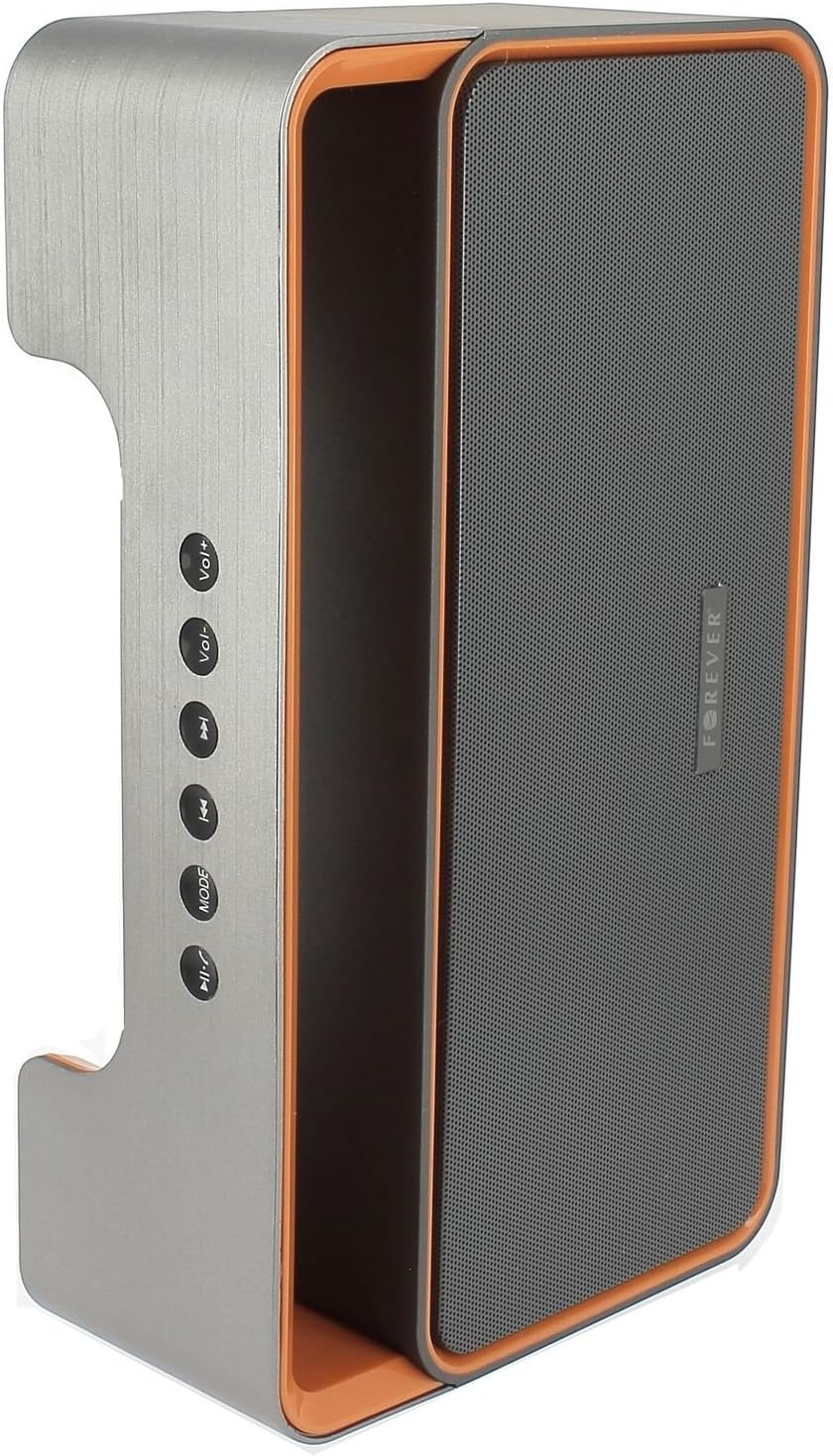
Image 3.1: Side panel with control buttons.
- Vol+ / Vol-: Үндү тууралоо.
- Мурунку трек / Кийинки трек: Navigate between tracks in playback modes or stations in FM mode.
- РЕЖИМ: Switch between Bluetooth, FM Radio, USB, SD Card, and AUX modes.
- Ойнотуу/Тыныгуу: Play or pause audio. Answer or end calls.
Порттор жана туташтыргычтар:

Image 3.2: Rear panel with ports and power switch.
- AUX киргизүү: For connecting external audio devices via 3.5mm cable.
- Микро SD карта уячасы: For playing music from a Micro SD card.
- USB порту: For playing music from a USB flash drive.
- Micro USB кубаттоо портДинамиктин ички батареясын кубаттоо үчүн.
- КҮЙГҮЗҮҮ/ӨЧҮРҮҮ: To power the speaker on or off.
4. Орнотуу
4.1 Динамикти заряддоо
- Connect the small end of the USB charging cable to the Micro USB port on the back of the speaker.
- USB кабелинин чоңураак учун USB кубат адаптерине (кошулмада жок) же компьютердин USB портуна туташтырыңыз.
- Динамик зарядталып жатканын көрсөтүү үчүн заряддоо индикатору күйөт (түсү ар кандай болушу мүмкүн).
- Толук заряддалгандан кийин индикатордун жарыгы өзгөрөт же өчөт. Заряддоо кабелин ажыратыңыз.
Note: For first-time use, fully charge the speaker for approximately 3-4 hours.
4.2 Күйгүзүү/өчүрүү
- To power on, slide the ON/OFF switch on the rear panel to the 'ON' position. You will hear an audible prompt.
- Өчүрүү үчүн, КҮЙГҮЗҮҮ/ӨЧҮРҮҮ которгучун "ӨЧҮРҮҮ" абалына жылдырыңыз.
5. Иштөө нускамалары
5.1 Режимди тандоо
басыңыз РЕЖИМ button repeatedly to cycle through the available modes: Bluetooth, FM Radio, USB, SD Card, and AUX.
5.2 Bluetooth жупташтыруу
- Динамикти күйгүзүңүз. Ал автоматтык түрдө Bluetooth жупташтыруу режимине өтөт, бул күйүп-өчүүчү LED жарыгы жана угулган сигнал менен көрсөтүлөт.
- Мобилдик түзмөгүңүздө (смартфон, планшет, компьютер) Bluetooth функциясын иштетиңиз.
- Издөө available Bluetooth devices. You should find "BS600" in the list.
- Select "BS600" to connect. Once paired, the LED light will stop flashing, and you will hear a confirmation sound.
- Эми сиз түзмөгүңүздөн аудиону динамик аркылуу ойной аласыз.
5.3 FM радио режими
- колдонуп, динамикти FM радио режимине которуңуз РЕЖИМ баскычы.
- басып, кармап туруңуз Ойнотуу/Тыныгуу button to initiate an automatic scan for FM stations. The speaker will save all found stations.
- колдонуу Мурунку трек жана Кийинки трек баскычтар сакталган станциялардын ортосунда чабыттоо.
5.4 USB/SD картаны ойнотуу
- USB флэш-дискти же Micro SD картаны (MP3 аудио менен fileс) арткы панелдеги тиешелүү портко киргизиңиз.
- The speaker will automatically switch to USB or SD card mode and begin playing music. If not, press the РЕЖИМ туура режимди тандоо үчүн баскычты басыңыз.
- колдонуу Мурунку трек, Кийинки трек, жана Ойнотуу/Тыныгуу ойнотууну башкаруу үчүн баскычтар.
5.5 AUX режими
- Connect one end of the 3.5mm audio cable to the AUX input port on the speaker.
- Connect the other end of the cable to the headphone jack of your external audio device.
- Switch the speaker to AUX mode using the РЕЖИМ баскычы.
- Тышкы аудио түзмөгүңүздөн ойнотууну башкарыңыз.
5.6 Call Handling (Bluetooth Mode)
- Чакырууга жооп бер: When a call comes in during Bluetooth mode, press the Ойнотуу/Тыныгуу жооп берүү үчүн баскычты бир жолу басыңыз.
- Чакырууну аяктоо: During a call, press the Ойнотуу/Тыныгуу чалууну бүтүрүү үчүн бир жолу басыңыз.
- Чакырууну четке кагуу: When a call comes in, press and hold the Ойнотуу/Тыныгуу чалууну четке кагуу үчүн баскыч.
5.7 Үндү башкаруу
басыңыз Том+ баскычын жана үн көлөмүн жогорулатуу үчүн Том- үнүн азайтуу үчүн баскыч.
6. Техникалык тейлөө
6.1 Тазалоо
- Тазалоодон мурун динамиктин өчүрүлгөнүн жана башка кубат булагынан ажыратылганын текшериңиз.
- Динамиктин сырткы беттерин сүртүү үчүн жумшак, кургак, түксүз чүпүрөктү колдонуңуз.
- Do not use abrasive cleaners, solvents, or chemical sprays, as these may damage the finish or internal components.
6.2 Сактоо
- Узак мөөнөткө колдонулбаганда, динамикти салкын, кургак жерде, тике күн нурунан жана экстремалдык температурадан алыс сактаңыз.
- It is recommended to charge the battery at least once every three months to maintain its lifespan.
7. Кыйынчылыктарды
| Көйгөй | Мүмкүн себеп | Чечим |
|---|---|---|
| Динамик күйбөйт. | Батарея түгөнүп калды. | Динамикти USB кабелин колдонуп кубаттаңыз. |
| Үн жок. | Үн өтө төмөн; туура эмес режим тандалган; түзмөк туташкан эмес. | Increase volume; press MODE button to select correct source; ensure Bluetooth/AUX connection is active. |
| Bluetooth жупташуусу болбой жатат. | Speaker not in pairing mode; device too far; Bluetooth not enabled on source. | Ensure speaker is in Bluetooth mode and flashing; move device closer; enable Bluetooth on your device. |
| FM радиосун кабыл алуу начар. | Алсыз сигнал; экологиялык кийлигишүү. | Динамикти кабыл алуу жакшыраак аймакка көчүрүңүз. |
| USB/SD карта ойнобой жатат. | Туура эмес file format; card/drive not inserted correctly; corrupted media. | камсыз кылуу files are MP3 format; reinsert media; try a different USB drive/SD card. |
8. Техникалык шарттар
| Модель аты | BS600 |
| Бренд | Түбөлүккө |
| Байланыш технологиясы | Bluetooth, көмөкчү, USB |
| Динамик түрү | Портативдик Bluetooth динамиги |
| Өзгөчөлүктөр | FM Radio, USB Reader, SD Card Reader |
| Максималдуу чыгаруу күчү | 10 Вт (2 x 5 Вт) |
| Аудио чыгаруу режими | Моно |
| Power Source | Батарея менен иштейт (литий-ион) |
| Башкаруу ыкмасы | Tactile Buttons |
| Өлчөмдөрү (болжол менен) | Бийиктиги: 13 см, туурасы: 24 см |
| Түс | Grey / Orange |
| Суу өткөрбөйт | Жок |
9. Кепилдик маалыматы
The Forever BS600 Bluetooth Speaker comes with a limited warranty. Please refer to the warranty card included with your purchase or contact your retailer for specific terms and conditions. This warranty typically covers manufacturing defects but does not cover damage caused by misuse, accidents, unauthorized modifications, or normal wear and tear.
10. Колдоо
If you encounter any issues not covered in the troubleshooting section or require further assistance, please contact the retailer where you purchased the product or visit the official Forever website for support resources. Please have your product model (BS600) and purchase details ready when seeking support.