
evga
EVGA GeForce GTX 1080 Founders Edition User Manual
Модель: 08G-P4-6180-KR
1. Киришүү
This manual provides comprehensive instructions for the installation, operation, and maintenance of your EVGA GeForce GTX 1080 Founders Edition graphics card. Please read this manual thoroughly before proceeding with installation to ensure proper setup and optimal performance.

Figure 1.1: The EVGA GeForce GTX 1080 Founders Edition graphics card alongside its packaging.
2. Коопсуздук маалыматы
Always observe the following safety precautions to prevent damage to the graphics card, your computer system, or personal injury:
- Графикалык картаны орнотуудан же алып салуудан мурун компьютериңиздин кубаты өчүрүлгөнүн жана розеткадан ажыратылганын текшериңиз.
- Discharge any static electricity from your body by touching a grounded metal object (e.g., the computer chassis) before handling the graphics card.
- Handle the graphics card by its edges. Avoid touching the gold-plated PCI Express connector or the components on the circuit board.
- Графикалык картаны нымдуулукка же экстремалдык температурага дуушар кылбаңыз.
- Компьютериңиздин ысып кетишине жол бербөө үчүн, анын ичинде жетиштүү аба айланышын камсыз кылыңыз.
- Орнотуу кадамдарына ишенбесеңиз, квалификациялуу техникке кайрылыңыз.
3. Пакеттин мазмуну
Verify that all items are present in your EVGA GeForce GTX 1080 Founders Edition package:
- EVGA GeForce GTX 1080 Founders Edition Graphics Card
- Driver CD / DVD (or link to driver download)
- Тез орнотуу боюнча колдонмо / Колдонуучунун колдонмосу
- Power Adapter Cable (if applicable, e.g., 6-pin to 8-pin PCIe power adapter)
- EVGA Case Badge

3.1-сүрөт: Мисamples of EVGA documentation and branding materials that may be included.

Figure 3.2: A PCIe power adapter cable, which may be necessary for some power supply configurations.
4. Системалык талаптар
Орнотуудан мурун, системаңыз төмөнкү минималдуу талаптарга жооп берерин текшериңиз:
- PCI Express талаптарына жооп берген Motherboard бир эки туурасы x16 графикалык уячасы бар.
- Minimum 500W or greater power supply with one 8-pin PCI Express power connector. (Consult your power supply manufacturer for specific details).
- 300MB of available hard-disk space.
- 4GB system memory (8GB or more recommended).
- Microsoft Windows 10, Windows 8.1, Windows 8, Windows 7, or Linux operating system.
- CD-ROM or DVD-ROM drive (for driver installation) or internet connection.
5. Орнотуу жана орнотуу
Follow these steps to install your EVGA GeForce GTX 1080 Founders Edition graphics card:
- Системаңызды даярдаңыз: Power off your computer and unplug the power cord from the wall outlet. Open your computer case.
- PCI Express уячасын табыңыз: Identify an available PCI Express x16 slot on your motherboard. This card requires a dual-width slot, meaning it will occupy two expansion slots on your case.
- Slot капкактарын алып салуу: Remove the two metal slot covers from the back of your computer case corresponding to the chosen PCI Express slot.
- Графикалык картаны орнотуу: Carefully align the graphics card with the PCI Express slot. Apply even pressure to both ends of the card until it is fully seated in the slot. A click may be heard when it is properly seated.
- Картаны коргоо: Secure the graphics card to the computer case using the screws from the removed slot covers.
- Туташуу кубаты: Connect the 8-pin PCI Express power connector from your power supply to the corresponding port on the graphics card. If your power supply does not have an 8-pin connector, use the included 6-pin to 8-pin adapter cable.
- Корпусту жаап, перифериялык түзүлүштөрдү туташтырыңыз: Close your computer case. Reconnect the power cord, monitor cables, and any other peripherals.

Figure 5.1: The EVGA GeForce GTX 1080 Founders Edition graphics card, ready for installation into a PCI Express slot.

Figure 5.2: The rear I/O panel of the graphics card, featuring DisplayPort, HDMI, and DVI connectors for display output.
6. Графикалык картаны иштетүү
6.1 Драйверди орнотуу
After physical installation, you must install the graphics drivers for proper functionality:
- Системаңызды жүктөңүз: Power on your computer. Windows will detect new hardware and may attempt to install generic drivers.
- Драйверлерди орнотуу:
- CD/DVD дисктеринен: Insert the included driver CD/DVD into your optical drive and follow the on-screen instructions.
- Интернеттен: Visit the official EVGA webсайт (www.evga.com/drivers/) же NVIDIAнын расмий webсайт (www.nvidia.com/drivers) to download the latest drivers for your GeForce GTX 1080. Run the downloaded installer and follow the prompts.
- Системаны кайра иштетүү: After the driver installation is complete, restart your computer when prompted.
6.2 Программалык камсыздоо жана утилиталар
EVGA provides additional software to enhance your experience:
- EVGA Precision XOC: This utility allows for monitoring, overclocking, and fan control of your graphics card. It can be downloaded from the EVGA webсайт.
- NVIDIA GeForce тажрыйбасы: This software optimizes game settings, updates drivers, and provides features like ShadowPlay for recording gameplay.
7. Техникалык тейлөө
Тийиштүү техникалык тейлөө видеокартаңыздын узак мөөнөттүү иштешин жана иштешин камсыз кылат:
- Айдоочуларды жаңыртыңыз: Regularly check for and install the latest graphics drivers from EVGA or NVIDIA to ensure optimal performance and compatibility with new games and applications.
- Таза чаң: Periodically clean dust from the graphics card's heatsink and fans using compressed air. Ensure the system is powered off and unplugged before cleaning. Hold the fan blades gently to prevent them from spinning rapidly during cleaning.
- Температураны көзөмөлдөө: Use monitoring software (e.g., EVGA Precision XOC) to keep an eye on GPU temperatures, especially during heavy loads. Ensure temperatures remain within safe operating limits.
- Туура аба агымын камсыз кылуу: Verify that your computer case has adequate ventilation and that case fans are functioning correctly to facilitate proper airflow around the graphics card.
8. Кыйынчылыктарды
Эгер графикалык картаңызда көйгөйлөргө туш болсоңуз, төмөнкү жалпы көйгөйлөрдү чечүү кадамдарын караңыз:
| Көйгөй | Мүмкүн болгон себеп / Чечим |
|---|---|
| Дисплей чыгышы жок / Кара экран |
|
| System crashes / Freezes during gaming |
|
| Poor performance in games / applications |
|
| Fan noise is excessive |
|
For further assistance, refer to the EVGA support webсайтка же алардын техникалык колдоосуна кайрылыңыз.
9. Техникалык шарттар
| Өзгөчөлүк | Деталь |
|---|---|
| Модель номери | 08G-P4-6180-KR |
| Графикалык процессор | NVIDIA GeForce GTX 1080 |
| Эс | 8 ГБ GDDR5X |
| GPU саат ылдамдыгы | 1607 MHz (Base) / 1733 MHz (Boost) |
| Видео чыгаруу интерфейстери | 3x DisplayPort 1.4, 1x HDMI 2.0b, 1x Dual-Link DVI-D |
| PCI Express | PCI Express 3.0 x16 |
| Power Connectors | 1x 8-pin PCIe |
| Сунушталган PSU | 500 Вт же андан жогору |
| Өлчөмдөрү (L x W x Y) | 10.63 x 0.39 x 4.33 дюйм |
| Салмагы | 2.2 фунт |

9.1-сүрөт: Жогорку view графикалык картанын, шоуasing its cooling solution.
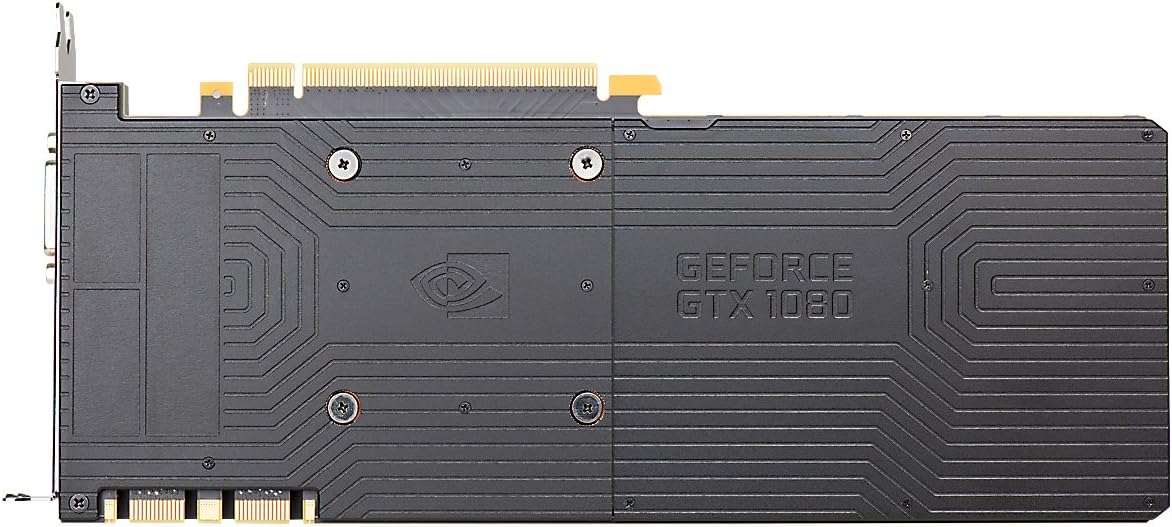
Figure 9.2: The backplate of the graphics card, providing structural support and heat dissipation.
10. Кепилдик жана колдоо
EVGA products are backed by a limited warranty. For detailed warranty information, including terms, conditions, and registration, please visit the official EVGA webсайт:
For technical support, driver downloads, FAQs, and community forums, please visit:
When contacting support, please have your product model number (08G-P4-6180-KR) and serial number ready.
Ask a question about this manual
Ask about setup, troubleshooting, compatibility, parts, safety, or missing instructions. Manuals+ will review the question and use this page’s manual context to help answer it.