
1. Продукт бүтүп калдыview
The Ergotron LX Monitor Arm is a versatile single monitor desk mount designed to enhance your workspace ergonomics and free up valuable desk space. It supports flat, curved, and ultrawide computer monitors up to 34 inches diagonal and weighing between 7 to 25 lbs. The arm features extensive adjustability for optimal viewing comfort and includes integrated cable management for a clean setup.

Figure 1: Ergotron LX Monitor Arm (5-Inch Pole, White)
2. Коопсуздук боюнча маанилүү маалымат
Please read this manual thoroughly before installation and use. Failure to follow these instructions could result in property damage or personal injury. Keep this manual for future reference.
- Столуңуздун бети монитордун колу менен мониторуңуздун жалпы салмагын көтөрө тургандай бекем экенин текшериңиз.
- 25 lbs (11.3 кг) максималдуу салмак сыйымдуулугунан ашпаңыз.
- Always install the monitor onto the arm before adjusting the monitor pivot or tension.
- Use appropriate tools and hardware as specified in the installation steps.
- Балдарды жана үй жаныбарларын орнотуу аянтынан алыс кармаңыз.
3. Кутуда эмне бар
The Ergotron LX Monitor Arm Kit includes the following components:
- LX Monitor Arm Assembly (5-Inch Pole, White)
- Эки бөлүктөн турган стол Clamp
- Орнотуу жабдуулары (бурамалар, шайбалар, алты бурчтуу ачкычтар)
- Instruction Manual

Figure 2: Contents of the Ergotron LX Monitor Arm Kit.
4. Орнотуу жана орнотуу
The LX Monitor Arm offers versatile mounting options, including a desk clamp and an optional grommet mount (sold separately). Follow the steps below for installation.
4.1 Desk Clamp Орнотуу
- Desk Clamp: Эки бөлүктөн турган столду бекитиңизamp to your desk. The clamp accommodates desk thicknesses from 0.4 to 2.4 inches (1 to 6.1 cm). Tighten the clamp securely using the provided knob.
- Insert Pole: Place the monitor arm pole into the secured desk clamp.
- Attach Arm: Slide the arm assembly onto the pole.
- Мониторду орнотуу: Attach your VESA-compatible monitor (75x75mm or 100x100mm) to the arm's mounting plate using the provided screws. Ensure the monitor is securely fastened.

3-сүрөт: Үстөл клamp attachment, showing compatibility with various desk thicknesses.
Video 1: Detailed guide on how to install and adjust the Ergotron LX Monitor Arm.
4.2 Grommet Mount Installation (Optional)
If using a grommet mount (sold separately), ensure your desk has a suitable hole (0.31" - 2" diameter) and the desk thickness is less than 2.25" (57 mm). Follow the grommet mount instructions provided with the accessory.
5. Монитор колунун иштеши
The Ergotron LX Monitor Arm allows for effortless adjustment to achieve your ideal viewing position. Always ensure your monitor is securely attached before making adjustments.
5.1 Adjusting Height and Extension
- Бийиктигин тууралоо: Gently lift or lower the monitor to your desired height. The arm provides up to 17.3 inches (44 cm) of vertical lift.
- Кеңейтүү/чектөө: Push or pull the monitor to extend or retract it from your viewing position. The arm offers up to 25.6 inches (65 cm) of extension.

Figure 4: Monitor mounted on the LX arm, demonstrating side-to-side movement.

Figure 5: Visual representation of the arm's extension capabilities.
Video 2: Demonstration of the LX Monitor Arm's full range of motion.
5.2 Tilt and Rotation
- Россия: Adjust the monitor's tilt up to 75 degrees (70° back, 5° forward) to reduce glare and optimize viewбурчтар.
- Айлануу: Rotate the monitor 360 degrees for portrait or landscape viewing.
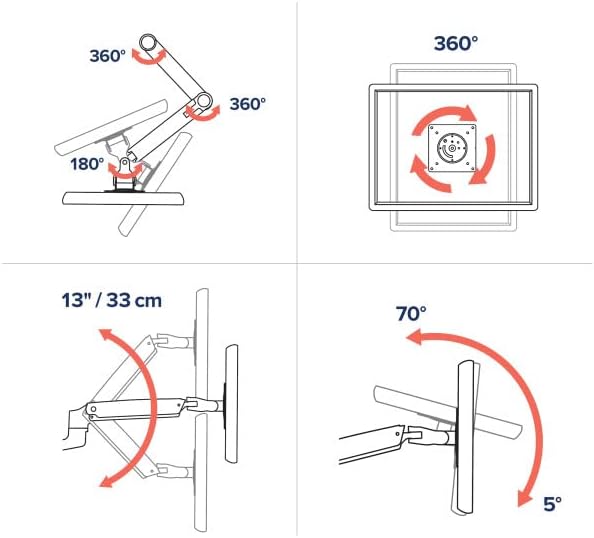
Figure 6: Illustrates 360° rotation, 13" (33cm) lift, and 75° tilt capabilities.

Figure 7: Monitor displayed in portrait orientation using the LX arm.
5.3 Кабелди башкаруу
Route cables through the integrated cable management channels along the arm to maintain a clean and organized workspace.
6. Техникалык тейлөө
- Тазалоо: Wipe the arm and monitor with a soft, damp кездеме. Катуу химиялык заттардан же абразивдүү тазалагычтардан алыс болуңуз.
- Мезгилдүү текшерүүлөр: Бардык бурамалар жана туташуулар бекем жана коопсуз экенин текшерүү үчүн мезгил-мезгили менен текшерип туруңуз.
- Чыңалууну жөндөө: If the monitor sags or is difficult to move, adjust the tension using the provided Allen wrench. Refer to the installation video for guidance.
7. Кыйынчылыктарды
- Monitor Sags/Drifts: The arm tension may be too low for your monitor's weight. Increase the tension using the appropriate Allen wrench.
- Мониторду жылдыруу кыйын: The arm tension may be too high. Decrease the tension using the appropriate Allen wrench.
- солкулдап: Ensure all mounting screws and clamp connections are securely tightened. A stable desk surface is also crucial.
8. Техникалык шарттар
| Өзгөчөлүк | Деталь |
|---|---|
| Бренд | Ergotron |
| Модел | LX Monitor Arm Kit (5-Inch Pole, White) |
| Монтаж түрү | Үстөлгө орнотуу (Стол үстөлү)amp included, Grommet Mount optional) |
| Кыймыл түрү | Артикуляциялоо |
| Материал | Металл |
| Түс | Ак |
| Шайкеш түзмөктөр | Monitors up to 34 inches diagonal |
| Салмак сыйымдуулугу | 7 – 25 фунт (3.2 – 11.3 кг) |
| VESA шайкештиги | 75x75мм, 100x100мм |
| Vertical Lift | 17.3 дюймга чейин (44 см) |
| Кеңейтүү | 25.6 дюймга чейин (65 см) |
| Тит бурч | 75 Degrees (70° back, 5° forward) |
| Айлануу | 360 Degrees (Portrait to Landscape) |
| Desk Clamp Калыңдыгы | 0.4 – 2.4 дюйм (1 – 6.1 см) |
9. Кепилдик жана колдоо
9.1 Кепилдик маалыматы
The Ergotron LX Monitor Arm is backed by a 10 жылдык чектелген кепилдик, ensuring quality and durability. This warranty covers defects in materials and workmanship under normal use.
9.2 Кардарларды колдоо
For technical assistance, troubleshooting, or warranty claims, please visit the official Ergotron webсайтына кириңиз же алардын кардарларды колдоо кызматына кайрылыңыз. Көбүрөөк маалыматты жана ресурстарды бул жерден таба аласыз Ergotron Store on Amazon.