
1. Киришүү
The LattePanda 2G/32GB V1.0 is a compact single board computer featuring a pre-installed full edition of Windows 10 Home Edition and an integrated Arduino compatible co-processor (ATmega32u4). This device is designed for developers, educators, and makers, enabling a wide range of projects from desktop computing to IoT applications and physical world interaction.
This manual provides essential information for setting up, operating, maintaining, and troubleshooting your LattePanda board.
2. Орнотуу нускамалары
2.1 Таңгактан чыгаруу жана алгачкы текшерүү
Carefully remove all components from the packaging. Verify that all items listed in the shipping list are present:
- LattePanda 2G/32GB board x 1
- WiFi Antenna x 1
- Printed Safety Precautions x 1
2.2 Электр энергиясы менен камсыздоого талаптар
The LattePanda requires a stable 5V power supply. Use a USB adapter with a minimum output of 2.1A and a high-quality MicroUSB cable. Insufficient power can lead to unstable operation or failure to boot.
2.3 Перифериялык түзүлүштөрдү туташтыруу
Connect necessary peripherals such as a display (via HDMI or MIPI-DSI), keyboard, and mouse to the available USB ports. The board supports standard USB keyboards and mice.
2.4 First Boot Procedure
To power on the LattePanda, locate the small, unmarked microswitch on the board. Press and hold this switch for approximately 1 секунд. The device will not power on with random or short presses. Wait for the red light to stop flashing before pressing the power button.

1-сүрөт: Жогорку view of the LattePanda board, showing various ports and components. The board measures approximately 7cm x 8cm.

Figure 2: Detailed pinout diagram of the LattePanda board, illustrating the various connectors and their functions, including Arduino-compatible pins.
3. Иштөө нускамалары
3.1 Windows 10 Home Edition
Your LattePanda comes pre-installed with a full edition of Windows 10 Home Edition. Upon first boot, the included Windows 10 OEM activation key will activate automatically. This allows you to run a wide range of Windows applications and development tools.

Figure 3: The LattePanda board connected to a display, showcasing the Windows 10 desktop environment.
3.2 Integrated Arduino Co-processor
The LattePanda features an integrated ATmega32u4 (Arduino Leonardo) co-processor. This allows for seamless integration of physical computing projects with the Windows environment. You can use the Arduino IDE directly on the LattePanda to program the co-processor.

Figure 4: A close-up of the ATmega32u4 chip, the integrated Arduino co-processor on the LattePanda board.
3.3 Байланыш
The board offers various connectivity options:
- USB порттору: 1x USB 3.0, 2x USB 2.0 for connecting peripherals and external devices.
- Зымсыз: Onboard Wi-Fi 802.11n 2.4G and Bluetooth 4.0 for network and device connections.
- Ethernet: 100Mbps Ethernet port for wired network access.
- Видео чыгаруу: HDMI and MIPI-DSI for display connections.
- GPIO: 6 Intel Processor GPIOs and 20 ATmega Processor GPIOs for custom hardware interfaces.
- Gravity Interface: 6 Gravity Interface Connectors for easy connection to DFRobot's Gravity series modules.
4. Техникалык тейлөө
4.1 Жылуулук башкаруу
The LattePanda board can generate heat during operation, especially under heavy loads. To ensure optimal performance and longevity, consider implementing a cooling solution. This may include:
- Attaching passive heatsinks to the main processor.
- Using a small cooling fan, particularly if the board is enclosed or used for extended periods.
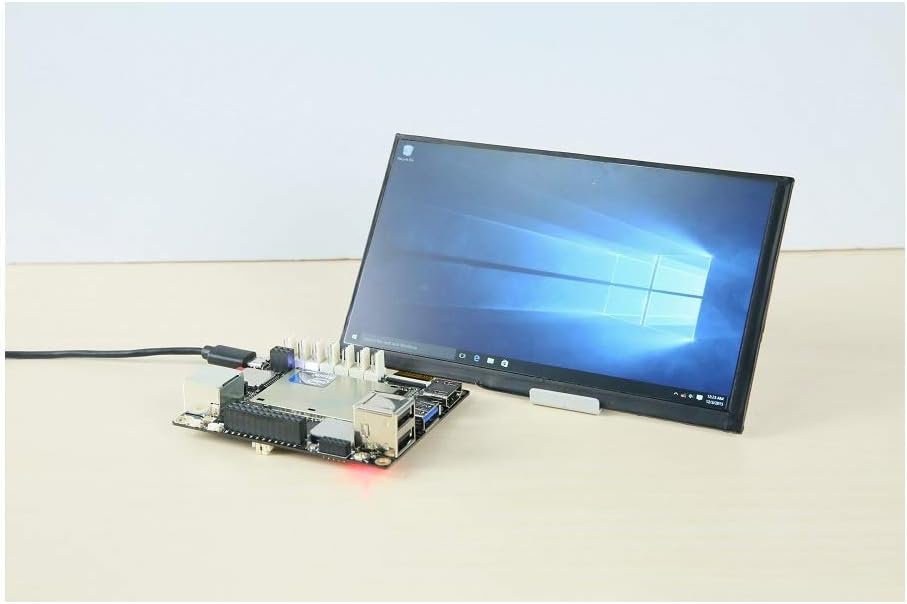
Figure 5: LattePanda board with an aftermarket heatsink installed, demonstrating a common thermal management solution.
4.2 Сактагычты башкаруу
The 32GB eMMC storage can become tight, especially with Windows 10 and additional development tools like Visual Studio. To manage storage effectively:
- Regularly clean up temporary files and unnecessary applications.
- Utilize external storage (USB drives, microSD cards) for large fileжана долбоорлор.
- Consider setting up a shared network drive if working with other computers.
4.3 Программалык камсыздоо жаңыртуулары
Ensure your Windows 10 operating system is kept up-to-date with the latest security patches and feature updates. This helps maintain system stability and security.
5. Кыйынчылыктарды
5.1 Board Not Powering On
- Электр камсыздоо: Verify that you are using a 5V power adapter with at least 2.1A output and a good quality MicroUSB cable.
- Кубат баскычы: Ensure you are pressing the correct microswitch for approximately 1 second. Short or multiple presses may not initiate boot.
5.2 Ашыкча ысып кетүү маселелери
- Муздатуу: If the board feels excessively hot or performance degrades, consider adding passive heatsinks or an active cooling fan.
- Вентиляция: Ensure the board has adequate airflow, especially if enclosed in a case.
5.3 Жай аткаруу
- Сактагыч: Check available storage space on the 32GB eMMC. Low space can significantly impact performance. Refer to Section 4.2 for storage management tips.
- Фондук процесстер: Close unnecessary applications and background processes in Windows 10.
- Термикалык жөнгө салуу: Overheating can cause the CPU to throttle, reducing performance. Address cooling as described in Section 5.2.
5.4 Жалпы маселелер
For any other concerns or issues not covered here, please refer to the official LattePanda website documentation or contact customer support via email.
6. Техникалык шарттар
| Өзгөчөлүк | Деталь |
|---|---|
| Процессор | Intel Cherry Trail Z8350 Quad Core (1.44GHz Base, 1.92GHz Burst) |
| Операция системасы | Windows 10 Home Edition |
| RAM | 2 ГБ DDR3L |
| Сактагыч | 32 ГБ eMMC |
| GPU | Intel HD Graphics, 12 ЕС @200-500Mhz |
| Arduino Co-processor | ATmega32u4 (Arduino Leonardo) |
| Video Output | HDMI, MIPI-DSI, Onboard touch panel overlay connector |
| USB порттору | 1x USB 3.0, 2x USB 2.0 |
| Зымсыз байланыш | Wi-Fi 802.11n 2.4G, Bluetooth 4.0 |
| Зымдуу туташуу | 100Mbps Ethernet |
| GPIO | Intel Processor GPIO x 6, ATmega Processor GPIO x 20 |
| Gravity Interface | Туташтыргычтар x 6 |
| Power Input | 5V @ 2.1A |
| Шайкештик | RoHS, FCC, CE |
| Модель номери | DFR0418 |
| Салмагы | 0.12 фунт |
7. Кепилдик
All faulty products can be replaced or repaired within 90 күн from the delivery date (including working days and holidays). This warranty covers manufacturing defects and malfunctions under normal use conditions.
8. Колдоо
For further assistance, documentation, or to report issues, please utilize the following resources:
- Официалдуу Website Documentation: Visit the LattePanda official website for comprehensive guides, tutorials, and community forums.
- Электрондук почта колдоо: If you have any questions or concerns, feel free to contact us directly via email.