
1. Киришүү
This manual provides detailed instructions for the installation, operation, and maintenance of the Altronix Digital Timer Model 6030. Please read this manual thoroughly before using the device to ensure proper function and to prevent damage.
2. Продукт бүтүп калдыview
The Altronix Digital Timer 6030 is a versatile programmable timer designed for various applications requiring timed operations. It is suitable for tasks such as siren/bell cut-off, dialer delay, guard tour supervision, and pulsing/flashing functions. Its robust design ensures reliable performance.
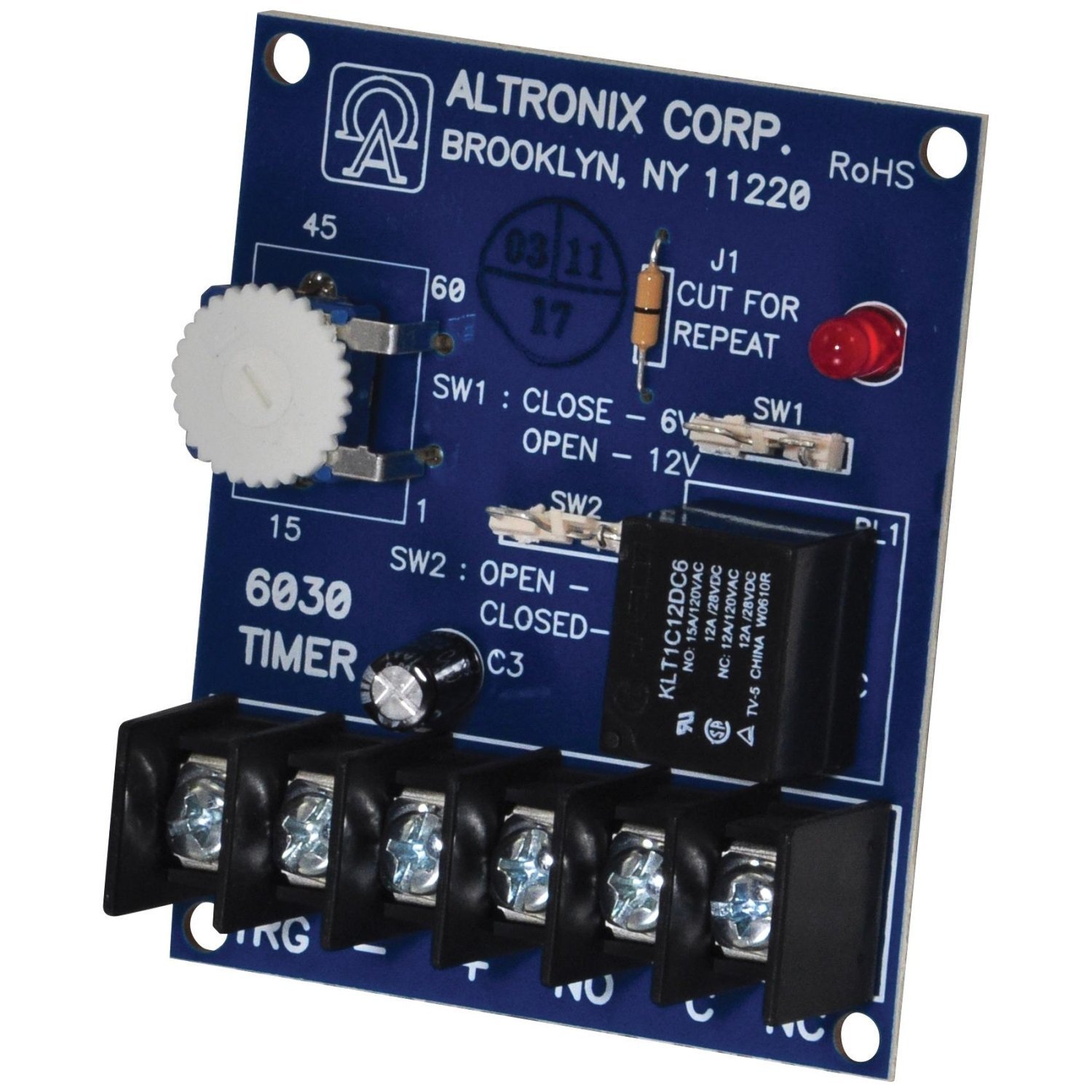
Сүрөт 1: Алдыңкы view of the Altronix Digital Timer 6030. This image shows the compact blue casing and the digital display area.
3. Орнотуу
Follow these steps for initial setup of your Altronix Digital Timer 6030:
- Кубат туташуу: Connect the timer to a stable power source as indicated in the wiring diagram (refer to the product's physical wiring instructions, not provided in this manual). Ensure correct polarity.
- Монтаждоо: Securely mount the timer in the desired location using appropriate fasteners. Ensure it is in a dry, protected environment.
- Баштапкы күйгүзүү: Once connected, the timer should power on. The display will typically show the current time or a default setting.
- Убакыт жана дата орнотуу: Refer to the "Operating Instructions" section to set the correct time and date for accurate scheduling.
4. Иштөө нускамалары
The Altronix Digital Timer 6030 features intuitive controls for programming and operation. The following steps outline common operational procedures:
4.1 Учурдагы убакытты жана датаны коюу
- басыңыз РЕЖИМ убакыт орнотуу режимине өтүү үчүн баскыч.
- колдонуу UP жана ылдый buttons to adjust hours, minutes, and date.
- Басыңыз SET or РЕЖИМ ырастоо жана кийинки жөндөөлөргө өтүү үчүн кайра басыңыз.
- баскычын басып, орнотуу режиминен чыгыңыз РЕЖИМ until the normal display returns.
4.2 Programming Timer Events
The timer supports up to 3 distinct settings or events.
- басыңыз ПРОГ программалоо режимине кирүү үчүн баскыч.
- Select the desired program number (e.g., P1, P2, P3) using the UP/ылдый баскычтар.
- коюңуз ON time for the event (hour, minute).
- коюңуз ӨЧҮРҮҮ time for the event (hour, minute).
- Select the days of the week for the program to be active.
- Кошумча программалар үчүн кайталаңыз.
- Басыңыз ПРОГ сактоо жана программалоо режиминен чыгуу үчүн.
4.3 Кол менен жокко чыгаруу
To manually switch the output ON or OFF outside of programmed times, press the КОЛ button. This typically cycles through AUTO ON, AUTO OFF, ON, and OFF states.
5. Техникалык тейлөө
The Altronix Digital Timer 6030 is designed for low maintenance. Adhering to these guidelines will help ensure its longevity:
- Тазалоо: Wipe the exterior with a soft, dry cloth. Do not use abrasive cleaners or solvents. Ensure no liquid enters the device.
- Курчап турган чөйрө: Keep the timer in a clean, dry environment, away from direct sunlight, extreme temperatures, and excessive humidity.
- Battery Backup (if applicable): Some digital timers include an internal battery for retaining settings during power outages. If your model includes one and experiences frequent resets, consult the manufacturer for battery replacement procedures.
6. Кыйынчылыктарды
If you encounter issues with your Altronix Digital Timer 6030, refer to the following common problems and solutions:
| Көйгөй | Мүмкүн себеп | Чечим |
|---|---|---|
| Таймер күйбөй жатат. | Электр менен камсыздоо жок же зымдар туура эмес туташтырылган. | Check power connections and ensure the power source is active. Verify wiring according to the product's diagram. |
| Программалар ишке ашпай жатат. | Incorrect programming or manual override active. | Review programming steps (Section 4.2). Ensure the timer is in AUTO mode, not manual ON/OFF. Check if the correct days of the week are selected. |
| Time/Date is incorrect after power loss. | Internal backup battery depleted or not present. | Reset the time and date (Section 4.1). If this occurs frequently, the internal backup battery may need replacement (if applicable to your model). |
| Дисплей бош же бүлбүлдөп турат. | Кубаттуулуктун төмөндүгү же ички ката. | Check power supply. If the issue persists, disconnect power for a few minutes and reconnect. If still problematic, contact support. |
If troubleshooting steps do not resolve the issue, please contact Altronix customer support for further assistance.
7. Техникалык шарттар
Key specifications for the Altronix Digital Timer 6030:
- Бренд: Altronix
- Модель номери: 6030
- Материал: Пластик
- Экрандын өлчөмү: 1.5 дюйм
- Орнотуулардын саны: 3 (programmable events)
- UPC: 782239930012
- Түсү: Blue (as per product listing)
8. Кепилдик жана колдоо
For specific warranty information, please refer to the documentation included with your purchase or visit the official Altronix webсайт. Кепилдиктин шарттары, адатта, сатып алынган күндөн тартып белгилүү бир мезгил ичинде өндүрүш кемчиликтерин камтыйт.
For technical support, product inquiries, or service, please contact Altronix customer service directly. Contact details can usually be found on the manufacturer's webсайтында же продуктунун таңгагында.
Note: Retain your proof of purchase for warranty claims.