
1. Киришүү
The Kramer VM-4HDT is a high-performance 4K@60Hz (4:2:0) HDBaseT extender distributor designed to take one HDMI input signal, along with IR and RS-232 control signals, and distribute it to four HDBaseT outputs. This device facilitates long-reach extension of HDMI signals with resolutions up to 4K, making it suitable for various professional AV installations. It is compatible with standard HDBaseT receivers such as the TP-580R.
2. Коопсуздук нускамалары
- Аппаратты иштетүүдөн мурун бардык нускамаларды кылдат окуп чыгыңыз.
- Аппаратты ачпаңыз casinг. Ичинде колдонуучу тейлей турган бөлүктөр жок.
- Түзмөктүн жерге туташтырылган розеткага туташтырылганын текшериңиз.
- Avoid exposing the device to moisture, rain, or extreme temperatures.
- Ашыкча ысып кетпеш үчүн аппаратты жакшы желдетилген жерге кой.
- Аппарат менен кошо берилген кубат адаптерин гана колдонуңуз.
3. Пакеттин мазмуну
Пакетиңизде төмөнкү заттар бар экенин текшериңиз:
- Kramer VM-4HDT 4K HDBaseT Extender Distributor unit
- Кубаттуу адаптер
- Rack ears (for rack mounting)
- Quick Start Guide
If any items are missing or damaged, contact your Kramer dealer immediately.
4. Продукт бүтүп калдыview
4.1 Арткы панелдин туташуулары
The rear panel of the VM-4HDT provides all necessary connections for input, output, control, and power.
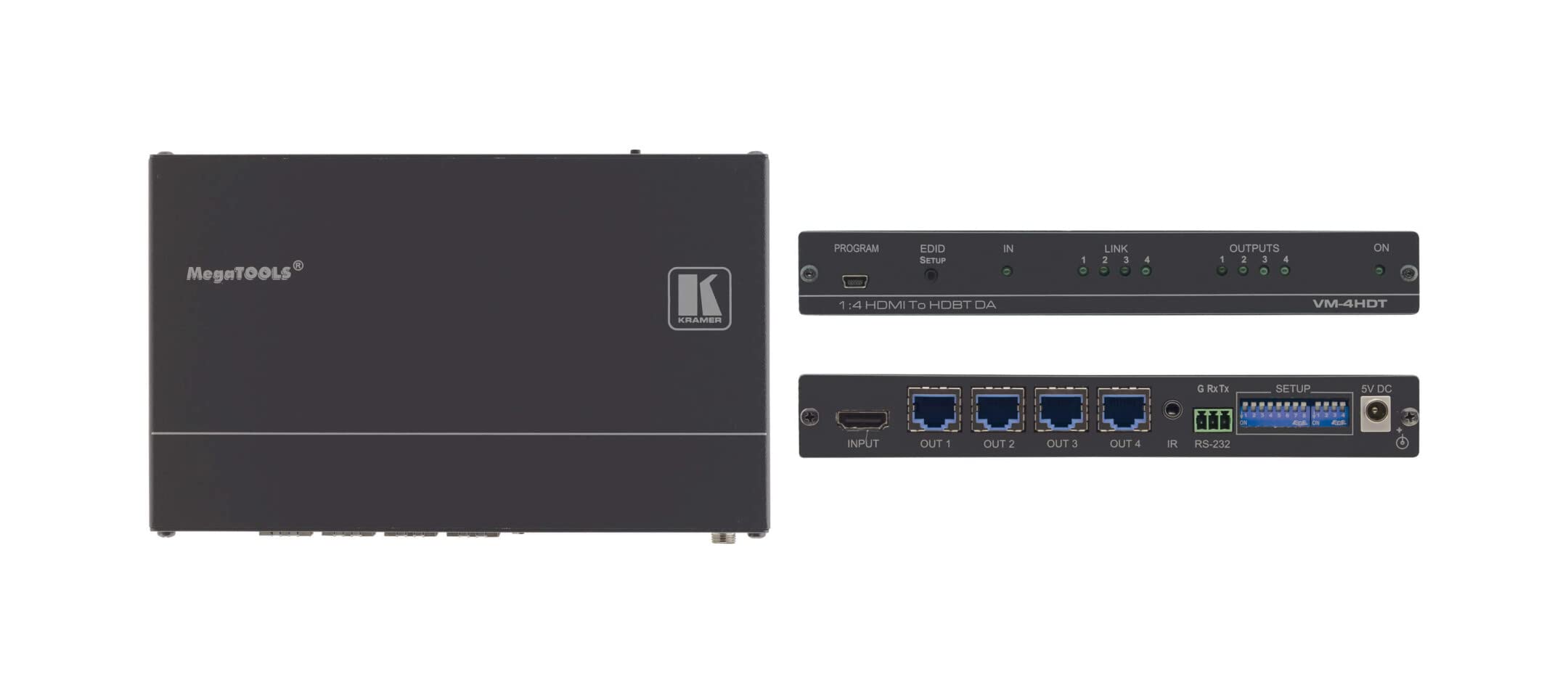
Figure 1: Kramer VM-4HDT Rear Panel Connections
1-сүрөттүн сүрөттөмөсү: This diagram illustrates the rear panel of the Kramer VM-4HDT. On the left, there is a single HDMI input labeled "IN 1" connected to a Blu-ray Player. To its right, there are four HDMI outputs labeled "OUT 1" through "OUT 4", each connected to a 4K Display. Further to the right, an RS-232 port is shown connected to an RC-43SL Control Keypad. Finally, on the far right, the power input and switch are depicted. This setup demonstrates how the VM-4HDT distributes a single HDMI source to multiple displays and integrates with an RS-232 control system.
- HDMI IN 1: Connect your HDMI source device (e.g., Blu-ray player, media server) to this input.
- HDMI OUT 1-4: Connect up to four HDBaseT receivers (not included) to these outputs. Each output extends the HDMI signal to a connected display.
- RS-232: Serial control port for connecting to a control system (e.g., Kramer RC-43SL Control Keypad) for remote management.
- Кубат киргизүү: Берилген кубат адаптерин бул жерге туташтырыңыз.
- Кубат которгучу: Toggles the device power on or off.
5. Орнотуу
- Бардык түзмөктөрдү өчүрүү: Before making any connections, ensure all devices (source, displays, VM-4HDT) are powered off and unplugged.
- HDMI булагын туташтырыңыз: HDMI булак түзмөгүңүздү туташтырыңыз HDMI IN 1 port on the VM-4HDT using a high-quality HDMI cable.
- Connect HDBaseT Receivers: Connect up to four HDBaseT receivers (not included) to the HDMI OUT 1-4 ports on the VM-4HDT using Cat5e/6/7 twisted-pair cables. Ensure the cables are properly terminated.
- Туташуу дисплейлери: Connect each HDBaseT receiver to its respective display (e.g., 4K TV, projector) using an HDMI cable.
- Connect Control System (Optional): If using an external control system, connect it to the RS-232 port on the VM-4HDT.
- Туташуу кубаты: Plug the supplied power adapter into the VM-4HDT's power input, then plug the adapter into a grounded AC outlet.
- Түзмөктөрдү күйгүзүү: Power on the VM-4HDT, then your displays, and finally your HDMI source device.
6. Иштөө
Once all connections are made and devices are powered on, the VM-4HDT will automatically detect the input signal and distribute it to all connected HDBaseT receivers and their respective displays.
- Сигналдын бөлүштүрүлүшү: The VM-4HDT acts as a 1:4 distributor, sending the single HDMI input to all four HDBaseT outputs simultaneously.
- EDID башкаруу: The device features Kramer's I-EDIDPro™ Intelligent EDID Processing™ to ensure proper communication between the source and displays, optimizing video resolution and audio formats.
- Контролдоо: If an RS-232 control system is connected, you can manage the VM-4HDT and potentially other connected Kramer devices via serial commands. Refer to the Kramer website for detailed RS-232 command protocols.
- LED көрсөткүчтөрү: Observe the LED indicators on the front panel (if present, or rear panel as per image) for status of HDMI and HDBaseT input/output connections and power.
7. Техникалык тейлөө
- Тазалоо: Disconnect power before cleaning. Use a soft, dry cloth to wipe the exterior of the device. Do not use liquid or aerosol cleaners.
- Вентиляция: Ensure that the ventilation openings are not blocked. Maintain adequate airflow around the device.
- Программалык камсыздоонун жаңыртуулары: Kramer Electronics компаниясын мезгил-мезгили менен текшерип туруңуз website for any available firmware updates for your VM-4HDT model. Follow the instructions provided with the update carefully.
8. Кыйынчылыктарды
| Көйгөй | Мүмкүн себеп | Чечим |
|---|---|---|
| Дисплейде видео чыгаруу жок. | Incorrect cable connection; Power issue; EDID conflict; Incompatible HDBaseT receiver. | Check all HDMI and Cat cable connections. Ensure the VM-4HDT and all connected devices are powered on. Verify the HDBaseT receiver is compatible and properly configured. Try power cycling all devices. |
| Видеонун сапаты начар же бүлбүлдөп. | Long cable run exceeding limits; Low-quality cables; Interference. | Ensure Cat cable length is within specified limits (e.g., 40m for 4K@60Hz). Use high-quality, certified Cat6a/7 cables. Check for sources of electromagnetic interference. |
| No control via RS-232. | Incorrect cable wiring; Incorrect serial port settings; Control system issue. | Verify RS-232 cable pinout and connection. Check baud rate, data bits, parity, and stop bits settings on the control system. Consult the Kramer website for RS-232 command documentation. |
9. Техникалык шарттар
| Өзгөчөлүк | Деталь |
|---|---|
| Модель номери | VM-4HDT (Item model number: 10-80359090) |
| Киргизүү | 1 x HDMI |
| Чыгуулар | 4 x HDBaseT (RJ-45) |
| Max чечим | 4K@60Hz (4:2:0) 24bpp |
| Максималдуу узартуу аралыгы | Up to 40m (130ft) for 4K@60Hz (4:2:0) |
| Шайкештик | HDMI 2.0, HDCP 1.4 |
| Башкаруу порттору | RS-232 |
| Өлчөмдөрү (L x W x Y) | 4.8 x 17 x 6.2 дюйм |
| Элемент Салмагы | 2.14 фунт |
| Өндүрүүчү | Kramer Electronics LTD |
10. Кепилдик
For detailed warranty information regarding your Kramer VM-4HDT, please refer to the official Kramer Electronics website or the warranty card included with your product. Warranty terms and conditions may vary by region and product type.
11. Колдоо
If you encounter any issues or require technical assistance with your Kramer VM-4HDT, please visit the official Kramer Electronics support webКөп берилүүчү суроолор, көйгөйлөрдү чечүү боюнча колдонмолор жана кардарларды тейлөө кызматынын байланыш маалыматы үчүн сайт.
Адатта, колдоо ресурстарын төмөнкү жерден таба аласыз: www.kramerav.com/support