
Introduction
This manual provides essential information for the safe and effective operation, maintenance, and troubleshooting of your BLACK+DECKER 28cm 18V Cordless Grass String Trimmer, model STC1820PCB-XJ. Please read this manual thoroughly before first use and keep it for future reference.
The BLACK+DECKER 28cm 18V trimmer is a powerful, ergonomically-designed string trimmer ideal for trimming excess grass and giving lawn borders a neat and tidy finish. It features E-drive technology for powering through tougher areas and a 28cm cutting swath for fast cutting. The Trim 'n' Edge function allows easy switching between trimming and edging applications. The Automatic Single Line Feed System (AFS) saves time and effort by automatically feeding line when needed.

Figure 1: ашыкview of the BLACK+DECKER STC1820PCB-XJ Cordless Grass String Trimmer.
Маанилүү коопсуздук маалыматы
Always wear appropriate safety gear, including eye protection, long pants, and sturdy footwear, when using this string trimmer. Be aware of flying debris and potential cut hazards. Keep bystanders, children, and pets at a safe distance (at least 15 meters/50 feet) from the operating area. Disconnect the battery pack before cleaning, performing maintenance, or when the tool is not in use.
Do not operate the trimmer in wet conditions or near flammable liquids or gases. Inspect the cutting line and guard before each use for any damage. Replace damaged parts immediately. Ensure all guards and handles are properly installed before operation.
Жайгашуу
1. Ассамблея
The STC1820PCB-XJ is designed for easy assembly. Ensure all components are present before beginning. The main shaft connects the motor head to the handle assembly. Securely fasten all connections as per the diagrams provided in the original packaging. This unit is a bare unit, meaning the battery and charger are sold separately.
2. Батареяны орнотуу
This trimmer operates on an 18V Lithium-Ion battery (not included). To install the battery, align the battery pack with the receptacle in the handle and slide it in until it clicks securely into place. To remove, press the release button and slide the battery out.

Figure 2: Proper insertion of the 18V Lithium-Ion battery into the trimmer handle.
3. Көмөкчү тутканы тууралоо
Adjust the auxiliary handle to a comfortable position that allows for balanced operation and good control. Loosen the knob on the handle, slide it to the desired position, and then tighten the knob firmly.
Иштөө нускамалары
1. Баштоо жана токтотуу
To start the trimmer, ensure the battery is fully charged and securely installed. Press the safety lock-off button (if present) and then squeeze the trigger switch. To stop, release the trigger switch.
2. Trimming Grass
Hold the trimmer firmly with both hands. Maintain a comfortable distance from the cutting head. Use a sweeping motion, moving the trimmer from side to side, to cut grass. The E-drive technology ensures consistent power, even in dense areas. The 28cm cutting swath allows for efficient coverage.

Figure 3: Operating the trimmer in an area with overgrown grass, demonstrating its power.
3. Edging Function (Trim 'n' Edge)
The Trim 'n' Edge feature allows you to easily convert the trimmer into an edger for neat lawn borders. To switch modes, twist the pole assembly as indicated by the markings on the tool. Once in edging mode, use the guide wheel to maintain a consistent cutting depth along paths and flowerbeds.
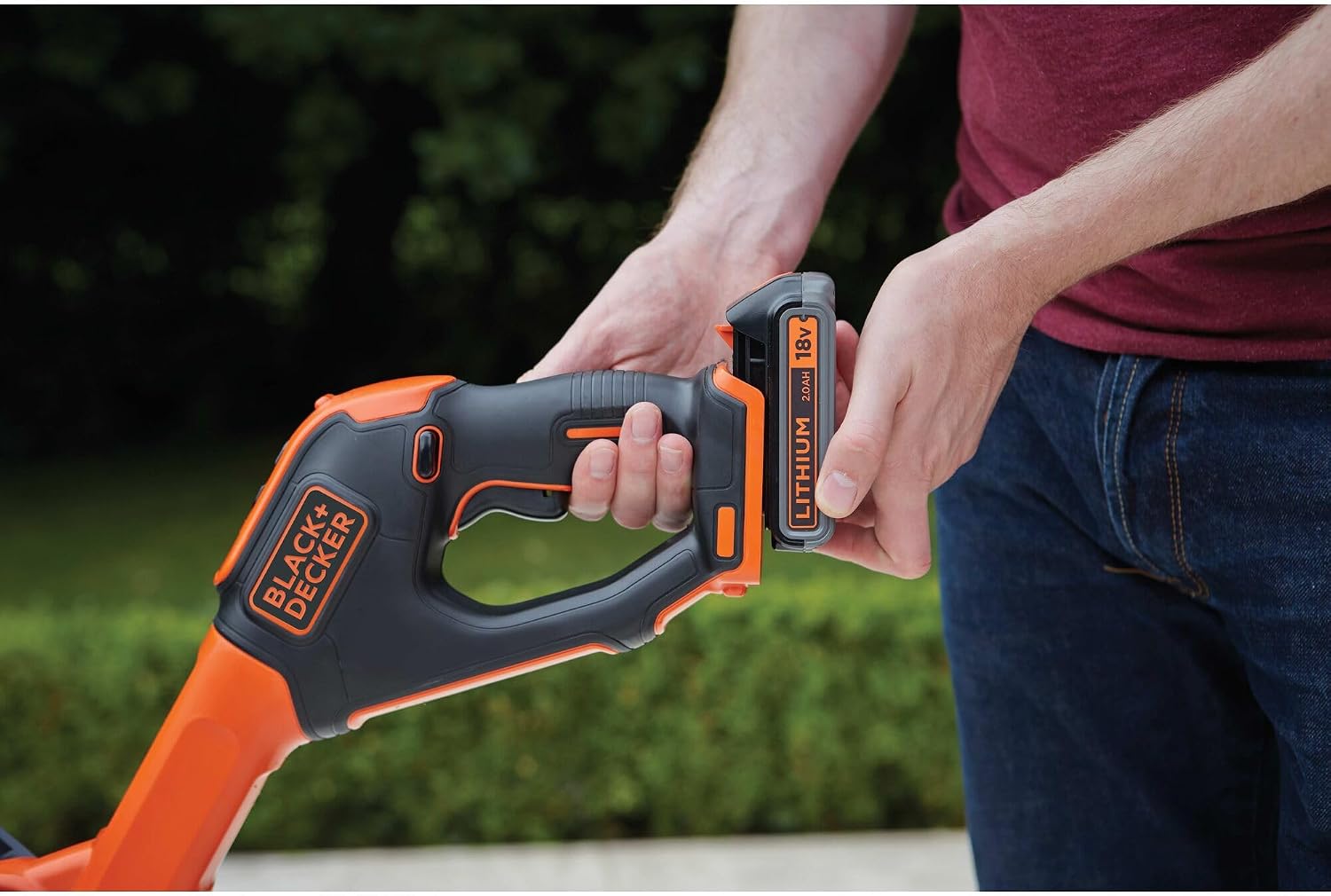
Figure 4: The trimmer being adjusted for the Trim 'n' Edge function, allowing for precise border work.

Figure 5: The trimmer in use for edging, creating a clean line along a garden bed.
4. Automatic Line Feed System (AFS)
The AFS automatically feeds out cutting line as needed, eliminating the need to manually bump or adjust the line. This ensures continuous cutting performance and saves time.

Сүрөт 6: Жакын пландан view of the trimmer head actively cutting grass, showcasing the automatic line feed.
Техникалык тейлөө
1. Тазалоо
After each use, disconnect the battery and clean the trimmer. Remove any grass clippings, dirt, or debris from the cutting head, guard, and ventilation slots. Use a damp cloth; do not use solvents or abrasive cleaners. Ensure the tool is dry before storage.
2. Replacing the Cutting Line
When the cutting line runs out, it needs to be replaced. Refer to your original product manual for specific instructions on how to open the spool housing and replace the line. Always use genuine BLACK+DECKER replacement line to ensure optimal performance and safety.
3. Сактоо
Store the trimmer in a dry, secure location, out of reach of children. If storing for extended periods, remove the battery pack and store it separately in a cool, dry place.
Проблемаларды чечүү
| Көйгөй | Мүмкүн себеп | Чечим |
|---|---|---|
| Триммер башталбайт. | Батарея туура орнотулган эмес же заряды түгөнгөн. | Батарея толук салынганын текшериңиз. Зарыл болсо, батареяны заряддаңыз. |
| Cutting line does not feed automatically. | Сап чаташкан же катушка бош. | Remove battery, clear any tangles. Replace spool if empty. |
| Мотор иштейт, бирок линия айланбайт. | Cutting head obstructed or damaged. | Disconnect battery. Clear debris from cutting head. Inspect for damage. |
| Төмөндөтүлгөн кесүү натыйжалуулугу. | Dull or short cutting line. | Allow AFS to feed more line, or replace spool if line is too short. |
Бул чечимдерди колдонгондон кийин көйгөй чечилбесе, BLACK+DECKER кардарларды колдоо кызматына кайрылыңыз.
Техникалык шарттар
| Өзгөчөлүк | Спецификация |
|---|---|
| Бренд | BLACK+DECKER |
| Модель номери | STC1820PCB-XJ |
| Power Source | Батарея менен иштейт (18V литий-ион, кошулган эмес) |
| Кесүү туурасы | 28 сантиметр |
| Line Cutting Speed | 8 000 - 24 000 RPM |
| Элемент Салмагы | 2.33 килограмм (5.13 фунт) |
| Продукциянын өлчөмдөрү | 9.13"L x 5.51"W (Dimensions of the head/base) |
| Ассамблея талап кылынат | No (minor assembly for initial setup) |
| Өзгөчөлүктөрү | E-drive Technology, Trim 'n' Edge Function, Automatic Single Line Feed System (AFS) |
Кепилдик жана колдоо
For warranty information, please refer to the warranty card included with your purchase or visit the official BLACK+DECKER webсайт. Кепилдик дооматтар үчүн сатып алганыңыздын далилин сактаңыз.
If you require technical assistance, replacement parts, or have questions regarding your BLACK+DECKER product, please contact BLACK+DECKER customer support. You can find contact details on the official BLACK+DECKER webсайты же продуктуну сатып алган сатуучу аркылуу.
Explore more BLACK+DECKER products and accessories at the BLACK+DECKER дүкөнү.
Кошумча маалымат
Бул колдонмого киргизүү үчүн сатуучунун эч кандай расмий продукт видеолору жеткиликтүү эмес.