
1. Продукт бүтүп калдыview
The Paddsun AW-NU231 is a Wireless USB Wi-Fi Adapter designed to provide wireless internet connectivity to compatible devices, primarily certain LG TV models and desktop computers. This adapter supports the IEEE 802.11n standard, operating on the 2.4GHz frequency band with a maximum data transfer rate of 300Mbps. It enables your device to connect to a wireless network for streaming content, browsing, and other internet-dependent functions.
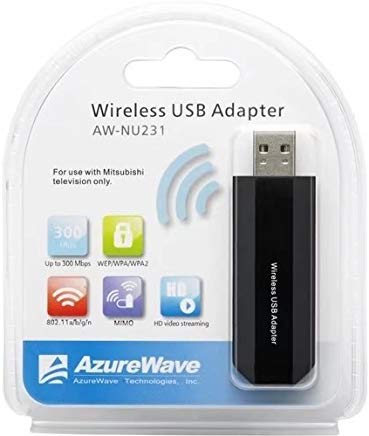
Image: The Paddsun AW-NU231 Wireless USB Wi-Fi Adapter, a compact dongle designed for easy connectivity.
2. Орнотуу нускамалары
- Түзмөктү өчүрүү: Ensure your television or desktop computer is powered off before proceeding with the installation.
- Адаптерди киргизүү: Locate an available USB port on your compatible device. Carefully insert the Paddsun AW-NU231 USB Wi-Fi Adapter into the USB port.
- Түзмөктү күйгүзүү: Power on your television or desktop computer.
- Driver Installation (for Desktops):
- For most modern operating systems, the adapter may be recognized automatically (plug-and-play).
- If not, you may need to install drivers. Refer to your operating system's device manager or the manufacturer's support webдрайверлерди жүктөө үчүн сайт.
- Тармак орнотууларына кирүү:
- For LG TVs: Navigate to the TV's settings menu, usually found under "Network" or "Connection" settings.
- For Desktops: Иштетүү системаңыздын тармак жөндөөлөрүнө кириңиз.
- Wi-Fi'га туташуу: Select "Wireless Connection" or "Wi-Fi" from the network options. Your device should scan for available wireless networks. Select your desired network from the list and enter the Wi-Fi password if prompted.
- Байланышты текшерүү: Once connected, your device should indicate a successful internet connection.
3. Иштөө нускамалары
Once the Paddsun AW-NU231 adapter is successfully installed and connected to a Wi-Fi network, your device will have internet access. The operation of the Wi-Fi connection is managed through your device's operating system or TV interface.
- Автоматтык кайра туташуу: The adapter is designed to automatically reconnect to the last known Wi-Fi network when the device is powered on, provided the network is available and the password has not changed.
- Changing Networks: To connect to a different Wi-Fi network, navigate to your device's network settings and select a new network from the available list.
- Шайкештик: This adapter is specifically designed for compatibility with various LG TV models including LM6200-CE, LA6200-CN, LM6400-CE, LM6400-CA, LM6450-CA, LA6500-CC, LM6600-CE, LW5500, LV5700, LW6500, and can also be used with desktop computers.
4. Техникалык тейлөө
Proper care ensures the longevity and optimal performance of your Paddsun AW-NU231 Wi-Fi adapter.
- Тазалоо: Gently wipe the adapter with a soft, dry cloth. Avoid using liquid cleaners or solvents, which can damage the device.
- Сактагыч: Колдонулбаганда, адаптерди салкын, кургак жерде, тике күндүн нурунан жана өтө температурадан алыс сактаңыз.
- Колдонуу: Avoid dropping the adapter or subjecting it to strong impacts. Do not bend or force the USB connector.
- Программалык камсыздоо жаңыртуулары: For desktop use, ensure your operating system and any relevant drivers are kept up-to-date to maintain compatibility and performance. For TVs, ensure your TV's firmware is updated.
5. Кыйынчылыктарды
If you encounter issues with your Paddsun AW-NU231 Wi-Fi adapter, refer to the following common solutions:
- Адаптер табылган жок:
- Адаптер USB портуна толугу менен киргизилгенин текшериңиз.
- Түзмөгүңүздөгү башка USB портун колдонуп көрүңүз.
- Restart your television or computer.
- For desktops, check Device Manager to see if the adapter is listed and if there are any driver issues.
- Wi-Fi тармагына туташпай жатат:
- Wi-Fi тармагыңыз активдүү жана жайылып жатканын текшериңиз.
- Wi-Fi сырсөзүн тактоо үчүн эки жолу текшериңиз.
- Ensure the adapter is within range of your wireless router.
- Зымсыз роутериңизди жана модемиңизди өчүрүп күйгүзүңүз.
- Жай Интернет ылдамдыгы:
- Ensure the adapter is not obstructed and has a clear line of sight to the router if possible.
- Check for other devices consuming bandwidth on your network.
- Роутериңизди жана модемиңизди өчүрүп күйгүзүңүз.
- Update drivers for desktop computers.
- Үзгүлтүксүз туташуу:
- Move the device closer to the wireless router.
- Кедергилердин булактарын текшериңиз (мисалы, микротолкундар, зымсыз телефондор).
- Ensure your router's firmware is up-to-date.
6. Техникалык шарттар
| Өзгөчөлүк | Деталь |
|---|---|
| Бренд | Паддсун |
| Модел | AW-NU231 |
| Аппараттык интерфейс | USB |
| Шайкеш түзмөктөр | Desktop, Specific LG TV Models (e.g., LM6200-CE, LA6200-CN, LM6400-CE, LM6400-CA, LM6450-CA, LA6500-CC, LM6600-CE, LW5500, LV5700, LW6500) |
| Маалыматтарды өткөрүү ылдамдыгы | 300 Мегабит/секунда (Мбит/сек) |
| Зымсыз стандарт | IEEE802.11n |
| Frequency Band | 2.4 ГГц |
| Пакеттин өлчөмдөрү | 12.2 x 10.2 x 1.4 см |
| Элемент Салмагы | 20 г |
7. Кепилдик маалыматы
The Paddsun AW-NU231 Wireless USB Wi-Fi Adapter comes with a 1 жылдык кепилдик сатып алынган күндөн тартып. Бул кепилдик кадимки колдонуудагы өндүрүштүк кемчиликтерди жана бузулууларды камтыйт. Ал туура эмес колдонуудан, кырсыктардан, уруксатсыз өзгөртүүлөрдөн же туура эмес орнотуудан келип чыккан зыянды камтыбайт.
Please retain your proof of purchase for warranty claims. For detailed terms and conditions, refer to the warranty card included with your product or contact customer support.
8. Колдоо
For further assistance, technical support, or warranty inquiries regarding your Paddsun AW-NU231 Wireless USB Wi-Fi Adapter, please refer to the following resources:
- Өндүрүүчүнүн Webсайт: Visit the official Paddsun website for updated drivers, FAQs, and support contact information.
- Кардарларды тейлөө: Contact the retailer or manufacturer's customer service department directly.
- Онлайн ресурстар: Search online forums or support communities for solutions to common issues.