
1. Киришүү
Thank you for choosing the Senso ActivBuds S-230 Wireless Bluetooth Noise Cancelling Headphones. These headphones are designed to provide high-fidelity audio and a secure, comfortable fit for an active lifestyle. This manual provides essential information on how to set up, operate, maintain, and troubleshoot your device.

Image 1.1: Senso ActivBuds S-230 Wireless Bluetooth Noise Cancelling Headphones.
2. Кутуда эмне бар
Сураныч, пакеттин мазмунун текшерип, бардык буюмдар бар экенин текшериңиз:
- Senso ActivBuds S-230 Bluetooth Headphones
- Ташуу кутусу
- Short Micro USB Charging Cable
- 3 Sets of Ear Tips (Small, Medium, Large)
- Cable Management Clip
- User Manual
- Dual Port USB Car Charger (Bonus Item)
- 3ft Charging Cable for Apple (Lightning connector) and Android (Micro USB connector) Devices (Bonus Item)
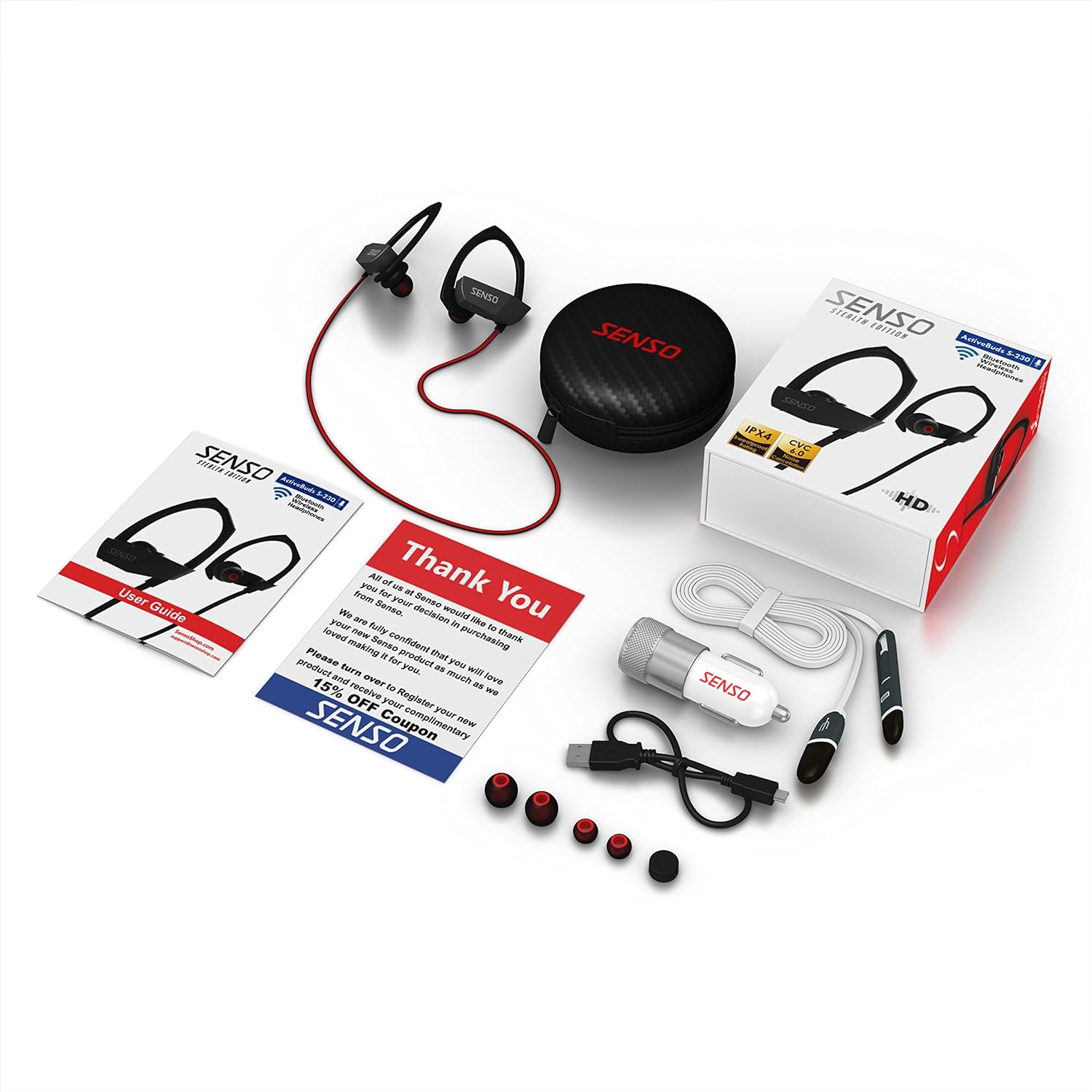
Image 2.1: All items included in the Senso ActivBuds S-230 package.
3. Орнотуу
3.1 Наушниктерди заряддоо
- Connect the short Micro USB charging cable to the charging port on the headphones.
- Connect the other end of the cable to a USB power source (e.g., computer USB port, wall adapter, or the included car charger).
- The LED indicator on the headphones will illuminate during charging.
- Charging typically takes approximately 1.5 hours. The LED indicator will change or turn off once charging is complete.
Ensure the headphones are fully charged before first use for optimal battery life.
3.2 Bluetooth түзмөгү менен жупташтыруу
- Наушниктердин өчүрүлгөнүн текшериңиз.
- Press and hold the Multi-function button (usually the center button on the control panel) for approximately 5-7 seconds until the LED indicator flashes red and blue alternately. This indicates pairing mode.
- Bluetooth иштетилген түзмөгүңүздө (смартфон, планшет, компьютер) Bluetooth жөндөөлөрүнө өтүп, Bluetooth'ду иштетиңиз.
- Издөө available devices. You should see "Senso ActivBuds S-230" or a similar name appear in the list.
- Select the headphones from the list to connect. If prompted for a password, enter "0000".
- Once successfully paired, the LED indicator on the headphones will flash blue slowly, and you may hear an audible confirmation.
Кулакчындар күйгүзүлгөндө, алар акыркы жупташтырылган түзмөккө автоматтык түрдө кайра туташууга аракет кылышат.
3.3 Adjusting for a Secure Fit
The ActivBuds S-230 feature an in-ear design with secure over-ear hooks for stability during activity. Experiment with the three included sizes of ear tips (Small, Medium, Large) to find the most comfortable and secure fit that also provides optimal sound isolation.
- Наушникти кулак каналыңызга акырын киргизиңиз.
- Position the over-ear hook comfortably around the back of your ear.
- Adjust the cable management clip to secure the cable behind your neck, preventing it from bouncing during movement.

Image 3.1: Proper fit and use of the cable management clip.
4. Иштөө нускамалары
4.1 Күйгүзүү/өчүрүү
- Күйгүзүү: Press and hold the Multi-function button for approximately 3 seconds until the LED flashes blue and you hear an audible prompt.
- Өчүрүү: Press and hold the Multi-function button for approximately 3 seconds until the LED flashes red and you hear an audible prompt.
4.2 Музыканы ойнотууну башкаруу

Image 4.1: Control panel on the Senso ActivBuds S-230.
- Ойнотуу/тындыруу: Көп функциялуу баскычты бир жолу басыңыз.
- Кийинки трек: Үндү жогорулатуу (+) баскычын басып, кармап туруңуз.
- Мурунку трек: Үндү азайтуу (-) баскычын басып, кармап туруңуз.
- Көлөмү: Үндү катуулатуу (+) баскычын кыскача басыңыз.
- Үнүн азайтуу: Үндү азайтуу (-) баскычын кыскача басыңыз.
4.3 Чалууларды башкаруу
- Чалууга жооп берүү/аяктоо: Көп функциялуу баскычты бир жолу басыңыз.
- Чакырууну четке кагуу: Көп функциялуу баскычты болжол менен 2 секунд басып, кармап туруңуз.
- Акыркы номерди кайра терүү: Көп функциялуу баскычты эки жолу басыңыз.
4.4 Бир убакта эки түзмөккө туташтыруу
The ActivBuds S-230 support connecting to two Bluetooth devices at once. Follow these steps:
- Наушниктерди 3.2-бөлүмдө сүрөттөлгөндөй биринчи аппарат менен жупташтырыңыз.
- Turn off the Bluetooth function on the first device.
- Put the headphones back into pairing mode (red and blue flashing LED).
- Наушниктерди экинчи аппарат менен жупташтырыңыз.
- Once the second device is paired, re-enable Bluetooth on the first device. The headphones should automatically connect to both devices.
5. Техникалык тейлөө
5.1 Тазалоо
- Regularly clean the ear tips with a soft, dry cloth. For deeper cleaning, remove the ear tips and wash them with mild soap and water, ensuring they are completely dry before reattaching.
- Wipe the headphone body and cable with a soft, slightly damp кездеме. Катуу химиялык заттарды же абразивдүү материалдарды колдонуудан алыс болуңуз.
- Заряддоо портунда чаң жана таштанды жок экенин текшериңиз.
5.2 Сактоо
- When not in use, store the headphones in the provided carrying case to protect them from dust, moisture, and physical damage.
- Салкын, кургак жерде, экстремалдык температурадан алыс сактаңыз.
5.3 Батареяга кам көрүү
- Avoid fully discharging the battery frequently. Charge the headphones when the low battery indicator appears.
- If storing for an extended period, charge the headphones to about 50% every few months to preserve battery health.
6. Кыйынчылыктарды
If you encounter issues with your Senso ActivBuds S-230, please refer to the following common problems and solutions:
| Көйгөй | Мүмкүн чечим |
|---|---|
| Кулакчындар күйбөйт. | Наушниктердин толук заряддалганын текшериңиз. Кубат булагына туташып, кайра аракет кылыңыз. |
| Bluetooth түзмөгү менен жупташтыруу мүмкүн эмес. |
|
| Үн жок же аз үн. |
|
| Intermittent connection or static. |
|
| Микрофон иштебей жатат. |
|
7. Техникалык шарттар
Technical specifications for the Senso ActivBuds S-230:
| Өзгөчөлүк | Спецификация |
|---|---|
| Модель аты | ActivBuds S-230 |
| Bluetooth спецификациясы | 4.1+EDR |
| Зымсыз диапазон | 30 фут (10 метр) чейин |
| Сууга туруктуулук рейтинги | IPX4 (терге чыдамдуу) |
| Noise Reduction | CVC6.0 |
| Батарея түрү | Литий-ион полимер 85 мАч |
| Заряддоо порту | Микро USB |
| Заряддоо убактысы | Болжол менен 1.5 саат |
| Ойнотуу убактысы | 8 саатка чейин |
| Күтүү убактысы | 240 саатка чейин |
| Frequency Response | 20 - 22кГц |
| Элемент Салмагы | Болжол менен 0.001 унция (0.02 грамм) |
| Продукциянын өлчөмдөрү | 1.93 x 0.51 x 1.85 дюйм |
| Өзгөчөлүктөр | Integrated Microphone, Noise Cancellation |
8. Кепилдик жана колдоо
8.1 Кепилдик маалыматы
The Senso ActivBuds S-230 headphones come with a 1-year limited warranty from the date of purchase. This warranty covers manufacturing defects. Additionally, a 30-day hassle-free return policy is offered. Please retain your proof of purchase for warranty claims.
8.2 Кардарларды колдоо
For any questions, technical assistance, or warranty claims, please contact Senso customer support. Refer to the contact information provided on the product packaging or the official Senso webэң заманбап колдоо каналдары үчүн сайт.