
EARTEC ULDM-HD
EARTEC ULDM-HD Ultralite HD Dual Ear Replacement Main Headset User Manual
Model: ULDM-HD | Brand: EARTEC
Introduction
The EARTEC ULDM-HD Ultralite HD Dual Ear Replacement Main Headset is engineered for seamless, full duplex wireless communication. This headset provides clear, hands-free audio, making it ideal for professional environments requiring constant team coordination. As a main unit, it is specifically designed for compatibility with existing UltraLite HD systems, enabling the expansion of your communication network.
This manual provides essential information for setting up, operating, maintaining, and troubleshooting your ULDM-HD headset to ensure optimal performance and longevity.
Продукт бүттүview

Main Headset View: The EARTEC ULDM-HD Ultralite HD Dual Ear Replacement Main Headset, featuring its integrated controls and microphone boom. This headset is designed for comfortable, extended use.

Шайкештикти текшерүү: Visual guide illustrating the difference between UltraLite HD (right, compatible) and UltraLite Classic (left, incompatible) models. Ensure your existing system is UltraLite HD for proper function.
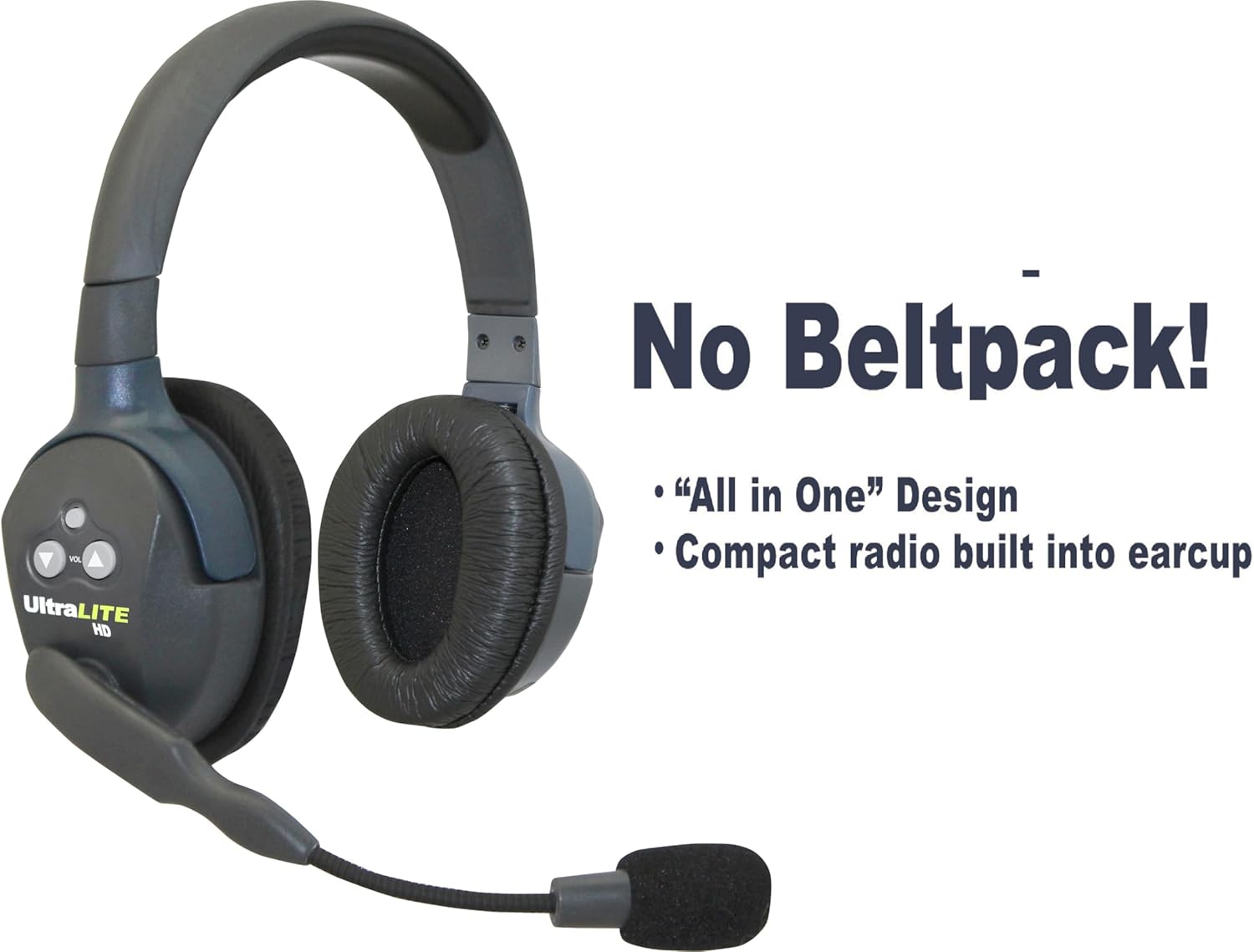
Интегралдык дизайн: The headset features an "All-in-One" design with the compact radio built directly into the earcup, eliminating the need for a separate beltpack.
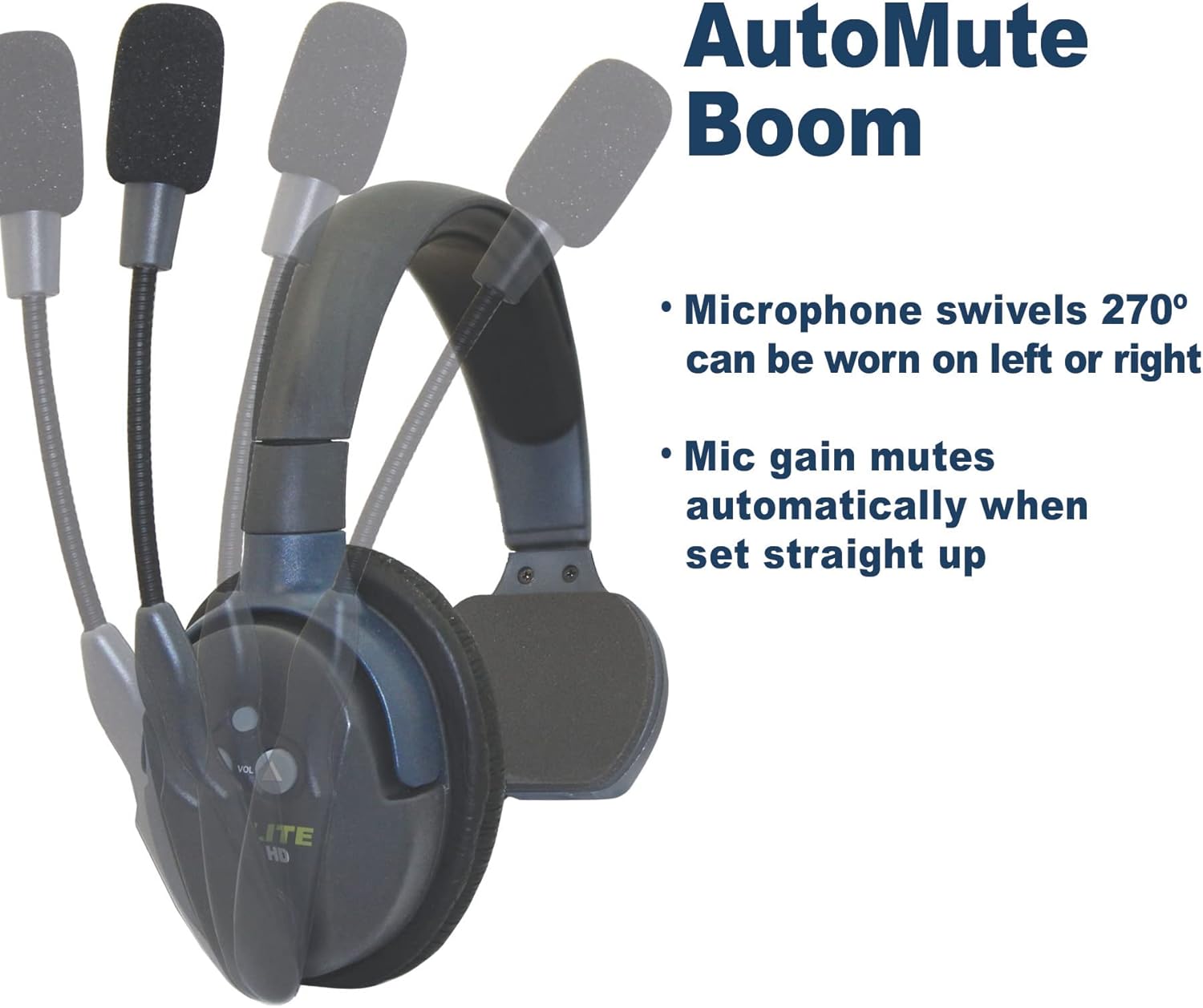
AutoMute Microphone: The microphone boom swivels 270 degrees, allowing the headset to be worn on either the left or right side. The mic gain automatically mutes when the boom is pivoted upwards.

Системанын кеңейиши: An illustration showing how the UltraLite HD system can be expanded. Headsets are "Field Programmable," allowing you to add up to 5 users (1 Main and 4 Remote units) for simultaneous communication.
Жайгашуу
1. Баштапкы заряддоо
Before first use, fully charge the included rechargeable battery. The headset provides up to 6 hours of talk time on a single charge. A full charge typically takes approximately 6 hours.
2. Шайкештикти текшерүү
This ULDM-HD Main headset is гана туура келет with the HD version of UltraLite systems. It is not compatible with UltraLite Classic models. Visually inspect your existing headsets to ensure they are UltraLite HD.
3. Системанын конфигурациясы
Each Main headset can support up to four Remote units. Only one Main headset can be used in a single UltraLite HD system. Main headsets are not compatible with HUB-based systems. For detailed pairing instructions, refer to the comprehensive Колдонуу боюнча нускама (IFU) PDF.
Иштөө нускамалары
1. Күйгүзүү/өчүрүү
Locate the power button on the earcup. Press and hold to power the headset on or off. An indicator light will confirm the power status.

Power Indicator (Red): A red light typically indicates the headset is powered on and actively transmitting or receiving.

Кубаттуулук индикатору (көк): A blue light may indicate a different operational status, such as standby or charging complete, depending on the specific model's behavior.
2. Үндү башкаруу
Use the volume up and down buttons located on the earcup to adjust the listening volume to a comfortable level.
3. Microphone Usage (AutoMute Boom)
The microphone boom can pivot 270 degrees, allowing you to wear the headset on either your left or right ear. For optimal voice clarity, position the microphone approximately one inch from your mouth. The noise-cancelling microphone automatically mutes when the boom is pivoted upwards, providing privacy when not speaking.
4. Зымсыз диапазон
The headset offers an exceptional wireless range of up to 1,000 feet Line of Sight (LOS). Performance may vary based on environmental factors and obstructions.
Техникалык тейлөө
1. Батареяга кам көрүү
- Always use the provided charger for the rechargeable Lithium battery.
- Батареянын иштөө мөөнөтүн узартуу үчүн аны ашыкча заряддоодон же толугу менен жарактан чыгаруудан качыңыз.
- If storing the headset for an extended period, ensure the battery is partially charged (around 50%) and store in a cool, dry place.
2. Тазалоо
- Гарнитуранын беттерин жумшак, d менен сүртүңүзamp кездеме. Катуу химиялык заттарды же абразивдүү тазалагычтарды колдонуудан алыс болуңуз.
- Ensure no liquid enters the earcup or microphone openings.
- Clean the microphone foam cover regularly to maintain audio clarity.
3. Сактоо
Store the headset in a protective case or a clean, dry environment when not in use to prevent dust accumulation and physical damage.
Проблемаларды чечүү
| Көйгөй | Мүмкүн себеп | Чечим |
|---|---|---|
| No power/Headset not turning on | Батарея аз же түгөнүп калган. | Charge the headset battery for at least 6 hours. |
| Аудио жок же аудио сапаты начар |
|
|
| Headset not connecting to other units |
|
|
For more complex issues or if troubleshooting steps do not resolve the problem, please contact EARTEC customer support.
Техникалык шарттар
| Өзгөчөлүк | Деталь |
|---|---|
| Модель аты | ULDM-HD |
| Бренд | EARTEC |
| Зымсыз байланыш технологиясы | RF |
| Байланыш технологиясы | Зымсыз |
| Шайкеш түзмөктөр | HD version of UltraLite systems |
| Камтылган компоненттер | Headset, rechargeable battery |
| Батареянын иштөө мөөнөтү | 6 Hours (talk time) |
| Заряддоо убактысы | 6 саат |
| Башкаруу түрү | Control Button |
| Микрофондун өзгөчөлүгү | Noise-cancelling, AutoMute Boom (pivoting) |
| Зымсыз диапазон | Up to 1,000 ft Line of Sight (LOS) |
| Форма фактору | On Ear |
| Наушник формасы | сүйрү |
| Элемент Салмагы | 9.6 унция (0.6 фунт) |
| Продукциянын өлчөмдөрү | 15 x 6 x 10 дюйм |
| Сууга туруктуулук деңгээли | Сууга чыдамдуу |
| UPC | 642892764471 |
| Өндүрүүчү | Eartec |
Колдоо
For further assistance, detailed product information, or to explore other EARTEC products, please visit the official EARTEC resources:
- Official Instructions for Use (IFU) PDF: A comprehensive guide for your headset.
- Visit the EARTEC Store on Amazon: Explore the full range of EARTEC communication solutions.
For direct customer service inquiries, please refer to the contact information provided on the official EARTEC webсайтка же продуктунун таңгагына.
Ask a question about this manual
Ask about setup, troubleshooting, compatibility, parts, safety, or missing instructions. Manuals+ will review the question and use this page’s manual context to help answer it.