
1. Киришүү
Thank you for choosing the Baseus Encok S16 Neck Hung Bluetooth Wireless In-Ear Earphone. This manual provides detailed instructions for setup, operation, and maintenance to ensure optimal performance and longevity of your device. Please read this manual thoroughly before use.
2. Пакеттин мазмуну
Пакетте бардык буюмдар бар экенин текшериңиз:
- 1 x Baseus Encok S16 Wireless Earphone
- 1 x заряддоо кабели
- 1 x User Manual
- 1 x Кепилдик картасы

Image: Contents of the Baseus Encok S16 earphone package, showing the earphones, charging cable, user manual, and warranty card.
3. Продукт бүтүп калдыview
The Baseus Encok S16 earphones feature a neck-hung design for comfortable and secure wear. Key features include:
- Магниттик бекитүү: Earbuds can be magnetically joined when not in use, preventing tangling and loss.
- Adjustable Coils: The earphone line length can be adjusted by sliding for a customized fit.
- Жогорку сапаттагы үн: Equipped with a dynamic speaker unit, composite diaphragm, and independent tune trope structure for clear audio.
- Натыйжалуу күч: Utilizes a British CSR chip and 120mAh battery for low power consumption and extended battery life.
- Жалпы шайкештик: Smartly matches with smartphones and tablet PCs, compatible with all Bluetooth 4.0 enabled devices.

Image: Close-up of the Baseus Encok S16 earbuds demonstrating their magnetic connection capability.
4. Орнотуу
4.1 Наушниктерди заряддоо
- Connect the provided charging cable to the charging port on the earphone's control unit.
- Кубаттоочу кабелдин экинчи учун USB кубат булагына туташтырыңыз (мисалы, компьютердин USB порту, USB дубал адаптери).
- Индикатор жарыгы заряддоо учурунда күйөт жана толук заряддалганда өчөт же түсүн өзгөртөт.
- Толук заряддоо, адатта, болжол менен 1.5-2 саатты талап кылат.
4.2 Bluetooth жупташтыруу
- Наушниктердин толук заряддалганын текшериңиз.
- Press and hold the Power button on the control unit until the indicator light flashes red and blue alternately, indicating pairing mode.
- Смартфонуңузда же Bluetooth иштетилген түзмөгүңүздө Bluetooth жөндөөлөрүнө өтүңүз.
- Издөө available devices and select "Baseus Encok S16" from the list.
- Once connected, the indicator light will flash blue slowly or turn solid blue.
- Эгер сырсөз суралса, "0000" киргизиңиз.
5. Иштөө нускамалары
5.1 Негизги башкаруу каражаттары
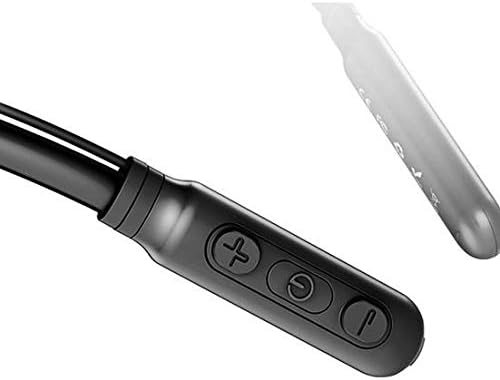
Image: Close-up of the Baseus Encok S16 earphone's inline control unit, showing the power/multi-function button, volume up, and volume down buttons.
| баскыч | Функция |
|---|---|
| Кубат баскычы (борбордо) |
|
| Үнүн жогорулатуу (+) |
|
| Үнүн азайтуу (-) |
|
5.2 Наушник тагынуу
Place the neckband around your neck, ensuring the control unit is easily accessible. Insert the earbuds comfortably into your ears. Adjust the earphone line length using the sliding coils for a secure and comfortable fit.
6. Техникалык тейлөө
- Clean the earbuds and control unit regularly with a soft, dry cloth.
- Avoid exposing the earphones to extreme temperatures, humidity, or corrosive liquids.
- Store the earphones in a cool, dry place when not in use. The magnetic earbuds can help prevent tangling during storage.
- Do not attempt to disassemble or repair the earphones yourself, as this will void the warranty.
7. Кыйынчылыктарды
| Көйгөй | Чечим |
|---|---|
| Күйгүзүлбөй жатат | Ensure the earphones are fully charged. Press and hold the Power button for 3 seconds. |
| Түзмөк менен жупташтыруу мүмкүн эмес |
|
| Үн жок же үнү төмөн |
|
| үзгүлтүктүү байланыш |
|
8. Техникалык шарттар
| Өзгөчөлүк | Деталь |
|---|---|
| Бренд | Baseus |
| Модель номери | FWP-E-S16 |
| Байланыш технологиясы | Bluetooth |
| Bluetooth версиясы | 4.0 (compatible with devices enabling Bluetooth 4.0) |
| Форма фактору | In Ear, Neck Hung |
| Башкаруу түрү | Voice Control, Touch (via buttons) |
| Батарея сыйымдуулугу | 120mAh |
| Салмагы | 30 грамм |
| Камтылган компоненттер | Wireless Earphone, Charging Cable, User Manual, Warranty Card |
9. Кепилдик жана колдоо
This product comes with a Limited Warranty. Please refer to the included Warranty Card for detailed terms and conditions regarding coverage and duration.
For technical support or warranty claims, please contact your retailer or visit the official Baseus webкардарларды тейлөө маалымат сайты.
Глобалдык соода идентификациялык номери (GTIN): 06953156264489