
Introduction
This manual provides detailed instructions for the installation, operation, and maintenance of your Monoprice 116122 Under Cabinet Tilt TV Wall Mount Bracket. This mount is designed to securely hold televisions up to 27 inches with a maximum weight of 44 lbs, featuring VESA patterns up to 100x100. Its space-saving design allows the display to be swung up and out of the way when not in use, making it ideal for kitchens, RVs, or other compact spaces.
Орнотуу жана орнотуу
Before beginning installation, ensure you have all necessary tools and that the mounting surface (e.g., under a cabinet or ceiling) is structurally sound and capable of supporting the combined weight of the mount and your television.
Пакеттин мазмуну
- Monoprice Small Under Cabinet Mount - (116122)
- Mounting Hardware (screws, washers, etc. - specific types may vary, refer to included hardware bag)
Талап кылынган куралдар (камтылган эмес)
- Бургулоо
- Drill bits appropriate for mounting surface and screws
- Филлипс бурагыч
- Деңгээл
- Карандаш
- Stud finder (if mounting to wood studs)
Кадам-кадам орнотуу
- Монтаждоо ордун аныктоо: Choose a suitable location under a cabinet or on a ceiling. Ensure there is enough clearance for the TV to swing down and operate freely.
- Attach Mounting Plate to Surface:
Position the mount's base plate against the chosen surface. Use a pencil to mark the drilling points. Drill pilot holes as required. Secure the base plate using the appropriate screws and washers provided. Ensure the mount is level and securely fastened.

Сүрөт: алдыңкы view of the Monoprice 116122 mount in its extended position, showing the base plate and TV mounting plate.
- Attach VESA Plate to TV:
Align the VESA mounting plate of the bracket with the VESA holes on the back of your television. This mount supports VESA patterns up to 100x100mm. Use the screws provided with the mount that fit your TV's VESA pattern. Tighten securely, but do not overtighten.

Сүрөт: алдыңкы view of the Monoprice 116122 mount, showing the TV mounting plate with VESA holes.
- Mount TV to Bracket:
Carefully lift the television and align the VESA plate attached to the TV with the corresponding attachment points on the main arm of the mount. Secure the TV to the mount using the designated locking mechanism or screws. Ensure the TV is firmly seated and cannot accidentally detach.
- Adjust Tension (if applicable):
Some mounts may have adjustable tension for tilting or swinging. Refer to the specific hardware for your model to make any necessary adjustments to ensure smooth movement and secure positioning.
Иштөө нускамалары
The Monoprice 116122 mount is designed for easy adjustment and secure storage.
Swinging the Display Down/Up
To bring the display down for viewing, locate the strong locking mechanism on the arm. Physically release the latch, and gently swing the display downwards. To store the display, swing it back up until the locking mechanism engages, securing it in the folded position.
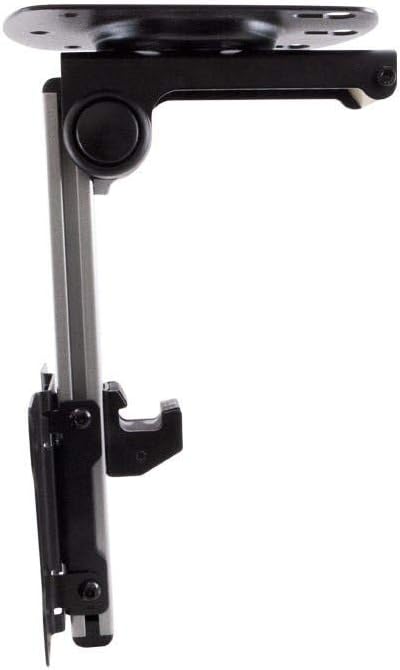
Сүрөт: каптал view of the Monoprice 116122 mount in its folded, space-saving position.

Image: The Monoprice 116122 mount demonstrating its tilt and swing capabilities, with a ghosted image showing the range of motion.
Tilting the Screen
Once the display is in the viewing position, you can adjust the tilt angle for optimal viewing. Gently push or pull the top or bottom of the screen to achieve the desired tilt. The mount is designed to hold the chosen angle securely.
Техникалык тейлөө
- Тазалоо: Орноткучту жумшак, кургак чүпүрөк менен сүртүңүз. Каптамага зыян келтире турган абразивдүү тазалоочу каражаттардан же эриткичтерден алыс болуңуз.
- Мезгилдүү текшерүү: Regularly check all screws and fasteners to ensure they remain tight and secure. Over time, vibrations or repeated adjustments may cause fasteners to loosen.
- Майлоо: No regular lubrication is required for the moving parts. If movement becomes stiff, contact customer support.
Проблемаларды чечүү
| Көйгөй | Мүмкүн себеп | Чечим |
|---|---|---|
| Тоо туруксуз же солкулдаган сезилет. | Бекитүүчү бурамалар бошоп калган же туура эмес орнотулган. | Ensure all mounting screws are securely tightened. Verify the mounting surface is strong enough. |
| TV does not stay in tilted position. | Tilt mechanism not tightened sufficiently. | Check for any adjustment screws on the tilt mechanism and tighten them to increase friction. |
| Difficulty swinging the TV up or down. | Locking mechanism not fully released or obstruction. | Ensure the latch for the locking mechanism is fully disengaged. Check for any cables or objects obstructing movement. |
Техникалык шарттар
- Модель номери: 116122
- Монтаж түрү: Wall Mount (Under Cabinet/Ceiling)
- Кыймыл түрү: Tilt, Swing
- Шайкеш түзмөктөр: Телевидение
- Maximum Supported Screen Size: 27 дюйм
- Максималдуу Салмак сыйымдуулугу: 44 фунт
- VESA шайкештиги: 100x100 мм чейин
- Материал: Silver (Enclosure Material)
- Түсү: Silver
- Элемент Салмагы: 0.21 фунт
- Элемент узундугу: 6.9 дюйм
- Өндүрүүчү: Monoprice Inc.
Кепилдик маалымат
This Monoprice product is covered by a Өмүр бою кепилдик. For specific terms and conditions, please refer to the official Monoprice warranty policy available on their webсайтка же кардарларды колдоо менен байланышыңыз.
Кардарларды колдоо
If you encounter any issues or have questions regarding your Monoprice 116122 Under Cabinet Tilt TV Wall Mount Bracket that are not addressed in this manual, please visit the official Monoprice website for support resources or contact their customer service department.
Monoprice расмий Webсайт: www.monoprice.com