
1. Киришүү
This manual provides detailed instructions for the installation, operation, and maintenance of the Panduit WMP1E Horizontal Cable Manager. Please read this manual thoroughly before using the product to ensure proper function and safety. Keep this manual for future reference.
2. Коопсуздук маалыматы
Always follow basic safety precautions to reduce the risk of injury or damage. This product is designed for managing cables within a rack system. Do not use it for purposes other than its intended use.
- Ensure all cables are properly secured to prevent accidental disconnections or damage.
- Do not overload the cable manager beyond its specified capacity.
- Wear appropriate personal protective equipment (PPE) if required during installation.
- Балдарды жана уруксаты жок кызматкерлерди орнотуу аянтынан алыс кармаңыз.
3. Пакеттин мазмуну
Орнотууну улантуудан мурун пакетте бардык элементтер бар экенин текшериңиз.
- Panduit WMP1E Horizontal Cable Manager (1 unit)
- Mounting Screws (quantity as specified by manufacturer)
- Орнотуу боюнча колдонмо (бул документ)
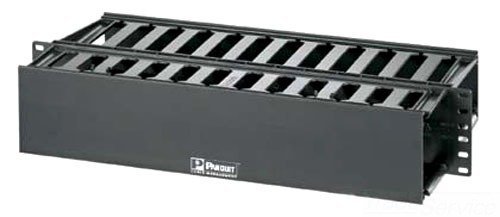
Figure 1: Panduit WMP1E Horizontal Cable Manager. This image shows the front view of the cable manager, illustrating its design for organizing cables within a rack.
4. Орнотуу жана орнотуу
The Panduit WMP1E Horizontal Cable Manager is designed for standard 19-inch rack mounting. It occupies 2 rack units (2 RU) of space.
- Монтаждоо ордун аныктоо: Select two adjacent rack units (2 RU) in your equipment rack where the cable manager will be installed. Ensure there is sufficient space for cable routing.
- Align the Manager: Position the cable manager in the chosen rack units, aligning its mounting holes with the corresponding holes on the rack rails.
- Бурама менен бекитүү: Use the provided mounting screws to firmly attach the cable manager to the rack rails. Tighten all screws securely to prevent movement. Do not overtighten.
- Маршруттук кабелдер: Once secured, route your network or power cables through the front and rear openings of the cable manager. Utilize the fingers on the front to organize and retain cables.
- Close Cover (if applicable): If your model includes a cover, ensure it is properly closed after cable routing to protect and conceal the cables.
Figure 2: Installation of the cable manager into a rack. This image illustrates how the cable manager is mounted onto standard rack rails using screws.
5. Operation and Cable Management
The WMP1E Horizontal Cable Manager is a passive device designed to facilitate organized cable routing. Its operation involves the proper placement and securing of cables.
- Front Cable Routing: Use the front fingers to guide and separate patch cords and other cables, maintaining proper bend radius and preventing tangles.
- Rear Cable Routing: The rear pass-through slots allow for routing cables from the front of the rack to the rear, or between different rack units.
- Кабелдик байланыштар: For additional security and neatness, use hook-and-loop cable ties (not included) to bundle cables within the manager.
6. Техникалык тейлөө
The Panduit WMP1E Horizontal Cable Manager requires minimal maintenance.
- Тазалоо: Periodically wipe the surface with a soft, dry cloth to remove dust. Do not use abrasive cleaners or solvents.
- Текшерүү: Regularly inspect the cable manager for any signs of damage or loose mounting screws. Ensure cables are not under excessive tension or pinched.
- Cable Reorganization: If changes are made to your network or equipment, take the opportunity to reorganize cables within the manager to maintain optimal airflow and accessibility.
7. Кыйынчылыктарды
This section addresses common issues that may arise during the use of the cable manager.
| Көйгөй | Мүмкүн себеп | Чечим |
|---|---|---|
| Cable manager is loose in the rack. | Mounting screws are not tightened sufficiently. | Бардык монтаждоо бурамаларын бекем тартыңыз. |
| Cables are tangled or disorganized. | Improper cable routing or lack of cable ties. | Re-route cables using the manager's fingers. Use hook-and-loop cable ties to bundle cables. |
| Difficulty closing the front cover (if applicable). | Too many cables or cables not properly seated. | Ensure cables are neatly arranged and not exceeding the manager's capacity. Adjust cable placement. |
8. Техникалык шарттар
Key technical specifications for the Panduit WMP1E Horizontal Cable Manager:
- Модел: WMP1E
- Бренд: Panduit
- Rack Units (RU): 2RU
- Түсү: Кара
- Орнотуу түрү: Screw-In
- Өлчөмдөрү (пакет): 21 x 11 x 4 дюйм
- Элемент Салмагы: 2.89 фунт
- UPC: 074983376490
9. Кепилдик жана колдоо
For warranty information and technical support, please refer to the official Panduit website or contact Panduit customer service directly. Keep your purchase receipt as proof of purchase.
Panduit Official Webсайт: www.panduit.com
Байланыш маалыматы: караңыз webаймактык байланыш маалыматы үчүн сайт.