
1. Продукт бүтүп калдыview
The Motorola PMNN4485A is an IMPRES 2 Li-Ion battery designed for rugged use, offering a capacity of 2550mAh. This battery is engineered to provide reliable power for compatible Motorola radios, ensuring extended operational periods.
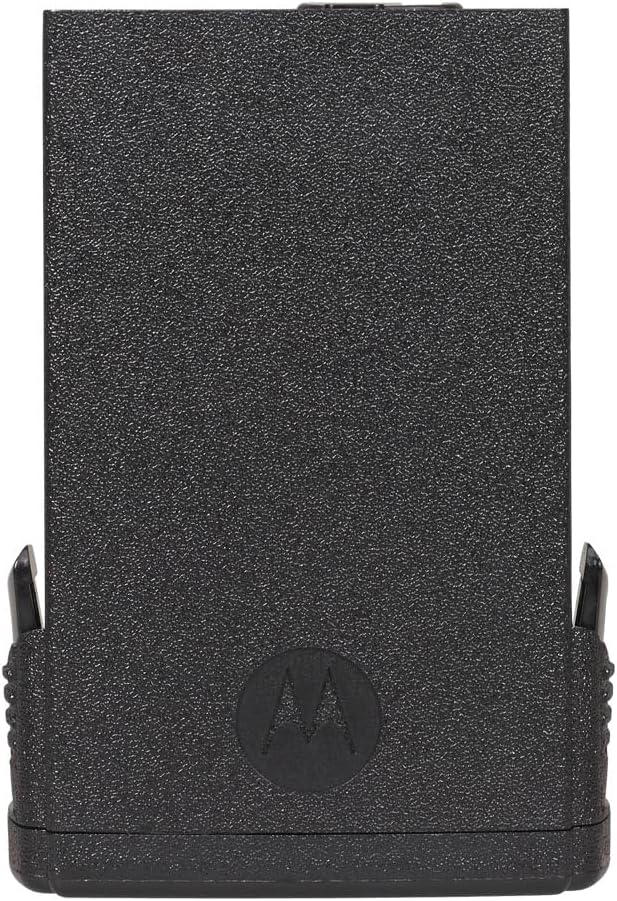
Сүрөт 1: Алдыңкы view of the Motorola PMNN4485A IMPRES 2 Li-Ion Battery, showing its robust construction.
Негизги өзгөчөлүктөрү:
- Сыйымдуулугу: 2550 mAh for extended use.
- Узактыгы: Rugged design suitable for demanding environments.
- Технология: Features IMPRES 2 technology for optimized battery life and charging.
- Шайкештик: Replaces model PMNN4403.

2-сүрөт: Артка view of the battery, displaying technical labels including "IMPRES 2", "Li-ion", "7.6V / 2550mAh", and recycling symbols.
2. Коопсуздук маалыматы
Read all instructions and cautionary markings on the battery, charger, and radio before use. Failure to do so may result in property damage, personal injury, or death.
- Бөлүп салбаңыз, майдалабаңыз, тешип, кыска тышкы контакттарды же отко же сууга таштабаңыз.
- Use only Motorola approved chargers for this battery.
- Батареяны 60°C (140°F) жогору температурага калтырбаңыз.
- Батареяны балдардан алыс кармаңыз.
- If the battery is damaged, discontinue use immediately.
3. Орнотуу жана орнотуу
This section outlines the process for installing the PMNN4485A battery into a compatible Motorola radio.
Батареяны орнотуу:
- Ensure the radio is powered off before attempting to install or remove the battery.
- Батареяны радионун артындагы батарея отсеги менен тууралаңыз.
- Slide the battery into place until it clicks securely. Ensure there is no gap between the battery and the radio body.
- To remove, locate the battery release latch (if present on your radio model), depress it, and slide the battery off.

3-сүрөт: Мисamples of compatible Motorola APX 8000 radios where the PMNN4485A battery can be installed.
4. Иштөө нускамалары
The Motorola PMNN4485A battery is designed for use with Motorola IMPRES 2 chargers. Proper charging ensures optimal battery performance and longevity.
Батареяны заряддоо:
- Connect the Motorola IMPRES 2 charger to a power source.
- Place the radio with the installed battery into the charger slot. Ensure it is seated correctly.
- Observe the charger's indicator lights. A red light typically indicates charging is in progress.
- An orange light may indicate reconditioning or recalibration, which is a normal process for IMPRES batteries to optimize performance. If you wish to bypass reconditioning, remove the radio and re-insert it into the charger.
- Жашыл жарык батареянын толук заряддалганын көрсөтөт.
Video 1: Demonstration of charging a Motorola APX 8000 radio with the IMPRES 2 battery using a compatible charger. The video illustrates the reconditioning process (orange light) and standard charging (red light).
The IMPRES 2 charging system is designed to automatically recondition and recalibrate batteries as needed, extending their service life and ensuring consistent performance.
5. Техникалык тейлөө
Proper maintenance helps prolong the life and performance of your Motorola PMNN4485A battery.
- Тазалоо: Periodically clean the battery contacts and charger contacts with a clean, dry cloth to ensure good electrical connection.
- Сактагыч: Батареяларды салкын, кургак жерде, күн нуру түз тийбеген жана өтө жогорку температурадан алыс сактаңыз. Узак мөөнөткө сактоо үчүн, батареяны болжол менен 50% кубаттуулукка чейин кубаттаңыз.
- Терең разряддан качуу: While IMPRES 2 technology manages battery health, avoiding complete discharge before recharging can contribute to overall battery longevity.
6. Кыйынчылыктарды
If you encounter issues with your PMNN4485A battery, refer to the following common problems and solutions:
| Көйгөй | Мүмкүн себеп | Чечим |
|---|---|---|
| Battery not charging (charger light off or error) |
|
|
| Толук заряддалгандан кийин кыска иштөө убактысы |
|
|
| Radio displays "NON-IMPRESS BATTERY" error |
|
|
7. Техникалык шарттар
| Өзгөчөлүк | Деталь |
|---|---|
| Модель номери | PMNN4485A |
| Батарея түрү | Литий-ион (Li-Ion) |
| Кубаттуулугу | 2550 мАч |
| Тtage | 3.85 вольт |
| Технология | IMPRES 2 |
| Туруктуу | Катуу |
| Кайра колдонууга жарамдуу | Зарядкалуу |
| Шайкеш түзмөктөр | Motorola radios (e.g., APX 8000 series) |
| Replaces Model | PMNN4403 |
| Элементтин өлчөмдөрү | 3 x 3 x 4 дюйм (болжолдуу, таңгак үчүн) |
8. Кепилдик жана колдоо
For specific warranty information regarding your Motorola PMNN4485A battery, please refer to the documentation provided with your purchase or visit the official Motorola website. Support for this product is typically handled through authorized Motorola dealers or service centers.
Note: The product data provided did not include specific warranty terms. Please consult official Motorola resources for the most accurate and up-to-date warranty details.