
Introduction
This manual provides detailed instructions for the setup, operation, maintenance, and troubleshooting of your Brightsign XT243 True 4K Dual Video Decode HTML5 Player. Please read this manual thoroughly before using the device to ensure proper functionality and to prevent damage.
Коопсуздук маалыматы
Өрт, электр шок жана адамдардын жаракат алуу коркунучун азайтуу үчүн бул продуктуну колдонууда ар дайым негизги коопсуздук чараларын сактаңыз. Бул колдонмону келечекте маалымат алуу үчүн сактаңыз.
- Аппаратты нымдуулукка же экстремалдык температурага дуушар кылбаңыз.
- Use only the power adapter supplied or recommended by Brightsign.
- Аппаратты өзүңүз ачууга же оңдоого аракет кылбаңыз. Бардык тейлөөлөрдү квалификациялуу кызматкерлерге тапшырыңыз.
- Ашыкча ысып кетүүнүн алдын алуу үчүн аппараттын айланасында туура желдетүүнү камсыз кылыңыз.
Пакеттин мазмуну
Пакетиңизде бардык буюмдар бар экенин текшериңиз:
- Brightsign XT243 Player
- Кубаттуу адаптер
- Ыкчам баштоо колдонмосу (эгер бар болсо)
- Other accessories (e.g., mounting brackets, cables)
Түзмөк бүттүview
Familiarize yourself with the ports and indicators on your Brightsign XT243 player.
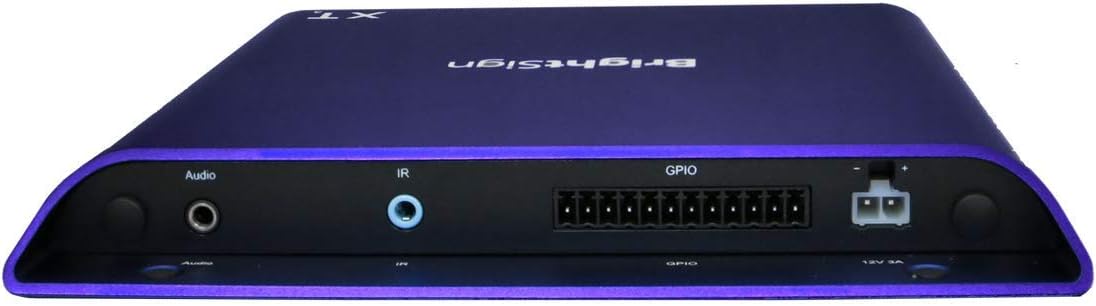
Сүрөт: алдыңкы жана каптал view of the Brightsign XT243 player, highlighting the HDMI, Ethernet, and USB ports for connectivity.
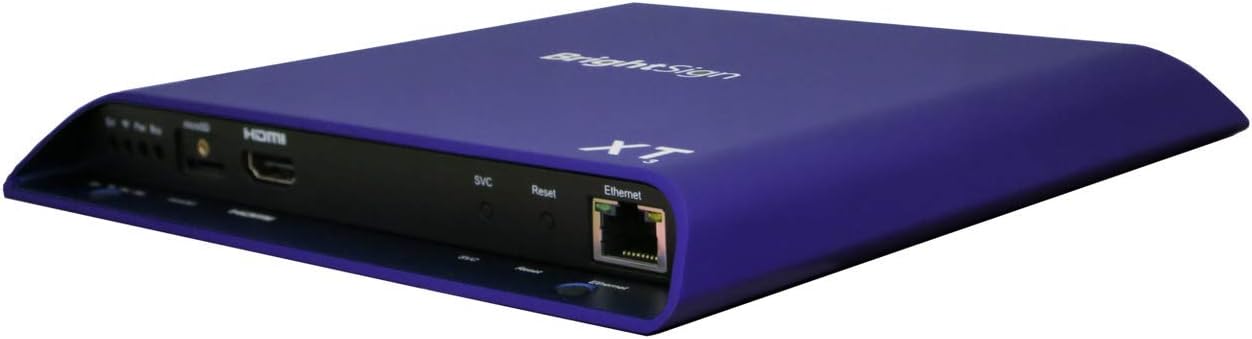
Сүрөт: Арткы view of the Brightsign XT243 player, displaying the Audio output, IR input, GPIO port, and 12V 3A power input.
Алдыңкы/каптал панелдердин туташуулары:
- HDMI Чыгышы: Connects to a display device (TV, monitor).
- Ethernet (RJ45): Connects to a network for content updates and control. Supports Power over Ethernet (PoE+).
- USB: For connecting peripherals like touchscreens, keyboards, or storage devices.
- SVC/Reset Button: Service port and reset functionality.
Арткы панелдин туташуулары:
- Аудио чыгышы: 3.5mm jack for analog audio output.
- IR ичинде: 3.5mm jack for infrared remote control input.
- GPIO: General Purpose Input/Output port for interactive controls.
- 12V 3A Power Input: Тышкы кубат адаптерин туташтыруу үчүн.
Жайгашуу
Follow these steps to set up your Brightsign XT243 player:
- Дисплейге туташуу: Connect an HDMI cable from the XT243's HDMI Out port to an HDMI input on your display device.
- Тармакка туташуу:
- For wired network: Connect an Ethernet cable from the XT243's Ethernet port to your network router or switch. If your network supports PoE+, the device may power on automatically.
- For Wi-Fi (if supported by an optional module, not included with standard I/O package): Refer to the Wi-Fi module's instructions for setup.
- Туташуу кубаты: If not using PoE+, connect the provided power adapter to the 12V 3A Power Input port on the XT243, then plug the adapter into a power outlet. The device will power on automatically.
- SD картаны салыңыз (милдеттүү эмес): If using an SD card for content storage, insert it into the designated slot. Ensure the card is properly formatted.
- Баштапкы жүктөө: The player will boot up. Follow any on-screen prompts for initial configuration, such as network settings or content loading.
Operating the Brightsign XT243
The Brightsign XT243 is designed for digital signage applications. Content is typically managed and deployed using Brightsign's BrightAuthor software or BrightSign Network.
Content Deployment:
- BrightAuthor: Create presentations using BrightAuthor software on a Windows PC. Publish the presentation to an SD card or directly to the player via a local network.
- BrightSign Network: For remote management and content updates, subscribe to BrightSign Network. This allows for cloud-based content deployment and player monitoring.
Негизги операция:
- Once content is loaded, the player will automatically begin playback according to the presentation schedule.
- The player operates continuously. To power off, disconnect the power adapter or disable PoE+.
- For interactive presentations, ensure all connected peripherals (e.g., touchscreens, buttons via GPIO) are properly configured in your BrightAuthor project.
Техникалык тейлөө
Regular maintenance ensures optimal performance and longevity of your Brightsign XT243 player.
- Тазалоо: Аппараттын сыртын тазалоо үчүн жумшак, кургак чүпүрөктү колдонуңуз. Суюк тазалагычтарды же аэрозолдорду колдонбоңуз.
- Вентиляция: Ensure that the ventilation openings are not blocked. Maintain adequate airflow around the device.
- Программалык камсыздоонун жаңыртуулары: Periodically check the Brightsign website for firmware updates. Keeping the firmware updated can improve performance and add new features. Follow the instructions provided by Brightsign for firmware update procedures.
- Мазмунду башкаруу: Дайыма кайраview and update your digital signage content to keep it fresh and engaging.
Проблемаларды чечүү
If you encounter issues with your Brightsign XT243, refer to the following common problems and solutions:
| Көйгөй | Мүмкүн себеп | Чечим |
|---|---|---|
| Видео чыгаруу жок |
|
|
| Player not powering on |
|
|
| Мазмун жаңыртылбай жатат |
|
|
Техникалык шарттар
Key technical specifications for the Brightsign XT243 player:
- Модел: XT243
- Видеону чечмелөө: True 4K, Dual Video Decode
- Байланыш: Ethernet, HDMI, USB
- Күч: PoE+ (Power over Ethernet Plus) or 12V 3A external power adapter
- Өлчөмдөрү: 7.08 x 8.03 x 0.86 дюйм (180 x 204 x 22 мм)
- Салмагы: 1.24 фунт (0.56 кг)
- Түсү: Кызгылт көк
- Колдоого алынган интернет кызматтары: Netflix, Hulu, Amazon Prime Video (Note: Player primarily for digital signage; these services may require specific configurations or apps not typically used in standard signage deployments.)
- Контроллердин түрү: Control Button (Refers to physical buttons on the device and external controls via GPIO/IR.)
- Кепилдик: 12 ай
Кепилдик жана колдоо
Кепилдик маалыматы:
The Brightsign XT243 comes with a 12 айлык кепилдик from the date of purchase. This warranty covers defects in materials and workmanship under normal use. It does not cover damage caused by misuse, accidents, unauthorized modifications, or external causes such as power surges.
For warranty claims, please retain your proof of purchase and contact Brightsign customer support.
Кардарларды колдоо:
For technical assistance, troubleshooting, or further information, please visit the official Brightsign support webсайтка же кардарларды тейлөө бөлүмүнө кайрылыңыз.
Brightsign Official Webсайт: www.brightsign.biz
Колдоо булактары: www.brightsign.biz/support