
1. Продукт бүтүп калдыview
The Tenergy 11W Dimmable LED Desk Lamp (Model FY-0001) is designed to provide versatile lighting for various tasks, featuring adjustable brightness, multiple color temperatures, and a convenient USB charging port. Its sleek design and flexible arm make it suitable for home and office environments.

Image: The Tenergy 11W LED Desk Lamp, showcasing its modern design and adjustable features.
2. Кутуда эмне бар
- Tenergy 11W Dimmable LED Desk Lamp
- USB заряддоо кабели
- Кубаттуу адаптер
- Колдонуучунун Колдонмосу (бул документ)

Image: The Tenergy 11W LED Desk Lamp and its included accessories laid out on a surface.
3. Орнотуу
- Бардык компоненттерди таңгактан кылдаттык менен алып салыңыз.
- l коюңузamp туруктуу, жалпак бетинде негизи.
- Кубат адаптерин l га туташтырыңызamp's power input port, typically located at the rear of the base.
- Кубат адаптерин стандарттуу электр розеткасына сайыңыз.amp's indicator light should illuminate, indicating it is ready for use.
4. Иштөө нускамалары
4.1 Күйгүзүү/өчүрүү
l буруш үчүнamp on or off, gently touch the On/Off button located on the touch control panel on the lampнегизи.
4.2 Жарыктыкты жөндөө
лamp offers 5 levels of brightness. Use the + жана - buttons on the touch control panel to increase or decrease the light intensity.
4.3 Changing Light Modes (Color Temperature)
лamp features 4 distinct light modes, each with a different color temperature, optimized for various activities:
- Окуу режими: Provides a bright, neutral white light ideal for reading.
- Study Mode: Offers a cooler, more focused light to enhance concentration.
- Эс алуу режими: Emits a warm, soft light for a comfortable and calming atmosphere.
- Уйку режими: Delivers a very warm, dim light suitable for winding down before sleep.
To switch between these modes, repeatedly touch the corresponding icon on the control panel.

Image: Visual representation of the four adjustable light color temperatures available on the lamp.
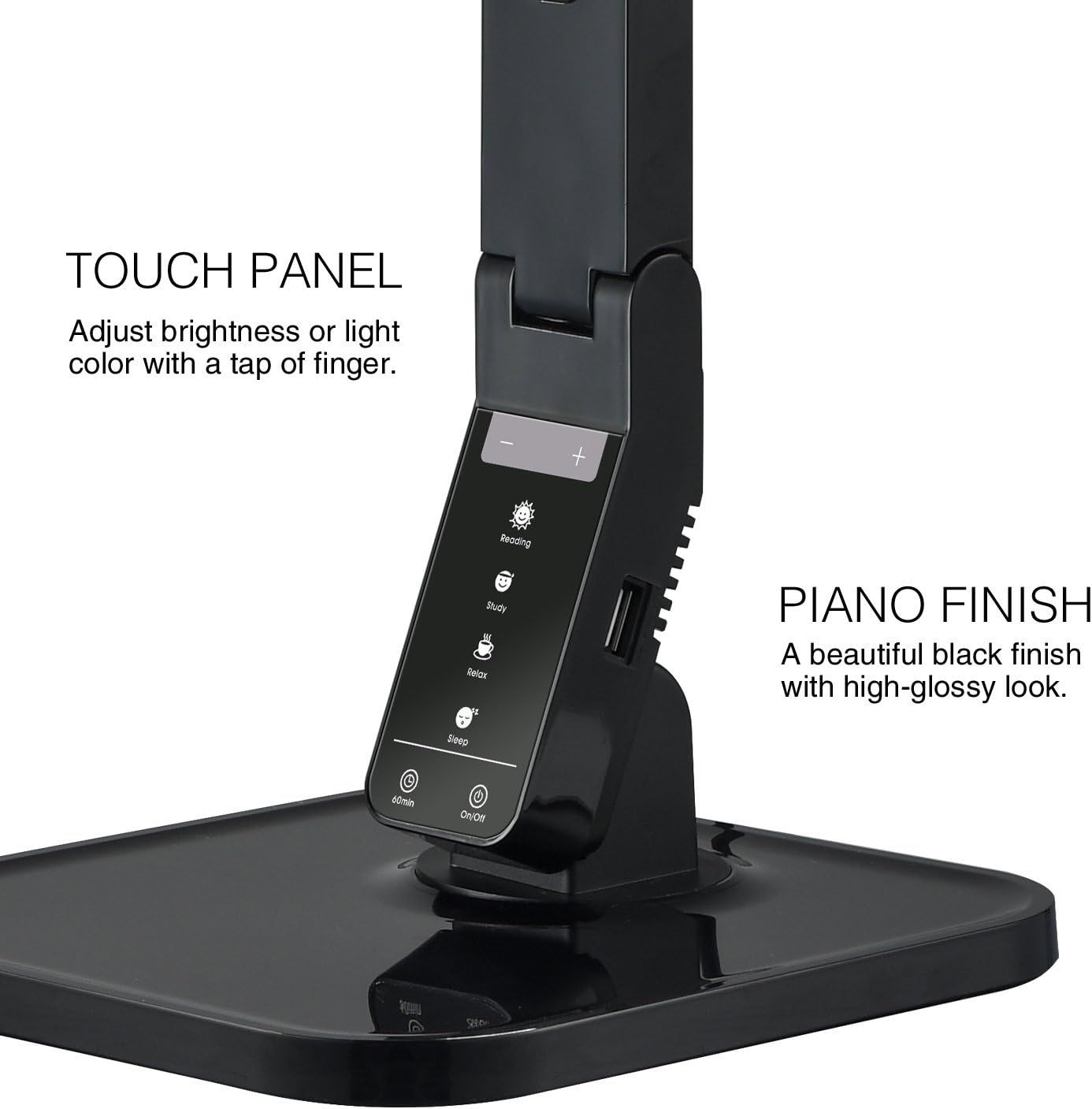
Image: The touch control panel with various light mode and brightness adjustment icons.
4.4 USB заряддоо портун колдонуу
A USB charging port is integrated into the lamp's base, allowing you to charge compatible devices such as smartphones or tablets. Simply connect your device's USB charging cable to the port.

Image: A smartphone being charged via the integrated USB port on the lampнегизи.
4.5 L. тууралооamp Кол
лamp features an adjustable arm that allows you to direct the light precisely where needed. The arm can be folded, extended, and swiveled to achieve optimal positioning.

Image: Illustrations demonstrating the flexibility and adjustability of the lamp's arm.
4.6 Таймер функциясы
лamp includes a 60-minute timer function. To activate, press the 60мин button on the control panel. The lamp автоматтык түрдө 60 мүнөттөн кийин өчөт.
4.7 Расмий продукт Video
Video: An official product video from Tenergy Corporation demonstrating the features and benefits of the 11W LED Desk Lamp, including its adjustable lighting, USB charging, and sleek design.
5. Техникалык тейлөө
- Тазалоо: л тазалоо үчүнamp, especially its glossy finish, use a soft, dry microfiber cloth. Avoid abrasive cleaners or harsh chemicals that may damage the surface.
- Сактагыч: Узак мөөнөткө колдонулбаганда, лamp салкын, кургак жерде.
6. Кыйынчылыктарды
- Lamp күйгүзбөй: Кубат адаптери l экөөнө тең бекем сайылганын текшериңизamp and a working electrical outlet. Check if the outlet is receiving power.
- USB порту кубатталбай жатат: l текшериңизamp is powered on and the USB cable is properly connected to both the lamp and your device. Ensure your device is compatible with USB charging.
- Жарык бүлбүлдөгөн: If the light flickers, try unplugging the lamp for a few minutes and then plugging it back in. If the issue persists, contact customer support.
7. Техникалык шарттар
| Модель номери | FY-0001 |
| Бренд | Тенергия |
| Ватtage | 11 ватт |
| Жарык булагы түрү | LED |
| Жарыктык деңгээли | 5 |
| Light Colors / Modes | 4 (Reading, Study, Relax, Sleep) |
| Башкаруу ыкмасы | тийүү |
| Байланыш технологиясы | USB |
| Power Source | Электр зымдары |
| Продукциянын өлчөмдөрү | 7"D x 6.75"W x 16.7"H |
| Материалдын түрү | Пластик |
| Аяктоо түрү | Жылтырак |
8. Кепилдик жана колдоо
For warranty information or technical support, please visit the official Tenergy webсайтка же кардарларды тейлөө бөлүмүнө кайрылыңыз. Бардык кепилдик дооматтар үчүн сатып алуу дүмүрчөгүңүздү сактаңыз.
Tenergy Store: https://www.amazon.com/stores/Tenergy/page/5AE2FFA8-E197-4708-9169-C4D8CB488E9E