
1. Киришүү
This manual provides essential instructions for the installation, operation, maintenance, and troubleshooting of your APC Smart-UPS SRT 3000VA RM 230V (SRT3000RMXLI). This Uninterruptible Power Supply (UPS) is designed to provide high-density, true double-conversion online power protection for critical electronic equipment, including servers, voice/data networks, medical labs, and light industrial applications. Please read this manual thoroughly before installing or operating the UPS to ensure proper and safe usage.
2. Коопсуздук маалыматы
Observe all warnings and operating instructions in this manual. Failure to do so may result in injury or equipment damage. This UPS contains hazardous voltages. Түзмөктү бөлүктөргө ажыратууга аракет кылбаңыз. Ичинде колдонуучу тейлей турган тетиктер жок.
Жалпы коопсуздук
- Бул UPS имараттын ичинде гана колдонууга арналган.
- Бул UPSти күндүн түз нурунда, суюктуктар менен байланышта же ашыкча чаң же нымдуулук бар жерде иштетпеңиз.
- Ensure the ventilation openings on the UPS are not blocked. Maintain adequate clearance around the unit for proper airflow.
- Connect the UPS power cable directly to a grounded wall outlet. Do not use extension cords or surge suppressors.
Батареянын коопсуздугу
- Batteries are heavy. Remove the battery module before installing the UPS in a rack or tower configuration.
- Battery service should be performed or supervised by personnel knowledgeable of batteries and the required precautions.
- Батареяларды отко таштабаңыз. Батареялар жарылып кетиши мүмкүн.
- Батареяларды ачпаңыз же кыйратпаңыз. Чыгарылган электролит териге жана көзгө зыяндуу. Бул уулуу болушу мүмкүн.
- Батареяларды башында орнотулган түрдөгү жана сандагы батареялар менен алмаштырыңыз.
3. Пакеттин мазмуну
Түзмөктү кылдаттык менен таңгактан чыгарып, жеткирүүдөгү бузулууларды текшериңиз. Эгерде кандайдыр бир бузулуу табылса, ташуучуга жана дилерге кабарлаңыз. Таңгактын ичинде төмөнкү нерселер болушу керек:
- APC Smart-UPS SRT 3000VA RM 230V (SRT3000RMXLI) unit
- Battery module (may be pre-installed or separate)
- Rack-mounting hardware (rails, brackets)
- Tower stand (for tower configuration)
- USB байланыш кабели
- Сериялык байланыш кабели
- Документтик CD
- Safety information and warranty guide
4. Продукт бүтүп калдыview
The APC Smart-UPS SRT 3000VA RM 230V is a high-performance Uninterruptible Power Supply designed to protect your critical equipment from power disturbances. It features a rack/tower convertible form factor for flexible deployment.
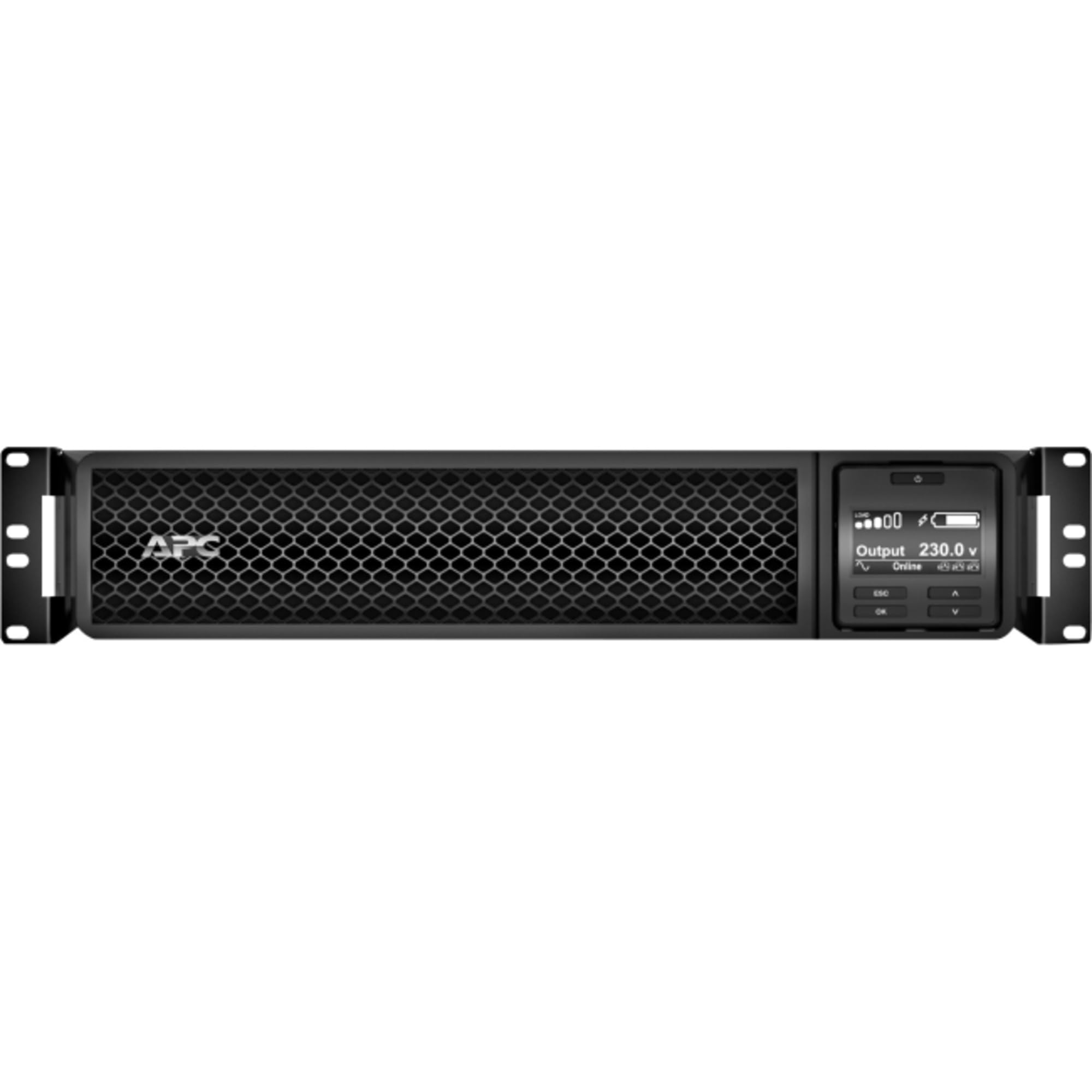
Сүрөт 1: Алдыңкы view of the APC Smart-UPS SRT 3000VA RM 230V. This image displays the front panel with the LCD display, control buttons, and ventilation grilles.
Негизги компоненттер
- Front Panel LCD Display: Provides real-time status information, configuration options, and alarm notifications.
- Башкаруу баскычтары: Used to navigate the LCD menu, power on/off the UPS, and perform self-tests.
- Батарея модулу: Provides backup power during outages. Hot-swappable for easy replacement.
- Киргизүү кубаты туташтыргычы: UPSти коммуналдык кубат булагына туташтырат.
- Output Receptacles (IEC 320): Provide protected power to connected equipment.
- Communication Ports (USB, Serial): For connecting to a computer or network management card for monitoring and control.
- EPO (Өзгөчө кырдаалда өчүрүү) порту: Allows for remote emergency shutdown of the UPS.
5. Орнотуу
Follow these steps for initial setup of your UPS.
Step 1: Жайгашуу ордун тандоо
- Place the UPS on a sturdy, level surface or install it in a standard 19-inch rack.
- Ensure the ambient temperature is between 0°C and 40°C (32°F and 104°F).
- Maintain at least 10 cm (4 inches) of clearance at the front and rear of the unit for proper ventilation.
Step 2: Install the Battery Module
If the battery module is not pre-installed, slide it into the battery bay until it clicks into place. Connect the battery cables as indicated by the labels.
Step 3: Connect to Utility Power
- Connect the UPS input power cord to a grounded 230V AC outlet.
- The UPS will perform a self-test and the LCD display will illuminate.
4-кадам: Жабдууларды туташтыруу
- Connect your critical equipment (servers, network devices, etc.) to the output receptacles on the rear of the UPS.
- Ensure the total load does not exceed the UPS capacity (3000VA / 2700W).
Step 5: Connect Communication Cables (Optional)
- Мониторинг жана көрктүү өчүрүү мүмкүнчүлүктөрү үчүн UPSтен USB же сериялык кабельди компьютериңизге же сервериңизге туташтырыңыз.
- Install the PowerChute software (available from APC website) on your computer for advanced management.
6. UPSти иштетүү
UPSти күйгүзүү
Press and hold the power button on the front panel until you hear a beep. The UPS will start up and provide power to connected equipment.
Powering Off the UPS
Press and hold the power button until the UPS shuts down. Ensure all connected equipment is safely shut down before powering off the UPS.
LCD Display and Navigation
The LCD display provides detailed information about the UPS status, battery charge, load level, and various settings. Use the navigation buttons (up, down, enter, escape) to browse through the menus and adjust settings.
Өзүн-өзү сыноо
Regularly perform a self-test to ensure the UPS battery and internal components are functioning correctly. This can typically be initiated via the LCD menu or PowerChute software.
7. Техникалык тейлөө
Батареяны алмаштыруу
The UPS batteries have a typical lifespan of 3-5 years. The UPS will indicate when the batteries need replacement. Refer to the safety information before attempting battery replacement. Use only APC-approved replacement battery modules (APCRBC152).
Тазалоо
Clean the exterior of the UPS with a soft, damp cloth. Do not use solvents or abrasive cleaners. Ensure ventilation openings are free from dust and debris.
Экологиялык эске алуулар
Store the UPS in a cool, dry place when not in use. Avoid extreme temperatures and humidity, which can shorten battery life.
8. Кыйынчылыктарды
Бул бөлүмдө UPS менен кездешүүчү жалпы көйгөйлөрдүн чечимдери келтирилген.
| Көйгөй | Мүмкүн себеп | Чечим |
|---|---|---|
| UPS күйбөйт | No utility power; Battery not connected; UPS fault | Check power outlet; Ensure battery cables are connected; Contact APC support if fault persists. |
| UPS тынымсыз сигнал берет | On battery power; Overload; Low battery | Check utility power; Reduce connected load; Allow battery to recharge. |
| Батарея заряддалбай жатат | Battery disconnected; Battery fault; Internal fault | Verify battery connection; Replace battery if faulty; Contact APC support. |
| Байланышкан жабдуу кубаттуулугун жоготот | UPS overload; Battery depleted; UPS fault | Reduce load; Allow battery to recharge; Contact APC support. |
9. Техникалык шарттар
Detailed technical specifications for the APC Smart-UPS SRT 3000VA RM 230V (SRT3000RMXLI).
| Өзгөчөлүк | Деталь |
|---|---|
| Модель номери | SRT3000RMXLI |
| Бренд | APC |
| Кубаттуулугу | 3000 VA / 2700 Ватт |
| Киргизүү көлөмүtage | 230 вольт |
| Output Voltage | 230 вольт |
| Форма фактору | Rack/Tower Convertible (2U) |
| Батарея түрү | Коргошун кислотасы |
| Typical Runtime (Full Load) | Болжол менен 4 мүнөт |
| Соода түйүндөрүнүн саны | 8 x IEC 320 C13, 2 x IEC 320 C19 |
| Байланыш порттору | USB, Serial (RJ45), SmartSlot |
| Өлчөмдөрү (H x W x D) | 8.5 см x 43.2 см x 63.5 см (3.35 дюйм x 17.0 дюйм x 25.0 дюйм) |
| Салмагы | 31.3 кг (69 фунт) |
| Түс | Кара |
10. Кепилдик жана колдоо
Кепилдик маалымат
APC provides a standard warranty for this product. Please refer to the warranty card included in your package or visit the official APC webСиздин аймакка тиешелүү деталдуу кепилдик шарттары жана шарттары үчүн сайт. Кепилдик дооматтар үчүн сатып алганыңыздын далилин сактаңыз.
Техникалык колдоо
For technical assistance, troubleshooting beyond this manual, or to inquire about replacement parts, please contact APC customer support. Support contact information can typically be found on the APC website or in the documentation provided with your unit. When contacting support, please have your model number (SRT3000RMXLI) and serial number ready.


