
Introduction
This manual provides instructions for the safe and effective operation of your Theefun 400W Fog Machine. This device is designed to produce atmospheric fog effects for various events such as parties, Halloween, weddings, and stage performances. Please read this manual thoroughly before use and retain it for future reference.
Маанилүү коопсуздук маалыматы
- Use only professional fog fluid. Do not use flammable liquids.
- Ensure the fog machine is placed on a stable, level surface.
- Do not spray fog directly at people or animals.
- Keep the machine away from fire, heat sources, and electrical appliances.
- Always ensure there is enough fog fluid in the tank to avoid dry burning.
- Тазалоодон же техникалык тейлөөдөн мурун машинаны электр розеткасынан сууруп коюңуз.
- This product is not waterproof. Avoid exposure to water or moisture.
- Normal working surface temperature is 60-75°C. Avoid touching hot surfaces.
Продукт бүттүview
Familiarize yourself with the components of your Theefun Fog Machine.

This image illustrates the main parts of the fog machine, including the handle for portability, the fluid tank, the fog outlet, the wired remote jack, the oil level indicator, the ON/OFF switch, the fuse, and the power supply cord.
Техникалык мүнөздөмөлөр
| Өзгөчөлүк | Деталь |
|---|---|
| Модел | TFM01 |
| Күч | 400 Вт |
| Тtage | AC 100-120V, 60Гц |
| Танк сыйымдуулугу | 300мл |
| Жылытуу убактысы | 3-5 мүнөт |
| Туман чыгышы | Болжол менен 2000 CFM |
| Output Distance | 2-3 meters (6.56-9.84 ft) |
| Алыстан башкаруу | Зымдуу жана зымсыз |
| Wired Remote Length | 3 метр (9.8 фут) |
| Өлчөмдөр | 9.09 x 4.49 x 4.29 дюйм |
| Салмагы | 4 фунт |
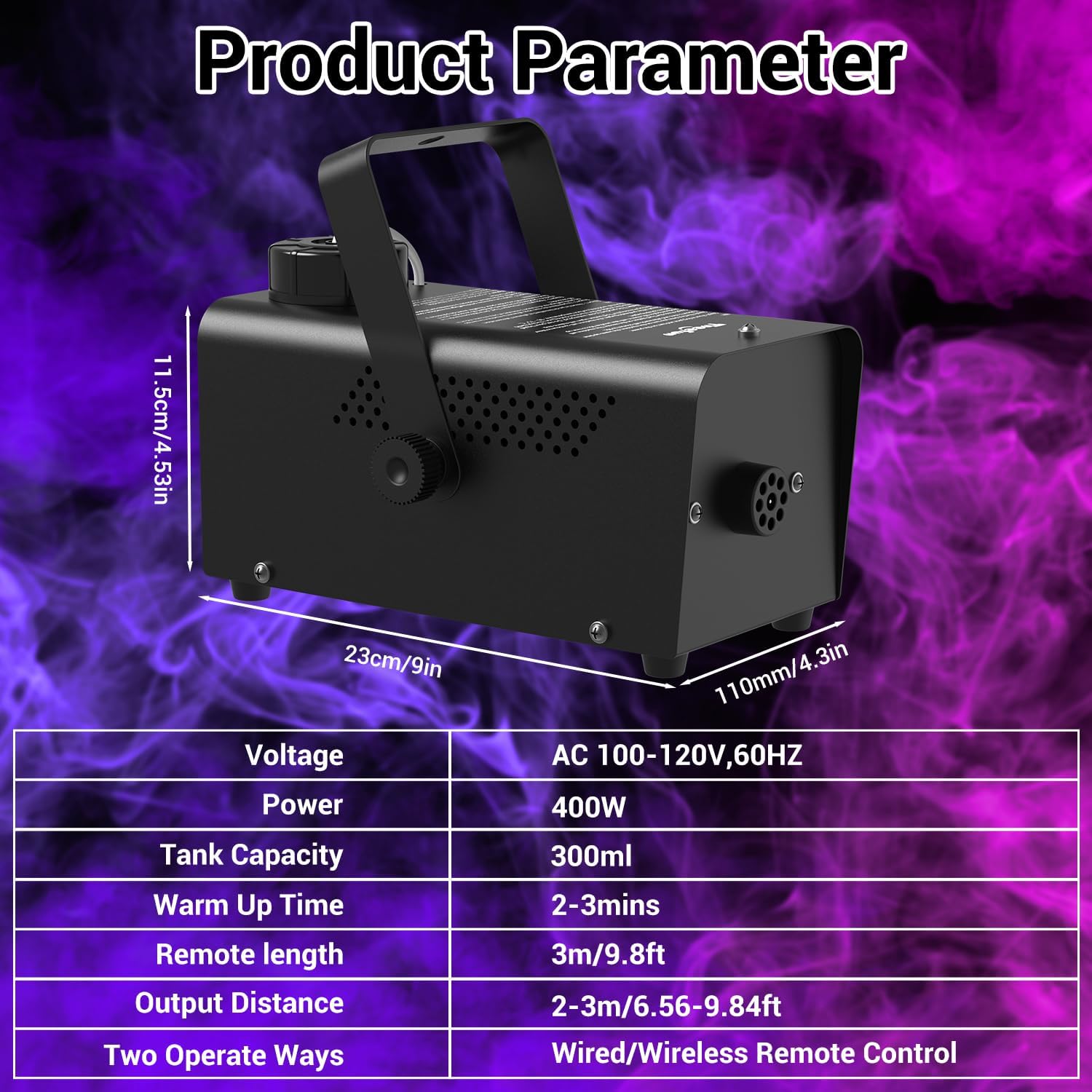
The table above details the key specifications of the fog machine, including its power, capacity, and operational characteristics. The accompanying image provides a visual representation of the product's dimensions and parameters.
Орнотуу нускамалары
- Суюктук куюлуучу бак толтуруңуз: Unscrew the tank cap and carefully pour professional fog fluid (not included) into the reservoir. Ensure the metal nozzle inside the tank is fully submerged. Do not overfill.
- Туташуу кубаты: Plug the machine's power cord into a standard electrical outlet.
- Алыстан башкарууну туташтыруу: Plug the wired remote control into the designated jack on the back of the machine.
- Күйгүзүү: Flip the ON/OFF switch to the "ON" position. The machine will begin to preheat.

This image sequence demonstrates the initial setup steps: filling the fog fluid, connecting the wired remote, and powering on the machine.
This video provides a visual guide on how to set up the Theefun Fog Machine, including filling the fluid tank and connecting the remote control.
Туманга каршы машинаны иштетүү
- Алдын ала ысытуу: Allow the machine to preheat for 3-5 minutes. The red light on the wired remote control will illuminate when the machine is ready to emit fog.
- Emit Fog (Wired Remote): Once the red light is on, press and hold the red button on the wired remote control to release fog. The fog will be emitted continuously for up to 60 seconds per cycle. After each emission, you will need to manually press the button again.
- Emit Fog (Wireless Remote): The wireless remote can also be used. Ensure the wired remote is connected to the machine as it acts as an infrared receiver for the wireless remote. Press the button on the wireless remote to emit fog.

This image illustrates the operation of the fog machine, showing the preheating indicator and how to activate fog emission using both wired and wireless remote controls.
This video demonstrates the operation of the fog machine, specifically highlighting the use of the wireless remote control and the fog output.
Тейлөө жана тазалоо
Үзгүлтүксүз техникалык тейлөө сиздин тумандандыруучу машинаңыздын узак мөөнөттүү иштешин жана оптималдуу иштешин камсыз кылат.
- Колдонгондон кийин тазалоо: After each use, it is recommended to clean the machine to prevent residue buildup. Empty any remaining fog fluid from the tank.
- Сактагыч: Машинаны колдонбогондо салкын, кургак жерде сактаңыз.
- Суюктуктун сапаты: Always use high-quality, water-based fog fluid. Poor quality fluid can clog the machine.
Кыйынчылыктарды табуу боюнча колдонмо
| Көйгөй | Мүмкүн себеп | Чечим |
|---|---|---|
| No fog emission | Not preheated | Wait for the red light on the wired remote to illuminate. |
| No fog emission | No fluid or low fluid level | Refill the fog fluid tank. Ensure the metal nozzle is submerged. |
| No fog emission | Remote not connected | Ensure the wired remote is securely plugged in. |
| Туман чыгаруу начар | Бүктелген сопло | Clean the nozzle according to maintenance instructions. Use high-quality fluid. |
| Машина иштебей жатат | Күч жок | Check power cord connection and wall outlet. Check fuse. |

Refer to the table above for common issues and their resolutions. The image highlights critical safety reminders, such as ensuring adequate fluid levels to prevent damage.
Кепилдик жана Кардарларды колдоо
For warranty information or technical support, please refer to the product packaging or contact Theefun customer service directly. Keep your purchase receipt as proof of purchase.